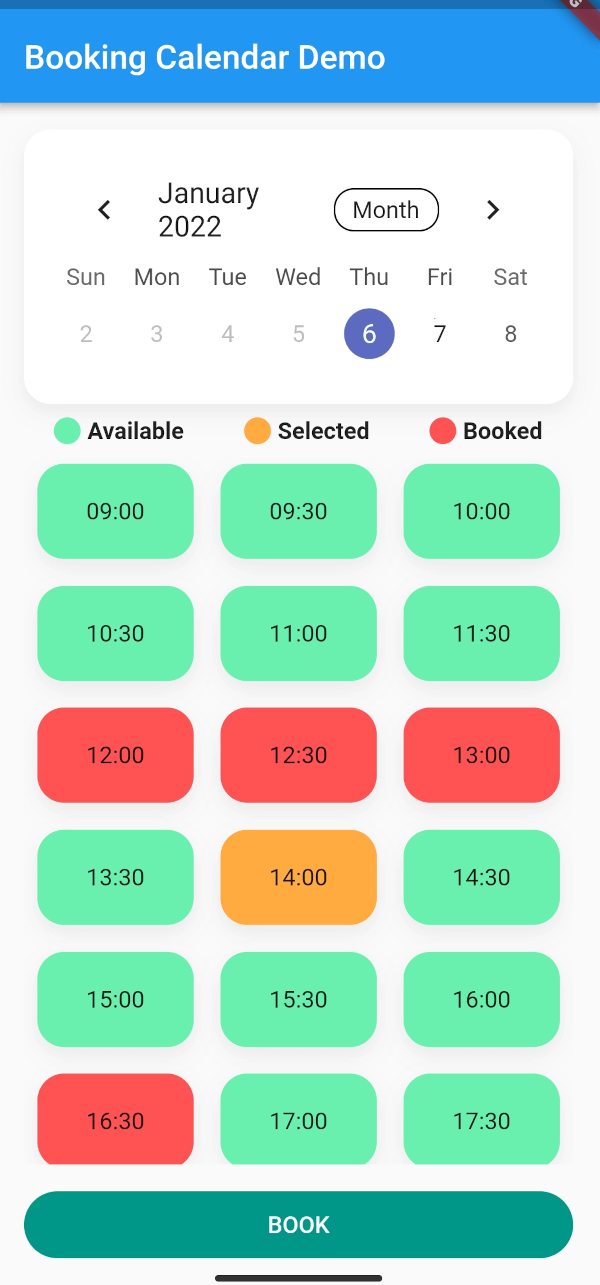
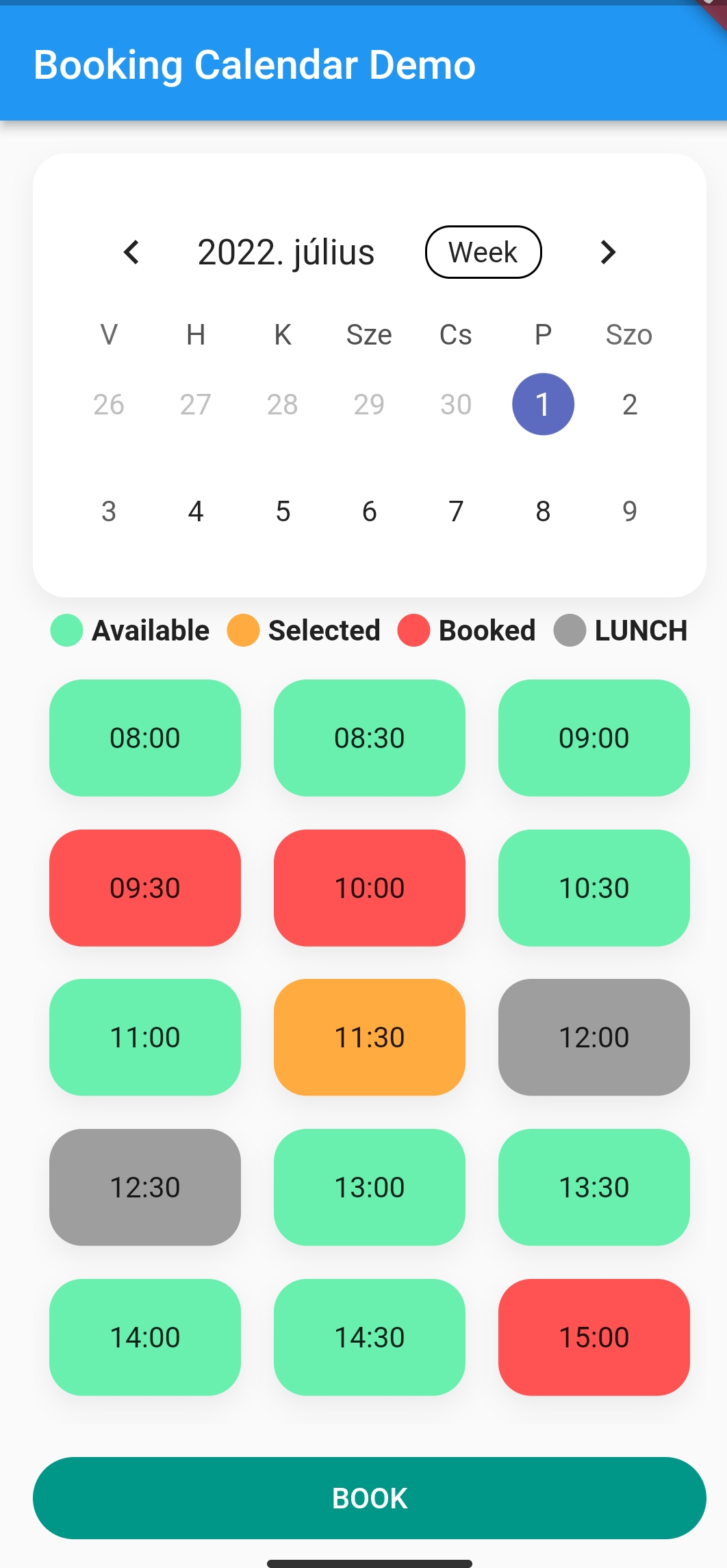
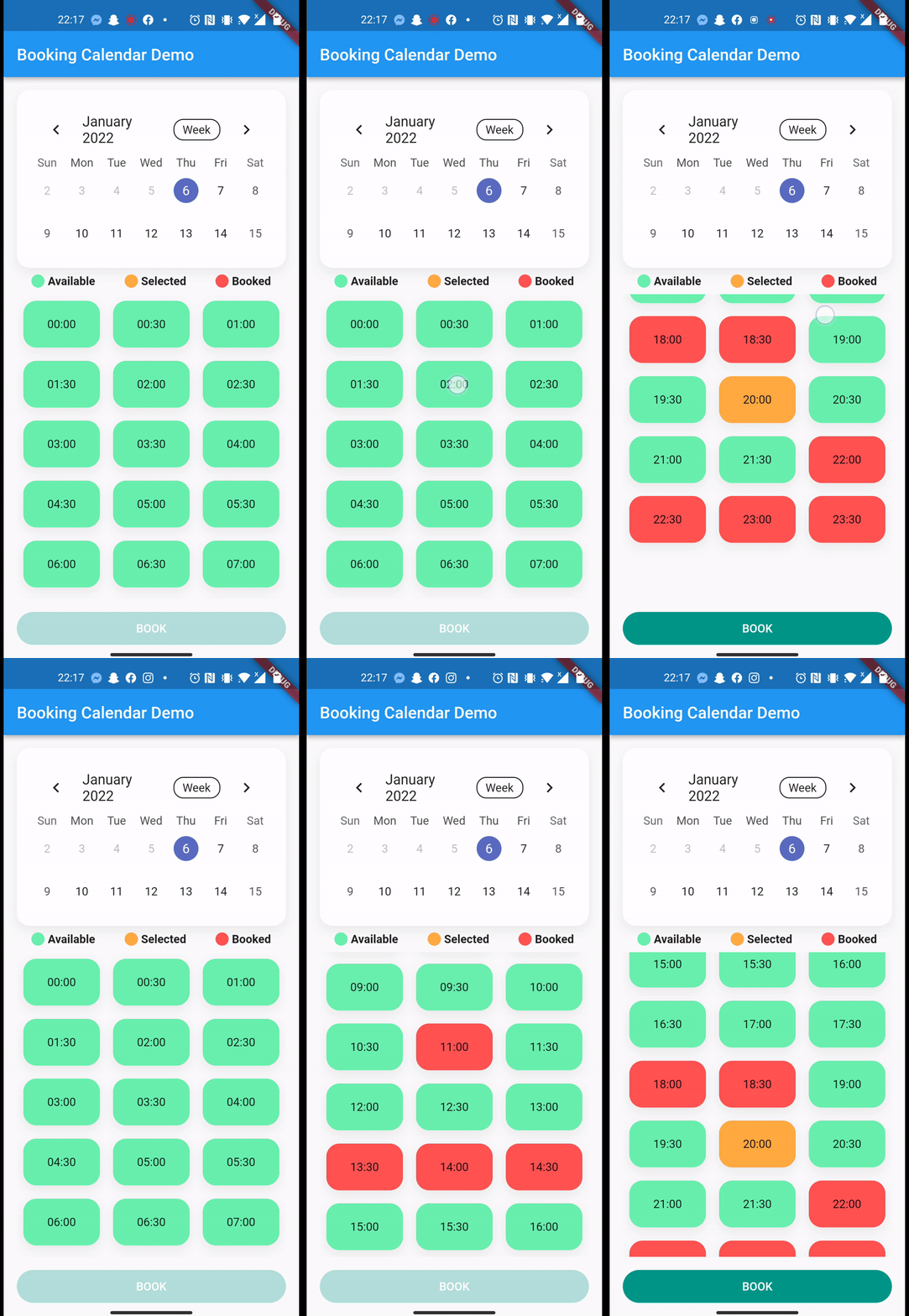
Pacote Flutter para reservar online por meio do seu aplicativo. Use com fluxos para obter dados de reserva em tempo real, por exemplo, com fluxos do Firestore
Orientação gerada a partir de informações públicas. Apenas para referência.
Um pacote Flutter que habilita funcionalidades de reserva online dentro do aplicativo, projetado para integrar-se perfeitamente com fontes de dados em tempo real, como o Firestore por meio de streams. Oferece uma interface de calendário personalizável para gerenciar reservas, exibir disponibilidade e lidar com eventos de reserva dinamicamente. Ideal para aplicações que exigem atualizações em tempo real e agendamento interativo, como sistemas de agendamento, planejadores de eventos ou plataformas de reserva de serviços. O pacote suporta múltiplas plataformas, garantindo experiências consistentes entre dispositivos.
Casos de uso
Agendamento online
Sistemas de reserva de eventos
Interfaces de agendamento de serviços
rastreamento de disponibilidade em tempo real
Integração com o Firestore para atualizações em tempo real
Principais recursos
Suporte a dados em tempo real baseado em stream
Compatibilidade multiplataforma
UI de calendário personalizável
Manipulação dinâmica de eventos de reserva
Integração fácil com o Firebase Firestore
Indicado para
Desenvolvedores de aplicativos de agendamento
Equipes usando o Firestore para dados de backend
Aplicações que precisam de atualizações ao vivo para reservas
Ferramentas de agendamento multiplataforma
interfaces de reserva focadas na interface do usuário
Considerações
Requer conhecimento de streams e programação assíncrona
Depende de fonte externa de dados (por exemplo, Firestore)
Pode ser necessário estilização personalizada para alinhamento da marca
O desempenho depende do volume de dados do fluxo
Validação embutida limitada além das verificações básicas de entrada
README original
Snapshot do README original do repositório-fonte vinculado. Consulte o repositório para o conteúdo mais recente.
Booking Calendar
Want to make online bookings in your app? Then luckily you need look no further!
With a total of 4 lines, you get a working online booking system where users can track bookings in real-time.
It calculates the cases where there would be a conflict in the calendar and displays them in different colors.
You can customise your booking calendar with a number of additional parameters.
After you successfully integrated Firebase to your app. How to setup Firebase with Flutter
In this example, we will book sporting slots, using Firebase Firestore.
Here is the model we store in the Firebase:
import'package:cloud_firestore/cloud_firestore.dart';
import'package:json_annotation/json_annotation.dart';
import'package:sport.bp/util/app_util.dart';
part'sport_booking.g.dart';
@JsonSerializable(explicitToJson: true)
classSportBooking{
/// The generated code assumes these values exist in JSON.finalString? userId;
finalString? userName;
finalString? placeId;
finalString? serviceName;
finalint? serviceDuration;
finalint? servicePrice;
//Because we are storing timestamp in Firestore, we need a converter for DateTime/* static DateTime timeStampToDateTime(Timestamp timestamp) {
return DateTime.parse(timestamp.toDate().toString());
}
static Timestamp dateTimeToTimeStamp(DateTime? dateTime) {
return Timestamp.fromDate(dateTime ?? DateTime.now()); //To TimeStamp
}*/@JsonKey(fromJson: AppUtil.timeStampToDateTime, toJson: AppUtil.dateTimeToTimeStamp)
finalDateTime? bookingStart;
@JsonKey(fromJson: AppUtil.timeStampToDateTime, toJson: AppUtil.dateTimeToTimeStamp)
finalDateTime? bookingEnd;
finalString? email;
finalString? phoneNumber;
finalString? placeAddress;
SportBooking(
{this.email,
this.phoneNumber,
this.placeAddress,
this.bookingStart,
this.bookingEnd,
this.placeId,
this.userId,
this.userName,
this.serviceName,
this.serviceDuration,
this.servicePrice});
/// Connect the generated [_$SportBookingFromJson] function to the `fromJson`/// factory.factorySportBooking.fromJson(Map<String, dynamic> json) => _$SportBookingFromJson(json);
/// Connect the generated [_$SportBookingToJson] function to the `toJson` method.Map<String, dynamic> toJson() => _$SportBookingToJson(this);
}
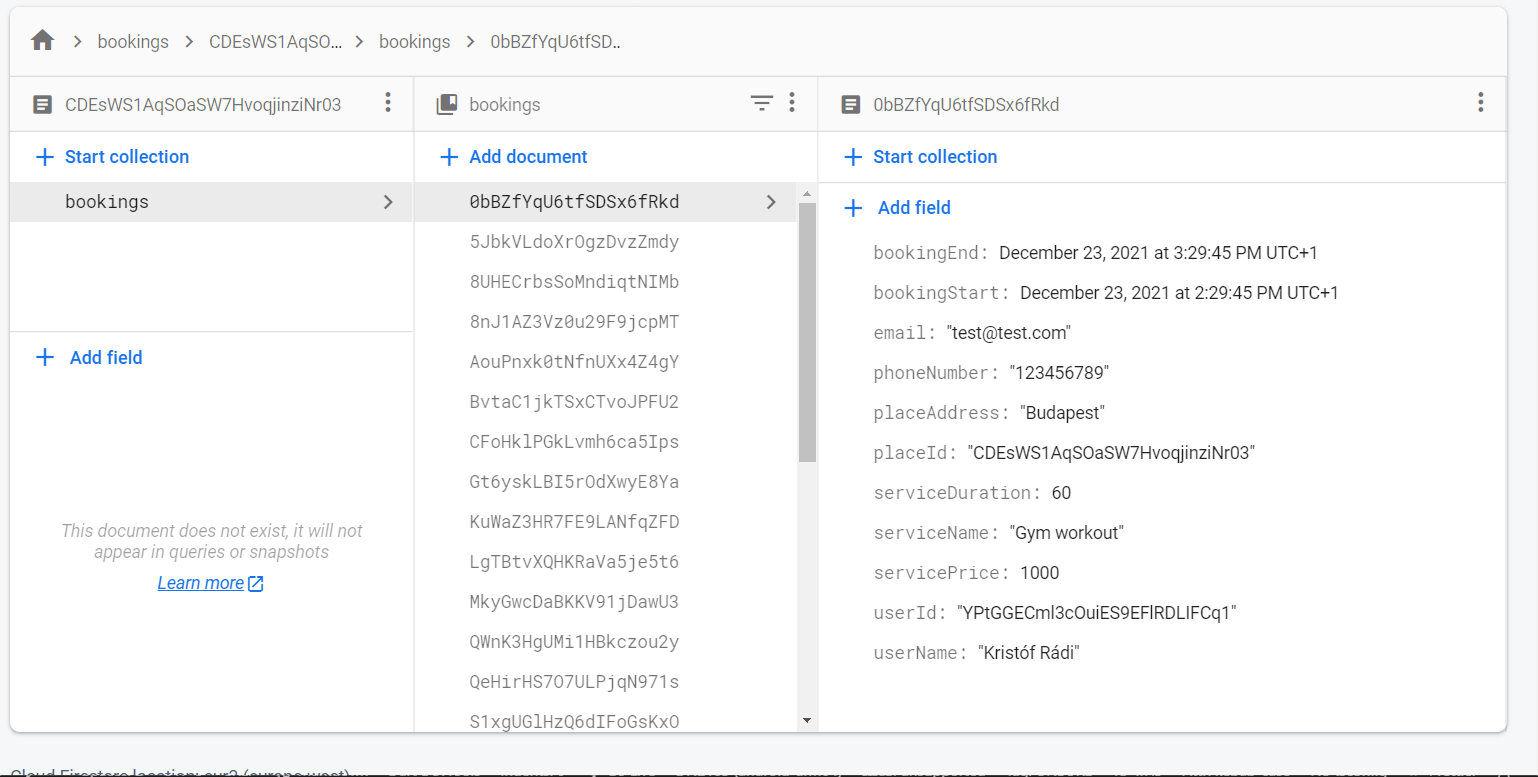
This is how the structure of the data looks like in the Firestore document:
So after the Firebase init, we can access the Firestore collection.
CollectionReference bookings = FirebaseFirestore.instance.collection('bookings');
///This is how can you get the reference to your data from the collection, and serialize the data with the help of the Firestore [withConverter]. This function would be in your repository.CollectionReference<SportBooking> getBookingStream({requiredString placeId}) {
return bookings.doc(placeId).collection('bookings').withConverter<SportBooking>(
fromFirestore: (snapshots, _) => SportBooking.fromJson(snapshots.data()!),
toFirestore: (snapshots, _) => snapshots.toJson(),
);
}
///How you actually get the stream of data from Firestore with the help of the previous function///note that this query filters are for my data structure, you need to adjust it to your solution.Stream<dynamic>? getBookingStreamFirebase(
{requiredDateTime end, requiredDateTime start}) {
returnApiRepository.
.getBookingStream(placeId: 'YOUR_DOC_ID')
.where('bookingStart', isGreaterThanOrEqualTo: start)
.where('bookingStart', isLessThanOrEqualTo: end)
.snapshots(),
}
///After you fetched the data from firestore, we only need to have a list of datetimes from the bookings:List<DateTimeRange> convertStreamResultFirebase(
{requireddynamic streamResult}) {
///here you can parse the streamresult and convert to [List<DateTimeRange>]///Note that this is dynamic, so you need to know what properties are available on your result, in our case the [SportBooking] has bookingStart and bookingEnd propertyList<DateTimeRange> converted = []
for (var i = 0; i < streamResult.size; i++) {
final item = streamResult.docs[i].data();
converted.add(DateTimeRange(start: (item.bookingStart!), end: (item.bookingEnd!)));
}
return converted;
}
///This is how you upload data to FirestoreFuture<dynamic> uploadBookingFirebase(
{requiredBookingService newBooking}) async {
await bookings
.doc('your id, or autogenerate')
.collection('bookings')
.add(newBooking.toJson())
.then((value) => print("Booking Added"))
.catchError((error) => print("Failed to add booking: $error"));
}
}
/**AFTER YOU HAVE EVERY HELPER FUNCTION YOU CAN PASS THESE TO YOUR BOOKINGCALENDAR */BookingCalendar(
bookingService: mockBookingService,
convertStreamResultToDateTimeRanges: convertStreamResultFirebase,
getBookingStream: getBookingStreamFirebase,
uploadBooking: uploadBookingFirebase,
uploadingWidget: constCircularProgressIndicator(),
//... other customisation properties
),
Additional information
Feel free to add issues, open PR-s and leave comments on the github repository.