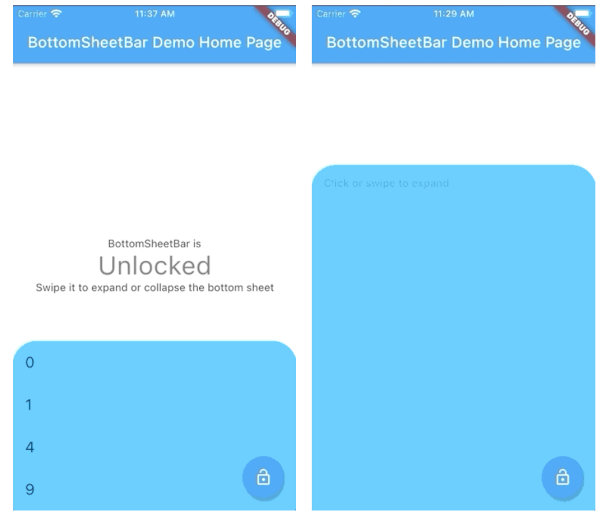
Orientação gerada a partir de informações públicas. Apenas para referência.
BottomSheetBar é um pacote Flutter que fornece uma barra de ferramentas fixada na parte inferior da tela, que pode se expandir para uma folha inferior completa. Oferece uma transição suave entre os estados compactos e expandidos, ideal para navegação, controles ou acesso a conteúdo adicional. O widget é personalizável e funciona em todas as principais plataformas, incluindo Android, iOS, Web, macOS, Windows e Linux. Projetado para interação intuitiva do usuário, melhora o fluxo da interface ao manter ações importantes acessíveis sem poluir a interface principal.
Casos de uso
Acesso rápido aos controles
Navegação com menu colapsável
Entrada de formulário com painel expansível
Controles de reprodução de mídia
Filtragem de conteúdo dinâmico
Principais recursos
Barra de ferramentas alinhada na parte inferior
Expansão suave para a folha inferior
Compatibilidade multiplataforma
Aparência personalizável
Abertura/fechamento acionado por gestos
design responsivo
Indicado para
Aplicativos com foco em dispositivos móveis
Painéis interativos
interfaces com grande volume de conteúdo
Navegação centrada no usuário
Aplicativos que precisam de barras de ferramentas colapsáveis
Considerações
Pode entrar em conflito com outros overlays inferiores
Requer planejamento cuidadoso de layout
Impacto no desempenho com conteúdo pesado
Personalização limitada no estado padrão
Não adequado para uso em modal de tela cheia
README original
Snapshot do README original do repositório-fonte vinculado. Consulte o repositório para o conteúdo mais recente.
bottom_sheet_bar
A toolbar that aligns to the bottom of a widget and expands into a bottom sheet.
Widget body - The toolbar will be aligned to the bottom of the body Widget. Padding equal to height is added to the bottom of this widget.
Function(ScrollController) expandedBuilder - A function to build the widget displayed when the bottom sheet is expanded. If the expanded content is scrollable, pass the provided ScrollController to the scrollable widget.
Optional
Widget collapsed - A Widget to be displayed on the toolbar in its collapsed state
BottomSheetBarController controller - A controller can be used to listen to events, and expand and collapse the bottom sheet.
Color color - The background color of the toolbar and bottom sheet. Defaults to Colors.white
Color backdropColor - The backdrop color that overlays the [body] widget when the bottom sheet is expanded. Defaults to Colors.transparent (no backdrop)
BorderRadius borderRadius - Provide a border-radius to adjust the shape of the toolbar
BorderRadius borderRadiusExpanded - Provide a border-radius to adjust the shape of the bottom-sheet when expanded
List<BoxShadow> boxShadows - Provide shadow decoration to the bottom sheet
double height - The height of the collapsed toolbar. Default to kToolbarHeight (56.0)
bool isDismissable - If true, the bottom sheet can be dismissed by tapping elsewhere. Defaults to true
bool locked - If true, the bottom sheet cannot be opened or closed with a swipe gesture. Defaults to true
bool willPopScope - If true, the bottom sheet widget will be wrapped in a WillPopScope widget to handle back-gestures. Defaults to false
bool backButtonListener - If true, the bottom sheet widget will be wrapped in a BackButtonListener widget to handle back-gestures. Defaults to false
BottomSheetBarController
A controller used to expand or collapse the bottom sheet of a BottomSheetBar. Listeners can be added to respond to expand and collapse events. The expanded or collapsed state can also be determined through this controller.
bool get isCollapsed - Only returns [true] if the bottom sheet if fully collapsed
bool get isExpanded - Only returns [true] if the bottom sheet if fully expanded
TickerFuture collapse() - Collapse the bottom sheet built by BottomSheetBar.expandedBuilder
TickerFuture expand() - Expand the bottom sheet built by BottomSheetBar.expandedBuilder
void addListener(Function listener) - Adds a function to be called on every animation frame
void removeListener(Function listener) - Removes a previously added listener
void dispose() - Removes all previously added listeners
void attach(AnimationController animationController) - Used internally to assign the AnimationController created by BottomSheetBar to the controller. Unless you're using advanced animation techniques, you probably won't ever need to use this method.
Example
A quick demonstration can be found in the example directory. To run the example: