Orientação gerada a partir de informações públicas. Apenas para referência.
Brick Offline First é um pacote Flutter/Dart que prioriza fontes de dados locais para busca de dados, garantindo funcionalidade offline sem interrupções. Ele roteia as requisições por provedores locais antes de tentar as remotas, melhorando a responsividade e confiabilidade do aplicativo. Ideal para aplicações que exigem experiência consistente do usuário independentemente da disponibilidade da rede, integra-se a bancos de dados NoSQL persistentes para gerenciar sincronização de dados de forma eficiente. O pacote suporta múltiplas plataformas, incluindo Android, iOS, macOS, Windows e Linux, tornando-o versátil para desenvolvimento multiplataforma.
Casos de uso
Aplicativos móveis com foco em offline
Sincronização de dados entre dispositivos
acesso de dados de alta confiabilidade
Aplicações web progressivas
Ferramentas de colaboração em tempo real
Principais recursos
Roteamento de dados primeiro local
Falha automática para dados locais
Suporte multiplataforma
Sincronização eficiente com fontes remotas
Integração com persistência NoSQL
Indicado para
Aplicativos que precisam de capacidade offline
Desenvolvedores priorizando a resiliência de dados
Projetos usando armazenamento persistente
Equipes construindo recursos em tempo real
Aplicações com conectividade intermitente
Considerações
Requer configuração de provedores locais de dados
Pode ser necessário lógica personalizada de sincronização
Curva de aprendizado para novos usuários
Dependente da implementação subjacente do NoSQL
Complexidade potencial na resolução de conflitos
README original
Snapshot do README original do repositório-fonte vinculado. Consulte o repositório para o conteúdo mais recente.
An intuitive way to work with persistent data in Dart.
Brick is an extensible query interface for Dart applications. It's an all-in-one solution responsible for representing business data in the application, regardless of where your data comes from. Using Brick, developers can focus on implementing the application, without concern for where the data lives. Brick was inspired by the need for applications to work offline first, even if an API represents your source of truth.
Quick Start
Add the packages:
dependencies:# Or brick_offline_first_with_graphql# Or brick_offline_first_with_supabasebrick_offline_first_with_rest:sqflite:# optionaldev_dependencies:# Or brick_offline_first_with_graphql_build: any# Or brick_offline_first_with_supabase_build: anybrick_offline_first_with_rest_build:build_runner:
Configure your app directory structure to match Brick's expectations:
mkdir -p lib/brick/adapters lib/brick/db;
Add models that contain your app logic. Models must be saved with the .model.dart suffix (i.e. lib/brick/models/person.model.dart).
Run dart run build_runner build to generate your models and sometimes migrations. Rerun after every new model change or dart run build_runner watch for automatic generations. You'll need to run this again after your first migration.
And generate (de)serializing code to fetch to and from multiple providers:
$ (flutter) pub run build_runner build
Fetching Data
A repository fetches and returns data across multiple providers. It's the single access point for data in your app:
classMyRepositoryextendsOfflineFirstWithRestRepository{
MyRepository();
}
final repository = MyRepository();
// Now the models can be queried:final users = await repository.get<User>();
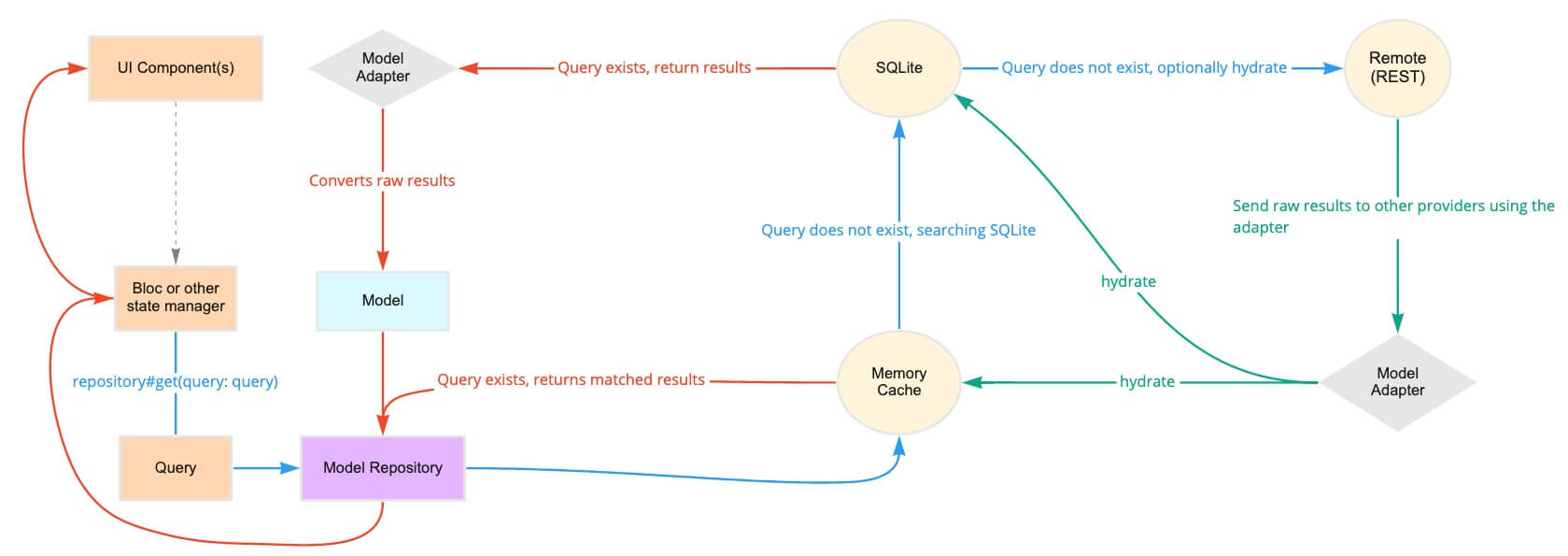
Behind the scenes, this repository could poll a memory cache, then SQLite, then a REST API. The repository intelligently determines how and when to use each of the providers to return the fastest, most reliable data.
// Queries can be general:final query = Query(where: [Where('lastName').contains('Muster')]);
final users = await repository.get<User>(query: query);
// Or singular:final query = Query.where('email', 'user@example.com', limit1: true);
final user = await repository.get<User>(query: query);
Queries can also receive reactive updates. The subscribed stream receives all models from its query whenever the local copy is updated (e.g. when the data is hydrated in another part of the app):
final users = repository.subscribe<User>().listen((users) {})
Mutating Data
Once a model has been created, it's sent to the repository and back out to each provider:
final user = User();
await repository.upsert<User>(user);
Associating Data
Repositories can support associations and automatic (de)serialization of child models.
classHatextendsOfflineFirstWithRestModel{
finalString color;
Hat({this.color});
}
classUserextendsOfflineFirstWithRestModel{
// user has many hatsfinalList<Hat> hats;
}
final query = Query.where('hats', Where('color').isExactly('brown'));
final usersWithBrownHats = repository.get<User>(query: query);