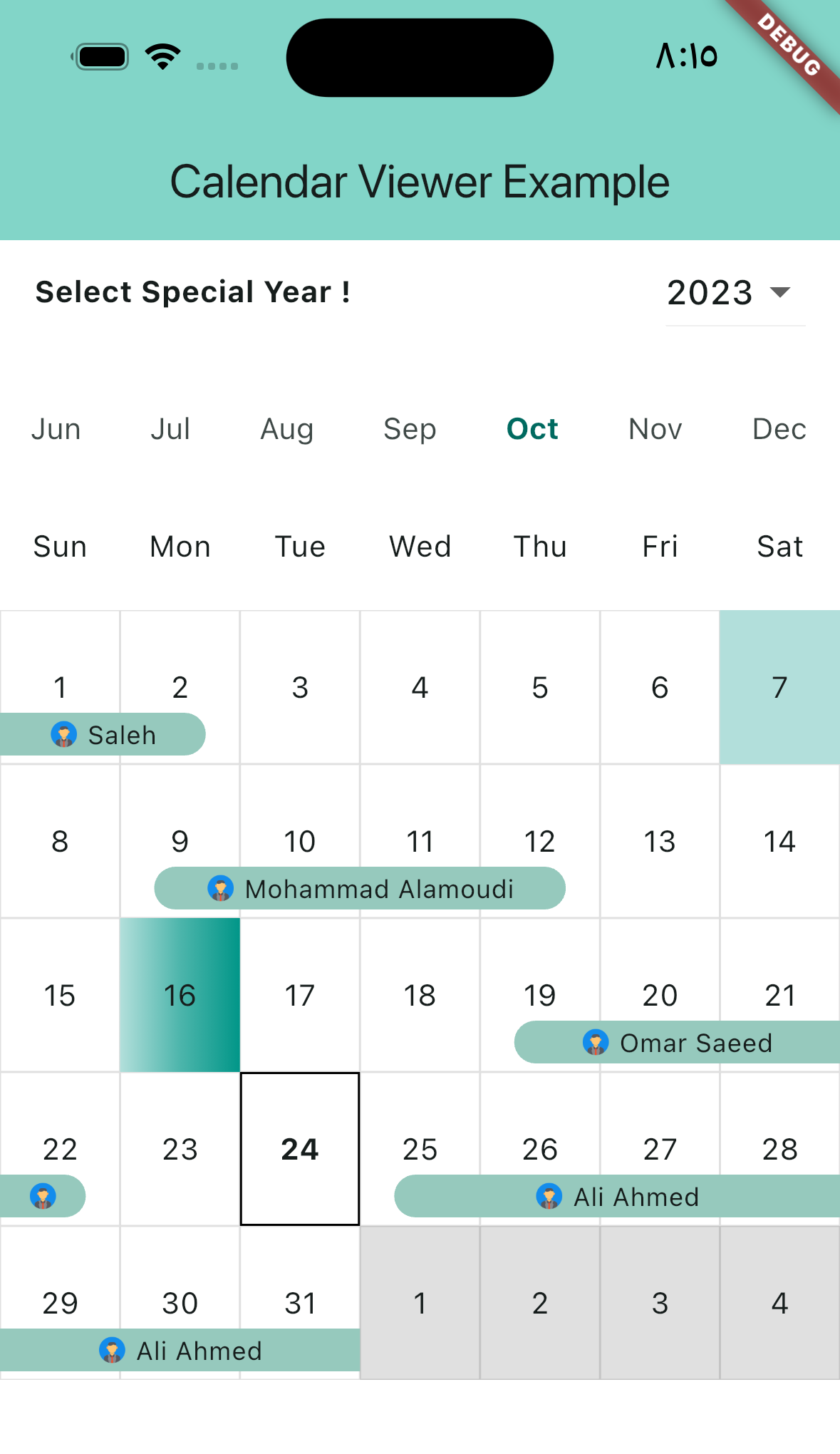
Orientação gerada a partir de informações públicas. Apenas para referência.
Um widget de calendário altamente personalizável para Flutter que suporta reservas, eventos e exibição multilíngue. Oferece estilos flexíveis, integração de eventos e compatibilidade semelhante entre plataformas em Android, iOS, Web, macOS, Windows e Linux. Projetado para desenvolvedores, permite fácil personalização de datas, cabeçalhos e componentes da interface enquanto mantém desempenho e responsividade. Ideal para aplicativos que exigem seleção dinâmica de datas e internacionalização.
Casos de uso
Agendamento de eventos
Sistemas de reserva
Calendários multilíngues
Integrações de seletor de data
Aplicativos de gerenciamento de tempo
Interfaces de reserva de viagens
Principais recursos
Temas de interface personalizáveis
Suporte a múltiplos idiomas
Destaque de evento
Compatibilidade multiplataforma
design responsivo
Intervalos de data configuráveis
Indicado para
Desenvolvedores de aplicativos de agendamento
Equipes que precisam de calendários internacionalizados
Aplicativos com interações complexas de datas
implementações de calendário focadas na interface do usuário
Projetos que exigem widgets de calendário leves
Considerações
Requer manipulação manual de dados de evento
Suporte limitado a fuso horário embutido
Sem lógica de evento recorrente nativa
O estilo pode exigir personalização profunda
Depende de pacotes de localização externos para i18n completo
README original
Snapshot do README original do repositório-fonte vinculado. Consulte o repositório para o conteúdo mais recente.
Calendar Viewer
A highly customizable calendar widget designed for reservations, events, and multi-language support.
Multi-language support for month and weekday names.
Add reservations spanning multiple dates.
Customizable styles for dates, weekdays, and reservations.
Support for event handling like taps and long presses on dates.
📖 Usage
Basic Example:
/// Use [CalendarPageViewer] if you want to show only one month at a time./// with no tab bar.////// Use [CalendarListViewer] if you want to show all months at a time./// with a scrollable list.CalendarTabBarViewer(
initialDate: DateTime.now(),
months: ['Jan', 'Feb', ...], // List of 12 months
weekdays: ['Mon', 'Tue', ...], // List of 7 weekdays
outsideDateConfig: CalendarDateConfig(
decoration: BoxDecoration(
color: Colors.black12,
border: Border.all(color: Colors.black12, width: 0.5),
),
),
);
Advanced Configuration:
/// Use [CalendarPageViewer] if you want to show only one month at a time./// with no tab bar.////// Use [CalendarListViewer] if you want to show all months at a time./// with a scrollable list.CalendarTabBarViewer(
key: Key(_selectedDate.toString()),
initialDate: _selectedDate,
months: ['January', 'February', ...],
weekdays: ['Monday', 'Tuesday', ...],
dateConfigBuilder: (date) {
if (date.isAtSameMomentAs(DateTime(_now.year, _now.month, _now.day))) {
returnCalendarDateConfig(
decoration: BoxDecoration(
color: Colors.teal.withValues(alpha: .6),
borderRadius: BorderRadius.circular(5),
),
);
} elseif(date.isAtSameMomentAs(_selectedDate)) {
returnCalendarDateConfig(
decoration: BoxDecoration(
color: Colors.blue.withValues(alpha: .6),
borderRadius: BorderRadius.circular(5),
),
);
}
returnnull;
},
reservations: [
CalendarViewerReservation(
from: DateTime(2023, 10, 9),
to: DateTime(2023, 10, 13),
user: constCalendarReservationUser(
name: 'Mohammad Alamoudi',
netImage:
'https://cdn-icons-png.flaticon.com/512/9203/9203764.png',
),
),
],
reservation: CalenderReservationConfig(
style: CalendarReservationStyle(
color: Colors.teal.withValues(alpha: .6),
),
),
outsideDateConfig: CalendarDateConfig(
decoration: BoxDecoration(
color: Colors.black12,
border: Border.all(color: Colors.black12, width: 0.5),
),
),
);