Buscar pacotes, repositórios e categorias de apps

Capa de cell_calendar
Detalhes do pacotev0.9.0

cell_calendar

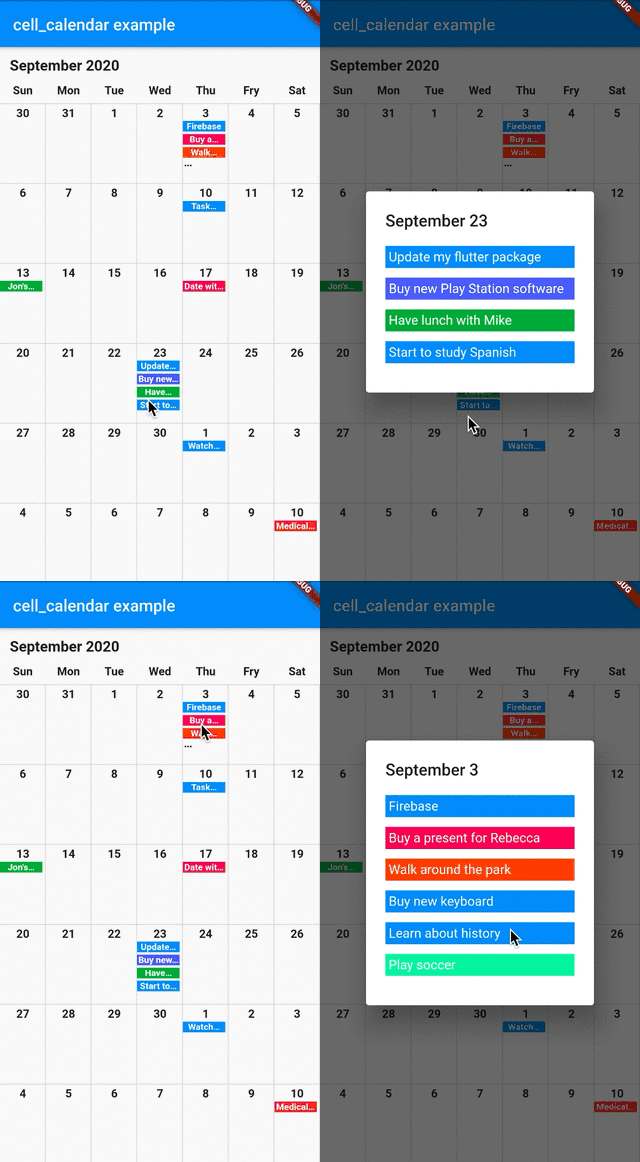
Widget de calendário moderno com recursos úteis. Permite desenvolver um calendário bem projetado em um instante. Inspirado na interface do Google Calendar.

AndroidiOSWebmacOSWindowsLinux
Downloads em 30 dias
1,5 mil
Curtidas
104
Pontos Pub
140

Instalar pacote

flutter pub add cell_calendar

Visão geral do pacote

Orientação gerada a partir de informações públicas. Apenas para referência.

Um widget de calendário moderno e personalizável inspirado na interface do Google Calendar. Permite o desenvolvimento rápido de calendários visualmente atraentes com configuração mínima. O pacote suporta múltiplas plataformas e inclui funcionalidades intuitivas como seleção de datas, navegação e integração de eventos. Projetado para desenvolvedores que buscam uma solução de calendário limpa e responsiva sem codificação extensa. Ideal para aplicativos que exigem gerenciamento de datas com aparência refinada.

Casos de uso

  • Aplicações de agendamento
  • Ferramentas de planejamento de eventos
  • Interfaces de gerenciamento de tarefas
  • Sistemas de reservas
  • Aplicativos de planejamento diário
  • Painéis baseados em calendário

Principais recursos

  • Design limpo e inspirado no Google Calendar
  • Suporte multiplataforma
  • Seleção fácil de data
  • Controles de navegação embutidos
  • Aparência personalizável
  • Capacidades de integração de eventos

Indicado para

  • Desenvolvedores construindo aplicativos com muitos calendários
  • Equipes que desejam implementação rápida da interface
  • Projetos que precisam de widgets de calendário responsivos
  • Aplicativos destinados a múltiplos sistemas operacionais
  • Aplicações móveis e web centradas no design

Considerações

  • Gerenciamento de eventos embutido limitado
  • Requer manipulação manual de lógica complexa de agendamento
  • Pode ser necessário estilização adicional para temas únicos
  • Depende do desempenho de renderização do Flutter em dispositivos mais antigos
  • Não ideal para fluxos de trabalho de calendário altamente especializados

README original

Snapshot do README original do repositório-fonte vinculado. Consulte o repositório para o conteúdo mais recente.

cell_calendar

pub package License: MIT

Modern calendar widget with useful features. Enables to develop well designed calendar in a moment.

Inspired by the UI of Google Calendar

cell_calendar

Usage

  • Events

You can show the events in the calendar by inserting the list of CalendarEvent as events

    CellCalendar(
      events: [
        CalendarEvent(eventName: "Event 1",eventDate: DateTime1),
        CalendarEvent(eventName: "Event 2",eventDate: DateTime2),
      ]
    );

If you need to customize the calendar more, the additional parameters like eventBackGroundColor, eventTextColor and eventID are helpful.

  • onPageChanged

The callback onPageChanged is literally called when the current page is changed.

    CellCalendar(
      onPageChanged: (firstDate, lastDate) {
        print("This is the first date of the new page: $firstDate");
        print("This is the last date of the new page: $lastDate");
      }
    );

In this sample code, firstDate is the date in the very first cell of the new page, and its logic is same as lastDate.

  • onCellTapped

The callback onCellTapped is called when user tapped a cell.

    CellCalendar(
      onCellTapped: (date) {
        print("$date is tapped !");
      }
    );

It is called with tapped DateTime, so you can get the events on the date if you want.

    CellCalendar(
      onCellTapped: (date){
        print("$date is tapped !");
        final eventsOnTheDate = sampleEvents().where((event) {
          final eventDate = event.eventDate;
          return eventDate.year == date.year &&
              eventDate.month == date.month &&
              eventDate.day == date.day;
        }).toList();
        /// ex) Show dialog or navigate to new page with [eventsOnTheDate]
      }
    );

  • daysOfTheWeekBuilder and monthYearLabelBuilder

If you don't want to use default labels on the calendar, you can use callbacks for customization.

    CellCalendar(
      daysOfTheWeekBuilder: (dayIndex) {
        /// dayIndex: 0 for Sunday, 6 for Saturday.
        final labels = ["S", "M", "T", "W", "T", "F", "S"];
        return Padding(
          padding: const EdgeInsets.only(bottom: 4.0),
          child: Text(
            labels[dayIndex],
            style: TextStyle(
              fontWeight: FontWeight.bold,
            ),
            textAlign: TextAlign.center,
          ),
        );
      },
      monthYearLabelBuilder: (datetime) {
        final year = datetime.year.toString();
        final month = datetime.month.toString();
        return Padding(
          padding: const EdgeInsets.all(16.0),
          child: Text(
            "$month, $year",
            style: TextStyle(
              fontSize: 24,
              fontWeight: FontWeight.bold,
            ),
          ),
        );
      },
    )

If you have any requests or questions, please feel free to ask on github.

Contributors ✨

Thanks goes to these wonderful people (emoji key):

Santa Takahashi
Santa Takahashi

💻
Denis Filonov
Denis Filonov

💻
HPanda
HPanda

💻

This project follows the all-contributors specification. Contributions of any kind welcome!

Categorias

Dependências

Lista de dependências 1 itens

Repositório-fonte

Projetos que usam este pacote

Ainda não há dados.