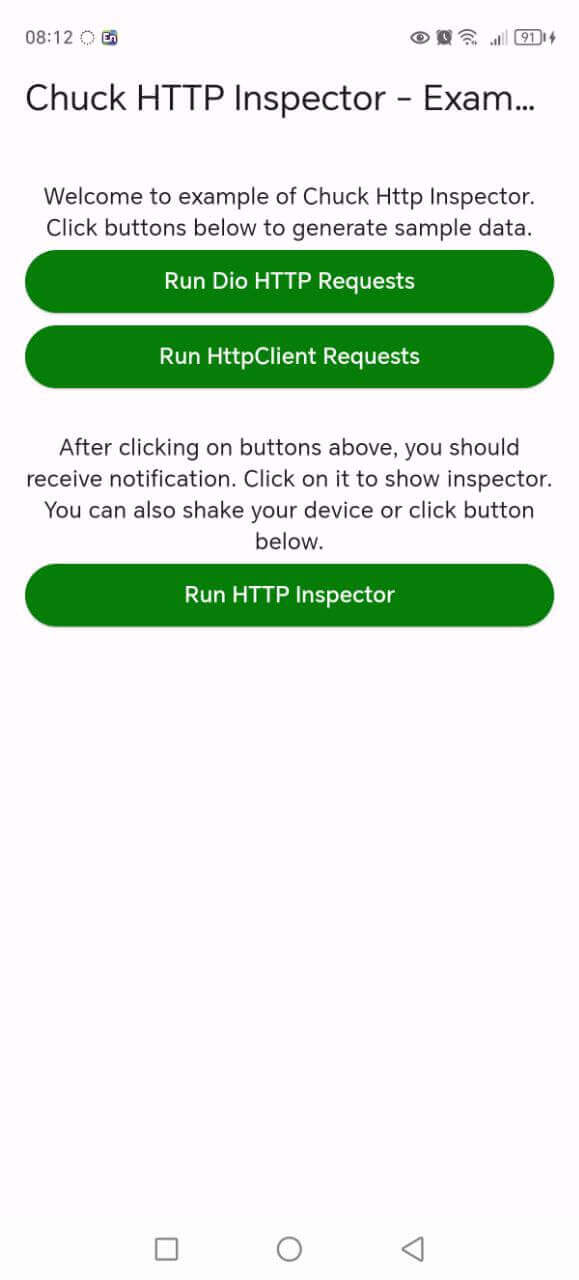
Chuck é uma ferramenta de inspeção HTTP que ajuda no depuração de solicitações HTTP. Ele captura e armazena solicitações e respostas HTTP, que podem ser visualizadas por meio de uma interface simples.
Orientação gerada a partir de informações públicas. Apenas para referência.
O Chuck Interceptor é uma ferramenta de depuração para aplicativos Flutter que intercepta requisições e respostas HTTP, armazenando-as para inspeção. Ele fornece uma interface simples para visualizar informações detalhadas sobre o tráfego de rede, incluindo cabeçalhos, corpos e timestamps. Ideal para desenvolvedores durante as fases de desenvolvimento e teste, ajuda a identificar problemas na comunicação com APIs sem modificar o código. A ferramenta se integra seamlessmente com clientes HTTP existentes por meio de interceptadores.
Casos de uso
Depuração de chamadas de API
Inspeção de dados de solicitação/resposta
Testando o comportamento da rede
Identificando problemas de conexão
Monitoramento de interações com o backend
Principais recursos
Registro de solicitações HTTP em tempo real
Interface de inspeção web simples
Suporta tanto solicitações quanto respostas
Integração fácil com Dio ou HttpClient
Compatibilidade multiplataforma
Indicado para
Desenvolvedores Flutter em modo de desenvolvimento
Depuração de integrações da API do Teams
Testadores de aplicativos móveis
Engenheiros de frontend diagnosticando problemas de rede
Considerações
Não destinado ao uso em produção
Requer ativação manual
Pode afetar o desempenho durante uso intenso
Interface de usuário acessível apenas localmente
Opções limitadas de personalização
README original
Snapshot do README original do repositório-fonte vinculado. Consulte o repositório para o conteúdo mais recente.
Chuck
Need anything Flutter related? Reach out
on LinkedIn
ChuckInterceptor is an HTTP Inspector tool for Flutter which helps debugging http requests. It
catches and stores http requests and responses, which can be viewed via simple UI. It is inspired
from Chuck
and Chucker.
Supported Dart http client plugins:
Dio
HttpClient from dart:io package
Any other client (http, chopper, retrofit, custom) via the client agnostic API
Features:
✔️ Detailed logs for each HTTP calls (HTTP Request, HTTP Response)
✔️ Inspector UI for viewing HTTP calls
✔️ Save HTTP calls to file
✔️ Statistics
✔️ Floating inspector button with live call counter
✔️ Support for top used HTTP clients in Dart
✔️ Client agnostic API - log calls from any HTTP client, zero extra dependencies
✔️ Enhanced error handling with comprehensive recovery
✔️ Shake to open inspector
✔️ HTTP calls search and filtering
✔️ Performance optimized with memory management
✔️ Comprehensive unit test coverage
✔️ Curl command generation for easy debugging
If you need to pass navigatorKey lazily, you can use:
chuck.setNavigatorKey(yourNavigatorKeyHere);
This is minimal configuration required to run Chuck. Can set optional settings in Chuck constructor,
which are presented below. If you don't want to change anything, you can move to Http clients
configuration.
Additional settings
You can enable/disable Chuck dynamically (e.g. disable in production builds for zero overhead):
Chuck chuck = Chuck(
  enabled: kDebugMode, // Completely short-circuits in production
  maxBodySize: 1024 * 1024, // 1 MB max payload body size
);
You can set showInspectorOnShake in Chuck constructor to open inspector by shaking your device (default disabled):
Chuck chuck = Chuck(showInspectorOnShake: true);
If you want to use dark mode just add darkTheme flag:
Chuck chuck = Chuck(darkTheme: true);
You can also customize the entire palette using ChuckThemeExtension:
If you want to limit max numbers of HTTP calls saved in memory, you may use maxCallsCount
parameter (default is 1000).
Chuck chuck = Chuck(maxCallsCount: 500);
If you want to change the Directionality of Chuck, you can use the directionality parameter. If
the parameter is set to null, the Directionality of the app will be used.
Chuck ships with ChuckButton — a draggable floating bubble which shows how many HTTP calls were
intercepted and opens the inspector when tapped. It replaces the local notification used by Chuck
2.x, so the package no longer depends on flutter_local_notifications (no notification
permission, no notification channel setup, smaller binary).
The bubble colour reflects the state of intercepted traffic: primary colour by default, orange while
requests are in flight, red when at least one call failed. Counts above 999 are shortened to 999+.
If you need more control, use the widget directly:
MaterialApp(
navigatorKey: chuck.navigatorKey,
builder: (context, child) => ChuckButton(
chuckCore: chuck.core,
visible: kDebugMode, // render the button only in debug builds
alignment: Alignment.bottomLeft, // start position
padding: constEdgeInsets.all(24), // distance from screen edges
draggable: true, // allow user to move the button
hideWhenEmpty: true, // hide until the first call is intercepted
child: child,
),
home: constHomeScreen(),
);
The button is hidden automatically when Chuck is disabled (Chuck(enabled: false)).
If you prefer your own UI, listen to the calls stream and build whatever you want:
Any other client (http, Chopper, Retrofit, custom)
Chuck does not depend on package:http or any other client. Instead it takes plain values
(method, uri, headers, body, status code), so every client can be inspected through the same API.
For a client which hands you the finished call, log it in one step:
You may need that if you won't use the floating button or shake:
chuck.showInspector();
Saving and Sharing calls
Chuck supports saving and sharing HTTP call logs directly via the system share sheet (share_plus). No storage permissions (WRITE_EXTERNAL_STORAGE) are required.
Extensions
You can use extensions to shorten your http client code:
See complete example
here: https://github.com/SunnatilloShavkatov/chuck_interceptor/blob/master/example/lib/main.dart
To run project, you need to call this command in your terminal:
flutter pub run build_runner build --delete-conflicting-outputs