Orientação gerada a partir de informações públicas. Apenas para referência.
Um pacote Flutter/Dart que permite a criação de interfaces de linha de comando (CLI) visualmente atraentes e interativas inspiradas no Inquirer.js. Permite aos desenvolvedores criar interações ricas com o usuário diretamente no terminal, como formulários de entrada, menus de seleção e diálogos de confirmação. O pacote foi projetado com testes em mente, facilitando a simulação e validação de fluxos de trabalho CLI. Compatível com macOS, Windows e Linux, integra-se perfeitamente em aplicações CLI baseadas em Dart.
Casos de uso
Construindo ferramentas CLI interativas
Testando fluxos de usuário baseados em terminal
Criando assistentes de configuração
Desenvolvendo utilitários de configuração de linha de comando
Implementando validação de entrada do usuário
Principais recursos
Prompts do estilo Inquirer.js
Suporte de teste embutido
Compatibilidade multiplataforma
API simples para tipos comuns de prompt
Suporta interações assíncronas do usuário
Indicado para
Desenvolvedores Dart construindo aplicativos de linha de comando
Equipes que precisam de interfaces de terminal testáveis
Ferramentas que exigem entrada do usuário em scripts
Projetos educacionais ensinando design de CLI
Scripts de automação com interação do usuário
Considerações
Requer ambiente de terminal
Limitado à saída baseada em console
Pode ser necessário configuração adicional para interfaces de usuário complexas
Não adequado para aplicações GUI
Dependente do comportamento específico da plataforma do terminal
README original
Snapshot do README original do repositório-fonte vinculado. Consulte o repositório para o conteúdo mais recente.
cli_dialog
A Dart package which allows you to use Inquirer.js prompts with some additional features.
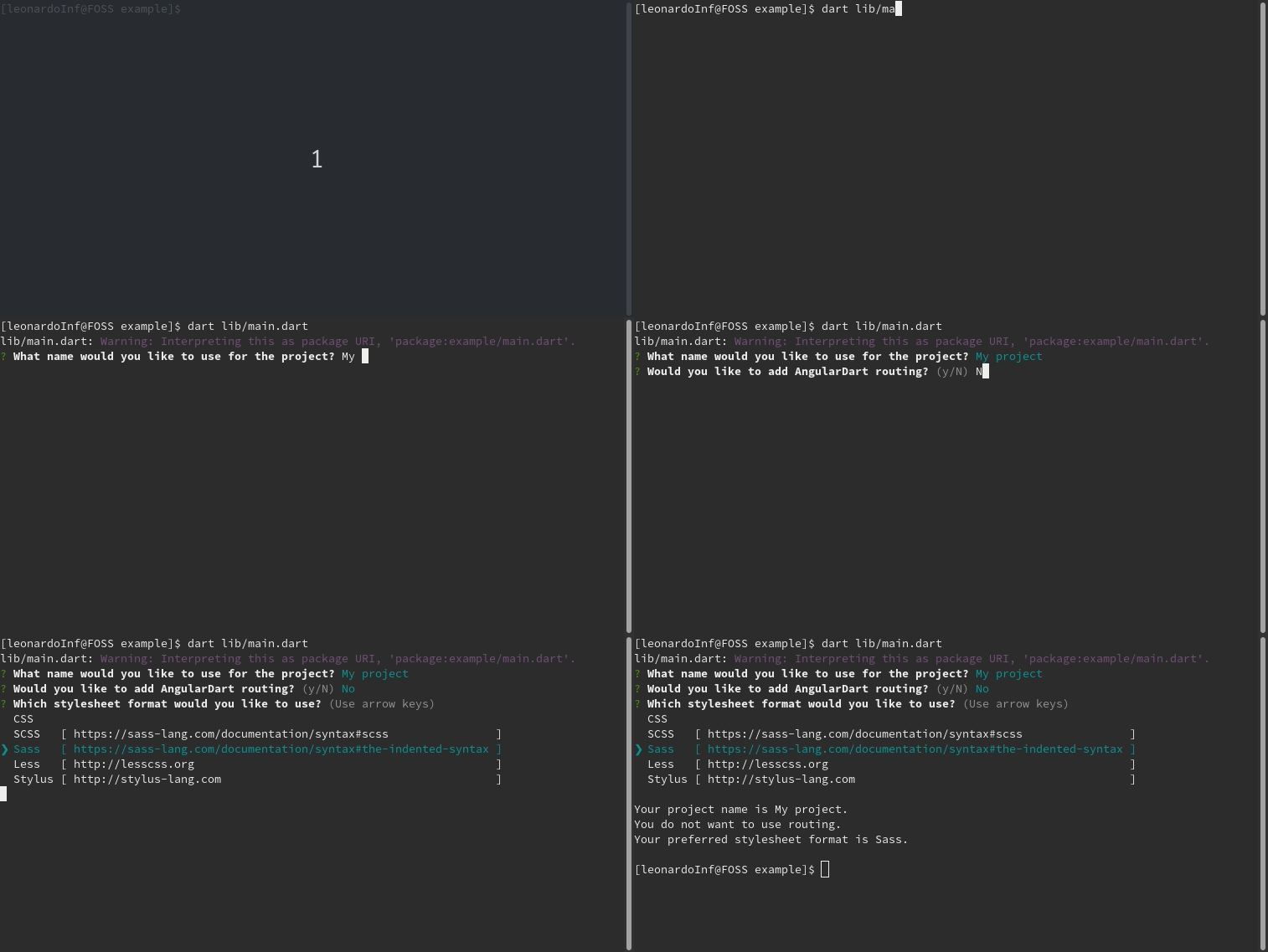
The following GIF shows a CLI dialog which was created using this library. You can also visit the library page on pub.dev.
import'package:cli_dialog/cli_dialog.dart';
voidmain() {
final dialog = CLI_Dialog(questions: [
['What is your name?', 'name']
]);
final name = dialog.ask()['name'];
}
Whenever you want to create a CLI dialog you create a CLI_Dialog() instance.
The CLI_Dialog class supports multiple keyword arguments amongst which questions is the most basic one.
questions is a list of questions and corresponding keys to retreive the answers.
Thus, each list entry for questions has the following syntax:
[<question>, <key<].
Then you will want to call the ask() method. It performs the CLI dialog and returns a map with the keys you provided and the values it received from the user.
Boolean questions
import'package:cli_dialog/cli_dialog.dart';
voidmain() {
final dialog = CLI_Dialog(booleanQuestions: [
['Are you happy with this package?', 'isHappy']
]);
final answer = dialog.ask()['isHappy'];
}
As the name suggests, boolean questions just asks the user for (y/N) answers and always returns bool values.
The N in (y/N) indicates that the default answer is no. You can change this by passing trueByDefault: true to the constructor.
List questions
import'package:cli_dialog/cli_dialog.dart';
voidmain() {
const listQuestions = [
[
{
'question': 'What is your favourite colour?',
'options': ['Red', 'Blue', 'Green']
},
'colour'
]
];
final dialog = CLI_Dialog(listQuestions: listQuestions);
final answer = dialog.ask();
final colour = answer['colour'];
}
List questions allow the user to make a selection amongst several strings. 'question' is the question that will be printed before the selection. 'options' are the options from which the user chooses exactly one. 'colour' is the key used to retreive the answer.
Messages
Messages were added in 0.2.0. They are used to display information to users without prompting them for an answer.
You can use them like any other question using the messages keyword parameter or addQuestion(message, is_message: true). It is only optional to include a key if you are not using order.
Order
import'package:cli_dialog/cli_dialog.dart';
voidmain() {
const listQuestions = [
[
{
'question': 'Where are you from?',
'options': ['Africa', 'Asia', 'Europe', 'North America', 'South Africa']
},
'origin'
]
];
const booleanQuestions = [
['Do you want to continue?', 'continue']
];
final dialog = CLI_Dialog(
booleanQuestions: booleanQuestions,
listQuestions: listQuestions,
order: ['origin', 'continue']);
dialog.ask();
}
The optional keyword parameter order for the constructor allows you to set a custom order for your questions in the dialog by passing a list with keys in your required order.
If you do not indicate any order then the standard order is applied:
All messages are displayed to the user.
All regular questions.
All boolean questions.
All list questions.
We used the order parameter in this example because otherwise the question 'Do you want to continue' would be asked before 'Where are you from?' according to standard order.
Navigation mode
Navigation mode was added in 0.2.0. It allows users to freely navigate through the prompt and repeadetly answer questions if the want to. For the developer it is a matter of setting navigationMode to true:
final dialog = CLI_Dialog(navigationMode: true);
In navigation mode, each question is prepended by an index which shows the user which question he currently answers.
The user can then prepend a colon to his answer and use these indices to jump to another question, even those he has not answered yet. For instance, answering :2 makes the user jump to the second question. After answering it, the user will be prompted with the third question (again) etc. Entering a question number which is out of scope finishes the CLI_Dialog and makes it return the answer map.
Testing
This package also provides a small infrastructure for testing your dialogs.
For this purpose, there is the named constructor CLI_Dialog.std() which has two required arguments:
std_input = a StdinService
std_output = a StdoutService
StdinService and StdoutService are classes which are provided with this library. There are always used internally for i/o. If you explicitly use these classes then you will probably want to set the mock parameter to true which will make these services mock objects.
Furtermore, it is mostly advised to pass std_output to std_input using the informStdout and isTest parameter to inform the StdoutService about standard input in echo mode.
Details can be checked out in the tests I have written (test/).
How it works
This library uses ANSI/XTerm escape sequences and regular escape sequences. You can take a look at them in this file
Contributing
Of course you are welcome to contribute to this project by issuing a pull request on Github.
Please write unit tests (test/) for new functionality and make sure that test.sh and lint.sh (tool/) run succesfully before submitting.
Please format your code using dartfmt -w . (this is also covered by lint.sh).
Windows
cli_dialog supports Windows.
Colors look a bit different in command prompt
The UTF-16 right indicator is replaced by a simple >
Acknowledgements and Alternatives
This library is more a less a Dart port of Inquirer.js.
There is dart_inquirer which is not developed any more
(even the Github repository was deleted by the author). It works fine but it has less features than this package
(no colors, no navigation, no resume, no question mark etc.).