Buscar pacotes, repositórios e categorias de apps

Capa de connectivity_widget
Detalhes do pacotev3.0.0

connectivity_widget

Um widget que mostra ao usuário se o telefone está conectado à internet ou não

AndroidiOSWebmacOSWindowsLinux
Downloads em 30 dias
324
Curtidas
88
Pontos Pub
140

Instalar pacote

flutter pub add connectivity_widget

Visão geral do pacote

Orientação gerada a partir de informações públicas. Apenas para referência.

O pacote connectivity_widget fornece um widget simples e reativo que exibe o status atual de conexão com a internet do dispositivo. Ele monitora a disponibilidade da rede em plataformas Android, iOS, Web, macOS, Windows e Linux, atualizando a interface em tempo real quando ocorrerem mudanças na conectividade. Projetado para facilitar a integração, permite que desenvolvedores mostrem indicadores visuais — como ícones ou texto — para informar aos usuários se estão online ou offline. Ideal para aplicativos que exigem feedback imediato sobre o estado da rede, como mensagens, transmissão de mídia ou serviços de sincronização de dados.

Casos de uso

  • Exibição em tempo real do status da rede
  • Indicadores de modo offline
  • Melhoria na experiência do usuário durante mudanças de conectividade
  • Adaptação da funcionalidade do aplicativo com base no estado da rede
  • Carregando gerenciamento de estado durante conectividade ruim

Principais recursos

  • Suporte multiplataforma
  • Atualizações de interface reativas
  • Integração simples com configuração mínima
  • Aparência personalizável
  • Detecção automática de alterações na conexão

Indicado para

  • Aplicativos que exigem conscientização em tempo real da rede
  • Desenvolvedores procurando monitoramento leve de conectividade
  • Componentes de interface que exigem feedback dinâmico de rede
  • Projetos direcionados para múltiplas plataformas
  • Usuários que desejam indicadores instantâneos de status online/offline

Considerações

  • Requer permissões adequadas em plataformas móveis
  • Pode ser necessário lógica adicional para lidar com estados transitórios de rede
  • Não lida com tipos específicos de rede (por exemplo, Wi-Fi versus celular)
  • Limitado ao status de conectividade, não à largura de banda ou qualidade
  • Depende das APIs de plataforma subjacentes para precisão
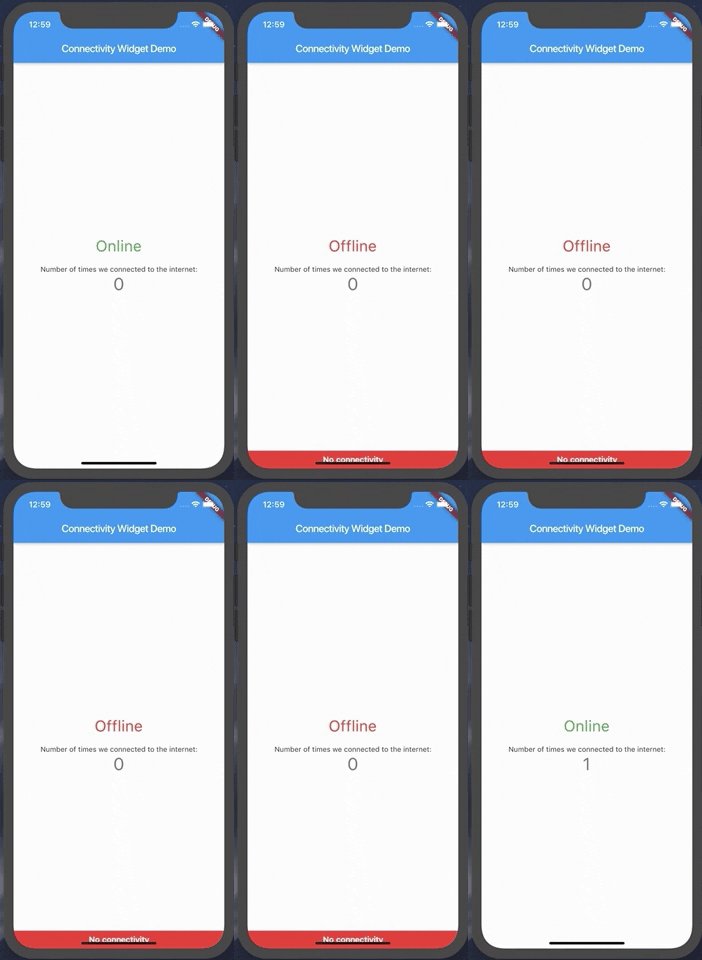
README original

Snapshot do README original do repositório-fonte vinculado. Consulte o repositório para o conteúdo mais recente.

connectivity_widget

A widget that shows the user if the phone is connected to the internet or not

This is accomplished not only by verifying the status of the mobile network and/or wifi, but also by pinging a remote server and verifying its response.

Example

Using the ConnectivityWidget

The ConnectivityWidget uses a builder function that provides you a isOnline flag to build different screens for offline or online mode.

 ConnectivityWidget(
        builder: (context, isOnline) => Center(
          child: Column(
            mainAxisAlignment: MainAxisAlignment.center,
            children: <Widget>[
              Text("${isOnline ? 'Online' : 'Offline'}", style: TextStyle(fontSize: 30, color: isOnline ? Colors.green : Colors.red),),
              SizedBox(height: 20,),
              Text(
                'Number of times we connected to the internet:',
              ),
              Text(
                '$_counter',
                style: Theme.of(context).textTheme.display1,
              ),
            ],
          ),
        )

It also provides both a onlineCallback and a offlineCallback that are called when the phone changes the connection state to online and offline, respectively.

 ConnectivityWidget(
        onlineCallback: _incrementCounter,
        builder: //...,
        )

If there is a need to change the default offline banner, a Widget can be provided to the offlineBanner parameter. Additionally, its visibility can be enabled or disabled by using the showOfflineBanner parameter.

Configurable Parameters:

  • serverToPing;
  • timeoutDuration;
  • debounceDuration;
  • verifyResponseCallback;

Changing the server to ping and the response verification

By default, the Connectivity Widget checks if there is a connection to http://www.google.com. If you want to check the availability of a custom endpoint, you can set a new endpoint to ping and a callback to verify the response.

ConnectivityUtils.instance.setCallback((response) => response.contains("This is a test!"));
ConnectivityUtils.instance.setServerToPing("https://gist.githubusercontent.com/Vanethos/dccc4b4605fc5c5aa4b9153dacc7391c/raw/355ccc0e06d0f84fdbdc83f5b8106065539d9781/gistfile1.txt");
Using ConnectivityUtils to Listen to Network Changes

This library also provides access to the ConnectivityUtils class in which you can verify the status of the network.

Stream<bool> ConnectivityUtils.instance.isPhoneConnectedStream // gets the current status of the network
Future<bool> ConnectivityUtils.instance.isPhoneConnected() // future that determines network status
Note on Web:

Although we can verify the status of the connection in web, what happens is that browsers will cache a request to a specific endpoint, so we cannot verify for certain if the connection is down or if we are using cache, using the methods presented in this package.

Categorias

Dependências

Lista de dependências 5 itens

Repositório-fonte

Projetos que usam este pacote

Ainda não há dados.