Buscar pacotes, repositórios e categorias de apps

Capa de create_date_picker
Detalhes do pacotev1.0.2

create_date_picker

Seletor de data 99% personalizável

AndroidiOSWebmacOSWindowsLinux
Downloads em 30 dias
193
Curtidas
7
Pontos Pub
150

Instalar pacote

flutter pub add create_date_picker

Visão geral do pacote

Orientação gerada a partir de informações públicas. Apenas para referência.

Um seletor de data altamente personalizável para aplicativos Flutter, oferecendo opções extensas de estilo e configuração. Feito para desenvolvedores que precisam de controle total sobre a aparência e o comportamento das interfaces de seleção de data em múltiplas plataformas. O pacote suporta Android, iOS, Web, macOS, Windows e Linux, garantindo experiências consistentes para os usuários independentemente do dispositivo. Com foco em flexibilidade e facilidade de integração, permite que os desenvolvedores ajustem exatamente o aspecto e o sentimento do seletor para combinar com os designs dos aplicativos.

Casos de uso

  • Seleção de data personalizada em formulários
  • Interface do usuário personalizada para aplicativos móveis e web
  • seletores de data multiplataforma
  • Melhoria na experiência do usuário com estilo único
  • Integração em fluxos de trabalho de entrada complexos

Principais recursos

  • design personalizável em 99%
  • Suporta todas as principais plataformas
  • Opções extensas de estilo
  • Integração fácil com o Flutter
  • Intervalos e formatos de data configuráveis
  • Adaptação de layout responsivo

Indicado para

  • Desenvolvedores que precisam de controle total da interface
  • Aplicativos que exigem estética única de seleção de data
  • Projetos multiplataforma do Flutter
  • Aplicações focadas no design
  • Equipes que priorizam a consistência entre dispositivos

Considerações

  • Requer estilização manual para personalização avançada
  • Pode ter curva de aprendizado para iniciantes
  • Temas internos limitados em comparação com seletores padrão
  • Impacto no desempenho com personalizações pesadas
  • Dependente de repositório externo no GitHub para atualizações

README original

Snapshot do README original do repositório-fonte vinculado. Consulte o repositório para o conteúdo mais recente.

CreateDatePicker Package

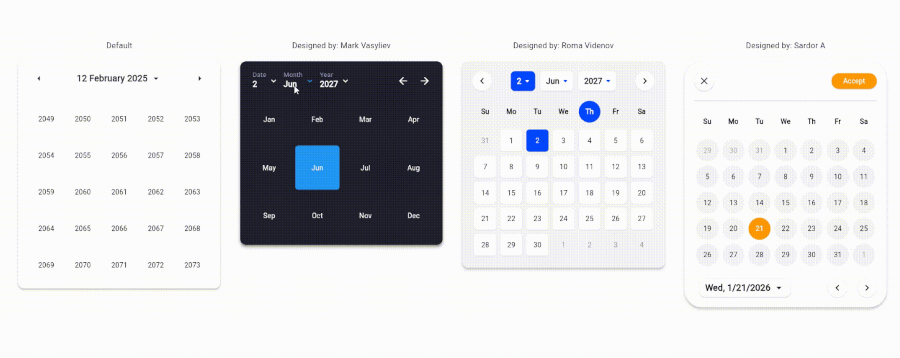
The CreateDatePicker package enables you to create a fully customizable date picker. You can create your own component without worrying about the functionality and place it anywhere to match your design

The example app running in Browser

Table of Contents

Integration Steps

To integrate the package into your Flutter application is very easy, you just need to add the Widget and customize every component and place it anywhere with the builder property:

    CreateDatePicker(
            width: 450,
            initialViewState: ViewState.date,
            initialDate: DateTime(2027, 6, 2),
            minDateTime: DateTime(2024, 5, 1),
            maxDateTime: DateTime(2029, 5, 1),
            restrictedDates: restrictedDates,
            weekLabels: weekLabels,
            monthLabels: monthLabels,
            leftArrowBuilder: _leftArrowBuilder,
            rightArrowBuilder: _rightArrowBuilder,
            dateViewButtonBuilder: _dateViewButtonBuilder,
            monthViewButtonBuilder: _monthViewButtonBuilder,
            yearViewButtonBuilder: _yearViewButtonBuilder,
            weekdayCellBuilder: _weekdayCellBuilder,
            dateCellBuilder: _dateCellBuilder,
            monthCellBuilder: _monthCellBuilder,
            yearCellBuilder: _yearCellBuilder,
            onViewStateChanged: _changeViewState,
            onSelectedDateChanged: _onSelectedDateChanged,
            builder: _createDatePickerBuilder,
        ),

NOTE: To place all the component together and anywhere, use builder property.

Available Parameters in CreateDatePicker
  • initialViewState: The initial view state of the picker (date, month, or year).

  • initialDate: The initially selected date.

  • minDateTime: The minimum selectable date.

  • maxDateTime: The maximum selectable date.

  • restrictedDates: A list of dates that cannot be selected.

  • weekLabels: Labels for the days of the week (e.g., Sunday, Monday). Must contain exactly 7 items.

  • monthLabels: Labels for the months of the year (e.g., January, February). Must contain exactly 12 items.

  • width: The width of the picker.

  • elevation: Sets the default elevation of the date picker.

  • popupMenuOffset: Offset for the popup menu.

  • popupMenuPosition: Position of the popup menu (above or below the trigger).

  • builder: Custom builder for the entire picker. Allows placing and customizing components using individual builders.

  • leftArrowBuilder: Custom builder for the left navigation arrow.

  • rightArrowBuilder: Custom builder for the right navigation arrow.

  • popupSelectedDateBuilder: Custom builder for the popup displaying the selected date.

  • dateViewButtonBuilder: Custom builder for the button to switch to the date view.

  • monthViewButtonBuilder: Custom builder for the button to switch to the month view.

  • yearViewButtonBuilder: Custom builder for the button to switch to the year view.

  • weekdayCellBuilder: Custom builder for the weekday cells.

  • dateCellBuilder: Custom builder for the date cells.

  • monthCellBuilder: Custom builder for the month cells.

  • yearCellBuilder: Custom builder for the year cells.

  • onViewStateChanged: Callback triggered when the view state changes.

  • onSelectedDateChanged: Callback triggered when the selected date changes.

Upcoming Updates

Currently, the package is only for a single datetime picker. Support for multiple pickers will be coming soon.

Contributing

Contributions are welcome! Please open an issue or submit a pull request if you have any improvements or bug fixes.

License

This project is licensed under the MIT License. See the LICENSE file for details.

Support Me

If you find this package helpful and want to support its development, consider making a donation. Thank you for your support!

Support via PayPal

Categorias

Repositório-fonte

Projetos que usam este pacote

Ainda não há dados.