Buscar pacotes, repositórios e categorias de apps

Detalhes do pacotev0.4.0+1

crimson

Analizador e serializador JSON rápido, eficiente e fácil de usar para Dart.

AndroidiOSWebmacOSWindowsLinux
Downloads em 30 dias
72
Curtidas
128
Pontos Pub
140

Instalar pacote

flutter pub add crimson

Visão geral do pacote

Orientação gerada a partir de informações públicas. Apenas para referência.

Crimson é um parser e serializador JSON de alto desempenho para Dart, projetado para velocidade e simplicidade. Permite conversão eficiente entre dados JSON e objetos Dart com mínimo boilerplate. Construído com desempenho em mente, suporta todas as principais plataformas, incluindo Android, iOS, Web, macOS, Windows e Linux. O Crimson oferece uma API limpa e intuitiva que torna o trabalho com JSON simples, ideal para aplicações que exigem manipulação rápida de dados. Sua natureza leve garante baixo overhead, tornando-o adequado tanto para projetos pequenos quanto para aplicativos em larga escala.

Casos de uso

  • Analisando respostas JSON de APIs
  • Serializar objetos Dart em JSON
  • Processamento de dados de alto desempenho
  • Desenvolvimento de aplicativos multiplataforma
  • Sincronização de dados em tempo real
  • Armazenamento de dados leve

Principais recursos

  • Análise e serialização ultra-rápidas
  • Código de boilerplate mínimo
  • Suporta todas as principais plataformas
  • API simples e intuitiva
  • Baixo consumo de memória
  • Segurança de tipo embutida

Indicado para

  • Aplicações críticas de desempenho
  • Aplicativos móveis e web
  • clientes de API
  • Serviços intensivos em dados
  • Desenvolvedores que buscam manipulação rápida de JSON
  • Projetos que priorizam a eficiência

Considerações

  • Requer definições explícitas de modelo
  • Validação interna limitada
  • Não adequado para estruturas aninhadas complexas sem personalização
  • Pode exigir configuração adicional para casos de uso avançados
  • Mais adequado para dados JSON bem estruturados

README original

Snapshot do README original do repositório-fonte vinculado. Consulte o repositório para o conteúdo mais recente.

Fast, efficient and easy-to-use JSON parser and serializer for Dart.
Crimson does not verify your JSON!

Features

  • 🏎️ Fast: Like really fast. Crimson parses JSON in a single pass.
  • 🌻 Easy to use: Crimson is designed to be easy to learn and use.
  • 💃 Flexible: Crimson can partially parse and serialize JSON.
  • 🥶 Freezed support: Crimson supports freezed classes.
  • 🪶 Lightweight: Crimson is lightweight and has no third-party dependencies.

Usage

After adding Crimson to your pubspec.yaml, you can start annotating your classes with @json and optionally @JsonField():

import 'package:crimson/crimson.dart';

part 'tweet.g.dart';

@json
class Tweet {
  DateTime? createdAt;

  String? tweet;

  int? favoriteCount;
}

Now you just need to run pub run build_runner build to generate the necessary code.

import 'package:crimson/crimson.dart';

void main() {
  final jsonBytes = downloadTweets();

  final crimson = Crimson(jsonBytes);
  final tweets = crimson.readTweetList();

  final writer = CrimsonWriter();
  writer.writeTweetList(tweets);
  final bytes = writer.toBytes();
}

That's it! You can now parse and serialize JSON with ease.

Ignoring JSON fields

Annotate properties with @jsonIgnore to ignore them:

@json
class Tweet {
  DateTime? created_at;

  String? tweet;

  @jsonIgnore
  int? favoriteCount;
}

Renaming JSON fields

Use the @JsonName() annotation to rename individual fields:

@json
class Tweet {
  @JsonName('created_at')
  DateTime? createdAt;

  @JsonName('text', aliases: {'alias1', 'alias2'})
  String? tweet;
}

The same works for enum values:

@json
enum TweetType {
  tweet,

  @JsonName('re-tweet')
  retweet,
}

If you want to rename all fields or enum values, you can use @jsonKebabCase and @jsonSnakeCase:

@jsonKebabCase
class Tweet {
  DateTime? createdAt; // created-at

  String? tweet; // tweet

  int? favoriteCount; // favorite-count
}

@jsonSnakeCase
enum PlaceType {
  country, // country
  largeCity, // large_city
  smallCity, // small_city
}

fromJson and toJson methods

Crimson supports generating a fromJson() constructor and a toJson() extension method for your classes use Uint8List.

Just add the following line to your class. The .toJson() method is generated using an extension.

@json
class Tweet {
  // ...

  factory Tweet.fromJson(Uint8List json) => _$TweetFromJson(json);
}

Alternatively you can use fromBytes() and toBytes(). It's equivalent to fromJson() and toJson().

@json
class Tweet {
  // ...

  factory Tweet.fromBytes(Uint8List bytes) => _$TweetFromBytes(bytes);
}

JSON Pointers

Crimson supports RFC 6901 JSON pointers to access nested JSON fields:

{
  "user": {
    "name": "Simon Choi"
  },
  "tweets": [
    {
      "text": "Hello World!"
    },
    {
      "text": "Hello Crimson!"
    }
  ]
}

We can access the name field of the user object and the text field of the second tweet by providing a JSON pointer:

@json
class Tweet {
  @JsonName('/user/name')
  String? userName;

  @JsonName('/tweets/1/text')
  String? secondTweet;
}

JSON pointers are evaluated at compile time and optimized code is generated so there is no runtime overhead.

Fields using JSON pointers are ignored for serialization.

Important: You can only use a pointer prefix once in a class. For example, you can't use /user and /user/name in the same class.

Custom JSON converters

You can use custom JSON converters to convert between JSON and Dart types using the @JsonConvert() annotation:

@json
class Tweet {
  String? tweet;

  @JsonConvert(fromJson: jsonIntToBool, toJson: boolToJsonInt)
  bool? isFavorite;
}

bool jsonIntToBool(int json) => json >= 1;

int boolToJsonInt(bool value) => value ? 1 : 0;

Freezed Support

Crimson supports classes annotated with @freezed from the freezed package.

import 'package:crimson/crimson.dart';

part 'tweet.g.dart';
part 'tweet.freezed.dart';

@freezed
class Tweet with _$Tweet {
  @json
  const factory Tweet({
    DateTime? created_at,
    @JsonField(name: 'text') String? tweet,
    int? reply_count,
    int? retweet_count,
    int? favorite_count,
  }) = _Tweet;
}

JSON Benchmarks

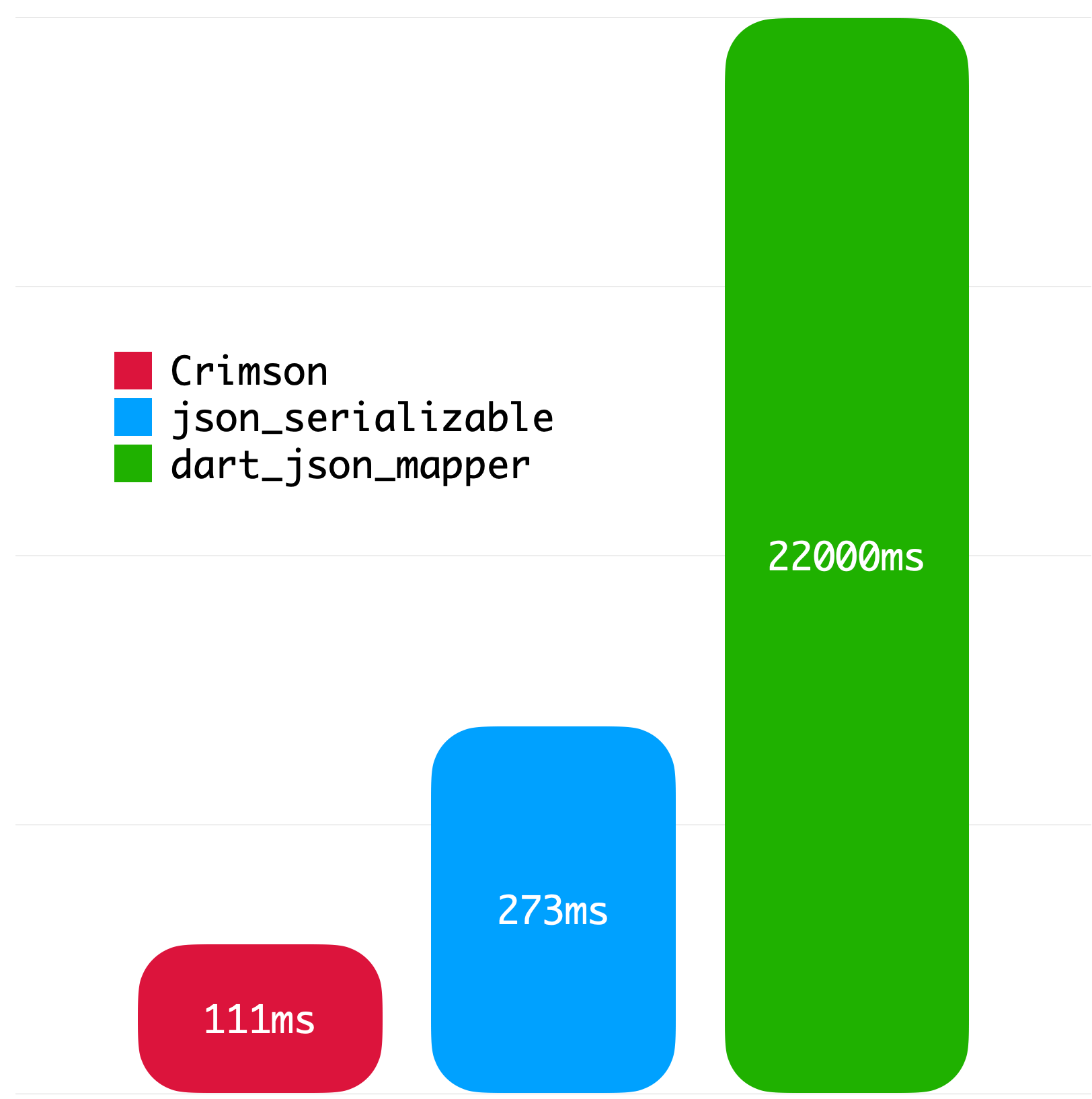
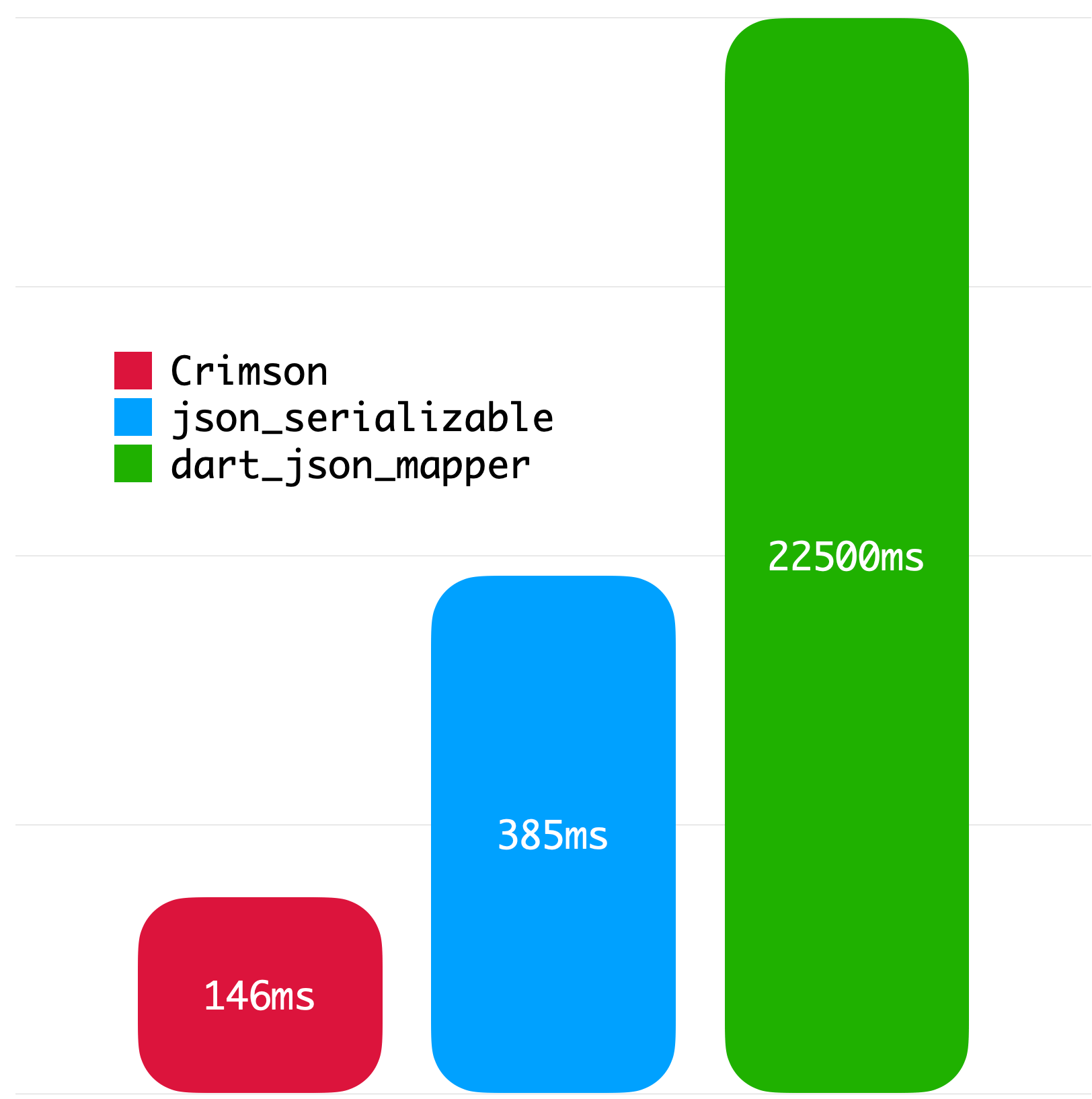
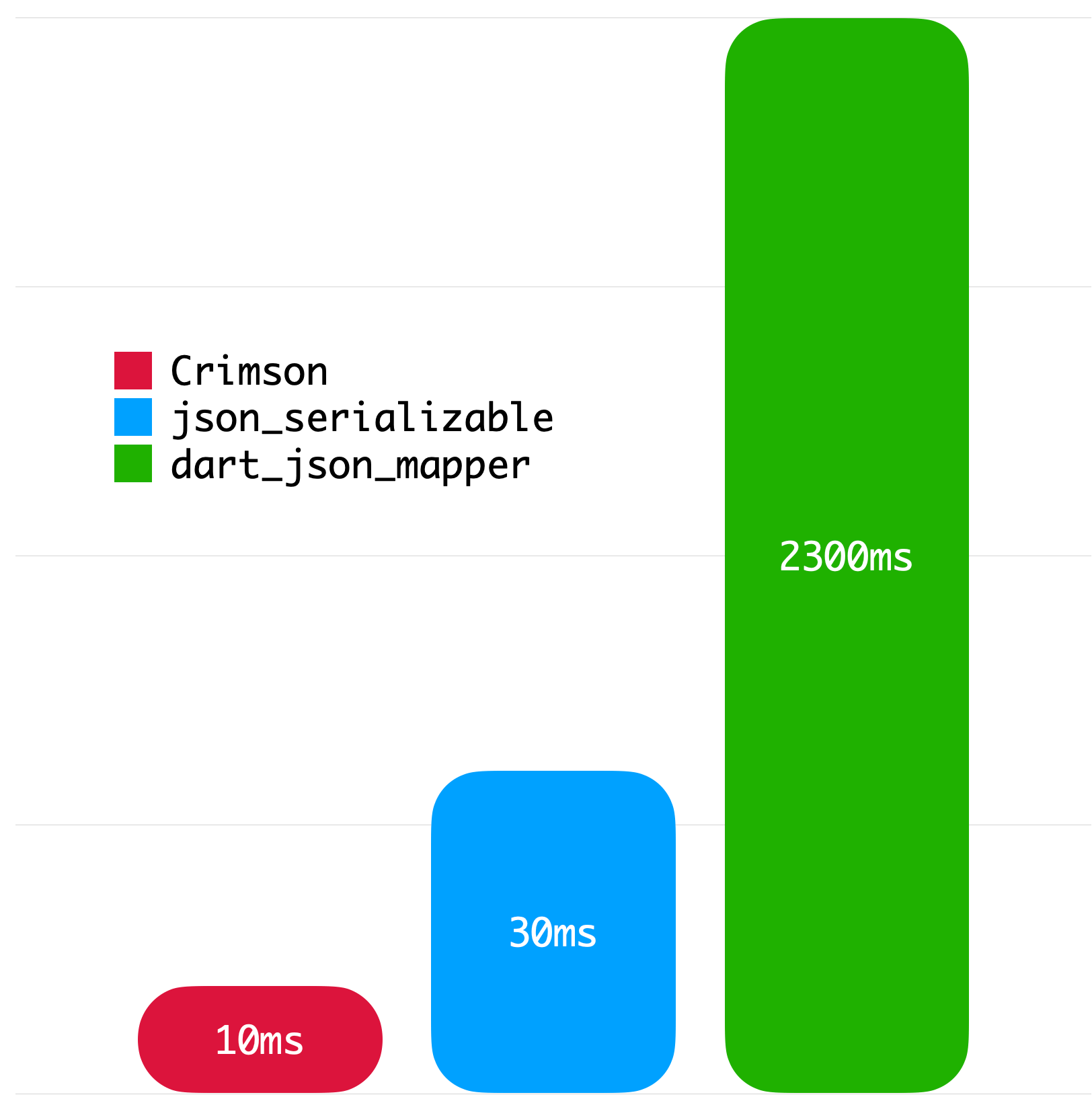
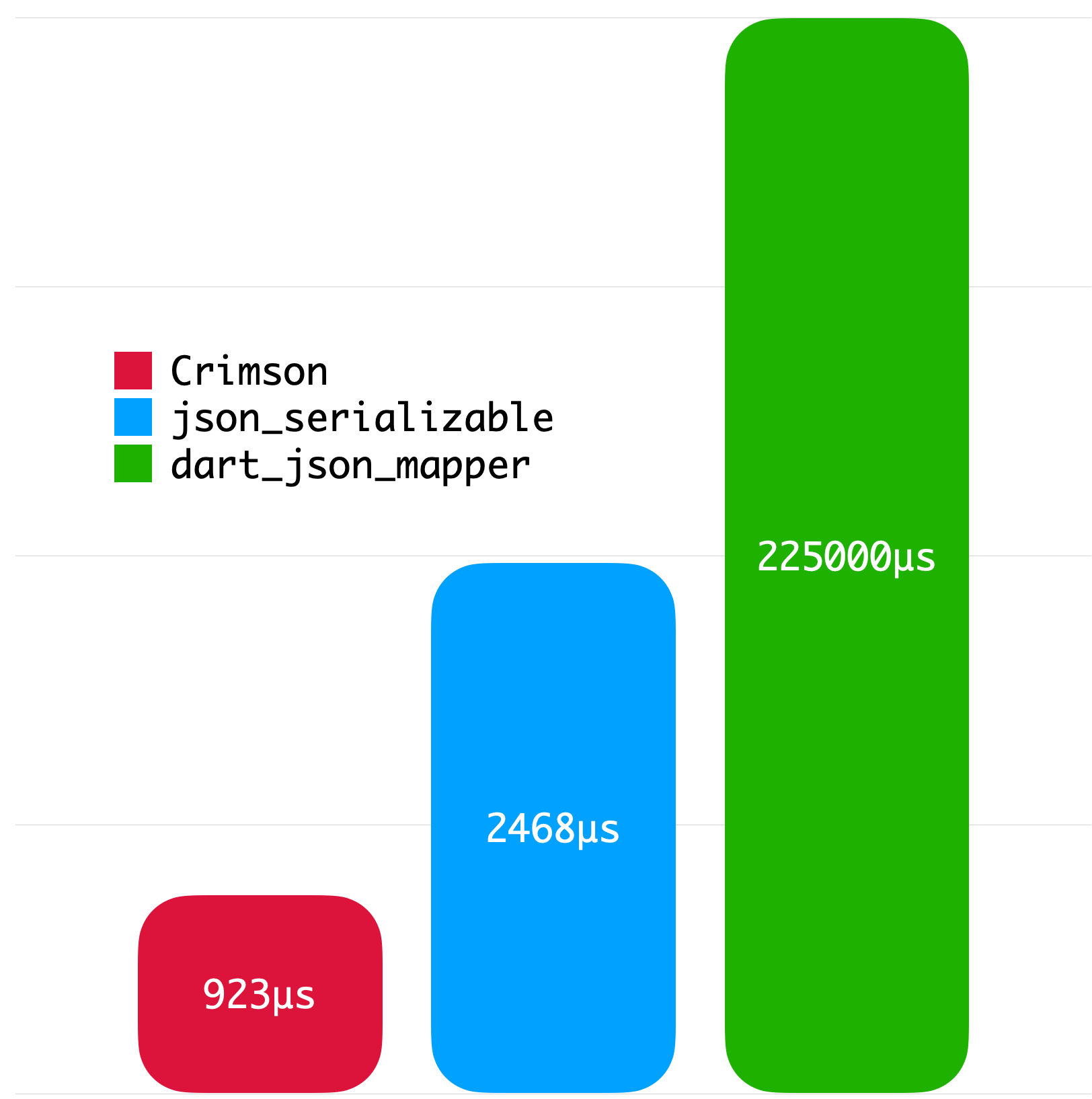
The following benchmarks give you an idea about the JSON parsing performance of Crimson. The benchmarks were run on a MacBook with M1 Pro and 32 GB of RAM using Twitter API data.

Big JSON without whitespace Big JSON with whitespace
Medium JSON without whitespace Small JSON without whitespace
License
Copyright 2023 Simon Choi

Licensed under the Apache License, Version 2.0 (the "License");
you may not use this file except in compliance with the License.
You may obtain a copy of the License at

   http://www.apache.org/licenses/LICENSE-2.0

Unless required by applicable law or agreed to in writing, software
distributed under the License is distributed on an "AS IS" BASIS,
WITHOUT WARRANTIES OR CONDITIONS OF ANY KIND, either express or implied.
See the License for the specific language governing permissions and
limitations under the License.

Categorias

Dependências

Lista de dependências 3 itens

Repositório-fonte

Projetos que usam este pacote

Ainda não há dados.