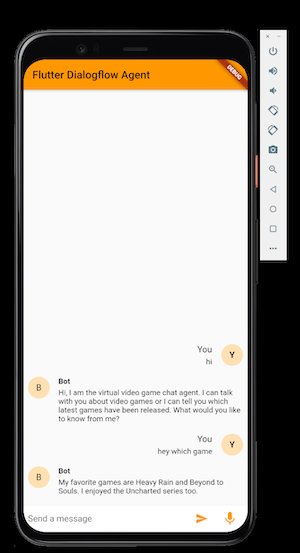
Pacote Flutter para Dialogflow CX, V2 e V2beta usando gRPC. Uma integração mais rápida com a API do Dialogflow e também a possibilidade de streaming de áudio.
Orientação gerada a partir de informações públicas. Apenas para referência.
Um pacote Flutter que permite integração rápida com as APIs do Dialogflow CX, V2 e V2beta baseada em gRPC. Ele suporta streaming de áudio em tempo real, tornando-o ideal para chatbots com voz e aplicações interativas. O pacote oferece comunicação de baixa latência e tratamento eficiente de dados por meio do gRPC, melhorando o desempenho em comparação com REST. É especialmente útil para desenvolvedores que constroem interfaces conversacionais avançadas com entrada e saída de áudio ao vivo.
Casos de uso
chatbots de voz em tempo real
Transmissão de áudio em aplicativos de chat
Integrações de alto desempenho do Dialogflow
Bots de suporte ao cliente interativos
Recursos do aplicativo controlado por voz
Sistemas de conversa multi-turno
Principais recursos
Comunicação de API baseada em gRPC
Suporte para Dialogflow CX, V2 e V2beta
Transmissão de áudio em tempo real
Respostas de baixa latência
Autenticação segura por meio de contas de serviço
Compatibilidade multiplataforma
Indicado para
Desenvolvedores criando aplicativos com recursos de voz
Equipes que precisam de integração de alto desempenho com o Dialogflow
Aplicações que exigem entrada/saída de áudio
Desenvolvedores de chatbots usando o Dialogflow
Aplicativos móveis com interação em tempo real
Considerações
Requer configuração e instalação do gRPC
Precisa de credenciais de conta de serviço
Limitado a casos de uso específicos do Dialogflow
Pode exigir processamento de áudio adicional
Permissões de áudio específicas da plataforma são necessárias
Não adequado para fluxos de trabalho simples apenas REST
README original
Snapshot do README original do repositório-fonte vinculado. Consulte o repositório para o conteúdo mais recente.
Auto-generated Flutter Dialogflow library for detecting intents using gRPC.
A faster integration with the Dialogflow API and also the possibility to do audio streaming.
Built by Google Developer Advocate for Dialogflow, Lee Boonstra
Disclaimer: This package is made by Google developer advocate Lee Boonstra. This is not an official Google package.
This package is provided as-is, without warranty or representation for any use or purpose.
Feel free to improve this package, and contribute.
Before making use of this package, enable the Dialogflow API in the Google Cloud console.
gcloud services enable dialogflow.googleapis.com
Afterwards, download a service account JSON file which has Dialogflow Integration access rights,
and store this in your project. (e.g. assets/credentials.json)
Example
Edit the pubspec.yaml file with the dialogflow_grpc dependency.
And point to your service account (e.g. assets/credentials.json)
...dependencies:dialogflow_grpc:any...# The following section is specific to Flutter.flutter:# The following line ensures that the Material Icons font is# included with your application, so that you can use the icons in# the material Icons class.uses-material-design:trueassets:-assets/credentials.json
Import this package in your code. Load your service account,
and create a DialogflowGrpc instance:
CAUTION: When working with production apps
Storing the service account in a client asset folder (or even in a secure key client keychain) can be dangerous if it’s not handled well. First of all, you will need to be very careful with your service accounts. Which read and access rights will you give your components? When you give admin rights to Google Cloud’s compute engine, you can imagine that attackers could hack and decompile your app. When they get access to your compute engine, they could drive you into costs by for example, mining bitcoins for them. Now, even when you don’t give compute access rights to your Google Cloud service accounts, you still won’t expose your keys. Even though for Dialogflow, it only gives you access to your chatbot within your project, it might be possible for attackers to read PII data from the chat history if your end-users were sharing PII data in the chat. That can be a huge problem.
On top of that, it’s not so easy to change service account keys in applications, as you don’t want the app to stop working for current users. So how can you serve service accounts and keys secure in mobile clients? By, for example, building a mechanism to rotate (a second set of) keys. Like working with JSON Web Tokens (JWT), an Internet proposed standard for creating data with optional signature and optional encryption whose payload holds JSON that asserts some number of claims. The tokens are signed either using a private secret or a public/private key. Or you can run (parts) of your integration on a server.
Example: DetectIntent
Detecting an intent based on a text input:
    var data = await dialogflow.detectIntent(text, 'en-US');
    print(data.queryResult.fulfillmentText);
Example: StreamingDetectIntent
Detecting an intent based on an audio stream:
var biasList = SpeechContextV2Beta1(
phrases: [
'Dialogflow CX',
'Dialogflow Essentials',
'Action Builder',
'HIPAA'
],
boost: 20.0
);
var config = InputConfigV2beta1(
encoding: 'AUDIO_ENCODING_LINEAR_16',
languageCode: 'en-US',
sampleRateHertz: 8000,
singleUtterance: false,
speechContexts: [biasList]
);
// import 'dart:io' show Platform;// On iOSif (Platform.isIOS) {
config = InputConfigV2beta1(
encoding: 'AUDIO_ENCODING_LINEAR_16',
languageCode: 'en-US',
sampleRateHertz: 16000,
singleUtterance: false,
speechContexts: [biasList]
);
}
// Make the streamingDetectIntent call, with the InputConfig and the audioStreamfinal responseStream = dialogflow.streamingDetectIntent(config, _audioStream);
responseStream.listen((data) {
print(data);
});
Official API documentation: https://cloud.google.com/dialogflow/es/docs/reference/rpc
Example: Tests
Make sure you have a service account: assets/credentials.json
flutter test test/v2_test.dart
flutter test test/v2beta1_test.dart
Environments
MacOS
https://flutter.dev/desktop
In order to run dialogflow_grpc in your MacOS app, enable internet.
Edit the .entitlements files in your macos/Runner/ folder.
In order to build the example for Android devices;
the audio recorder library sound_stream requires a minSdk of at least 21. So let's change this in android/app/build.gradle in the defaultConfig block.
Also, don't forget to go into the virtual device settings and enable your microphone.