Buscar pacotes, repositórios e categorias de apps

Detalhes do pacotev0.8.2

easy_event_bus

É uma biblioteca fácil de usar e elegante baseada em barramento de eventos.

AndroidiOSWebmacOSWindowsLinux
Downloads em 30 dias
699
Curtidas
9
Pontos Pub
145

Instalar pacote

flutter pub add easy_event_bus

Visão geral do pacote

Orientação gerada a partir de informações públicas. Apenas para referência.

Easy EventBus é uma biblioteca leve e intuitiva de barramento de eventos para aplicativos Flutter, permitindo comunicação simples e eficiente entre componentes por meio de eventos. Oferece uma API elegante para publicar e assinar eventos sem acoplamento rígido, tornando-a ideal para gerenciamento de estado e mensagens entre componentes. A biblioteca suporta todas as principais plataformas, incluindo Android, iOS, Web, macOS, Windows e Linux, garantindo consistência entre plataformas. Com configuração mínima e sintaxe limpa, ela melhora a manutenibilidade e escalabilidade do código em aplicativos complexos.

Casos de uso

  • Notificações em tempo real
  • Comunicação entre widgets
  • Desacoplamento da UI da lógica de negócios
  • Arquitetura orientada a eventos
  • Sincronização de estado entre telas
  • Integração de plugin ou módulo

Principais recursos

  • Padrão simples de publicação/assinatura
  • Suporte multiplataforma
  • Boilerplate mínimo
  • Tratamento de eventos seguro por tipo
  • Dependência leve
  • API limpa e legível

Indicado para

  • Desenvolvedores procurando gerenciamento de estado leve
  • Aplicativos com comunicação frequente entre componentes
  • Projetos que exigem arquitetura desacoplada
  • Equipes que priorizam a simplicidade do código
  • Iniciantes do Flutter explorando o design orientado a eventos

Considerações

  • Não adequado para gerenciamento de estado em grande escala
  • Tratamento de erro embutido limitado
  • Persistência embutida não disponível
  • Requer uma nomeação cuidadosa de eventos para evitar conflitos
  • Melhor usado junto com outras soluções de gerenciamento de estado

README original

Snapshot do README original do repositório-fonte vinculado. Consulte o repositório para o conteúdo mais recente.

pub package GitHub

EasyEventBus

Discord Server Invite Kakao_Talk

It's an easy-to-use and elegant library based on event bus. It was greatly inspired by EventBus and made much simpler.

About Event Bus

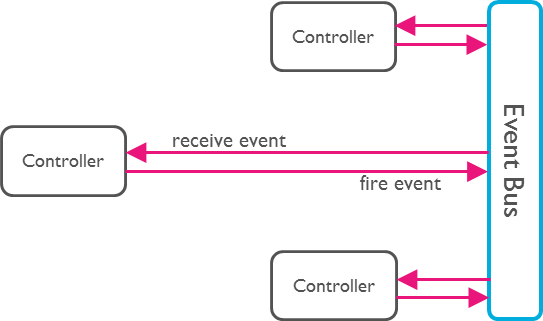
An Event Bus follows the publish/subscribe pattern. It allows listeners to subscribe for events and publishers to fire events. This enables objects to interact without requiring to explicitly define listeners and keeping track of them.

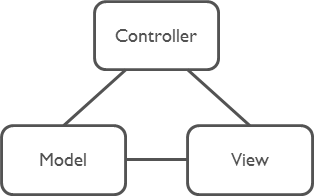
The Event Bus pattern is especially helpful for decoupling MVC (or MVP) applications.

One group of MVC is not a problem.

Model-View-Controller

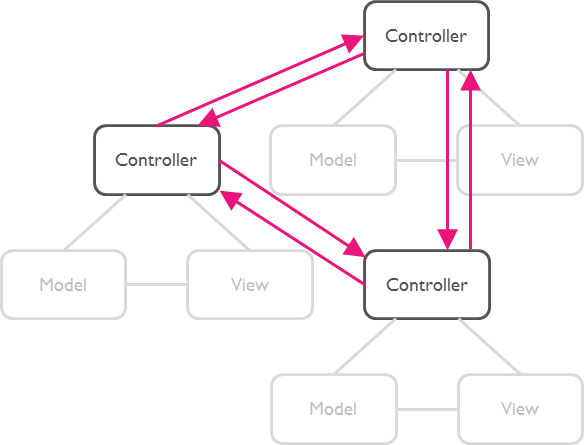
But as soon as there are multiple groups of MVCs, those groups will have to talk to each other. This creates a tight coupling between the controllers.

Multi Model-View-Controllers

By communication through an Event Bus, the coupling is reduced.

Event Bus

Usage

Step 1: Subscribe to an Event

First, set up a subscription for the desired event. This allows you to listen for and react to the event whenever it is triggered.

EasyEventBus.on('sayHello', (event) {
  print(event); // write your code here.
});
Step 2: Trigger the Event

Next, trigger the event at the appropriate time in your application. This will notify all subscribers of the event.

EasyEventBus.fire('sayHello', 'hello world'); // Triggers the event with a any data.

Note: The event data can be of any type, giving you flexibility in what information you pass to the subscribers.

That's All!

Advance

1. Cancel Subscription

To cancel a subscription, you call the cancel method. This example shows how to cancel all subscriptions for the 'sayHello' event, both anonymous and with identifiers.

// Cancel all subscriptions to the 'sayHello' event.
EasyEventBus.cancel('sayHello');
2. Cancel Specific Subscription

Before canceling a specific subscription, you first need to create a subscription with an identifier (id). Here is how to subscribe to an event with an id and then cancel that specific subscription by calling the cancel method with the same id.

First, subscribe to an event with an id:

// Subscribe to the 'sayHello' event with an identifier.
EasyEventBus.on('sayHello', (event) {
  print('Received: $event');
}, id: 'uniqueId123');

Then, cancel the subscription using the same id:

// Cancel the subscription to the 'sayHello' event using the identifier 'uniqueId123'.
EasyEventBus.cancel('sayHello', id: 'uniqueId123');
3. Cancel All Subscriptions

You can cancel all subscriptions by calling the cancelAll method. This method cancels all subscriptions for all events and closes all event controllers.

// Cancel all subscriptions and close all event controllers.
EasyEventBus.cancelAll();

Categorias

Repositório-fonte

Projetos que usam este pacote