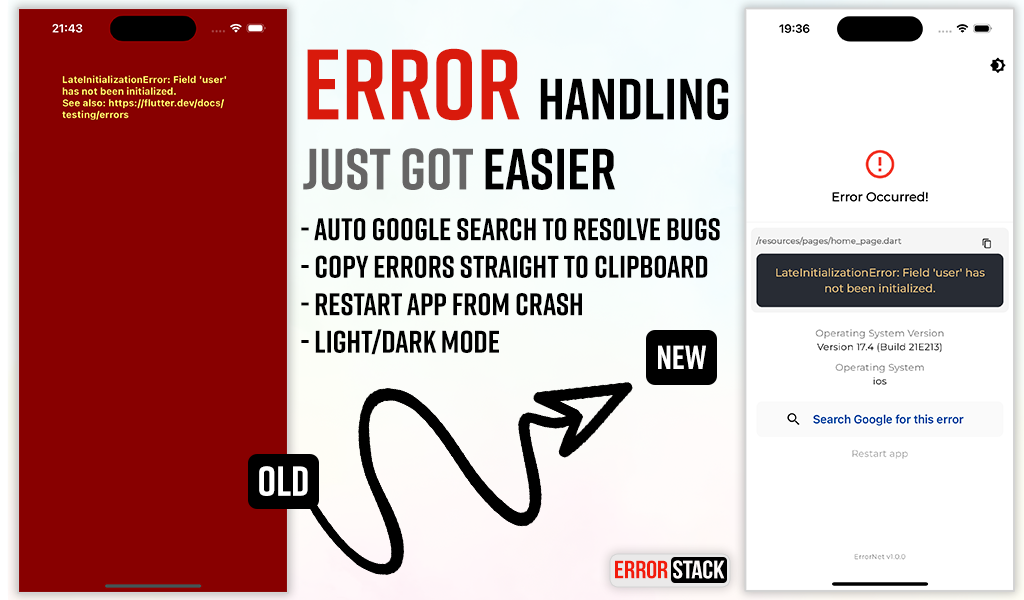
ErrorStack ajuda você a lidar rapidamente com erros em seus aplicativos Flutter! Interface personalizada de tratamento de erros e registro para manter sua produtividade.
Orientação gerada a partir de informações públicas. Apenas para referência.
ErrorStack é um pacote Flutter projetado para simplificar o tratamento de erros em aplicativos, fornecendo interfaces personalizáveis para exibir erros e capacidades robustas de registro. Ajuda os desenvolvedores a identificar e resolver problemas rapidamente durante o desenvolvimento e produção, melhorando a eficiência de depuração. Com suporte a múltiplas plataformas, integra-se perfeitamente em fluxos de trabalho existentes. O pacote aumenta a produtividade ao oferecer feedback claro e acionável quando exceções ocorrem.
Casos de uso
Depuração de erros em tempo de execução
Exibindo mensagens de erro amigáveis ao usuário
Registre exceções para análise
Melhorando a estabilidade do aplicativo
Monitorando falhas em produção
Melhorando o fluxo de trabalho do desenvolvedor
Principais recursos
UI de erro personalizável
Registro de erros embutido
Suporte multiplataforma
Integração fácil com aplicativos Flutter
Relatório de erros em tempo real
Comportamento de tratamento de erros configurável
Indicado para
Desenvolvedores Flutter
Equipes usando pipelines de CI/CD
Aplicativos que exigem monitoramento robusto de erros
Desenvolvedores focados em UX durante falhas
Projetos com necessidades rigorosas de rastreamento de erros
Equipes de frontend que priorizam a velocidade de depuração
Considerações
Requer configuração para funcionalidade completa
Pode aumentar levemente o tamanho do aplicativo
Depende da configuração adequada para registro
Não destinado ao uso em produção sem personalização
Limitado ao escopo de exibição de erros e registro
Melhor usado junto com outras ferramentas de monitoramento
README original
Snapshot do README original do repositório-fonte vinculado. Consulte o repositório para o conteúdo mais recente.
Error Stack for Flutter
Error Stack is a comprehensive error handling and debugging toolkit for Flutter. It provides beautiful error screens in debug mode with actionable information, customizable error pages for production, and a powerful dev panel for runtime debugging.
Features
Beautiful debug error screens with Google search links and stack traces
Customizable production error pages
Light and dark mode support
Dev Panel - Runtime debugging tool with:
API request/response logging
Console logging with severity levels
Navigation route tracking
Local storage viewer (Secure Storage & Shared Preferences)
UI debugging overlays (grid, layout bounds, etc.)
Dio interceptor for automatic HTTP logging
SOLID architecture with dependency injection support
Option 1: Long-press the "Dev Mode" bar at the bottom of the screen
Option 2: Call programmatically:
ErrorStack.showDevPanel(context);
API Tab
View HTTP requests and responses with timing, headers, and body data.
Dio Integration
import'package:error_stack/error_stack_dio.dart';
final dio = Dio();
dio.interceptors.add(ErrorStackDioInterceptor());
// All requests are automatically loggedfinal response = await dio.get('https://api.example.com/users');
Console logs with filtering by severity level. Tap the copy icon on any log entry to copy the full entry (level, timestamp, tag, message, and stack trace) to the clipboard.
import'package:error_stack/error_stack.dart';
// Log at different levelsDevPanelStore.instance.debug('Debug message');
DevPanelStore.instance.info('User logged in', tag: 'auth');
DevPanelStore.instance.warning('Cache miss for key');
DevPanelStore.instance.error('Failed to load data', stackTrace: trace.toString());
// With metadataDevPanelStore.instance.info(
'Payment processed',
tag: 'payments',
metadata: {'amount': 99.99, 'currency': 'USD'},
);
Routes Tab
Navigation history with route names, arguments, and actions. Tap a route to open its details sheet, where you can copy the route name to the clipboard.
Route tracking is automatic when using ErrorStackNavigatorObserver:
View all local storage data from both Secure Storage and Shared Preferences. Tap an entry to open the edit modal, where you can copy the key or value to the clipboard or update the stored value.
UI Debug Tools
The dev panel includes visual debugging overlays:
Tool
Description
Grid Paper
Overlay grid for alignment checking
Layout Bounds
Show widget boundaries
Text Scale
Override text scale (0.5-3.0x)
Color Blindness
Simulate protanopia, deuteranopia, tritanopia
Slow Animations
5x animation slowdown
Performance Overlay
Flutter performance metrics
Safe Areas
Visualize safe area boundaries
Control programmatically:
final store = DevPanelStore.instance;

store.toggleGridPaper(true);
store.setGridSpacing(24.0);
store.toggleLayoutBounds(true);
store.setTextScaleFactor(1.5);
store.setColorBlindnessMode(ColorBlindnessMode.protanopia);
store.toggleSlowAnimations(true);
store.togglePerformanceOverlay(true);
store.toggleSafeAreas(true);

// Reset all to defaults
store.resetUIDebugSettings();
Architecture
Error Stack follows SOLID principles with a modular design: