Buscar pacotes, repositórios e categorias de apps

Detalhes do pacotev1.3.3+5

fast_cached_network_image

Um pacote Flutter para armazenar em cache imagens da rede facilmente. Você pode adicionar carregadores bonitos, indicadores de porcentagem e construtores de erro.

AndroidiOSWebmacOSWindowsLinux
Downloads em 30 dias
447
Curtidas
228
Pontos Pub
140

Instalar pacote

flutter pub add fast_cached_network_image

Visão geral do pacote

Orientação gerada a partir de informações públicas. Apenas para referência.

FastCachedNetworkImage é um pacote do Flutter projetado para cachear imagens de rede de forma eficiente com pouca configuração. Ele oferece suporte embutido para indicadores de carregamento personalizáveis, exibição de porcentagem de progresso e tratamento de erros por meio de um construtor dedicado. Ideal para aplicativos que exigem renderização rápida de imagens e melhor desempenho ao reduzir solicitações de rede redundantes. O pacote suporta todas as principais plataformas, incluindo Android, iOS, Web, macOS, Windows e Linux, tornando-se altamente versátil para desenvolvimento multiplataforma.

Casos de uso

  • Exibindo imagens de URLs em listas
  • Melhorando o desempenho do aplicativo com cache de imagem
  • Mostrando estados de carregamento durante a busca de imagem
  • Adicionando indicadores de progresso para imagens grandes
  • Tratar falhas no carregamento de imagens com elegância

Principais recursos

  • Integração fácil com código mínimo
  • Suporte para carregadores personalizados e construtores de erros
  • rastreamento em tempo real do progresso de download
  • Compatibilidade multiplataforma
  • Cache automático de imagens
  • Tamanho e duração de cache configuráveis

Indicado para

  • Aplicativos com conteúdo de imagem pesado
  • Visualizações de lista ou grade com imagens remotas
  • Desenvolvedores priorizando desempenho
  • Projetos que precisam de UX suave durante o carregamento de imagens
  • Equipes que desenvolvem aplicativos multiplataforma

Considerações

  • A gestão de cache requer configuração manual para uso avançado
  • Grandes caches podem afetar o armazenamento do dispositivo
  • Personalização limitada para políticas de evicção de cache
  • Não otimizado para atualizações de imagem de muito alta frequência
  • Pode exigir memória adicional para ativos em cache

README original

Snapshot do README original do repositório-fonte vinculado. Consulte o repositório para o conteúdo mais recente.

Fast Cached Network Image

A flutter package to cache network image easily, with loader, error builder, and smooth fade transitions. You can also add beautiful loaders and percentage indicators with the total and download size of the image.

Use fast_cached_network_image: 1.2.9 (without "^") for projects with Flutter SDK version < 3.27.1.

MIT License pub dart

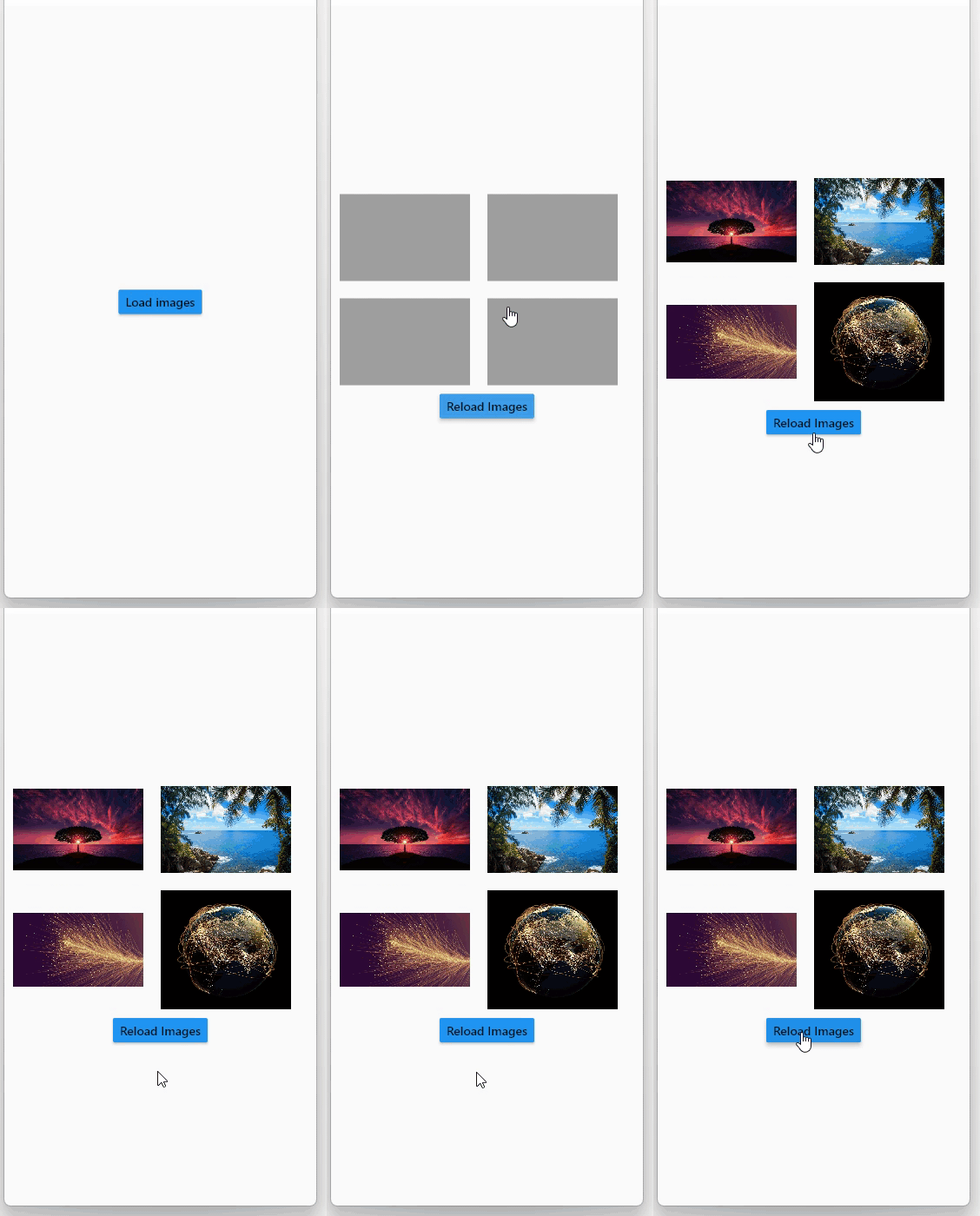
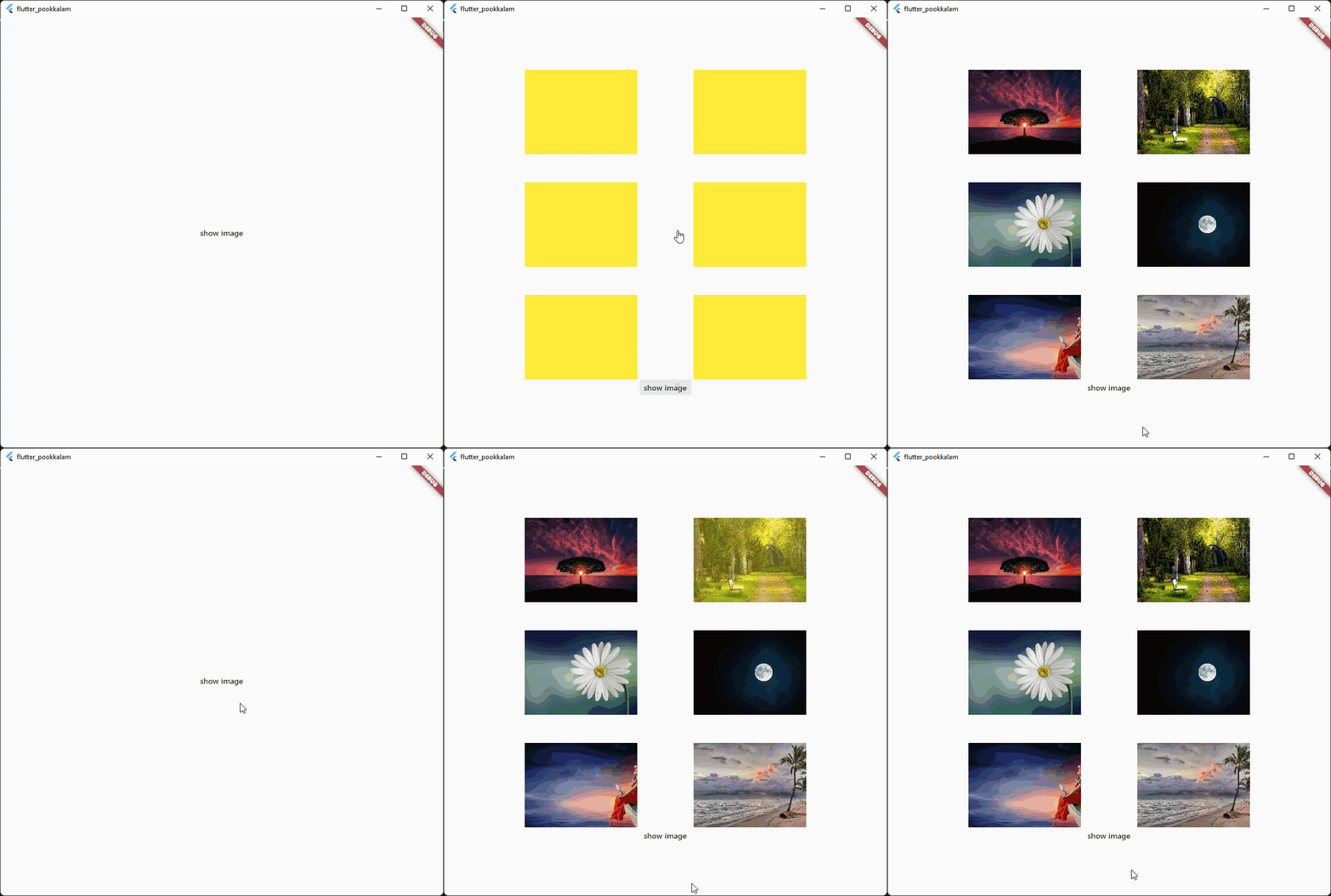
Screenshots

App caching

Caching with fade in animation

Caching with progress indicator and image  size

The below gif displays a 30 MB image from cache Use shimmer package to create a beautiful loading widget.

Usage

Import it

import 'package:fast_cached_network_image/fast_cached_network_image.dart';

This package uses Hive as cache container, which uses getApplicationDocumentsDirectory() to get the default path in case subDir is not specified

Initialize the cache configuration in the main function.

await FastCachedImageConfig.init();

The init function takes 2 arguments which are subDir, and clearCacheAfter. Both are optional.

To set a custom directory for your storage box, you can use path_provider

String storageLocation = (await getApplicationDocumentsDirectory()).path;

and then pass the storageLocation to the subDir parameter.

The clearCacheAfter property is used to set the Duration after with the cached image will be cleared. By default its set to 7 days, which means an image cached today will be deleted when you open the app after 7 days.

Use it as a Widget

child: FastCachedImage(url: url)

Properties

errorBuilder: (context, exception, stacktrace) {
  return Text(stacktrace.toString());
},

errorBuilder property needs to return a widget. This widget will be displayed if there is any error while loading the provided image.


loadingBuilder: (context, progress) {
  return Container(
    color: Colors.yellow,
    child: Stack(
      alignment: Alignment.center,
      children: [
        if (progress.isDownloading && progress.totalBytes != null)
          Text('${progress.downloadedBytes ~/ 1024} / ${progress.totalBytes! ~/ 1024} kb',
              style: const TextStyle(color: Colors.red)),
        SizedBox(
            width: 120,
            height: 120,
            child:
            CircularProgressIndicator(color: Colors.red, value: progress.progressPercentage.value)),
      ],
    ),
  );
},

loadingBuilder property can be used to display a loading widget such as a shimmer. This widget will be displayed while the image is being downloaded and processed. loadingBuilder provides a progress property which can be used to display the image download progress with the size(in bytes) of the image.

fadeInDuration: const Duration(seconds: 1);

fadeInDuration property can be use to set the fadeInDuration between the loadingBuilder and the image. Default duration is 500 milliseconds

FastCachedImageConfig.isCached(imageUrl: url));

You can pass in a url to this method and check whether the image in the url is already cached.

FastCachedImageConfig.deleteCachedImage(imageUrl: url);

This method deletes the image with given url from cache.

FastCachedImageConfig.clearAllCachedImages();

This method removes all the cached images. This method can be used in situations such as user logout, where you need to clear all the images corresponding to the particular user.

If an image had some errors while displaying, the image will be automatically re - downloaded when the image is requested again.

FastCachedImage have all other default properties such as height, width etc. provided by flutter.

If you want to use an image from cache as image provider, use

FastCachedImageProvider(url);

Example

import 'package:fast_cached_network_image/fast_cached_network_image.dart';
import 'package:flutter/material.dart';

void main() async {
  WidgetsFlutterBinding.ensureInitialized();

  await FastCachedImageConfig.init(clearCacheAfter: const Duration(days: 15));

  runApp(const MyApp());
}

class MyApp extends StatefulWidget {
  const MyApp({super.key});

  @override
  State<MyApp> createState() => _MyAppState();
}

class _MyAppState extends State<MyApp> {
  String url1 = 'https://www.sefram.com/images/products/photos/hi_res/7202.jpg';

  bool isImageCached = false;
  String? log;

  @override
  Widget build(BuildContext context) {
    return MaterialApp(
        home: Scaffold(
            body: Center(
              child: Column(
                mainAxisAlignment: MainAxisAlignment.center,
                children: [
                  SizedBox(
                    height: 150,
                    width: 150,
                    child: FastCachedImage(
                      url: url1,
                      fit: BoxFit.cover,
                      fadeInDuration: const Duration(seconds: 1),
                      errorBuilder: (context, exception, stacktrace) {
                        return Text(stacktrace.toString());
                      },
                      loadingBuilder: (context, progress) {
                        return Container(
                          color: Colors.yellow,
                          child: Stack(
                            alignment: Alignment.center,
                            children: [
                              if (progress.isDownloading && progress.totalBytes != null)
                                Text('${progress.downloadedBytes ~/ 1024} / ${progress.totalBytes! ~/ 1024} kb',
                                    style: const TextStyle(color: Colors.red)),
                              
                              SizedBox(
                                  width: 120,
                                  height: 120,
                                  child:
                                  CircularProgressIndicator(color: Colors.red, value: progress.progressPercentage.value)),
                            ],
                          ),
                        );
                      },
                    ),
                  ),

                  const SizedBox(height: 12),
                  
                  Text('Is image cached? = $isImageCached', style: const TextStyle(color: Colors.red)),
                 
                  const SizedBox(height: 12),
                  
                  Text(log ?? ''),

                  const SizedBox(height: 120),

                  MaterialButton(
                    onPressed: () async {
                      setState(() => isImageCached = FastCachedImageConfig.isCached(imageUrl: url1));
                    },
                    child: const Text('check image is cached or not'),
                  ),

                  const SizedBox(height: 12),

                  MaterialButton(
                    onPressed: () async {
                      await FastCachedImageConfig.deleteCachedImage(imageUrl: url1);
                      setState(() => log = 'deleted image $url1');
                      await Future.delayed(const Duration(seconds: 2), () => setState(() => log = null));
                    },
                    child: const Text('delete cached image'),
                  ),

                  const SizedBox(height: 12),

                  MaterialButton(
                    onPressed: () async {
                      await FastCachedImageConfig.clearAllCachedImages();
                      setState(() => log = 'All cached images deleted');
                      await Future.delayed(const Duration(seconds: 2), () => setState(() => log = null));
                    },
                    child: const Text('delete all cached images'),
                  ),
                ],
              ),
            )));
  }
}


Feel free to contribute and support.

Contributors 🤝

Big thanks go to these wonderful people:


Author: Christo Pananjickal

Contributor: Wouter van Wijk

Contributor: Merdan Atamyradow

Contributor: Steve

Contributor: Suyog Patil

Package on pub.dev

fast_cached_network_image

Categorias

Dependências

Lista de dependências 3 itens

Repositório-fonte

Projetos que usam este pacote