Orientação gerada a partir de informações públicas. Apenas para referência.
Fast Image Compress é um plugin Flutter projetado para comprimir imagens de forma eficiente em dispositivos Android e iOS. Ele permite que desenvolvedores reduzam o tamanho dos arquivos de imagem sem perda significativa de qualidade, melhorando o desempenho do aplicativo e reduzindo o uso de armazenamento. O plugin oferece APIs simples para comprimir imagens a partir de arquivos ou bytes, tornando-o ideal para recursos de upload de fotos, fotos de perfil e aplicações com grande volume de mídia. Desenvolvido com foco em desempenho, ele utiliza código nativo para processamento rápido. O pacote é mantido pela Simform e está disponível por meio do pub.dev.
Casos de uso
Otimização de imagem para uploads
Reduzindo o tamanho do armazenamento do aplicativo
Acelerando o processamento de imagens
compressão de imagem de perfil
Otimização da galeria de mídia
Principais recursos
compressão de alta velocidade
Perda mínima de qualidade
Suporta Android e iOS
Integração de API simples
Suporte de entrada de arquivo e byte
Indicado para
Aplicativos com uso intenso de imagens
Plataformas de compartilhamento de fotos
sistemas de perfil de usuário
Aplicativos de mídia com foco em dispositivos móveis
aplicações críticas de desempenho
Considerações
Limitado a Android e iOS
Sem suporte a web
As configurações de compressão podem variar conforme o dispositivo
Requer permissão para acesso a arquivos
Melhores resultados com entradas de alta resolução
README original
Snapshot do README original do repositório-fonte vinculado. Consulte o repositório para o conteúdo mais recente.
fast_image_compress
A Flutter plugin that allows you to compress images easily and quickly.
Features
Fast Image Compress can do much more (and we are just getting started)
📱 Supported platform. iOS, Android
🧪 Batch processing. Support batch processing using batchSize
🖼️ Supported image types jpeg, png and heic
⏱ Parallelism. Support parallel image compression
Why fast_image_compress
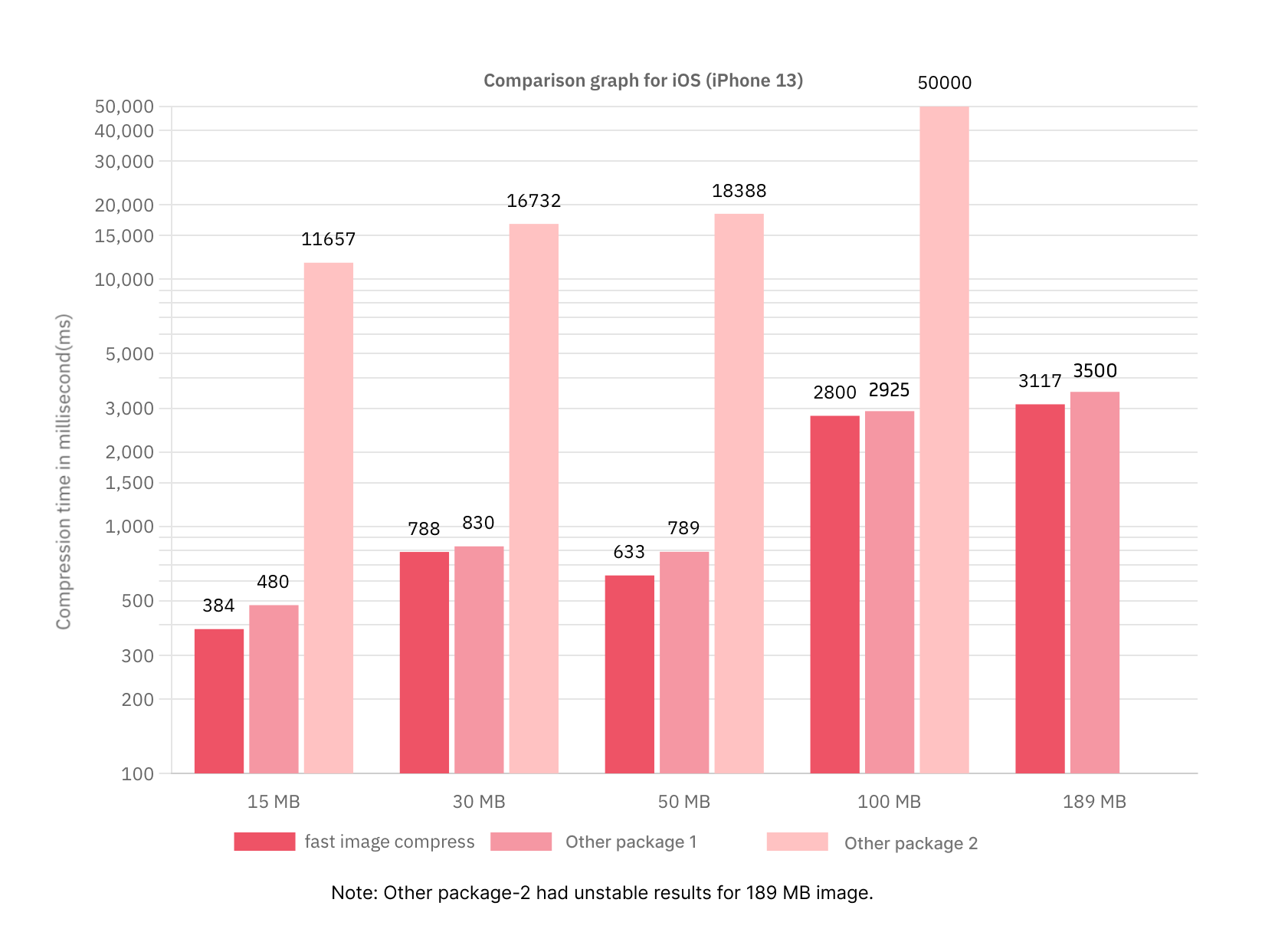
The following bar graph demonstrates the efficiency of our plugin compared to two other existing packages.
The comparison was conducted by compressing one image at a time for various image sizes, measuring the time taken in milliseconds (Y-axis) against the image size in MB (X-axis).
Below are the comparison graphs:
Android
iOS
This visual representation highlights the better performance of our plugin in terms of compression speed and efficiency across different image sizes.
// 1. Compress an image and get Uint8ListFuture<Uint8List> compressImage(Uint8List imageData) async {
final compressedImage = await fastImageCompress.compressImage(
imageData: imageData,
quality: 60,
targetWidth: 400,
imageQuality: ImageQuality.low,
);
return compressedImage;
}
// 2. Compress list of images and get a list of Uint8ListFuture<List<Uint8List>> compressMultipleImages(List<Uint8List> imageList) async {
final result = await fastImageCompress.compressImageList(
images: imageList,
quality: 30,
targetWidth: 800,
batchSize: 3,
imageQuality: ImageQuality.low,
);
return result;
}
// 3. Cancel the compression processFuture<void> _cancelCompression() async {
await fastImageCompress.cancelCompression();
}
Parameters of compressImage function:
Parameter Name
Data type
Default Value
Description
imageData
Uint8List
-
The image to be compressed
quality
int
60
The compression quality percentage
targetWidth
int?
null
The desired width for the compressed image
imageQuality
ImageQuality
ImageQuality.medium
The quality of the image to store after compression
Parameters of compressImage function:
Parameter Name
Data type
Default Value
Description
imageData
Uint8List
-
The image to be compressed
quality
int
60
The compression quality percentage
targetWidth
int?
null
The desired width for the compressed image
imageQuality
ImageQuality
ImageQuality.medium
The quality of the image to store after compression
batchSize
int
3
The number of images to process simultaneously in a batch
About params
targetWidth
The targetWidth parameter allows you to resize the images to a specific width.
Use this parameter when you need all images to have a uniform width. It is particularly useful for optimizing image processing performance.
Recommended to use this parameter when image size or image width is large.
batchSize
The batchSize parameter determines how many images are processed in a single batch.
If the image sizes are large (greater than 50 MB), set batchSize to a smaller value to avoid memory issues.
If the image sizes are small, you can set a higher value (e.g., 6) for better performance.
To dynamically adjust batchSize based on the number of CPU threads available on the device, you can use the following code:
final maxAvailableCPUThreads = Platform.numberOfProcessors;
final batchSize = maxAvailableCPUThreads > 0 ? maxAvailableCPUThreads ~/ 2 : 1;
imageQuality
The imageQuality parameter controls the quality of the processed images. It has three predefined values:
low
medium (default)
high
Android
You may need to update Kotlin to version 1.5.20 or higher.
About EXIF information
Using this library, the image orientation is maintained.
HEIF(Heic)
Heif on iOS
Only support iOS 11+.
Heif on Android
Only support API 28+.
Note: Requires hardware encoder support, so availability is not guaranteed on all devices running API 28 or higher.
MIT LicenseCopyright (c) 2021SimformSolutionsPermissionis hereby granted, free of charge, to any person obtaining a copy
of this software and associated documentation files (the "Software"), to deal
in the Software without restriction, including without limitation the rights
to use, copy, modify, merge, publish, distribute, sublicense, and/or sell
copies of the Software, and to permit persons to whom the Softwareis
furnished to do so, subject to the following conditions:
The above copyright notice and this permission notice shall be included in all
copies or substantial portions of the Software.
THE SOFTWARE IS PROVIDED "AS IS", WITHOUT WARRANTY OF ANY KIND, EXPRESS OR
IMPLIED, INCLUDING BUT NOT LIMITED TO THE WARRANTIES OF MERCHANTABILITY,
FITNESS FOR A PARTICULAR PURPOSE AND NONINFRINGEMENT. IN NO EVENT SHALL THE
AUTHORS OR COPYRIGHT HOLDERS BE LIABLE FOR ANY CLAIM, DAMAGES OR OTHER
LIABILITY, WHETHER IN AN ACTION OF CONTRACT, TORT OR OTHERWISE, ARISING FROM,
OUT OF OR IN CONNECTION WITH THE SOFTWARE OR THE USE OR OTHER DEALINGS IN THE
SOFTWARE.