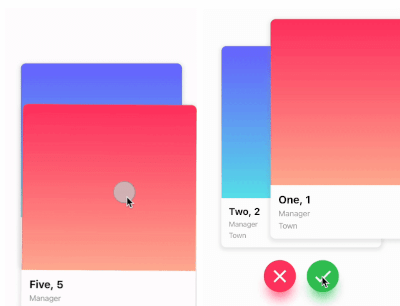
Este é um pacote de deslize de cartão semelhante ao Tinder. Ele permite que você deslize para a esquerda, direita, cima e baixo e defina sua própria lógica de negócios para cada direção.
Orientação gerada a partir de informações públicas. Apenas para referência.
Um pacote Flutter que permite deslizar cartões no estilo Tinder com suporte para gestos à esquerda, direita, cima e baixo. Os desenvolvedores podem definir lógica personalizada para cada direção de deslize, tornando-o ideal para aplicativos como apps de namoro, apresentações de produtos ou interfaces de descoberta de conteúdo. O pacote é multiplataforma, funcionando perfeitamente em Android, iOS, Web, macOS, Windows e Linux. Oferece uma experiência de deslize suave e personalizável com animação integrada e tratamento de gestos.
Casos de uso
interfaces de aplicativos de namoro
Descoberta de produto ou item
Sistemas de recomendação de conteúdo
Narrativa interativa
Coleta de preferência do usuário
Principais recursos
gestos de deslize semelhantes ao Tinder
Lógica de deslize personalizável por direção
Compatibilidade multiplataforma
animações embutidas
Reconhecimento de gestos
design de widget extensível
Indicado para
Desenvolvedores construindo interfaces de usuário baseadas em deslize
Aplicativos que exigem interação do usuário por meio de deslizes de cartão
Projetos que precisam de padrões intuitivos de navegação
Prototipagem de experiências interativas com cartões
Considerações
Requer manipulação cuidadosa da gestão do estado de deslize
Pode ser necessário estilos adicionais para layouts complexos
Impacto no desempenho com grandes conjuntos de dados
Limitado a interações baseadas em cartões apenas
Não otimizado para listas de rolagem vertical
README original
Snapshot do README original do repositório-fonte vinculado. Consulte o repositório para o conteúdo mais recente.
flutter_card_swiper
This is a Flutter package for a Tinder-like card swiper. ✨
It allows you to swipe left, right, up, and down and define your own business logic for each direction.
Very smooth animations supporting Android, iOS, Web & Desktop.
Why?
We built this package because we wanted to:
Have a fully customizable slider
Swipe in any direction
Undo swipes as many times as you want
Choose your own settings such as duration, angle, padding and more
Trigger swipes in any direction with the controller
Add callbacks while swiping, on end, or when the swiper is disabled
Detect the direction (left, right, top, bottom) the card was swiped
Show Cases
Swipe in any direction
Trigger swipes
Unswipe the cards
Fully customizable
Installation
Add this to your package's pubspec.yaml file:
card_swiper:...
OR run
flutterpubaddflutter_card_swiper
in your project's root directory.
Usage
You can place your CardSwiper inside of a Scaffold like we did here. Optional parameters can be defined to enable different features. See the following example:
Index of the first card when the swiper is initialized
false
isDisabled
false
Set to true if swiping should be disabled, has no impact when triggered from the outside
false
isLoop
true
Set to true if the stack should loop
false
maxAngle
30
Maximum angle that the card can reach during swiping
false
allowedSwipeDirection
AllowedSwipeDirection.all
Sets the direction in which the card can be swiped. It can be set to any combination of left, right up or down.
false
numberOfCardsDisplayed
2
Number of cards displayed at the same time
false
onEnd
-
Callback when there are no more cards left to swipe
false
onSwipe
-
Callback when the user swipes a card. If the function returns false, the swipe action is canceled. If it returns true, the swipe action is performed as expected
false
onTapDisabled
-
Callback when a card is tapped and isDisabled is true
false
onUndo
-
Callback when the controller calls undo. If the function returns false, the undo action is canceled. If it returns true, the undo action is performed as expected
A callback containing the horizontal and vertical swipe direction
false
showBackCardOnUndo
-
If true, the previous card will be shown in the background when swiping, and the swipe action will trigger an undo
false
undoSwipeThreshold
50
The horizontal swipe distance threshold, in pixels, after which the back card switches to the previous card. Only active when showBackCardOnUndo is true
false
undoDirection
UndoDirection.left
The direction of the swipe to trigger an undo
false
Controller
The Controller is used to swipe the card from outside of the widget. You can create a controller called CardSwiperController and save the instance for further usage. Please have a closer look at our Example for the usage.