Orientação gerada a partir de informações públicas. Apenas para referência.
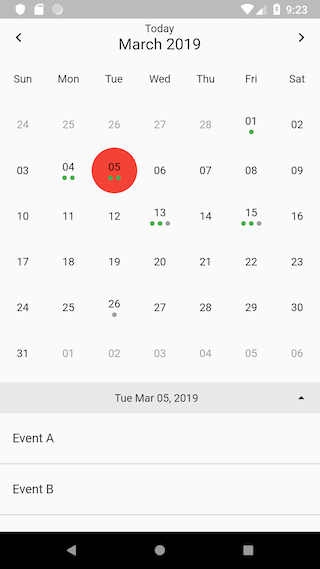
Um widget de calendário simples e limpo para Flutter que permite aos usuários deslizar para cima ou para baixo para alternar entre visualizações semanais e mensais. Projetado com uma interface minimalista, oferece uma maneira intuitiva de navegar pelas datas e gerenciar tarefas baseadas no tempo. O pacote é leve e fácil de integrar em projetos existentes, oferecendo transições suaves entre as visualizações sem complexidade adicional. Suporta seleção básica de datas e personalização por meio das propriedades disponíveis.
Casos de uso
Exibindo eventos em modo mensal
Alternando entre visualizações semanais e mensais
Integrando um seletor de data limpo em aplicativos
Gerenciamento de recursos e planejamento de funcionalidades
Criando interfaces de agendamento de compromissos
Principais recursos
Deslize para alternar entre as visualizações semanais e mensais
Interface do usuário minimalista e personalizável
Animações suaves para transições de visualização
Suporta seleção de data
Leve e fácil de implementar
Indicado para
Necessidades de calendário simples
Aplicativos de gerenciamento de tarefas e eventos
Ferramentas de agendamento e planejamento
Aplicativos que exigem navegação intuitiva de datas
Desenvolvedores em busca de um calendário limpo e sem complicações
Considerações
Recursos avançados limitados, como eventos recorrentes
Sem gerenciamento de eventos embutido
Estilo personalizado exige código adicional
Não otimizado para fluxos de trabalho complexos de calendário
Não possui suporte de localização por padrão
README original
Snapshot do README original do repositório-fonte vinculado. Consulte o repositório para o conteúdo mais recente.
flutter_clean_calendar
NOTE:
Due to my current job I'm not able to maintain this project anymore, it's been an exciting journey and thanks to everyone who used it.
You can now use fluter_neat_and_clean_calendar by @rwbr who is actively maintaining his project, his package was forked from this one so be sure everything in here would be supported and more
You can find me on twitter as @elcharliep
Simple flutter calendar based on flutter_calendar package.
Thanks to @AppleEducate for his contributions.
You can pull up and down the calendar to show between weekly/monthly calendar.
It shows the number of events for thats specific date.
It shows the already Done events in other color
Breaking Changes
Introduction of 'CleanCalendarEvent' class. This makes the former syntax of the 'Map' that stores the events incompatible.
Usage
Embed the 'Calendar' widget in a column. Below the calendar (as the second widget in the Column) place a 'ListView.builder' widget for rendereing the list of events.
/// [onDateSelected] is of type [ValueChanged<DateTime>] and it containes the callback function/// extecuted when tapping a date/// [onMonthChanged] is of type [ValueChanged<DateTime>] and it containes the callback function/// extecuted when changing to another month/// [onExpandStateChanged] is of type [ValueChanged<bool>] and it contains a callback function/// executed when the view changes to expanded or to condensed/// [onRangeSelected] contains a callback function of type [ValueChanged], that gets called on changes/// of the range (switch to next or previous week or month)/// [isExpandable] is a [bool]. With this parameter you can control, if the view can expand from week view/// to month view. Default is [false]./// [dayBuilder] can contain a [Widget]. If this property is not null (!= null), this widget will get used to/// render the calenar tiles (so you can customize the view)/// [hideArrows] is a bool. When set to [true] the arrows to navigate to the next or previous week/month in the/// top bar well get suppressed. Default is [false]./// [hideTodayIcon] is a bool. When set to [true] the dispaly of the Today-Icon (button to navigate to today) in the/// top bar well get suppressed. Default is [false]./// [hideBottomBar] at the moment has no function. Default is [false]./// [events] are of type [Map<DateTime, List<CleanCalendarEvent>>]. This data structure containes the events to display/// [selctedColor] this is the color, applied to the circle on the selcted day/// [todayColor] this is the color of the date of today/// [todayButtonText] is a [String]. With this property you can set the caption of the today icon (button to navigate to today)./// If left empty, the calendar will use the string "Today"./// [eventColor] lets you optionally specify the color of the event (dot). If the [CleanCaendarEvents] property color is not set, the/// calendar will use this parameter./// [eventDoneColor] with this property you can define the color of "done" events, that is events in the past./// [initialDate] is of type [DateTime]. It can contain an optional start date. This is the day, that gets initially selected/// by the calendar. The default is to not set this parameter. Then the calendar uses [DateTime.now()]/// [isExpanded] is a bool. If is us set to [true], the calendar gets rendered in month view./// [weekDays] contains a [List<String>] defining the names of the week days, so that it is possible to name them according/// to your current locale./// [locale] is a [String]. This setting gets used to format dates according to the current locale./// [startOnMonday] is a [bool]. This parameter allows the calendar to determine the first day of the week./// [dayOfWeekStyle] is a [TextStyle] for styling the text of the weekday names in the top bar./// [bottomBarTextStyle] is a [TextStyle], that sets the style of the text in the bottom bar./// [bottomBarArrowColor] can set the [Color] of the arrow to expand/compress the calendar in the bottom bar./// [bottomBarColor] sets the [Color] of the bottom bar/// [expandableDateFormat] defines the formatting of the date in the bottom barfinalValueChanged<DateTime> onDateSelected;
finalValueChanged<DateTime> onMonthChanged;
finalValueChanged<bool> onExpandStateChanged;
finalValueChanged onRangeSelected;
finalbool isExpandable;
finalDayBuilder dayBuilder;
finalbool hideArrows;
finalbool hideTodayIcon;
finalMap<DateTime, List<CleanCalendarEvent>> events;
finalColor selectedColor;
finalColor todayColor;
finalString todayButtonText;
finalColor eventColor;
finalColor eventDoneColor;
finalDateTime initialDate;
finalbool isExpanded;
finalList<String> weekDays;
finalString locale;
finalbool startOnMonday;
finalbool hideBottomBar;
finalTextStyle dayOfWeekStyle;
finalTextStyle bottomBarTextStyle;
finalColor bottomBarArrowColor;
finalColor bottomBarColor;
finalString expandableDateFormat;
Sample event data
The syntax of the event map changed due to the introduction of the 'CleanCalendarEvent' class.