Buscar pacotes, repositórios e categorias de apps

Capa de flutter_context_menu
Detalhes do pacotev0.4.2

flutter_context_menu

Crie e exiba menus de contexto personalizáveis em seu aplicativo.

AndroidiOSWebmacOSWindowsLinux
Downloads em 30 dias
32,6 mil
Curtidas
125
Pontos Pub
160

Instalar pacote

flutter pub add flutter_context_menu

Visão geral do pacote

Orientação gerada a partir de informações públicas. Apenas para referência.

Um pacote Flutter que permite aos desenvolvedores criar e exibir menus de contexto personalizáveis em múltiplas plataformas. Ele fornece uma maneira consistente de apresentar opções de ação quando os usuários pressionam por tempo prolongado ou clicam com o botão direito em widgets, melhorando a interação do usuário nos aplicativos. O pacote suporta todas as principais plataformas, incluindo Android, iOS, Web, macOS, Windows e Linux, garantindo ampla compatibilidade. Com opções flexíveis de personalização, permite que os desenvolvedores ajustem aparência e comportamento do menu para corresponder ao design do aplicativo. Ideal para adicionar ações contextuais intuitivas e adaptadas às plataformas.

Casos de uso

  • Adicionando menus de clique direito em aplicativos para desktop
  • Implementando ações de pressão prolongada em dispositivos móveis
  • Criando interfaces de usuário interativas com escolhas contextuais
  • Melhorando ferramentas de produtividade com ações rápidas
  • Suporte a aplicativos multiplataforma

Principais recursos

  • Suporte multiplataforma
  • Itens de menu personalizáveis
  • Integração fácil com widgets existentes
  • Responsivo ao toque longo e clique direito
  • Estilo e layout configuráveis

Indicado para

  • Desenvolvedores criando aplicativos para desktop ou móvel com interações ricas
  • Equipes direcionadas para múltiplas plataformas
  • Aplicativos que exigem ações do usuário contextuais

Considerações

  • Requer manipulação cuidadosa de conflitos de gestos
  • Pode ser necessário estilização adicional para consistência
  • Não adequado para ações simples de uma vez

README original

Snapshot do README original do repositório-fonte vinculado. Consulte o repositório para o conteúdo mais recente.

Logo

Flutter Context Menu

A Flutter library that provides a flexible and customizable solution for creating and displaying context menus in Flutter applications. It allows you to easily add context menus to your UI, providing users with a convenient way to access additional options and actions specific to the selected item or area.

View Example · Report Bug · Request Feature

GitHub Actions Workflow Status
Pub Version License GitHub Stars
Pub Likes Pub Points Pub Downloads
Stand With Palestine

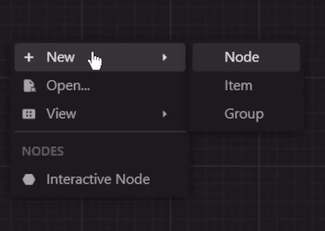
Preview

zread

Features

  • ContextMenu: The package includes a highly customizable context menu system that can be easily integrated into your Flutter application. It provides a seamless and intuitive user experience, enhancing the usability of your app.

  • Hierarchical Structure: The context menu supports a hierarchical structure with submenu functionality. This enables you to create nested menus, providing a clear and organized representation of options and suboptions.

  • Selection Handling: The package includes built-in selection handling for context menu items. It allows you to define callback functions for individual menu items, enabling you to execute specific actions or logic when an item is selected.

  • Customization Options: Customize the appearance and behavior of the context menu to match your app's design and requirements. Modify the style, positioning, animation, and interaction of the menu to create a cohesive user interface.

  • Built-in Components: The package includes built-in components, such as MenuItem, MenuDivider, and MenuHeader, that can be used in your context menu.

  • Cross Platform Support: The package is compatible with multiple platforms, including Android, iOS, Web, and Desktop.

Getting Started

Installation
  • Method 1 (Recommended):

    run this command in your terminal:

    flutter pub add flutter_context_menu
    
  • Method 2:

    add this line to your pubspec.yaml dependencies:

    dependencies:
        flutter_context_menu:
    

    then, run this command in your terminal:

    flutter pub get
    

Usage

  1. First, import the package:

    import 'package:flutter_context_menu/flutter_context_menu.dart';
    
  2. Then, initialize a ContextMenu instance:

    // define your context menu entries
    final entries = <ContextMenuEntry>[
      const MenuHeader(text: "Context Menu"),
      MenuItem(
        label: const Text('Copy'),
        icon: const Icon(Icons.copy),
        onSelected: (value) {
          // implement copy
        },
      ),
      MenuItem(
        enabled: false, // disable this item
        label: const Text('Cut'),
        icon: const Icon(Icons.cut),
        onSelected: (value) {
          // implement cut
        },
      ),
      MenuItem(
        label: const Text('Paste'),
        icon: const Icon(Icons.paste),
        onSelected: (value) {
          // implement paste
        },
      ),
      const MenuDivider(),
      MenuItem.submenu(
        label: const Text('Edit'),
        icon: const Icon(Icons.edit),
        items: [
          MenuItem(
            label: const Text('Undo'),
            value: "Undo",
            icon: const Icon(Icons.undo),
            onSelected: (value) {
              // implement undo
            },
          ),
          MenuItem(
            label: const Text('Redo'),
            value: 'Redo',
            icon: const Icon(Icons.redo),
            onSelected: (value) {
              // implement redo
            },
          ),
        ],
      ),
    ];
    
    // initialize a context menu
    final menu = ContextMenu(
      entries: entries,
      position: const Offset(300, 300),
      padding: const EdgeInsets.all(8.0),
    );
    
  3. Finally, to show the context menu, there are two ways:

    • Method 1: Directly calling one of the show methods.

      This will show the context menu at the manually specified position.

      void showMenu() async {
        showContextMenu(context, contextMenu: menu);
        // or 
        final selectedValue = await menu.show(context);
        print(selectedValue);
      }
      
    • Method 2: Using the ContextMenuRegion widget to show the context menu when the user right-clicks or long-presses the region area.

      This will show the context menu where the user clicks when the position property is not specified in the ContextMenu constructor.

      @override
      Widget build(BuildContext context) {
        return Column(
          children: [
            ContextMenuRegion(
              contextMenu: contextMenu,
              onItemSelected: (value) {
                print(value);
              },
              child: Container(
                color: Colors.indigo,
                height: 300,
                width: 300,
                child: const Center(
                  child: Text(
                    'Right click or long press!',
                  ),
                ),
              ),
            )
          ],
        );
      }
      

Customization

Theme: By default, the context menu and its items uses the MaterialApp's theme data for styling. However, you can customize the appearance and behavior of the context menu by modifying the theme data. Or individually by specifying a BoxDecoration in the boxDecoration property of the ContextMenu.

Custom Entries: You can create your own context menu entries by subclassing the ContextMenuEntry class. This allows you to customize the appearance, behavior, and functionality of the context menu items.

Learn More

  • More info: Full documentation will be provided, inshallah 🙏
  • See: Full Example

Feedback and Contributions

If you have any suggestions or feedback, please open an issue or create a pull request.

If you like this package, please star it and follow me on X and GitHub.

License

This project is licensed under the BSD 3-Clause License.


Made with ❤️ in Egypt 🇪🇬

🇵🇸 Stand With Palestine 🇵🇸

Categorias

Repositório-fonte

Projetos que usam este pacote