Buscar pacotes, repositórios e categorias de apps

Detalhes do pacotev0.1.3

flutter_dialogflow

Pacote Flutter que facilita a integração com o Dialogflow e suporta o Dialogflow v2

Downloads em 30 dias
154
Curtidas
50
Pontos Pub
40

Instalar pacote

flutter pub add flutter_dialogflow

Visão geral do pacote

Orientação gerada a partir de informações públicas. Apenas para referência.

Um pacote Flutter que simplifica a integração com o Dialogflow, suportando o Dialogflow v2. Permite aos desenvolvedores criar interfaces conversacionais conectando aplicativos Flutter a agentes do Dialogflow para compreensão de linguagem natural e reconhecimento de intenções. O pacote gerencia a comunicação com a API do Dialogflow, permitindo interações em tempo real com chatbots alimentados pelo Dialogflow. É projetado para uso sem problemas em aplicativos Flutter em várias plataformas, oferecendo uma maneira simples de implementar conversas impulsione por IA sem configurações complexas no backend. Ideal para funcionalidades de chatbot em aplicativos móveis.

Casos de uso

  • Integrando chatbots em aplicativos móveis
  • detecção em tempo real da intenção do usuário
  • Construindo bots de suporte ao cliente
  • Habilitar interações por voz ou texto
  • Criando assistentes virtuais com inteligência artificial

Principais recursos

  • Suporta o Dialogflow v2
  • API simples para Flutter
  • Tratamento de conversa em tempo real
  • Compatibilidade multiplataforma
  • Integração fácil com agentes do Dialogflow

Indicado para

  • Desenvolvedores construindo recursos de chatbot
  • Aplicativos que exigem processamento de linguagem natural
  • Aplicativos móveis com interações impulsione por IA
  • Equipes usando o Dialogflow para NLP
  • Projetos que precisam de integração rápida de bot

Considerações

  • Requer configuração de agente do Dialogflow
  • Depende da conectividade com a internet
  • Limitado ao Dialogflow v2
  • Sem suporte de tradução embutido
  • Autenticação por meio de chaves de conta de serviço

README original

Snapshot do README original do repositório-fonte vinculado. Consulte o repositório para o conteúdo mais recente.

Dialogflow v1 & v2 for Flutter apps.

Dialogflow

:heart: Star :heart: the repo to support the project. Thanks!

A new Flutter package.

Awesome Tutorials

Thanks for the tutorials!

Installation

  • Add this to your package's pubspec.yaml file:
dependencies:
  flutter_dialogflow: ^0.1.0
  • You can install packages from the command line: with Flutter:
$ flutter packages get
  • Dialogflow v1 Import it Now in your Dart code, you can use:
 import 'package:flutter_dialogflow/flutter_dialogflow.dart';
  • Or Dialogflow v2 Import it Now in your Dart code, you can use:
 import 'package:flutter_dialogflow/dialogflow_v2.dart';

Usage

Dialogflow v1
  • Dialogflow register and create new Agent
  • Copy Api key (Token)
  • Code
  Dialogflow dialogflow = Dialogflow(token: "Your Token");
  AIResponse response = await dialogflow.sendQuery("Your Query");
  • Example
  void Response(query) async {
    Dialogflow dialogflow = Dialogflow(token: "10178f9cb6cf12321asdf4aae75c87cd");
    AIResponse response = await dialogflow.sendQuery(query);
    print(response.getMessageResponse());
  }
Dialogflow v2
  • Dialogflow](https://dialogflow.com/) register and create new Agent
  • Project Setup and Authentication
    • First of all, we need to create a Google Cloud Platform Project using Console Google Cloud
    • Create or select an existing GCP project.
    • From the GCP console, go to APIs and Services and click on credentials.
    • Click on Create credentials and choose Service account key.
    • Select your service account from the dropdown, choose JSON and click Create. This will download the JSON key to your computer. Save it securely.
    • We downloaded a JSON file with all our data.
  • In your project create folder assets(folder name recommended optional)
  • Move file json in your project in folder created
  • open file pubspec.yaml
flutter:
  uses-material-design: true
  assets:
    - assets/your_file_downloaded_google_cloud.json
  • Import dialogflow_v2
import 'package:flutter_dialogflow/dialogflow_v2.dart';
  • Code
  AuthGoogle authGoogle = await AuthGoogle(fileJson: "Asset Your File Json").build();
  // Select Language.ENGLISH or Language.SPANISH or others...
  Dialogflow dialogflow =Dialogflow(authGoogle: authGoogle,language: Language.ENGLISH); 
  AIResponse response = await dialogflow.detectIntent("Your Query");
  • Example
  AuthGoogle authGoogle = await AuthGoogle(fileJson: "assets/your_file_downloaded_google_cloud.json").build();
  Dialogflow dialogflow = Dialogflow(authGoogle: authGoogle,language: Language.ENGLISH);
  AIResponse response = await dialogflow.detectIntent("Hi!!!");
  print(response.getMessage())
  • Or Get List Message type Card
Call function response.getListMessage() 
response List<dynamic>
example 
new CardDialogflow(response.getListMessage()[0]).title
Convert first item in CardDialogflow for worked easy
CardDialogflow have
- title
- subtitle
- imageUri
- List buttonss
    - each button have text and postback
  • Or Setup custom authentication (session)
Get a session id from your backend server after authentication.(Eg: OAuth Token)
Pass the session id a named parameter 'sessionId' to AuthGoogle function.
On the dialogflow fulfillment, access it inside `agent.session` (WebhookClient.session)
and apply your session logic

Example:
  AuthGoogle authGoogle = await AuthGoogle(fileJson: "assets/your_file_downloaded_google_cloud.json", sessionId: "YOUR_CUSTOM_SESSION_ID").build();
  Dialogflow dialogflow = Dialogflow(authGoogle: authGoogle,language: Language.ENGLISH);
  AIResponse response = await dialogflow.detectIntent("Hi!!!");
  print(response.getMessage())

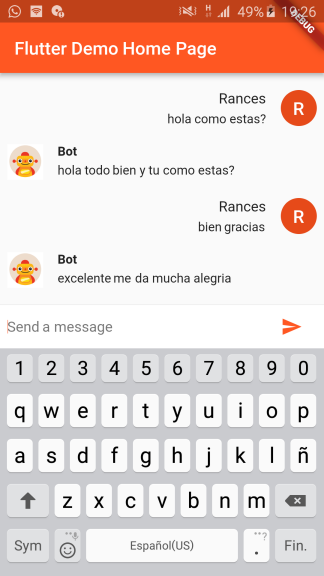
Demo

Dialogflow For Flutter Web

Visit the repository: Flutter Dialogflow Web 🚀

Categorias

Dependências

Lista de dependências 2 itens

Repositório-fonte

Projetos que usam este pacote

Ainda não há dados.