Orientação gerada a partir de informações públicas. Apenas para referência.
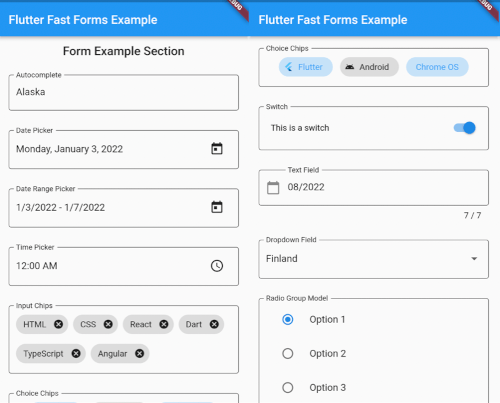
Flutter Fast Forms é um pacote Dart projetado para agilizar a criação de formulários no Flutter, permitindo que desenvolvedores construam componentes de formulário robustos e reutilizáveis rapidamente. Ele oferece uma API simples e declarativa para definir campos de formulário, regras de validação e lógica de envio com mínimo código boilerplate. O pacote suporta todas as principais plataformas, incluindo Android, iOS, Web, macOS, Windows e Linux, tornando-o ideal para aplicações multiplataforma. Com suporte integrado para tipos de entrada comuns e validadores personalizáveis, acelera o desenvolvimento sem sacrificar flexibilidade ou desempenho.
Casos de uso
Prototipagem rápida de formas
Desenvolvimento de formulários multiplataforma
Fluxos de trabalho de validação complexos
componentes de formulário reutilizáveis
Fluxos de registro de usuário simplificados
Principais recursos
Sintaxe de formulário declarativo
Helpers de validação embutidos
Compatibilidade multiplataforma
Tipos de campo extensíveis
Código mínimo de boilerplate
Indicado para
Desenvolvedores iniciantes do Flutter
Equipes que priorizam velocidade
Aplicativos que exigem formulários dinâmicos
Projetos com prazos apertados
Desenvolvedores evitando complexidade de formulário
Considerações
Personalização limitada além dos widgets padrão
Pode ser necessário aprender uma nova sintaxe semelhante a DSL
Não ideal para layouts de formulário altamente únicos
Depende da manutenção do pacote
Mais adequado para padrões de formulário padrão
README original
Snapshot do README original do repositório-fonte vinculado. Consulte o repositório para o conteúdo mais recente.
Flutter Fast Forms
Flutter Fast Forms is the only Dart package you need to build Flutter forms fast.
It adds these missing features to the Flutter SDK:
Not all controls in a form are autonomous and act independent of each other.
Occasionally, the state of a form field might be directly related to the state of some other form field as well.
Flutter Fast Forms allows you to define such conditions declaratively.
📓 Example: A FastTextField that is disabled when a FastSwitch is selected.
1. Add the conditions property to the conditional form field and assign an empty Map:
constFastSwitch(
name: 'switch',
titleText: 'Disable text field',
),
FastTextField(
name: 'text_field',
labelText: 'Just some sample text field',
conditions: {},
),
2. Choose a suitable FastConditionHandler as Map key and assign a FastConditionList:
constFastSwitch(
name: 'switch',
titleText: 'Disable text field when selected',
),
FastTextField(
name: 'text_field',
labelText: 'Just some sample text field',
conditions: {
FastCondition.disabled: FastConditionList([]),
},
)
[!NOTE]
A FastConditionHandler is a function that runs whenever a FastConditionList is checked and determines what happens when the condition is either met or not.
3. Add a FastCondition relating the field to another field:
constFastSwitch(
name: 'switch',
titleText: 'Disable text field when selected',
),
FastTextField(
name: 'text_field',
labelText: 'Just some sample text field',
conditions: {
FastCondition.disabled: FastConditionList([
FastCondition(
target: 'switch',
test: (value, field) => value isbool && value,
),
]),
},
),
[!NOTE]
target is the name of the FastFormField that the form field depends on.
📓 Example: A FastTextField that is enabled when a FastSwitchor a FastCheckbox is selected.
constFastCheckbox(
name: 'checkbox',
titleText: 'Enable text field when selected',
),
constFastSwitch(
name: 'switch',
titleText: 'Enable text field when selected',
),
FastTextField(
name: 'text_field',
enabled: false,
labelText: 'Just some sample text field',
conditions: {
FastCondition.enabled: FastConditionList([
FastCondition(
target: 'switch',
test: (value, field) => value isbool && value,
),
FastCondition(
target: 'checkbox',
test: (value, field) => value isbool && value,
),
]),
},
),
📓 Example: A FastTextField that is disabled when both a FastSwitchand a FastCheckbox are selected.
constFastCheckbox(
name: 'checkbox',
titleText: 'Disable text field when selected',
),
constFastSwitch(
name: 'switch',
titleText: 'Disable text field when selected',
),
FastTextField(
name: 'text_field',
labelText: 'Just some sample text field',
conditions: {
FastCondition.enabled: FastConditionList(
[
FastCondition(
target: 'switch',
test: (value, field) => value isbool && value,
),
FastCondition(
target: 'checkbox',
test: (value, field) => value isbool && value,
),
],
match: FastConditionMatch.every,
),
},
),
[!NOTE]
match specifies how all individual test results in the list are evaluated to determine whether the condition is met.
Custom Form Fields
There are use cases where the widget catalog does not fully satisfy your individual requirements.
As a consequence you have to add non-standard controls to your form.
With Flutter Fast Forms you're free to wrap any custom widget into a form field.
📓 Example: A simple widget that provides a random integer whenever a button is pressed.
1. Create a stateful widget class extending FastFormField<T> with a corresponding FastFormFieldState<T>:
[!NOTE]
Always make sure that you apply certain super-initializer parameters like decoration or enabled in your builder functions.
Otherwise assigning those arguments when invoking the constructor won't have any effect.