Buscar pacotes, repositórios e categorias de apps

Capa de flutter_font_picker
Detalhes do pacotev2.1.1

flutter_font_picker

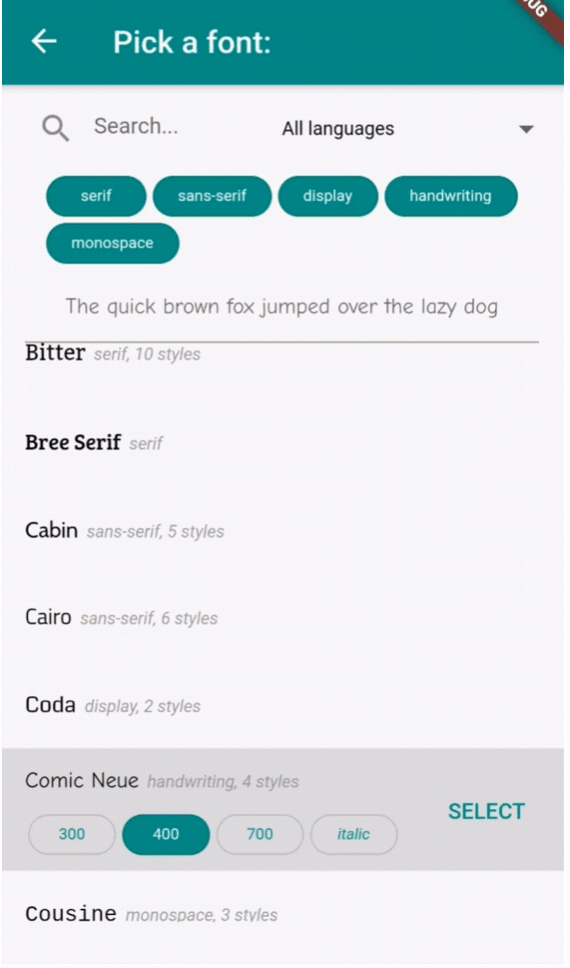
Um widget do Flutter que permite ao usuário selecionar uma fonte do Google de um menu suspenso/tela personalizado.

AndroidiOSWebmacOSWindowsLinux
Downloads em 30 dias
426
Curtidas
40
Pontos Pub
150

Instalar pacote

flutter pub add flutter_font_picker

Visão geral do pacote

Orientação gerada a partir de informações públicas. Apenas para referência.

Um pacote Flutter que fornece um widget personalizável para seleção de fontes do Google a partir de um menu suspenso ou tela dedicada. Integra-se perfeitamente em aplicativos Flutter em múltiplas plataformas, permitindo que os usuários naveguem e apliquem fontes diretamente na interface do aplicativo. O pacote simplifica a integração de fontes aproveitando a extensa biblioteca do Google Fonts, oferecendo uma experiência de seleção limpa e intuitiva. Ideal para aplicativos que exigem personalização dinâmica da tipografia, como ferramentas de design, editores de texto ou aplicações criativas.

Casos de uso

  • Aplicativo com estilo de texto dinâmico
  • Ferramentas de design e tipografia
  • Editor de texto com seleção de fonte
  • Temas de interface personalizáveis
  • Aplicativos educacionais com conteúdo visual
  • aplicativos de criação de conteúdo criativo

Principais recursos

  • Integração do Google Fonts
  • Seletor de dropdown personalizável ou seletor em tela cheia
  • Suporte multiplataforma
  • Aplicação fácil de fonte
  • Leve e rápido
  • Suporte de visualização de fonte

Indicado para

  • Desenvolvedores construindo aplicativos com grande quantidade de texto
  • Aplicações Flutter centradas no design
  • Aplicativos que precisam de personalização de fonte do usuário
  • Software educacional e criativo
  • Designers de UI/UX usando Flutter

Considerações

  • Requer acesso à internet para carregar fontes
  • Pode aumentar levemente o tamanho do aplicativo
  • Limitado a fontes do Google
  • O desempenho de renderização de fontes varia em dispositivos antigos
  • Sem suporte a fontes offline
  • Tempo inicial de carregamento para listas grandes de fontes

README original

Snapshot do README original do repositório-fonte vinculado. Consulte o repositório para o conteúdo mais recente.

flutter_font_picker Pub Version

A Flutter widget that lets the user select and apply a Google Font from a custom dropdown.

Provides a FontPicker widget that can be used in a route or dialog as a UI for choosing a font from Google Fonts.

Depends on the google_fonts package for loading and displaying the fonts.

Localizations available for 🇪🇸🇩🇪🇮🇹🇵🇹🇫🇷🇵🇱🇳🇱🇯🇵.

Simple Example

Inside your build method, use a button that when pressed, will navigate to the font picker screen:

PickerFont? _selectedFont;

ElevatedButton(
  child: Text('Pick a font'),
  onPressed: () {
    Navigator.push(
      context,
      MaterialPageRoute(
          builder: (context) => FontPicker(
              onFontChanged: (PickerFont font) {
                _selectedFont = font;
                print("${font.fontFamily} with font weight ${font.fontWeight} and font style ${font.fontStyle}.}");
              },
          ),
      ),
    );
  }),

The onFontChanged function retrieves the font that the user selects with an object containing details like the font's name, weight, style, etc.

You can then use its toTextStyle() method to style any text with the selected font:

Text('This will be styled with the font: $_selectedFont.fontFamily',
      style: selectedFont.toTextStyle()),

Check the example project for more usages.


FontPicker settings

  • onFontChanged: (required) the callback that returns a PickerFont object with all the details and methods for the user's selected font.
  • googleFonts: A list of Google fonts to use in the font picker. By default it contains all 975 fonts included in constants.dart. You should only use a limited number of them for performance and data saving, as each font is downloaded and stored to the app's storage when it comes into view. Using up to 100-200 fonts should work fine.
  • initialFontFamily: The font family to use initially in the font picker. Defaults to 'Roboto'.
  • showFontInfo: Whether to show font details (category, number of variants) next to each font tile in the list.
  • showFontVariants: Whether to show font variants (weights and styles) in the font picker. If set to false, user will only be able to select the default variant of each font.
  • showInDialog: Set this to true if you want to use the font picker inside an AlertDialog (check examples).
  • recentsCount: Fonts that the user selected before are saved to be shown at the start of the list. Sets how many you want saved as recents.
  • lang: The language in which to show the UI. Defaults to English ('en'). Other options are 🇪🇸🇩🇪🇮🇹🇵🇹🇫🇷🇵🇱🇳🇱🇯🇵 ('es', 'de', 'it', 'pt', 'fr', 'pl', 'nl', 'ja'). If you need a translation in another language: take a look at the dictionary variable in translations.dart, and send me (or fix) the translations for your language .

FontPicker features

The user can:

  • Browse a list of any Google fonts you want.
  • Select a variant (font weight and/or style) for each font.
  • Filter the fonts by category (serif, sans-serif, handwriting, etc.) or available font glyphs (Latin, Greek, Cyrillic, etc.).
  • Search the fonts by name.
  • See the most recently used fonts at the top of the list.
Credits

Inspired by the FontPicker jQuery plugin.

Categorias

Dependências

Lista de dependências 2 itens

Repositório-fonte

Projetos que usam este pacote

Ainda não há dados.