Orientação gerada a partir de informações públicas. Apenas para referência.
Um pacote Flutter que aprimora o ListView padrão com recursos avançados, como navegação por índice de salto, persistência de posição durante reconstruções e comportamento de rolagem aprimorado. Foi projetado para proporcionar uma experiência do usuário mais suave em aplicativos com muitas listas, mantendo o estado de rolagem e permitindo navegação rápida em grandes conjuntos de dados. Ideal para aplicativos que exigem gerenciamento eficiente e responsivo de listas em múltiplas plataformas.
Casos de uso
Grandes listas de dados com navegação rápida
Manter a posição de rolagem após atualizações
Experiência do usuário aprimorada em listas longas
Consistência da lista multiplataforma
Recarregamento dinâmico de conteúdo sem perder o estado de rolagem
Implementando índices de pulo alfabético
Principais recursos
Índice de pulo para navegação rápida
Preserva a posição de rolagem durante as reconstruções
Desempenho otimizado para listas grandes
Suporta todas as principais plataformas do Flutter
indicadores de índice personalizáveis
Transições de rolagem suave
Indicado para
Desenvolvedores construindo interfaces de lista complexas
Aplicativos com listas dinâmicas ou frequentemente atualizadas
Usuários que precisam de navegação intuitiva em listas
Aplicações móveis e web multiplataforma
Aplicações que exigem renderização de lista de alto desempenho
Considerações
Requer integração cuidadosa com a lógica de lista existente
Pode aumentar ligeiramente o tamanho do pacote
Mais adequado para listas com mais de 50 itens
Personalização limitada para layouts de lista não padrão
Depende da compatibilidade com versão estável do Flutter
README original
Snapshot do README original do repositório-fonte vinculado. Consulte o repositório para o conteúdo mais recente.
Flutter List View
Enhance list view to support scroll to index, jump to index, header sticky, enable without scroll when insert data on top and turn performance to reused items.
Features
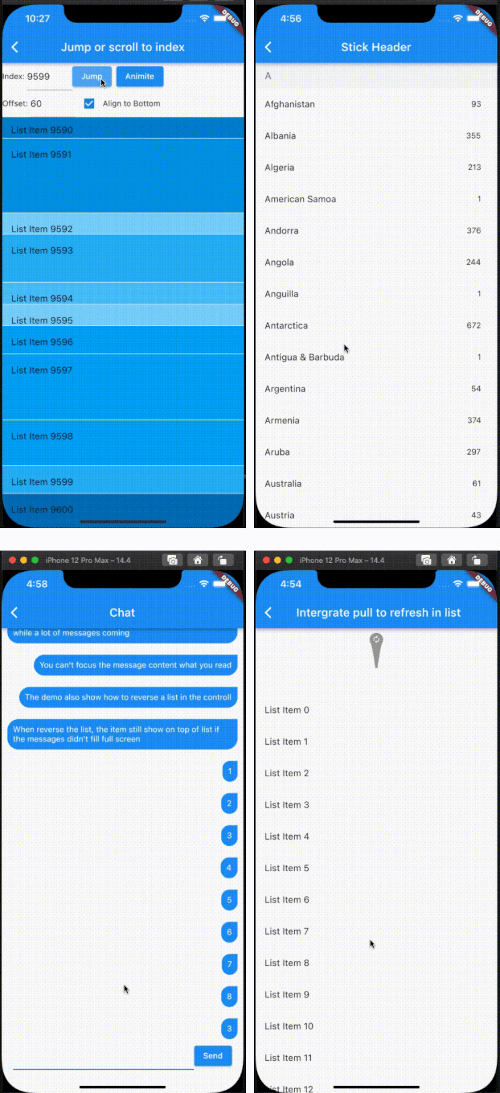
Support the list view to jump to and scroll to index.
Support for inserting data without scrolling
Support for show top in reverse mode if the data can't fill the full viewport.
Support sticky header.
Support integrated pull_to_refresh
When initializing data, allow for scrolling to specify an index.
To save performance, flutter list_view always reuses the rendered item.
Support to keep specifying items without reusing and disposing of them once the item is created.
[!NOTE]
The list item will be reuse when disableCacheItems=false and the invisible item will destroy. This mean, one item may be create or destroy multiple times. So The Item widget must not have any state, as it may lead to unforeseeable issues. If you want work same with list_view which item didn't destroy after create, please put onIsPermanent: (keyOrIndex) => true to FlutterListViewDelegate
If you want better user expierence, preferItemHeight or onItemHeight may set to.
preferItemHeight
The package don't know the item's height, If you don't set, package alway think the item height is 50 util layout the item. If you know the height, you should set it.
onItemHeight
like preferItemHeight, the function will used to get height of each item util the item layout.
Notice: Keep positoin need implement onItemKey, the onItemKey used to identify the unique of item. The key should difference with other items' key.
We use the key to know what position you insert to current list. if you insert a item before the rendered item, package should increase the scrollOffset.
@overrideWidgetbuild(BuildContext context) {
returnScaffold(
appBar: AppBar(
title: constText("Intergrate pull to refresh in list"),
),
body: SmartRefresher(
enablePullDown: true,
enablePullUp: true,
header: constWaterDropHeader(),
footer: CustomFooter(
builder: (context, mode) {
Widget body;
if (mode == LoadStatus.idle) {
body = constText("pull up load");
} elseif (mode == LoadStatus.loading) {
body = constCupertinoActivityIndicator();
} elseif (mode == LoadStatus.failed) {
body = constText("Load Failed!Click retry!");
} elseif (mode == LoadStatus.canLoading) {
body = constText("release to load more");
} else {
body = constText("No more Data");
}
returnSizedBox(
height: 55.0,
child: Center(child: body),
);
},
),
controller: _refreshController,
onRefresh: _onRefresh,
onLoading: _onLoading,
child: FlutterListView(
delegate: FlutterListViewDelegate(
(BuildContext context, int index) =>
ListTile(title: Text('List Item ${data[index]}')),
childCount: data.length,
)),
),
);
}
Support to keep specifying items without reusing and disposing of them once the item is created.
FlutterListView(
delegate: FlutterListViewDelegate(
(BuildContext context, int index) =>
Item(text: data[index].toString()),
childCount: data.length,
// If onItemKey is not given, the key is index// The example is indicate the "40" item will not be reused and disposed after it was created
onIsPermanent: (key) => key == "40"))