Buscar pacotes, repositórios e categorias de apps

Capa de flutter_scroll_to_top
Detalhes do pacotev2.3.0

flutter_scroll_to_top

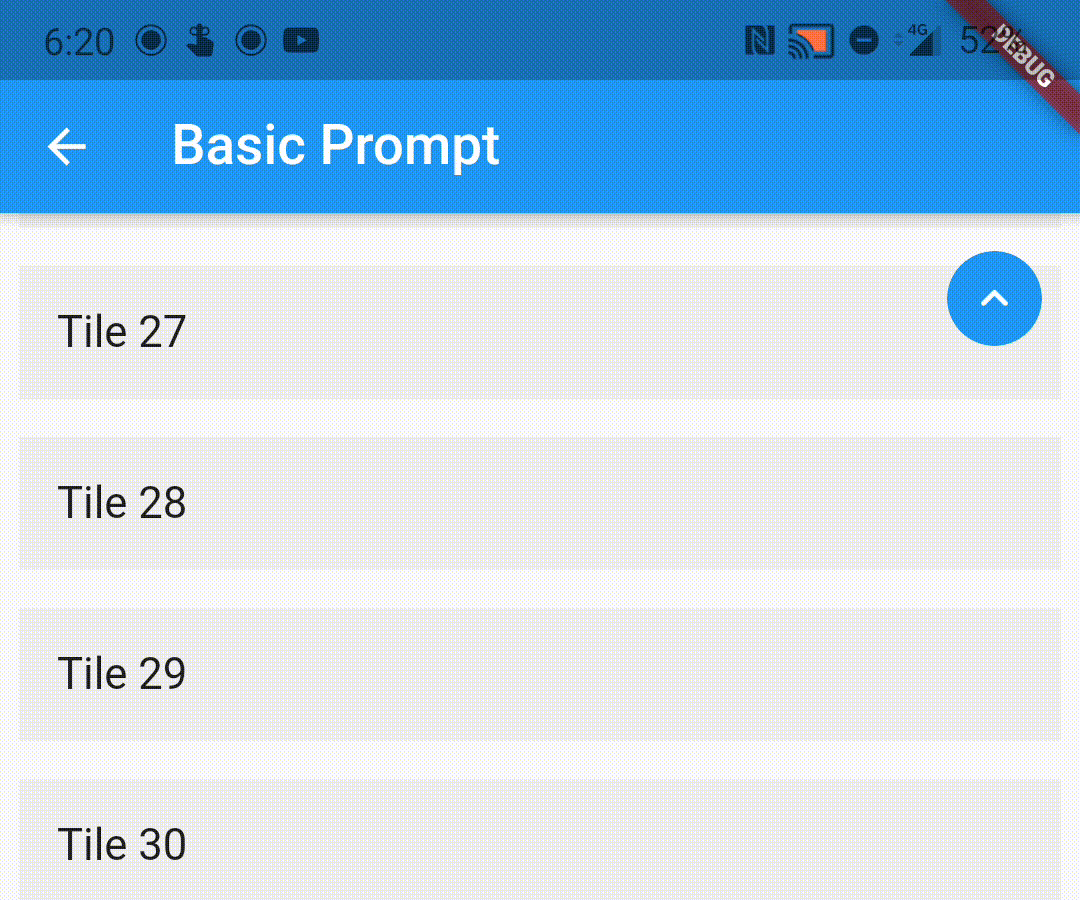
Um pacote que fornece um invólucro simples para envolver seus widgets roláveis, permitindo exibir uma mensagem de retorno ao topo ao usuário quando ele rolar.

Downloads em 30 dias
322
Curtidas
104
Pontos Pub
70

Instalar pacote

flutter pub add flutter_scroll_to_top

Visão geral do pacote

Orientação gerada a partir de informações públicas. Apenas para referência.

Um pacote leve do Flutter que envolve widgets roláveis para exibir automaticamente um indicador 'rolar para o topo' quando o usuário rola para baixo. Ele melhora a experiência do usuário ao fornecer uma maneira intuitiva de retornar ao topo de listas longas ou visualizações roláveis. O pacote é fácil de integrar e funciona perfeitamente com qualquer conteúdo rolável, como ListView, CustomScrollView ou SingleChildScrollView. Suporta personalização da aparência e comportamento do botão.

Casos de uso

  • Adicionando um botão de rolagem para o topo em listas longas
  • Melhorando a UX em painéis com rolagem
  • Melhorando a acessibilidade em aplicativos com conteúdo intenso
  • Fornecendo feedback visual durante o rolagem
  • Simplificando a navegação em visualizações de rolagem aninhadas

Principais recursos

  • Visibilidade automática com base na posição de rolagem
  • Botão de ação flutuante personalizável
  • Configuração mínima com widget wrapper
  • Funciona com todos os widgets rolagens
  • Suporta modo escuro e integração de tema

Indicado para

  • Aplicativos com conteúdo longo e rolável
  • Designers de interface do usuário priorizando UX
  • Desenvolvedores procurando implementação rápida de rolagem para o topo
  • Projetos com dependências mínimas
  • Aplicativos móveis com telas ricas em conteúdo

Considerações

  • Pode não funcionar com visualizações de rolagem aninhadas complexas sem configuração adicional
  • Requer o tratamento manual do controlador de rolagem se não estiver usando o padrão
  • Opções limitadas de personalização além da estilização básica
  • Não adequado para widgets não roláveis
  • Depende do comportamento específico da plataforma para rolagem

README original

Snapshot do README original do repositório-fonte vinculado. Consulte o repositório para o conteúdo mais recente.

flutter_scroll_to_top

Pub

A wrapper to show a scroll to top prompt to the user on ScrollView widgets.

Installing

Add the following dependency to your pubspec.yaml file:

dependencies:
  flutter_scroll_to_top: ^2.2.4

Import the package

import 'package:flutter_scroll_to_top/flutter_scroll_to_top.dart';

ScrollWrapper

Just wrap the scrollable widget you want to show the scroll to top prompt over with a ScrollWrapper.

ScrollWrapper(
    builder: (context, properties) => ListView.builder(
        itemBuilder: (context, index) => Padding(
            padding: const EdgeInsets.all(8.0),
            child: ListTile(
                title: Text('Tile $index'),
                tileColor: Colors.grey.shade200,
            ),
        ),
    ),
)

ScrollView Properties

If the child ScrollView has different properties for scrollController, scrollDirection, primary or reverse parameters than the default values, you need to pass them to the ScrollWrapper widget as it requires the same parameters. It provides a ScrollViewProperties object in the builder callback that you can use to access the properties in the ScrollView widget.

ScrollWrapper(
    primary: true,
    scrollDirection: Axis.horizontal,
    reverse: true,
    builder: (context, properties) => ListView.builder(
        controller: properties.scrollController,
        scrollDirection: properties.scrollDirection,
        reverse: properties.reverse,
        primary: properties.primary,
        itemBuilder: (context, index) => Padding(
            padding: const EdgeInsets.all(8.0),
            child: ListTile(
                title: Text('Tile $index'),
                tileColor: Colors.grey.shade200,
            ),
        ),
    ),
)

Customisation

You can pass the following parameters to customise the prompt accordingly

  • enabledAtOffset - At what scroll offset to enable the prompt on.
  • alwaysVisibleAtOffset - If the prompt is to be always visible at the provided offset. Setting this to false only shows the prompt when the user starts scrolling upwards. Default value is false.
  • scrollOffsetUntilVisible - Offset should the user scroll in the opposite direction before the prompt becomes visible.
  • scrollOffsetUntilHide - Offset should the user scroll before the prompt hides itself, if visible.
  • promptAlignment - Where on the widget to align the prompt.
  • promptDuration - Duration it takes for the prompt to come into view/vanish.
  • promptAnimationCurve - Animation Curve that the prompt will follow when coming into view.
  • promptAnimationType - PromptAnimation that the prompt follows when animating. Has three options, fade, scale and size.
  • scrollToTopDuration - Duration it takes for the page to scroll to the top on prompt button press.
  • scrollToTopCurve - Animation Curve for scrolling to the top.
  • promptTheme - You can pass PromptButtonTheme to modify the prompt button further. It has the following parameters:
    • padding - Padding around the prompt button.
    • iconPadding - Padding around the icon inside the button.
    • icon - The icon inside the button.
    • color - Color of the prompt button.
    • elevation - Elevation of the button.
ScrollWrapper(
    promptAlignment: Alignment.topCenter,
    promptAnimationCurve: Curves.elasticInOut,
    promptDuration: const Duration(milliseconds: 400),
    enabledAtOffset: 300,
    scrollOffsetUntilVisible: 500,
    promptTheme: const PromptButtonTheme(
    icon: Icon(Icons.arrow_circle_up, color: Colors.amber),
    color: Colors.deepPurpleAccent,
    iconPadding: EdgeInsets.all(16),
    padding: EdgeInsets.all(32)),
    builder: (context, properties) => ListView.builder(
        controller: properties.scrollController,
        scrollDirection: properties.scrollDirection,
        reverse: properties.reverse,
        primary: properties.primary,
            itemBuilder: (context, index) => Padding(
            padding: const EdgeInsets.all(8.0),
            child: ListTile(
                title: Text('Tile $index'),
                tileColor: Colors.grey.shade200,
            ),
        ),
    ),
)

Custom Prompt Widget

You can replace the default prompt widget with a widget of your choosing by passing it off in the promptReplacementBuilder parameter.

ScrollWrapper(
    promptReplacementBuilder: (context, function) => MaterialButton(
        onPressed: () => function(),
        child: const Text('Scroll to top'),
    ),
    builder: (context, properties) => ListView.builder(
        controller: properties.scrollController,
        scrollDirection: properties.scrollDirection,
        reverse: properties.reverse,
        primary: properties.primary,
        itemBuilder: (context, index) => Padding(
            padding: const EdgeInsets.all(8.0),
            child: ListTile(
                title: Text('Tile $index'),
                tileColor: Colors.grey.shade200,
            ),
        ),
    ),
)


The prompt shows up inconsistently if I have multipe scrollviews listening to the same scroll controller, how do I fix it?

This is a limitation of the way Flutter handles this scenario. If you are receiving this error (likely due to multiple scrollables under a NestedScrollView), this library bundles a modified version of the scrollviews which would fix this issue.

To use them, add the following import:

import 'package:flutter_scroll_to_top/scroll_view.dart' as scrollview;

Then replace your scrollview in the following way:

Before

ScrollWrapper(
    builder: (context, properties) => ListView.builder(
        itemBuilder: (context, index) => Padding(
            padding: const EdgeInsets.all(8.0),
            child: ListTile(
                title: Text('Tile $index'),
                tileColor: Colors.grey.shade200,
            ),
        ),
    ),
)

After

ScrollWrapper(
    builder: (context, properties) => scrollview.ListView.builder(
        properties: properties,
        itemBuilder: (context, index) => Padding(
            padding: const EdgeInsets.all(8.0),
            child: ListTile(
                title: Text('Tile $index'),
                tileColor: Colors.grey.shade200,
            ),
        ),
    ),
)

Categorias

Repositório-fonte

Projetos que usam este pacote