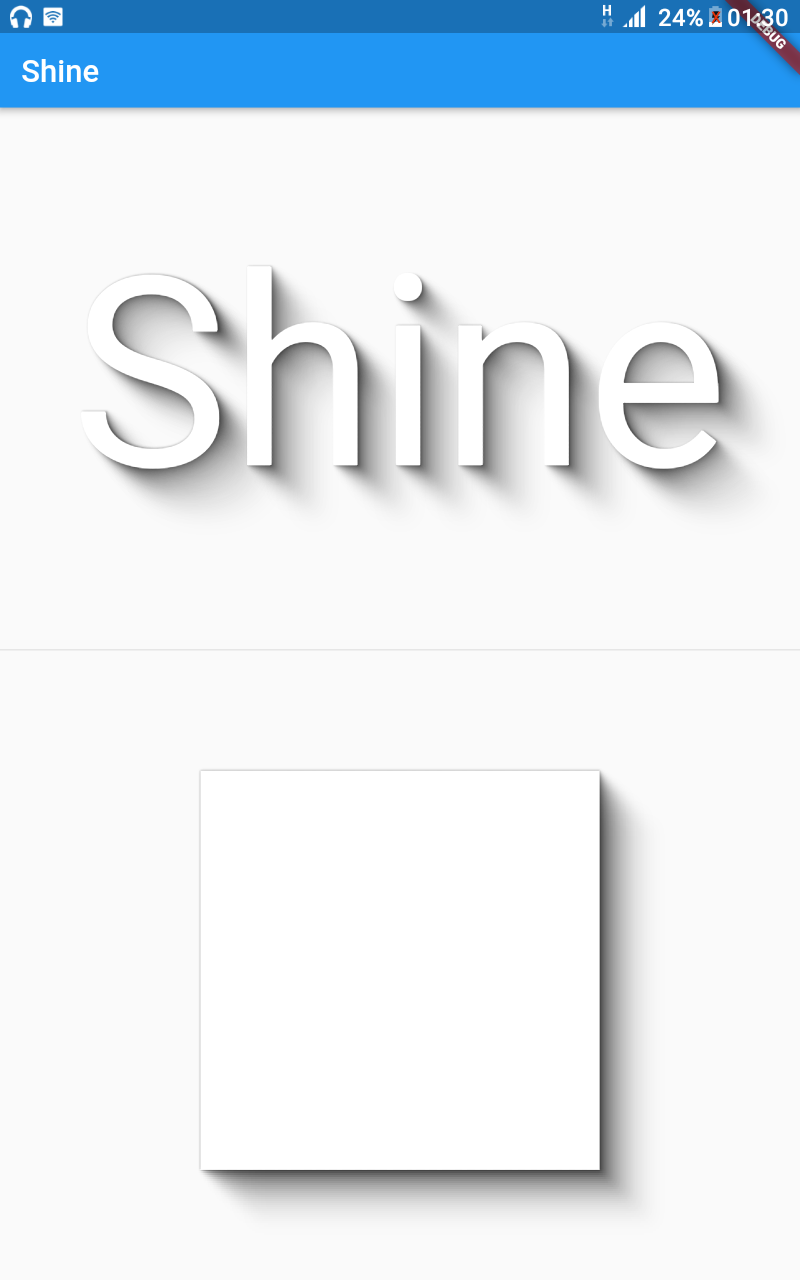
Flutter Shine é uma biblioteca para sombras bonitas, posições dinâmicas de luz, sombras extremamente personalizáveis, sem dependências de bibliotecas e sombras de texto ou caixa baseadas no conteúdo.
Orientação gerada a partir de informações públicas. Apenas para referência.
Flutter Shine é uma biblioteca leve e sem dependências que permite sombras visualmente atraentes e dinâmicas em aplicativos Flutter. Suporta sombras de texto e caixa que se adaptam ao conteúdo, com posições de luz personalizáveis para efeitos de iluminação realistas. Projetada para simplicidade e flexibilidade, ela melhora as interfaces com sombras sutis e animadas sem exigir bibliotecas externas. Ideal para interfaces modernas e refinadas onde profundidade e interatividade importam.
Casos de uso
Criando sombras dinâmicas em botões
Melhorando o texto com efeitos de iluminação realistas
Design de elementos de interface interativa
Adicionando profundidade a cartões e contêineres
Construindo feedback visual animado
Melhorando a estética do aplicativo com código mínimo
Principais recursos
Posicionamento dinâmico da luz
Intensidade e cor de sombra personalizáveis
Sem dependências externas
Suporta sombras de texto e caixa
Renderização de sombra consciente do conteúdo
Leve e eficiente
Indicado para
Designers de interface procurando acabamento visual
Desenvolvedores que querem configuração mínima
Aplicativos com elementos interativos ou animados
Projetos focados no design material moderno
Equipes que priorizam desempenho e tamanho
Considerações
Limitado a efeitos de sombra apenas
Sem controles de animação embutidos
Requer configuração manual para comportamentos complexos
Não adequado para efeitos 3D pesados
Melhor usado com layouts de interface simples e limpos
README original
Snapshot do README original do repositório-fonte vinculado. Consulte o repositório para o conteúdo mais recente.
Flutter Shine
Show some :heart: and star the repo to support the project
In order to run the command line example, please follow these steps:
Clone this repo and enter the directory
Run pub get
Run dart example/lib/main.dart
Flutter Example
Install Flutter
In order to run the flutter example, you must have Flutter installed. For installation instructions, view the online
documentation.
Run the app
Open up an Android Emulator, the iOS Simulator, or connect an appropriate mobile device for debugging.
Open up a terminal
cd into the example/lib/ directory
Run flutter doctor to ensure you have all Flutter dependencies working.
Run flutter packages get
Run flutter run
Stargazers over time
License
MIT License

Copyright (c) 2020 Jonathan Monga

Permission is hereby granted, free of charge, to any person obtaining a copy
of this software and associated documentation files (the "Software"), to deal
in the Software without restriction, including without limitation the rights
to use, copy, modify, merge, publish, distribute, sublicense, and/or sell
copies of the Software, and to permit persons to whom the Software is
furnished to do so, subject to the following conditions:

The above copyright notice and this permission notice shall be included in all
copies or substantial portions of the Software.

THE SOFTWARE IS PROVIDED "AS IS", WITHOUT WARRANTY OF ANY KIND, EXPRESS OR
IMPLIED, INCLUDING BUT NOT LIMITED TO THE WARRANTIES OF MERCHANTABILITY,
FITNESS FOR A PARTICULAR PURPOSE AND NONINFRINGEMENT. IN NO EVENT SHALL THE
AUTHORS OR COPYRIGHT HOLDERS BE LIABLE FOR ANY CLAIM, DAMAGES OR OTHER
LIABILITY, WHETHER IN AN ACTION OF CONTRACT, TORT OR OTHERWISE, ARISING FROM,
OUT OF OR IN CONNECTION WITH THE SOFTWARE OR THE USE OR OTHER DEALINGS IN THE
SOFTWARE.