Orientação gerada a partir de informações públicas. Apenas para referência.
Um pacote Flutter que permite prompts de atualização forçada controlados remotamente para aplicativos Android e iOS. Permite que desenvolvedores forcem atualizações de aplicativos verificando uma configuração remota (por exemplo, um ponto final JSON) ao iniciar o aplicativo. Se uma atualização for necessária, o usuário será solicitado a atualizar imediatamente, garantindo que todos os usuários permaneçam na versão mais recente. O pacote é leve e se integra sem problemas em aplicativos existentes sem configuração complexa.
Casos de uso
Aplicando correções críticas de bugs
Enviar atualizações de segurança
Manter a paridade de recursos entre os usuários
Controlando o cronograma de lançamento de atualizações
Garantir o cumprimento das novas políticas de aplicativos
Principais recursos
Configuração remota por meio de ponto final HTTP
Integração simples com código mínimo
Suporte para Android e iOS
Interface de prompt personalizável
Atraso opcional antes de forçar a atualização
Indicado para
Aplicativos que exigem controle estrito de versão
Aplicações empresariais ou regulamentadas
Aplicativos com lançamentos frequentes de recursos
Equipes gerenciando várias versões de aplicativos
Considerações
Requer conexão estável com a internet
Depende da disponibilidade de servidor externo
Pode afetar a experiência do usuário se usado em excesso
Necessita de tratamento adequado de erros para verificações falhas
Não adequado para aplicativos sem suporte de back-end
README original
Snapshot do README original do repositório-fonte vinculado. Consulte o repositório para o conteúdo mais recente.
Force Update Helper
A package for showing a force update prompt that is controlled remotely.
Features
Remote control: control the force update logic remotely with a custom backend, or Firebase Remote Config, or anything that resolves to a Future<String>.
UI-agnostic: the package tells you when to show the update UI, you decide how to show it (localization is up to you).
Small and opinionated: the package is made of only two classes. Use it as is, or fork it to suit your needs.
Getting started
Depend on it:
dependencies:force_update_helper:
Use it by adding a ForceUpdateWidget to your MaterialApp's builder property:
voidmain() {
runApp(constMainApp());
}
final _rootNavigatorKey = GlobalKey<NavigatorState>();
classMainAppextendsStatelessWidget{
constMainApp({super.key});
@overrideWidgetbuild(BuildContext context) {
returnMaterialApp(
navigatorKey: _rootNavigatorKey,
builder: (context, child) {
returnForceUpdateWidget(
navigatorKey: _rootNavigatorKey,
forceUpdateClient: ForceUpdateClient(
// * Real apps should fetch this from an API endpoint or via// * Firebase Remote Config
fetchRequiredVersion: () => Future.value('2.0.0'),
// * Example ID from this app: https://fluttertips.dev/// * To avoid mistakes, store the ID as an environment variable and// * read it with String.fromEnvironment
iosAppStoreId: '6482293361',
),
allowCancel: false,
showForceUpdateAlert: (context, allowCancel) => showAlertDialog(
context: context,
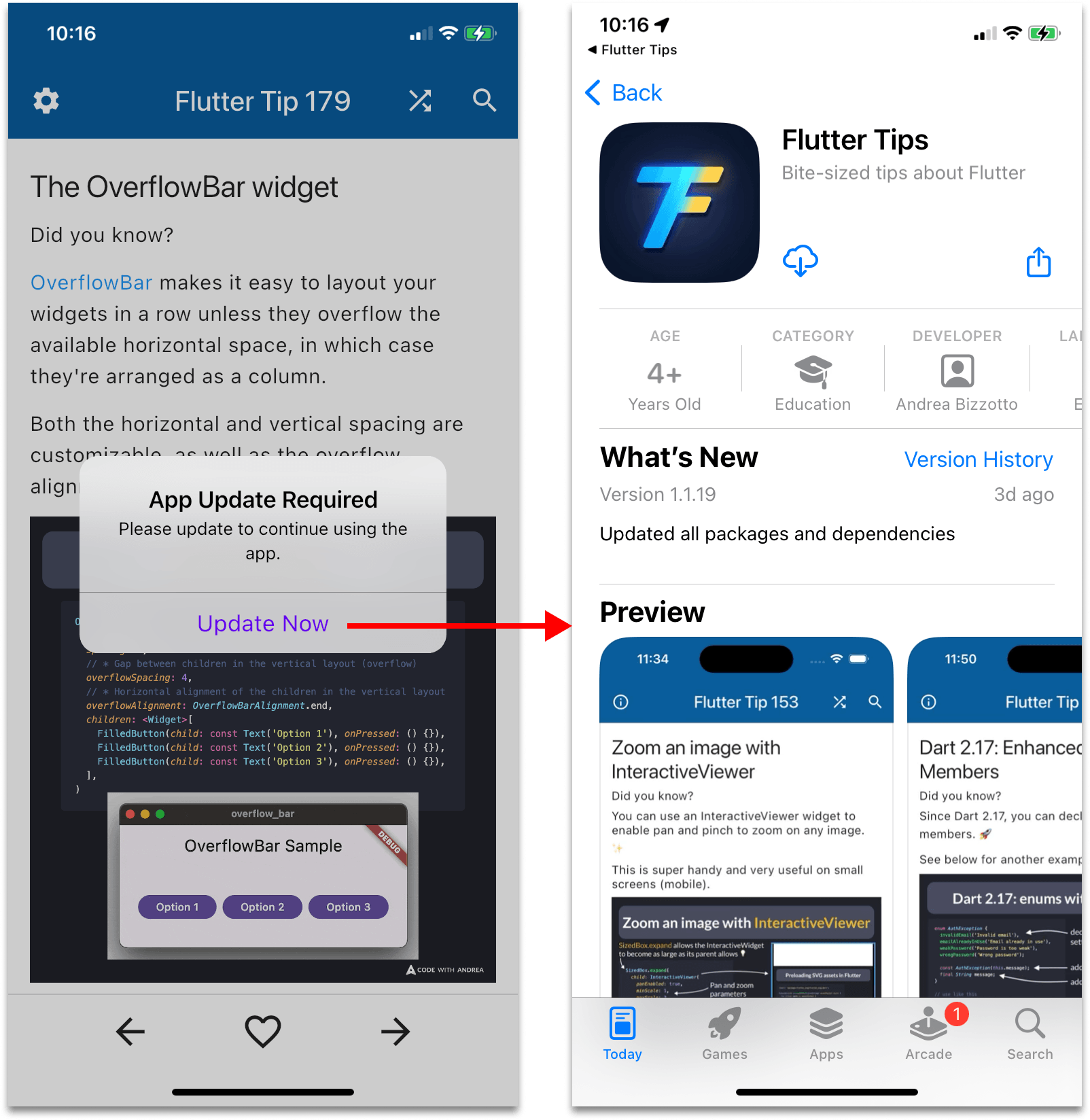
title: 'App Update Required',
content: 'Please update to continue using the app.',
cancelActionText: allowCancel ? 'Later' : null,
defaultActionText: 'Update Now',
),
showStoreListing: (storeUrl) async {
if (awaitcanLaunchUrl(storeUrl)) {
awaitlaunchUrl(
storeUrl,
// * Open app store app directly (or fallback to browser)
mode: LaunchMode.externalApplication,
);
} else {
log('Cannot launch URL: $storeUrl');
}
},
onException: (e, st) {
log(e.toString());
},
child: child!,
);
},
home: constScaffold(
body: Center(
child: Text('Hello World!'),
),
),
);
}
}
Note that in order to show the update dialog, a root navigator key needs to be added to MaterialApp (this is the same technique used by the upgrader package).
How the package works
Unlike the upgrader package, this package does not use the app store APIs to check if a newer version is available.
Instead, it allows you to store the required version remotely (using a custom backend or Firebase Remote Config), and compare it with the current version from your pubspec.yaml.
Here's how you may use this in production:
Submit a new version of your app to the stores
Once it's approved, publish it
Wait for an hour or so, to account for the time it takes for the new version to be visible on all stores/countries
Update the required_version endpoint in your custom backend or via Firebase Remote Config
Once users open the app, the force update logic will kick in and force them to update
The ForceUpdateClient class fetches the required version and compares it with the current version from package_info_plus. Versions are compared using the pub_semver package.
The fetchRequiredVersion callback should fetch the required version from an API endpoint or Firebase Remote Config.
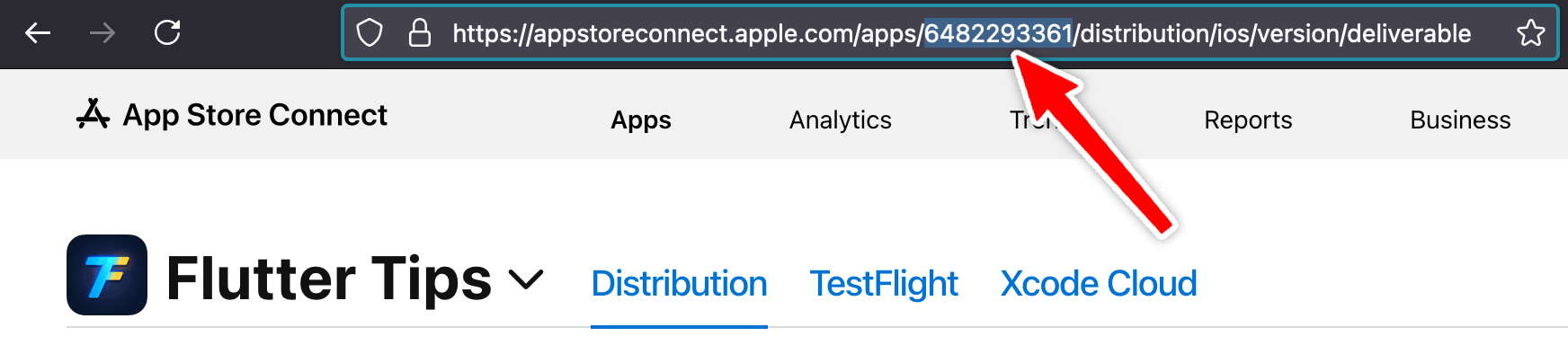
When creating your iOS app in App Store Connect, copy the app ID and use it as the iosAppStoreId, otherwise the force upgrade alert will not show. I recommend storing an APP_STORE_ID as an environment variable that is set with --dart-define or --dart-define-from-file and read with String.fromEnvironment.
The Play Store URL is automatically generated from the package name (which is retrieved with the package_info_plus package)
If you want to make the update optional, pass allowCancel: true to the ForceUpdateWidget and use it to add a cancel button to the alert dialog. This will make the alert dismissable, but the prompt will still show on the next app start.
You can catch and handle any exceptions with the onException handler. Alternatively, omit the onException and handle exceptions globally.
If you use the url_launcher package to open the app store URLs (which is the recommended way), don't forget to add the necessary query intent inside AndroidManifest.xml:
when the app returns to the foreground (common when switching between apps)
Then, the update alert will show if all these conditions are true:
the app is running on iOS or Android (web and desktop are not supported)
the requiredVersion is fetched successfully
the requiredVersion is greater than the currentVersion
(iOS only) the iosAppStoreId is a non-empty string
If the user clicks on "Update Now" and lands on the app store page but does not update the app, the force update alert will show again when returning to the app.
If the update alert shows on Android and the back button is pressed, it will be shown again unless allowCancel is true.
Where to find the iosAppStoreId
Once you have created your app in App Store Connect, you can grab the app ID from the browser URL:
Make sure to set the correct iosAppStoreIdbefore releasing the first version of your app, otherwise users on old version won't be able to update.
Example: fetching a remote config JSON from a GitHub Gist
The example app shows how to fetch some remote config JSON from a RemoteConfigGistClient:
ForceUpdateWidget(
navigatorKey: _rootNavigatorKey,
forceUpdateClient: ForceUpdateClient(
fetchRequiredVersion: () async {
// * Fetch remote config from an API endpoint.// * Alternatively, you can use Firebase Remote Configfinal client = RemoteConfigGistClient(dio: Dio());
final remoteConfig = await client.fetchRemoteConfig();
return remoteConfig.requiredVersion;
},
// * Example ID from this app: https://fluttertips.dev/// * To avoid mistakes, store the ID as an environment variable and// * read it with String.fromEnvironment
iosAppStoreId: '6482293361',
),
allowCancel: false,
showForceUpdateAlert: (context, allowCancel) => showAlertDialog(
context: context,
title: 'App Update Required',
content: 'Please update to continue using the app.',
cancelActionText: allowCancel ? 'Later' : null,
defaultActionText: 'Update Now',
),
showStoreListing: (storeUrl) async {
if (awaitcanLaunchUrl(storeUrl)) {
awaitlaunchUrl(
storeUrl,
// * Open app store app directly (or fallback to browser)
mode: LaunchMode.externalApplication,
);
} else {
log('Cannot launch URL: $storeUrl');
}
},
onException: (e, st) {
log(e.toString());
},
child: child!,
)
The RemoteConfigGistData class can be used to fetch and parse some JSON in this format:
{"config":{"required_version":"2.0.0"}}
Here's the reference RemoteConfigGistData class:
import'dart:convert';
import'package:dio/dio.dart';
classRemoteConfigGistData{
RemoteConfigGistData({requiredthis.requiredVersion});
finalString requiredVersion;
factoryRemoteConfigGistData.fromJson(Map<String, dynamic> json) {
final requiredVersion = json['config']?['required_version'];
if (requiredVersion == null) {
throwFormatException('required_version not found in JSON: $json');
}
returnRemoteConfigGistData(requiredVersion: requiredVersion);
}
}
/// An API client class for fetching a remote config JSON from a GitHub gistclassRemoteConfigGistClient{
constRemoteConfigGistClient({requiredthis.dio});
finalDio dio;
/// Fetch the remote config JSONFuture<RemoteConfigGistData> fetchRemoteConfig() async {
// TODO: Update this with your GitHub usernameconst owner = 'bizz84';
// TODO: Update this with your gist IDsconst gistId = 'e5b8041b35c58a3eba2baa23096d1678';
// TODO: Update this with your gist file nameconst fileName = 'app_name_remote_config.json';
const url =
'https://gist.githubusercontent.com/$owner/$gistId/raw/$fileName';
final response = await dio.get(url);
final jsonData = jsonDecode(response.data);
returnRemoteConfigGistData.fromJson(jsonData);
}
}