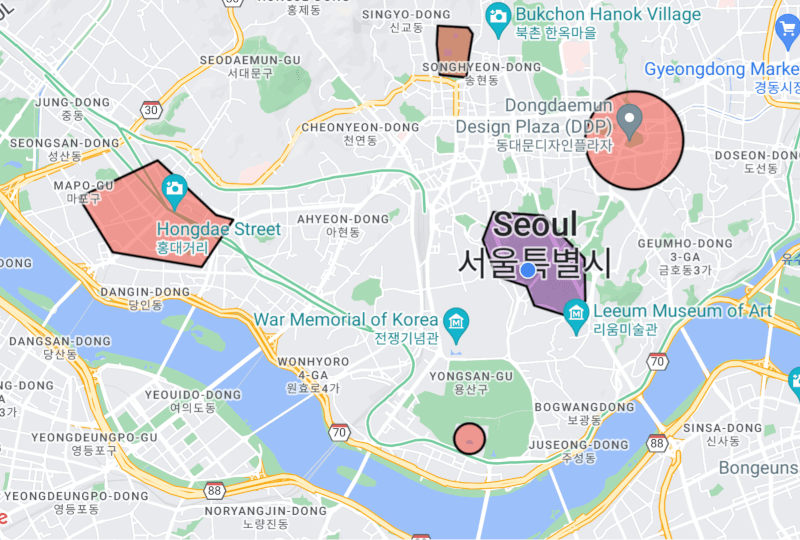
Orientação gerada a partir de informações públicas. Apenas para referência.
O pacote geofencing_api permite que desenvolvedores implementem geofencing circular e baseado em polígonos em plataformas Android, iOS e Web. Ele fornece uma interface unificada para monitorar fronteiras geográficas e acionar eventos quando os usuários entram ou saem de regiões definidas. Ideal para aplicativos orientados por localização, oferece rastreamento de localização em tempo real e monitoramento de regiões com configuração mínima. O plugin se integra perfeitamente a aplicativos Flutter e aproveita os recursos nativos de geofencing para desempenho otimizado e eficiência na bateria.
Casos de uso
Notificações baseadas em localização
Rastreamento de ativos
Alertas de proximidade
Check-ins geofenceados
Monitoramento de localização em tempo real
Principais recursos
Geofencing circular e poligonal
Suporte multiplataforma (Android, iOS, Web)
Integração de desempenho nativo
Monitoramento de região baseado em eventos
API simples para gerenciamento de região
Indicado para
Aplicativos móveis com serviços de localização
rastreamento de operações de campo
Aplicações de cidade inteligente
marketing de proximidade varejista
Sistemas de logística e entrega
Considerações
Requer permissão de localização
O uso da bateria pode aumentar com o monitoramento ativo
Suporte web limitado a navegadores modernos
A precisão do polígono depende da precisão do dispositivo
Restrições de execução em segundo plano em algumas plataformas
README original
Snapshot do README original do repositório-fonte vinculado. Consulte o repositório para o conteúdo mais recente.
This plugin is used to implement circular and polygon geofencing service.
[!CAUTION]
It does not use the geofencing api implemented in the platform.
Therefore, battery efficiency cannot be guaranteed.
Instead, this plugin can provide more accurate and real-time geofencing by navigating your location while your app is alive.
Features
Can create a circular type geofence.
Can create a polygon type geofence.
Can listen to geofence status changes in real-time.
<key>NSLocationAlwaysAndWhenInUseUsageDescription</key>
<string>Used to collect location data in the background.</string><key>NSLocationAlwaysUsageDescription</key><string>Used to collect location data in the background.</string><key>UIBackgroundModes</key><array><string>fetch</string><string>location</string></array>
Request location permission. To start the geofencing service, the permission result must be always or whileInUse.
Future<bool> requestLocationPermission({bool background = false}) async {
if (!awaitGeofencing.instance.isLocationServicesEnabled) {
// Location services is disabled.returnfalse;
}
LocationPermission permission =
awaitGeofencing.instance.getLocationPermission();
if (permission == LocationPermission.denied) {
// Android: ACCESS_COARSE_LOCATION or ACCESS_FINE_LOCATION// iOS 12-: NSLocationWhenInUseUsageDescription or NSLocationAlwaysAndWhenInUseUsageDescription// iOS 13+: NSLocationWhenInUseUsageDescription
permission = awaitGeofencing.instance.requestLocationPermission();
}
if (permission == LocationPermission.denied ||
permission == LocationPermission.deniedForever) {
// Location permission has been ${permission.name}.returnfalse;
}
// Web: Only allow whileInUse permission.if (kIsWeb || kIsWasm) {
returntrue;
}
// Android: You must request location permission one more time to access background location.// iOS 12-: You can request always permission through the above request.// iOS 13+: You can only request whileInUse permission through the above request.// When the app enters the background, a prompt will appear asking for always permission.if (Platform.isAndroid &&
background &&
permission == LocationPermission.whileInUse) {
// You need a clear explanation of why your app's feature needs access to background location.// https://developer.android.com/develop/sensors-and-location/location/permissions#request-background-location// Android: ACCESS_BACKGROUND_LOCATION
permission = awaitGeofencing.instance.requestLocationPermission();
if (permission != LocationPermission.always) {
// Location permission must always be granted to collect location in the background.returnfalse;
}
}
returntrue;
}
Set up the geofencing service.
interval: The millisecond interval at which to update the geofence status. This value may be delayed by device platform limitations. The default is 5000.
accuracy: The accuracy of the geofencing service in meters. The default is 100.
statusChangeDelay: The status change delay in milliseconds. GeofenceStatus.enter and GeofenceStatus.exit events may be called frequently when the location is near the boundary of the geofence. If the option value is too large, real-time geofencing is not possible, so use it carefully. The default is 10000.
allowsMockLocation: Whether to allow mock location. The default is false.
printsDebugLog: Whether to print debug logs in plugin. The default is true.