Orientação gerada a partir de informações públicas. Apenas para referência.
O pacote google_language_fonts simplifica a integração de fontes do Google que suportam diversos idiomas em aplicativos Flutter. Permite aos desenvolvedores incluir facilmente fontes compatíveis com idiomas sem configuração manual ou gerenciamento de recursos. O pacote manipula automaticamente o carregamento da fonte e garante uma renderização adequada em diferentes scripts e regiões. Ideal para aplicativos multilíngues, melhora a consistência tipográfica e acessibilidade. Com configuração mínima por meio de um único comando, ele agiliza a inclusão de fontes mantendo desempenho e escalabilidade.
Casos de uso
Interfaces de aplicativos multilíngues
Exibição de conteúdo internacionalizado
Melhor legibilidade do texto em diferentes scripts
Mudança dinâmica de fonte
design centrado em acessibilidade
Experiências do usuário localizadas
Principais recursos
Integração fácil com o Flutter
Carregamento automático de fonte
Suporte para múltiplos scripts de idiomas
Configuração mínima necessária
Desempenho otimizado
Compatibilidade multiplataforma
Indicado para
Desenvolvedores de aplicativos internacionais
Aplicativos voltados para públicos globais
Projetos que exigem suporte a diversos scripts
Equipes que priorizam a consistência da tipografia
Aplicações que precisam de renderização de texto acessível
Considerações
Limitado a fontes do Google
Nenhuma cache de fonte offline
Depende da conectividade com a internet para o carregamento inicial
Pode aumentar levemente o tamanho do aplicativo
Não adequado para fluxos de trabalho de fonte altamente personalizados
Requer seleção cuidadosa de glifos específicos da língua
README original
Snapshot do README original do repositório-fonte vinculado. Consulte o repositório para o conteúdo mais recente.
google_language_fonts
A simple way to use compatible fonts with your languages, without worrying about unrecognized characters.
This unofficial google_language_fonts package is an extension of the google_fonts package and it allows you to easily use more than 950 fonts
(and their variants) from fonts.google.com in your Flutter app.
These fonts are matched with the 27 languages listed below so you can use them right away from your IDE.
To use it as a language font simply add Fonts suffix to any of these currently supported languages below
** This language subset contains almost all fonts (same as base GoogleFonts)
Getting Started
With the google_language_fonts package, .ttf or .otf files do not need to be stored in your assets folder and mapped in
the pubspec. Instead, they can be fetched once via http at runtime, and cached in the app's file system. This is ideal for development, and can be the preferred behavior for production apps that
are looking to reduce the app bundle size. Still, you may at any time choose to include the font file in the assets, and the Google Fonts package will prioritize pre-bundled files over http fetching.
Because of this, the Google Fonts package allows developers to choose between pre-bundling the fonts and loading them over http, while using the same API.
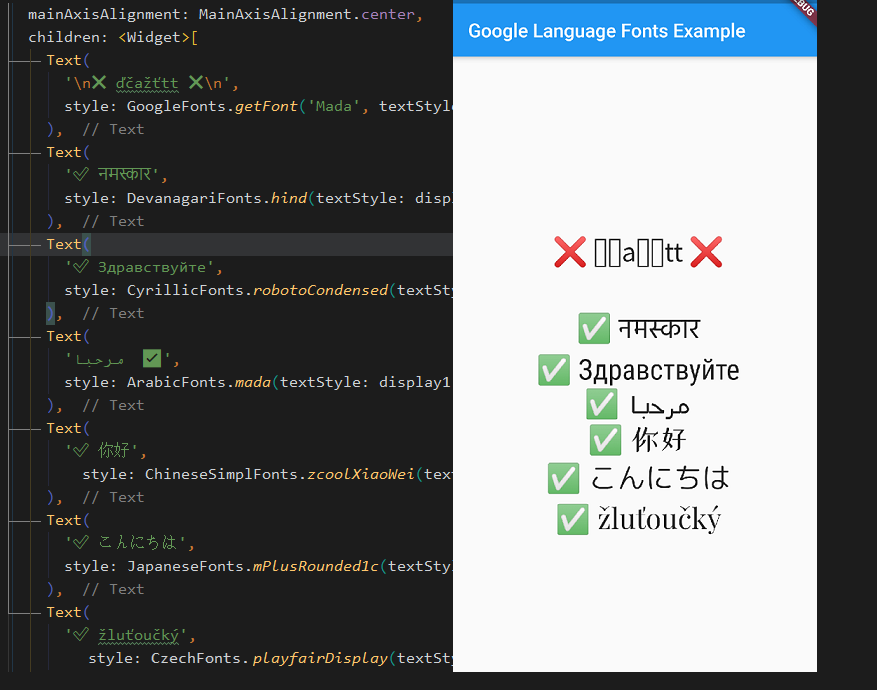
For example, say you want to use any of the Cyrillic fonts from Google Fonts in your Flutter app. You would need to try one by one until you find what satisfies your needs. With this package, you can try your fonts right away from IDE thanks to auto-suggestions.
To use for example LatinFonts with the default TextStyle:
Text(
  'This is Google Fonts',
  style: LatinFonts.playfairDisplay(),
),
Or, if you want to load the font dynamically:
Text(
  'This is Google Fonts',
  style: GoogleFonts.getFont('Lato'),
),
To use GoogleFonts with an existing TextStyle:
Text(
  'This is Google Fonts',
  style: CyrillicFonts.robotoCondensed(
    textStyle: TextStyle(color: Colors.blue, letterSpacing: .5),
  ),
),
or
Text(
  'This is Google Fonts',
  style: CyrillicFonts.robotoCondensed(textStyle: Theme.of(context).textTheme.display1),
),
To override the fontSize, fontWeight, or fontStyle:
Text(
  'This is Google Fonts',
  style: LatinFonts.playfairDisplay(
    textStyle: Theme.of(context).textTheme.display1,
    fontSize: 48,
    fontWeight: FontWeight.w700,
    fontStyle: FontStyle.italic,
  ),
),
You can also use for example CyrillicFonts.robotoCondensedTextTheme() to make or modify an entire text theme to use the "robotoCondensedTextTheme" font.
The google_language_fonts package will automatically use matching font files in your pubspec.yaml's
assets (rather than fetching them at runtime via HTTP). Once you've settled on the fonts
you want to use:
Download the font files from https://fonts.google.com.
You only need to download the weights and styles you are using for any given family.
Italic styles will include Italic in the filename. Font weights map to file names as follows:
Move those fonts to a top-level app directory (e.g. google_fonts).
Ensure that you have listed the folder (e.g. google_fonts/) in your pubspec.yaml under assets.
Note: Since these files are listed as assets, there is no need to list them in the fonts section
of the pubspec.yaml. This can be done because the files are consistently named from the Google Fonts API
(so be sure not to rename them!)
Compatibility
In this package calling fonts from the GoogleFonts class is not possible due to having faster IDE auto-suggestions and to not clash with the official package. However, this package is compatible with the official google_fonts package. If you want to access any font without having to be limited to a language then you can either:
just use LatinFonts prefix, which contains almost all fonts from the base GoogleFonts, e.g.: LatinFonts.lato(),
or call a font dynamically: GoogleFonts.getFont('Lato'),
// you can not access e.g.: GoogleFonts.lato(), only dynamically via GoogleFonts.getFont('Lato')import'package:google_language_fonts/google_language_fonts.dart';
or add official google_fonts package and use GoogleFonts in this way:
// only if you add google_fonts package then you can access it with 'as' keyword like:import'package:google_fonts/google_fonts.dart'as basic; // basic.GoogleFonts.lato()
Licensing Fonts
The fonts on fonts.google.com include license files for each font. For
example, the Lato font comes with an OFL.txt file.
Once you've decided on the fonts you want in your published app, you should download and add the appropriate
licenses to your flutter app's LicenseRegistry.