Buscar pacotes, repositórios e categorias de apps

Detalhes do pacotev0.0.6

image_crop_widget

Um widget Flutter para cortar imagens. O widget é escrito completamente em Dart e tem dependências mínimas.

Downloads em 30 dias
18
Curtidas
9
Pontos Pub
40

Instalar pacote

flutter pub add image_crop_widget

Visão geral do pacote

Orientação gerada a partir de informações públicas. Apenas para referência.

Um widget do Flutter projetado para cortar imagens diretamente dentro dos aplicativos. Construído inteiramente em Dart com dependências mínimas, oferece uma solução leve e eficiente para manipulação de imagens. O widget fornece controles intuitivos para selecionar e ajustar áreas de corte, tornando-o ideal para edição de fotos de perfil ou pré-processamento de imagens. Integra-se perfeitamente em projetos Flutter e suporta design responsivo em diferentes tamanhos de tela.

Casos de uso

  • Recorte de imagem de perfil
  • Pré-processamento de imagem antes do upload
  • edição de conteúdo gerado pelo usuário
  • Ferramentas de edição de fotos em aplicativos
  • Fluxos de trabalho personalizados de seleção de imagem

Principais recursos

  • Implementação pura em Dart
  • Dependências mínimas
  • Interface do usuário responsiva
  • Controles intuitivos de corte por arrastar e soltar
  • Integração fácil com projetos Flutter

Indicado para

  • Desenvolvedores construindo aplicativos com muitas imagens
  • Aplicativos que exigem cortar imagem do usuário
  • Projetos que priorizam dependências leves
  • Desenvolvedores front-end procurando soluções simples
  • Recursos de aplicativo móvel com necessidades de edição de imagem

Considerações

  • Limitado à funcionalidade básica de corte
  • Sem filtros ou melhorias de imagem embutidos
  • Requer manipulação manual da saída de imagem cortada
  • Não otimizado para imagens muito grandes
  • Sem suporte para múltiplas áreas de corte simultaneamente
README original

Snapshot do README original do repositório-fonte vinculado. Consulte o repositório para o conteúdo mais recente.

image_crop_widget

A Flutter widget to crop images. The widget is completely written in Dart and has minimal dependencies.

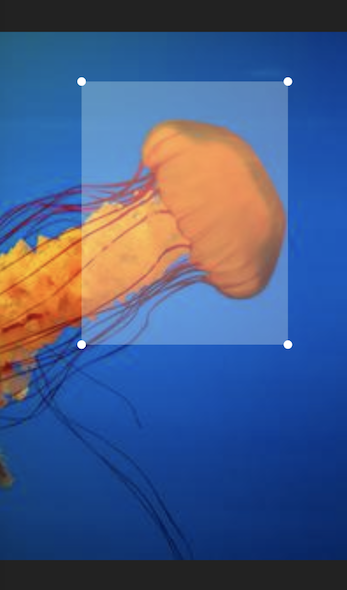
The widget displays the image within the given layout space. On top of the image a transparent rectangular overlay, with handles on each corner, is drawn. The overlay handles can be dragged by touch to adjust the cropping area.

Example

By calling the cropImage() method on the widget's state object, the image area that is marked by the overlay is returned as a new image object.

To acquire the widget's state you can use a GlobalKey object.

Example:

import 'dart:ui'; // This imports the 'Image' class.

final key = GlobalKey<ImageCropState>();
Image imageObject = ...

...

ImageCrop(key: key, image: imageObject) // This could be used inside a  build method.

...
await key.currentState.rotateImage(); // Rotate the image be 90° clockwise.
final cropedImage = await key.currentState.cropImage(); // This could be used inside a 'onPress' handler method.

How to create an image object

The Image class from dart:ui is typically not instantiated directly. Instead, you could convert your image data into a Uint8List and instantiate the image like this:

Uint8List bytes = ...
final codec = await instantiateImageCodec(bytes);
final frame = await codec.getNextFrame();
final image = frame.image;

How to display an image object

The Image object can be displayed with the Flutter Image widget. One way to do this, is by converting the image into a Uint8List and pass it into the widget's memory constructor. Please note, that the widget is not the same Image class as the image object itself.

final cropedImage = await key.currentState.cropImage();
final byte = await cropedImage.toByteData(format: ui.ImageByteFormat.png);
final byteList = byte.buffer.asUint8List();

Image.memory(byteList)

How to persist an image object

The Image object can be persisted into a file or a database. To do this, you can convert the image object into a Uint8List and write it into a File or your database object.

final cropedImage = await key.currentState.cropImage();
final byte = await cropedImage.toByteData(format: ui.ImageByteFormat.png);
final byteList = byte.buffer.asUint8List();

final imageFile = File("Some path and filename"); // You can use the path_provider package to locate the right path.
final result = await imageFile.writeAsBytes(byteList);

Categorias

Repositório-fonte

Projetos que usam este pacote

Ainda não há dados.