Orientação gerada a partir de informações públicas. Apenas para referência.
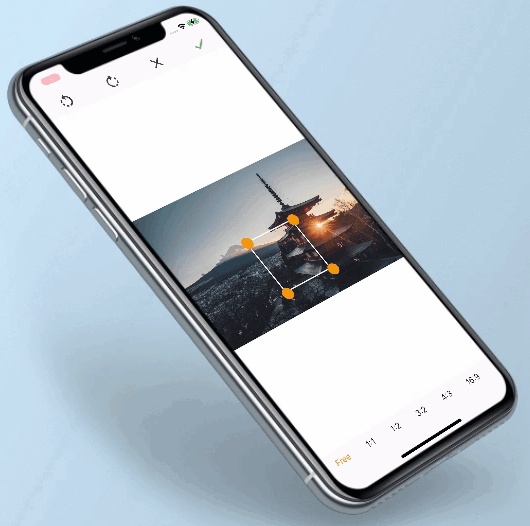
O pacote image_cropping permite que desenvolvedores Flutter implementem funcionalidades de recorte de imagem com proporções personalizáveis e escala livre. Ele oferece controle preciso sobre as regiões de corte, tornando-o ideal para fotos de perfil, miniaturas ou qualquer outro caso de uso que exija redimensionamento e corte de imagens. O pacote é compatível com múltiplas plataformas, incluindo Android, iOS, Web, macOS, Windows e Linux, garantindo comportamento consistente em ambientes diversos. Com uma API simples, integra-se perfeitamente a aplicativos existentes, proporcionando uma experiência de usuário aprimorada.
Casos de uso
Corte de imagem do perfil
Geração de miniaturas
Ferramentas de edição de imagem
Personalização do avatar do usuário
Fluxos de trabalho de criação de conteúdo
Processamento de imagem de mídia social
Principais recursos
Travação de proporção
Corte de escala livre
Compatibilidade multiplataforma
Integração simples da API
Suporte de visualização em tempo real
Suporte para múltiplas plataformas
Indicado para
desenvolvedores de aplicativos móveis
Criadores de aplicativos web
Implementadores de recursos de edição de imagem
plataformas de mídia social
Aplicações de comércio eletrônico
Sistemas de upload de fotos para usuários
Considerações
Requer validação de entrada de imagem
Pode ser necessário componentes de interface adicionais para uma experiência do usuário completa
Impacto no desempenho em imagens grandes
Limitado a operações básicas de corte
Sem filtros de imagem embutidos
Depende de dependências externas para funcionalidades avançadas
README original
Snapshot do README original do repositório-fonte vinculado. Consulte o repositório para o conteúdo mais recente.
image_cropping
This plugin supports cropping and rotating images for multiplatform. It Allow inclusion of background, Rotation of image, changing ratio of selection as per requirements.
Allow inclusion of background.
Rotation of image.
Change ratio of selection.
Installation
If you are targeting web, don't forget to add worker.js in your project's root directory.
You can also add worker.js.deps and worker.js.map but they are optional and only used for development.
These 3 files are generated when running the following command in the example folder:
For more details on the command, check this link.
It converts the dart code to JS, which will then be run in a web worker.
Example
final croppedBytes = awaitImageCropping.cropImage(
context: context,
imageBytes: bytes,
onImageStartLoading: () {
showLoader();
},
onImageEndLoading: () {
hideLoader();
},
onImageDoneListener: (data) {
// You can also use a listener instead of awaiting the functionsetState(() {
imageBytes = data;
});
},
selectedImageRatio: ImageRatio.RATIO_1_1,
visibleOtherAspectRatios: true,
squareBorderWidth: 2,
squareCircleColor: Colors.black,
defaultTextColor: Colors.orange,
selectedTextColor: Colors.black,
colorForWhiteSpace: Colors.grey,
encodingQuality: 80,
outputImageFormat: OutputImageFormat.jpg,
workerPath: 'crop_worker.js',
);
Required parameters
BuildContext:
Context is use to push new screen for image cropping.
_imageBytes:
Image bytes is use to draw image in device and if image not fits in device screen then we manage background color(if you have passed colorForWhiteSpace or else White background) in image cropping screen.
_onImageStartLoading:
This is a callback. you have to override and show dialog or etc when image cropping is in loading state.
_onImageEndLoading:
This is a callback. you have to override and hide dialog or etc when image cropping is ready to show result in cropping screen.
_onImageDoneListener:
This is a callback. you have to override and you will get Uint8List as result.
Optional parameters
ImageRatio:
This property contains ImageRatio value. You can set the initialized aspect ratio when starting the cropper by passing a value of ImageRatio. default value is ImageRatio.FREE
visibleOtherAspectRatios:
This property contains boolean value. If this properties is true then it shows all other aspect ratios in cropping screen. default value is true.
squareBorderWidth:
This property contains double value. You can change square border width by passing this value.
squareCircleColor:
This property contains Color value. You can change square circle color by passing this value.
defaultTextColor:
This property contains Color value. By passing this property you can set aspect ratios color which are unselected.
selectedTextColor:
This property contains Color value. By passing this property you can set aspect ratios color which is selected.
colorForWhiteSpace:
This property contains Color value. By passing this property you can set background color, if screen contains blank space.
encodingQuality
Set the encodingQuality of the cropped image. Defaults to 100 (max).
High quality involves bigger image file size.
outputImageFormat
Output format of cropped image, can be PNG or JPG, default is JPG.
workerPath
You may want to change the worker.js name, especially if you use other web workers and you already have a worker.js file.
Defaults to 'worker.js'.
Note:
For flutter web, copy worker.js from example folder to the project, else it will not work.
The result returns in Uint8List. so it can be lost later, you are responsible for storing it somewhere permanent (if needed).
Guideline for contributors
Contribution towards our repository is always welcome, we request contributors to create a pull request to the develop branch only.
Guideline to report an issue/feature request
It would be great for us if the reporter can share the below things to understand the root cause of the issue.
Library version
Code snippet
Logs if applicable
Device specification like (Manufacturer, OS version, etc)
Screenshot/video with steps to reproduce the issue
We’d be really happy if you send us links to your projects where you use our component. Just send an email to sales@mindinventory.com And do let us know if you have any questions or suggestion regarding our work.