Buscar pacotes, repositórios e categorias de apps

Capa de input_history_text_field
Detalhes do pacotev0.4.0

input_history_text_field

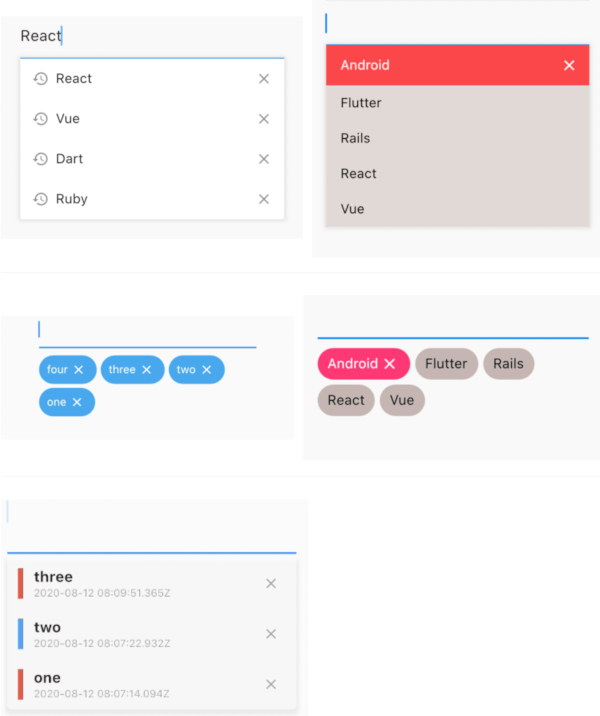
Um widget input_history_text_field é salvo automaticamente e sugere enquanto você digita.

AndroidiOSWebmacOSWindowsLinux
Downloads em 30 dias
1,3 mil
Curtidas
80
Pontos Pub
150

Instalar pacote

flutter pub add input_history_text_field

Visão geral do pacote

Orientação gerada a partir de informações públicas. Apenas para referência.

O pacote input_history_text_field fornece um widget do Flutter que salva automaticamente o histórico de entrada do usuário e oferece sugestões enquanto os usuários digitam. Melhora a usabilidade dos formulários lembrando entradas anteriores, reduzindo a digitação repetitiva. Ideal para campos de pesquisa, formulários de login ou qualquer entrada onde entradas anteriores sejam valiosas. O widget é compatível com múltiplas plataformas, incluindo Android, iOS, Web, macOS, Windows e Linux, garantindo comportamento consistente entre dispositivos. Desenvolvido com simplicidade e desempenho em mente, integra-se perfeitamente em aplicativos Flutter existentes.

Casos de uso

  • Barras de pesquisa com sugestões automáticas
  • Entradas de formulário com retenção de histórico
  • Campos de login ou registro
  • Configurações de preferência do usuário
  • Acesso rápido ao texto frequentemente digitado
  • Experiência do usuário aprimorada na entrada de dados

Principais recursos

  • Salvamento automático do histórico de entrada
  • Sugestão em tempo real enquanto você digita
  • Compatibilidade multiplataforma
  • Integração simples com formulários existentes
  • Leve e eficiente
  • Suporta todas as principais plataformas do Flutter

Indicado para

  • Desenvolvedores construindo interfaces de pesquisa
  • Aplicativos que exigem entrada repetida do usuário
  • Formulários com o objetivo de melhorar a experiência do usuário
  • Projetos direcionados para múltiplas plataformas
  • Equipes que desejam configuração mínima para recursos de histórico

Considerações

  • Requer manipulação manual da persistência de armazenamento
  • Pode ser necessário personalizar para grandes conjuntos de dados
  • Não adequado para dados sensíveis devido ao armazenamento local
  • Opções limitadas de estilo embutido
  • Depende de gerenciamento externo de estado para casos de uso avançados

README original

Snapshot do README original do repositório-fonte vinculado. Consulte o repositório para o conteúdo mais recente.

input_history_text_field

A input_history_text_field widget is automatically saved and suggest as you type.

Overview

List

example1 example2
image image

Badge

example1 example2
image image

Customize

 
image

Getting Started

Usage

The only key in the your widget of application set to historyKey, supports like a text_field.

InputHistoryTextField(
    historyKey: "01",
),

a saved automatically as you type.( save up to limit, default to 5 )

input_history_text_field-1

a input history is suggested.

input_history_text_field-2

input history can be deleted.

input_history_text_field-3

Example

simple

All you need is a historyKey.

InputHistoryTextField(
    historyKey: "01",
),
badge style

Change style to badge is listStyle = ListStyle.Badge

InputHistoryTextField(
    historyKey: "01",
    listStyle: ListStyle.Badge,
),

 
image
Default items

If there is an item you want to display from the beginning or an item you want the user to selected.

InputHistoryTextField(
    historyKey: "01",
    lockItems: ['Flutter', 'Rails', 'React', 'Vue'],
),

List
image
change icon

Can hide or change the icon.

InputHistoryTextField(
    historyKey: "01",
    showHistoryIcon: true,
    showDeleteIcon: true,
    historyIcon: Icons.add,
    deleteIcon: Icons.delete,
),
 
image
gradually transmitted

enableOpacityGradient is input history list is gradually transmitted.

InputHistoryTextField(
    historyKey: "01",
    enableOpacityGradient: true,
),
 
image
lines decoration

listRowDecoration is input history lines as a decoration.

InputHistoryTextField(
    historyKey: "01",
    listRowDecoration: BoxDecoration(
        border: Border(
        left: BorderSide(color: Colors.blue, width: 8),
        ),
    ),
),

 
image
list decoration

listDecoration is input history list as a decoration.

InputHistoryTextField(
    historyKey: "01",
    listDecoration: BoxDecoration(
        color: Colors.cyan,
        borderRadius: BorderRadius.only(
            bottomLeft: Radius.circular(20),
            bottomRight: Radius.circular(20)),
        boxShadow: [
        BoxShadow(
            color: Colors.grey.withOpacity(0.2),
            spreadRadius: 8,
            blurRadius: 8,
            offset: Offset(0, 3)),
        ],
    ),
),

 
image
list layout builder

If you want to customize everything, to use historyListItemLayoutBuilder.

InputHistoryTextField(
    historyKey: "01",
    historyListItemLayoutBuilder: (controller, value, index) {
        return InkWell(
        onTap: () => controller.select(value.text),
        child: Row(
            children: [
            Expanded(
                flex: 1,
                child: Container(
                    margin: const EdgeInsets.only(left: 10.0),
                    padding: const EdgeInsets.only(left: 10.0),
                    decoration: BoxDecoration(
                    border: Border(
                        left: BorderSide(
                        width: 5.0,
                        color: index % 2 == 0
                            ? Colors.red
                            : Colors.blue,
                        ),
                    ),
                    ),
                    child: Column(
                    crossAxisAlignment: CrossAxisAlignment.start,
                    children: [
                        Text(
                        value.textToSingleLine,
                        overflow: TextOverflow.ellipsis,
                        style:
                            TextStyle(fontWeight: FontWeight.bold),
                        ),
                        Text(
                        DateTime.fromMillisecondsSinceEpoch(
                                value.createdTime)
                            .toUtc()
                            .toString(),
                        overflow: TextOverflow.ellipsis,
                        style: TextStyle(
                            fontSize: 10,
                            color: Theme.of(context).disabledColor),
                        ),
                    ],
                    )),
            ),
            IconButton(
                icon: Icon(
                Icons.close,
                size: 16,
                color: Theme.of(context).disabledColor,
                ),
                onPressed: () {
                controller.remove(value);
                },
            ),
            ],
        ),
    );}
)
 
image
API
name ex note
historyKey key-01 String a only key in the your application,saved with this key.
limit 5 int max limit of input history
hasFocusExpand true bool show input history of edit text focused
showHistoryIcon true bool icon of input history at left positioned
showDeleteIcon true bool icon of delete at right positioned
enableHistory true bool enabled/disabled of input history
enableSave true bool enabled/disabled saved history
enableOpacityGradient true bool make the input history list gradually transparent
enableFilterHistory true bool suggest filters when input text
showHistoryList true bool show/hide of input history list
historyIcon Icons.add IconData IconData for history icon.
historyIconTheme IconTheme IconTheme IconTheme for history icon.
deleteIcon Icons.delete IconData IconData for delete icon.
deleteIconTheme IconTheme IconTheme IconTheme for delete icon.
listOffset Offset(0, 5) Offset set a position for list.
listTextStyle TextStyle(fontSize: 30) TextStyle sets a text style for list.
listRowDecoration BoxDecoration Decoration a row of input history for decoration
listDecoration BoxDecoration Decoration a list of input history for decoration
listStyle ListStyle.List ListStyle change style List or Badge
textColor Colors.black Color a text color
backGroundColor Colors.grey Color a background color
historyIconColor Colors.white Color a history icon color
deleteIconColor Colors.white Color a delete icon color
lockItems ['Flutter', 'Rails', 'React', 'Vue'] List
fixed shown, cannot be delete items
lockTextColor Colors.black Color a lock items text color
lockBackgroundColor Colors.grey Color a lock items background color
historyListItemLayoutBuilder Widget Widget a customize full layout.
InputHistoryController InputHistoryController InputHistoryController Select or delete the input history list

Categorias

Dependências

Lista de dependências 1 itens

Repositório-fonte

Projetos que usam este pacote

Ainda não há dados.