Buscar pacotes, repositórios e categorias de apps

Detalhes do pacotev1.4.0

intent

Um plugin Flutter simples de usar para lidar com Intents do Android - sua solução completa para Intents do Android.

Downloads em 30 dias
223
Curtidas
122
Pontos Pub
40

Instalar pacote

flutter pub add intent

Visão geral do pacote

Orientação gerada a partir de informações públicas. Apenas para referência.

O pacote intent é um plugin simples do Flutter projetado para simplificar o manuseio de Intents no Android. Permite uma comunicação fluida entre aplicativos Flutter e componentes nativos do Android, permitindo que desenvolvedores iniciem atividades, enviem transmissões e gerenciem intents com código mínimo. Ideal para compartilhar dados, abrir aplicativos externos ou acionar ações do sistema, como enviar e-mails ou mensagens. O plugin abstrai a complexa API de Intent do Android em métodos Dart fáceis de usar, tornando-o acessível mesmo para iniciantes. Com documentação clara e manutenção ativa, serve como uma ponte confiável entre o Flutter e a funcionalidade nativa do Android.

Casos de uso

  • Compartilhando conteúdo entre aplicativos
  • Iniciando aplicativos externos
  • Enviando intenções de difusão
  • Abrir configurações do sistema
  • Manipulação de links profundos
  • Disparar ações do dispositivo

Principais recursos

  • Interface simples do Dart para Android Intents
  • Suporta intenções implícitas e explícitas
  • Integração fácil com fluxos de trabalho do Flutter
  • Código mínimo de boilerplate
  • Repositório ativo no GitHub
  • Documentação clara

Indicado para

  • Desenvolvedores Flutter direcionados ao Android
  • Aplicativos que precisam de ações específicas do Android
  • Recursos de compartilhamento e link profundo
  • Iniciantes aprendendo integração com Android

Considerações

  • Funcionalidade exclusiva para Android
  • Limitado à plataforma Android
  • Requer conhecimento do Android SDK para uso avançado
  • Sem suporte para iOS
  • Pode ser necessário permissões adicionais para certos intents

README original

Snapshot do README original do repositório-fonte vinculado. Consulte o repositório para o conteúdo mais recente.

Warning I've stopped maintaining this project !

intent

A simple flutter plugin to deal with Android Intents - your one stop solution for Android Intents, written with :heart:.

Show some :heart: by putting :star:

intent tries to help you in launching another android activity using Android Intents. This Dart API replicates Android Intent API, so for detailed information on how to use it efficiently, when to send what kind of data, you may be interested in taking a look here, which explains things more elaborately.

intent is readily available for use.

what does it do ?

  • intent is your one stop solution for handling different Android Intents from Flutter app.
  • It provides an easy to use Dart API, which can be used to launch different kind of Android Activities
  • You can view / create documents
  • Pick document(s) from Document Tree
  • Open default Assist Activity
  • Perform a Web Search
  • Request definition of a certain string to default Assist Activity
  • Open image for editing / viewing
  • Share text / multimedia to another activity
  • Send Email to specific user, while also setting CC & BCC
  • Share multiple documents at a time
  • Sync system content
  • Translate text
  • Set Wallpaper
  • Open any URL
  • Open Dialer for calling a specific number
  • Can pick a contact from your default phone activity
  • Can capture a photo using default Camera Activity
latest addition

Newest Addition: You can pass extra data's type information, while invoking Intent.putExtra(String extra, dynamic data, {String type}) as optional named param type. You don't even need to hardcode type names as Strings, rather a class named TypedExtra has been given to developers, which has all currently supported type names as static variables. Consider using them. And last but not least, this is not a breaking change !!!

import 'package:intent/intent.dart' as android_intent;
import 'package:intent/extra.dart' as android_extra;
import 'package:intent/typedExtra.dart' as android_typedExtra;
import 'package:intent/action.dart' as android_action;

// more codes ...

android_intent.Intent()
        ..setAction(android_action.Action.ACTION_SHOW_APP_INFO)
        ..putExtra(android_extra.Extra.EXTRA_PACKAGE_NAME, "com.whatsapp", type: android_typedExtra.TypedExtra.stringExtra)
        ..startActivity().catchError((e) => print(e));

how to use it ?

Well make sure, you include intent in your pubspec.yaml.

Define a Term :
Intent()
        ..setAction(Action.ACTION_DEFINE)
        ..putExtra(Extra.EXTRA_TEXT, "json")
        ..startActivity().catchError((e) => print(e));
Show Desired Application Info :

Make sure you address app using its unique package id.

Intent()
        ..setAction(Action.ACTION_SHOW_APP_INFO)
        ..putExtra(Extra.EXTRA_PACKAGE_NAME, "com.whatsapp")
        ..startActivity().catchError((e) => print(e));
Show Application Preference Activity :
Intent()
        ..setAction(Action.ACTION_APPLICATION_PREFERENCES)
        ..startActivity().catchError((e) => print(e));
Launch Application Error Reporting Activity :
Intent()
        ..setAction(Action.ACTION_APP_ERROR)
        ..startActivity().catchError((e) => print(e));
Launch Default Assist Activity :
Intent()
        ..setAction(Action.ACTION_ASSIST)
        ..startActivity().catchError((e) => print(e));
Report Bug :
Intent()
        ..setAction(Action.ACTION_BUG_REPORT)
        ..startActivity().catchError((e) => print(e));
View a URI :

Which activity to be launched, depends upon type of URI passed.

In case of passing tel URI, opens dialer up.

Intent()
        ..setAction(Action.ACTION_VIEW)
        ..setData(Uri(scheme: "tel", path: "123"))
        ..startActivity().catchError((e) => print(e));

If you pass a mailto URI, it'll open email app.

Intent()
        ..setAction(Action.ACTION_VIEW)
        ..setData(Uri(scheme: "mailto", path: "someone@example.com"))
        ..startActivity().catchError((e) => print(e));

In case of http/ https URI, opens browser up.

Intent()
        ..setAction(Action.ACTION_VIEW)
        ..setData(Uri(scheme: "https", host:"google.com"))
        ..startActivity().catchError((e) => print(e));
Dial a Number using Default Dial Activity :

Setting data using tel URI, will open dialer, number as input.

Intent()
        ..setAction(Action.ACTION_DIAL)
        ..setData(Uri(scheme: 'tel', path: '121'))
        ..startActivity().catchError((e) => print(e));

But if you're interested in opening dialer without any numbers dialer, make sure you don't set data field.

Intent()
        ..setAction(Action.ACTION_DIAL)
        ..startActivity().catchError((e) => print(e));
Calling a Number :

You can simply call a number, but make sure you've necessary permissions to do so.

Intent()
        ..setAction(Action.ACTION_CALL)
        ..setData(Uri(scheme: 'tel', path: '121'))
        ..startActivity().catchError((e) => print(e));

It'll always be a wise decision to use ACTION_DIAL, because that won't require any kind of permissions.

Create Precomposed Email :
Intent()
        ..setPackage("com.google.android.gm")
        ..setAction(Action.ACTION_SEND);
        ..setType("message/rfc822");
        ..putExtra(Extra.EXTRA_EMAIL, ["john.doe@exampleemail.com"]);
        ..putExtra(Extra.EXTRA_CC, ["jane.doe@exampleemail.com"]);
        ..putExtra(Extra.EXTRA_SUBJECT, "Foo bar");
        ..putExtra(Extra.EXTRA_TEXT, "Lorem ipsum");
        ..startActivity().catchError((e) => print(e));
Create a Document :

Content type of document is set text/plain, category is CATEGORY_OPENABLE and file name is passed as an extra i.e. EXTRA_TITLE.

Intent()
        ..setAction(Action.ACTION_CREATE_DOCUMENT)
        ..setType("text/plain")
        ..addCategory(Category.CATEGORY_OPENABLE)
        ..putExtra(Extra.EXTRA_TITLE, "test.txt")
        ..startActivity().catchError((e) => print(e));

You can also set path of file using data field. But make sure data field is a valid path URI.

Edit Document :

You can edit image/ text or any other kind of data using appropriate activity.

Intent()
        ..setAction(Action.ACTION_EDIT)
        ..setData(Uri(scheme: 'content',
                path:
                'path-to-image'))
        ..setType('image/*')
        ..startActivity().catchError((e) => print(e));
Add a Contact to your Contact Database :
Intent()
        ..setAction('com.android.contacts.action.SHOW_OR_CREATE_CONTACT')
        ..setData(Uri(scheme: 'tel', path: '1234567890'))
        ..startActivity().catchError((e) => print(e));
Search for a Term :

Opens up a list of eligible candidates, which can provides search activity.

Intent()
        ..setAction(Action.ACTION_SEARCH)
        ..putExtra(Extra.EXTRA_TEXT, 'json')
        ..startActivity().catchError((e) => print(e));
Share Text/ Media :

Make sure you've set appropriate path URI for sharing documents/ media using EXTRA_STREAM and also set type properly.

Following one will share a plain text. For sharing html formatted text, set type to text/html.

Intent()
        ..setAction(Action.ACTION_SEND)
        ..setType('text/plain')
        ..putExtra(Extra.EXTRA_TEXT, 'json')
        ..startActivity().catchError((e) => print(e));

But if you're interested in creating a chooser i.e. all eligible candidates shown up system, which can handle this intent, make sure you set createChooser named parameter to true, which is by default false.

Send Email to certain ID while setting Content and CC/ BCC :
Intent()
        ..setAction(Action.ACTION_SENDTO)
        ..setData(Uri(scheme: 'mailto', path: 'anjanroy@yandex.com'))
        ..putExtra(Extra.EXTRA_CC, ['someone@example.com'])
        ..putExtra(Extra.EXTRA_TEXT, 'Hello World')
        ..startActivity().catchError((e) => print(e));
Translate a Text using default Assist Activity :
Intent()
        ..setAction(Action.ACTION_TRANSLATE)
        ..putExtra(Extra.EXTRA_TEXT, "I Love Computers")
        ..startActivity().catchError((e) => print(e));
Pick a Contact up from Phone :
  • Opens default Phone Activity and let user pick a contact up, selected contact will be returned as Future<List<String>> from startActivityForResult().
        Intent()
                ..setAction(Action.ACTION_PICK)
                ..setData(Uri.parse('content://contacts'))
                ..setType("vnd.android.cursor.dir/phone_v2")
                ..startActivityForResult().then((data) => print(data),
                onError: (e) => print(e));
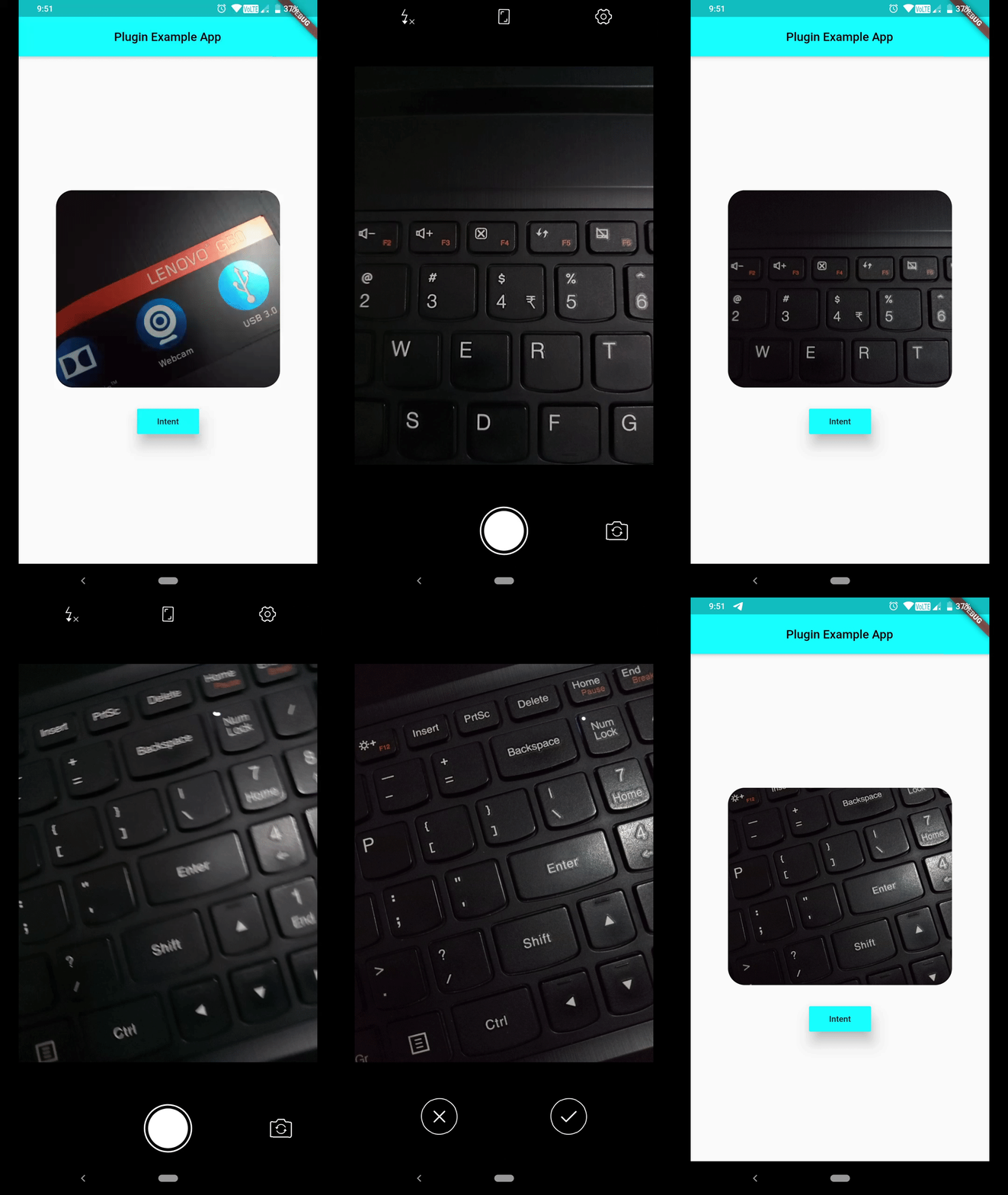
Capture Image using default Camera activity :

Path to captured image can be grabbed from Intent().startActivityForResult().then(() { ... } ), which will be provided in form of List<String>, open file using that path, File(data[0]). Now you can work on that image file.

        Intent()
                ..setAction(Action.ACTION_IMAGE_CAPTURE)
                ..startActivityForResult().then((data) => print(data[0]), // gets you path to image captured
                onError: (e) => print(e));

image_capture_using_intent

If you're not interested in showing default activity launch animation, set following flag.

Intent()..addFlag(Flag.FLAG_ACTIVITY_NO_ANIMATION);

If you don't want this activity to be displayed in recents, set following flag.

Intent()..addFlag(Flag.FLAG_ACTIVITY_EXCLUDE_FROM_RECENTS);

If you request for certain Activity and no eligible candidate was found, you'll receive one error message, which you can listen for using Future.catchError((e) {},) method.

PlatformException(Error, android.content.ActivityNotFoundException: No Activity found to handle Intent { act=android.intent.action.SYSTEM_TUTORIAL }, null)

Currently a limited number of Actions are provided in Action class, but you can always use a string constant as an Action, which will help you in dealing with many more Activities.

Hoping this helps :wink:

Categorias

Repositório-fonte

Projetos que usam este pacote

Ainda não há dados.