Buscar pacotes, repositórios e categorias de apps

Detalhes do pacotev0.3.0

json_gen_form

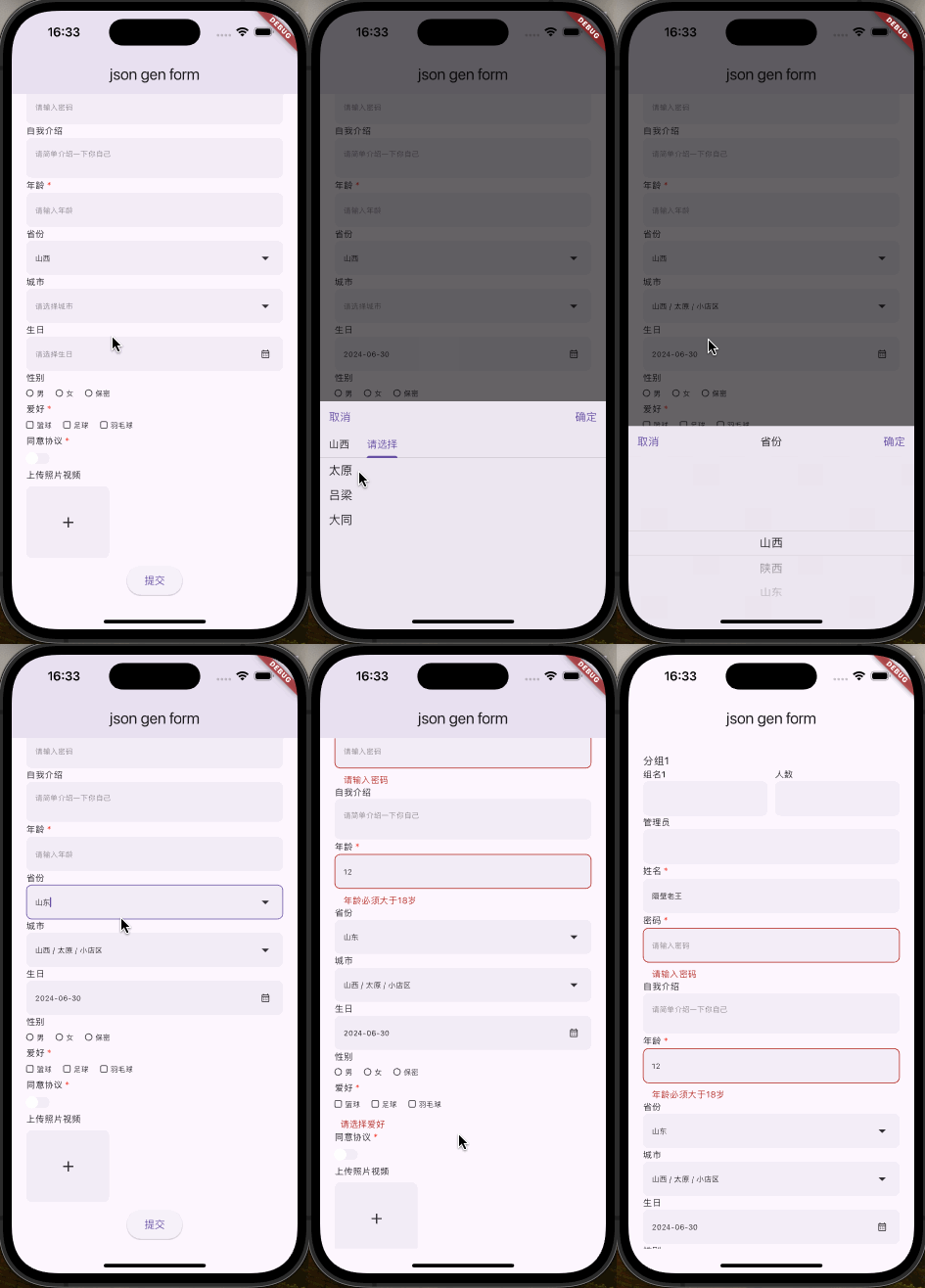
Gere formulários Flutter usando JSON, com uma variedade de controles de formulário integrados, suporte à validação, layouts personalizados, estilos personalizados e agrupamento de formulários aninhados ilimitados.

AndroidiOSmacOS
Downloads em 30 dias
28
Curtidas
5
Pontos Pub
140

Instalar pacote

flutter pub add json_gen_form

Visão geral do pacote

Orientação gerada a partir de informações públicas. Apenas para referência.

json_gen_form é um pacote Flutter que permite a geração dinâmica de formulários a partir de JSON, com suporte a uma ampla variedade de controles de formulário embutidos, regras de validação, layouts personalizados e estilos. Ele permite o agrupamento aninhado de formulários, tornando-o ideal para interfaces do tipo server-driven. Os desenvolvedores podem definir formulários de forma declarativa em JSON, reduzindo o código repetitivo e permitindo estruturas de formulários flexíveis e sustentáveis em múltiplas plataformas.

Casos de uso

  • Renderização dinâmica de formulários a partir de JSON
  • UI impulsionada por servidor com formulários configuráveis
  • Estruturas de formulário aninhadas
  • Validação em tempo real do formulário
  • Layouts de formulários personalizáveis

Principais recursos

  • Controles de formulário embutidos
  • Suporte de validação
  • Layouts e estilos personalizados
  • Agrupamento de formulário aninhado
  • Definição de formulário baseada em JSON

Indicado para

  • Desenvolvedores construindo interfaces de usuário com controle do servidor
  • Equipes que precisam de lógica de formulário reutilizável
  • Aplicativos que exigem conteúdo de formulário dinâmico
  • Desenvolvedores front-end trabalhando com esquemas JSON
  • Projetos com mudanças frequentes de formulário

Considerações

  • Requer um design cuidadoso do esquema JSON
  • Limitado aos tipos de controle compatíveis
  • Pode ser necessário lógica de validação adicional
  • sobrecarga de análise em tempo de execução
  • Dependente de entrada JSON precisa

README original

Snapshot do README original do repositório-fonte vinculado. Consulte o repositório para o conteúdo mais recente.

JSON_GEN_FORM

Generate Flutter forms using JSON, featuring a variety of built-in form controls,
support for validation, custom layouts, custom styles, and unlimited nested form grouping.

English · 中文

Features

  • Render form using JSON
  • Form validation
  • Custom form styles
  • Custom layouts (row, col)
  • Infinite form grouping and nesting (group)
  • Modify entire form values or individual form control values through methods
  • Form controls:
    • Text box
    • Password box
    • Textarea
    • Number
    • Radio button
    • Checkbox
    • Dropdown
    • Switch
    • Multimedia upload
    • Date picker
    • Time picker
    • DateTime picker

Usage

import 'package:flutter/material.dart';
import 'package:json_gen_form/json_gen_form.dart';

void main() {
  runApp(const MainApp());
}

class MainApp extends StatefulWidget {
  const MainApp({super.key});

  @override
  State<MainApp> createState() => _MainAppState();
}

class _MainAppState extends State<MainApp> {
  final GlobalKey _key = GlobalKey<JsonGenFormState>();
  final List<dynamic> _data = [
    {
      "type": "text",
      "field": "name",
      "label": "姓名",
      "value": "隔壁老王",
      "placeholder": "请输入姓名",
      "rules": [
        {"required": true, "message": "请输入姓名"}
      ]
    },
    {
      "type": "textarea",
      "field": "remark",
      "label": "自我介绍",
      "value": null,
      "placeholder": "请简单介绍一下你自己",
      "rules": []
    },
    {
      "type": "number",
      "field": "age",
      "label": "年龄",
      "value": null,
      "placeholder": "请输入年龄",
      "rules": [
        {"required": true, "message": "请输入年龄"},
        {"min": 18, "message": "年龄必须大于18岁"}
      ]
    }
  ];

  @override
  Widget build(BuildContext context) {
    return MaterialApp(
      theme: ThemeData(
        brightness: Brightness.light,
        useMaterial3: true,
      ),
      home: Scaffold(
        appBar: AppBar(
          title: const Text('json gen form'),
        ),
        body: SafeArea(
          child: SingleChildScrollView(
            physics: const BouncingScrollPhysics(),
            padding: const EdgeInsets.symmetric(
              horizontal: 20.0,
              vertical: 20.0,
            ),
            child: Column(
              children: [
                JsonGenForm(
                  key: _key,
                  config: _data,
                  decoration: JsonGenFormDecoration(
                    // groupLabelWrap: (Widget child, dynamic data) {
                    //   return Container(
                    //     margin: const EdgeInsets.only(bottom: 5),
                    //     child: child,
                    //   );
                    // },
                    controlLabelWrap: (Widget child, dynamic data) {
                      return Container(
                        margin: const EdgeInsets.only(bottom: 5),
                        child: child,
                      );
                    },
                    controlWrap: (Widget child, dynamic data) {
                      return Container(
                        margin: const EdgeInsets.only(bottom: 10),
                        child: child,
                      );
                    },
                  ),
                ),
                ElevatedButton(
                  onPressed: () async {
                    final formState = _key.currentState as JsonGenFormState;
                    try {
                      final data = await formState.validate();
                      debugPrint('Validation success $data');
                    } catch (e) {
                      debugPrint('Validation error: $e');
                    }
                  },
                  child: const Text('Submit'),
                ),
              ],
            ),
          ),
        ),
      ),
    );
  }
}

General Parameters

Except for group, row, and col, all types have the following general parameters. All types have extra.

Field Description Type Default Value Required
type Type String '' true
field Field Name String '' true
label Label String - -
hiddenLabel Hidden Label bool false -
value Default Value dynamic - -
disabled Disabled bool false -
readonly Read-Only bool false -
rules Validation Rules List [] -
extra Extra Params dynamic -

Form Types

group
Field Description Type Default Value Required
type Type String 'group' true
field Field Name String '' -
label Label String '' -
hiddenLabel Hidden Label bool '' -
children Sub-Forms List [] -
text
Field Description Type Default Value Required
type Type String 'text' true
placeholder Placeholder String - -
General Params - - - -
password
Field Description Type Default Value Required
type Type String 'password' true
placeholder Placeholder String - -
General Params - - - -
textarea
Field Description Type Default Value Required
type Type String 'textarea' true
placeholder Placeholder String - -
General Params - - - -
number
Field Description Type Default Value Required
type Type String 'number' true
placeholder Placeholder String - -
General Params - - - -
radio
Field Description Type Default Value Required
type Type String 'radio' true
options Options List [] -
direction Options Direction String 'horizontal' -
itemHorizontalSpace Item Horizontal Space double 16 -
itemVerticalSpace Item Vertical Space double 8 -
General Params - - - -
checkbox
Field Description Type Default Value Required
type Type String 'checkbox' true
options Options List [] -
direction Options Direction String 'horizontal' -
itemHorizontalSpace Item Horizontal Space double 16 -
itemVerticalSpace Item Vertical Space double 8 -
General Params - - - -
select
Field Description Type Default Value Required
type Type String 'select' true
options Options List [] -
multiple Multiple Select bool false -
General Params - - - -
switch
Field Description Type Default Value Required
type Type String 'switch' true
General Params - - - -
media
Field Description Type Default Value Required
type Type String 'media' true
mediaType Media Type (media, image, video) String 'media' -
multiple Multiple Uploads bool false -
General Params - - - -
ios Configuration info.plist
<key>NSCameraUsageDescription</key>
<string>Need camera for taking photos or scanning codes</string>
<key>NSPhotoLibraryUsageDescription</key>
<string>Need access to photo library for selecting photos or videos</string>
<key>NSMicrophoneUsageDescription</key>
<string>Need microphone access for recording videos</string>
android Configuration AndroidManifest.xml
<uses-permission android:name="android.permission.CAMERA" />
date
Field Description Type Default Value Required
type Type String 'date' true
time
Field Description Type Default Value Required
type Type String 'time' true
datetime
Field Description Type Default Value Required
type Type String 'datetime' true

Layout Types

row

row's children must have type as col.

Field Description Type Default Value Required
type Type String 'row' true
gutter Spacing double 0 -
children Children List [] -
col

col's parent must be row.

Field Description Type Default Value Required
type Type String 'col' true
flex Flex int 1 -
child Child Config Map
group
Field Description Type Default Value Required
type Type String 'group' true
field Field Name String null -

Validation Rules

  • required
  • type: Shortcut validation type, only supported for text input
    • email
    • url
  • min: For string type, it's string length; for number type, it's a specific number; for array type, it's array length
  • max: For string type, it's string length; for number type, it's a specific number; for array type, it's array length
  • len: For string type, it's string length; for number type, it's a specific number; for array type, it's array length
  • pattern: Regex validation
  • message: Error message

Categorias

Dependências

Lista de dependências 6 itens

Repositório-fonte

Projetos que usam este pacote

Ainda não há dados.