Buscar pacotes, repositórios e categorias de apps

Capa de keyboard_attachable
Detalhes do pacotev2.2.0

keyboard_attachable

Um pacote Flutter para criar widgets que podem ser anexados ao teclado virtual.

AndroidiOSmacOSWindowsLinux
Downloads em 30 dias
5 mil
Curtidas
119
Pontos Pub
150

Instalar pacote

flutter pub add keyboard_attachable

Visão geral do pacote

Orientação gerada a partir de informações públicas. Apenas para referência.

Um pacote Flutter que permite aos desenvolvedores criar widgets que se conectam dinamicamente ao teclado na tela, melhorando a experiência do usuário ao fornecer controles ou conteúdo contextual diretamente acima do teclado. Ele suporta múltiplas plataformas, incluindo Android, iOS, macOS, Windows e Linux, garantindo comportamento consistente entre dispositivos. O pacote simplifica a integração com interfaces existentes, oferecendo uma API limpa para posicionamento e gerenciamento de widgets anexados.

Casos de uso

  • Adicionar botões de ação acima do teclado
  • Exibindo sugestões ou emojis perto dos campos de entrada
  • Criando sobreposições de teclado personalizadas
  • Melhorando a usabilidade do formulário com controles embutidos
  • Habilitar acesso rápido às ferramentas durante a digitação de texto

Principais recursos

  • Compatibilidade multiplataforma
  • Integração fácil com widgets existentes
  • Posicionamento dinâmico em relação ao teclado
  • Suporte para vários tipos de widget
  • Código de boilerplate mínimo

Indicado para

  • Desenvolvedores construindo formulários interativos
  • Aplicativos que exigem interação frequente com o teclado
  • Designers de UI procurando experiências de entrada aprimoradas
  • Aplicações multiplataforma com fluxos de trabalho centrados no teclado
  • Equipes que priorizam o envolvimento do usuário em entradas de texto

Considerações

  • Pode exigir gerenciamento cuidadoso do layout
  • Impacto no desempenho com widgets complexos
  • Personalização limitada para alterações na altura do teclado
  • Conflitos potenciais com outros widgets de sobreposição
  • Requer testes em diferentes tamanhos e orientações de dispositivos

README original

Snapshot do README original do repositório-fonte vinculado. Consulte o repositório para o conteúdo mais recente.

keyboard_attachable

A Flutter package to build widgets that can be attached to the soft keyboard.

Pub

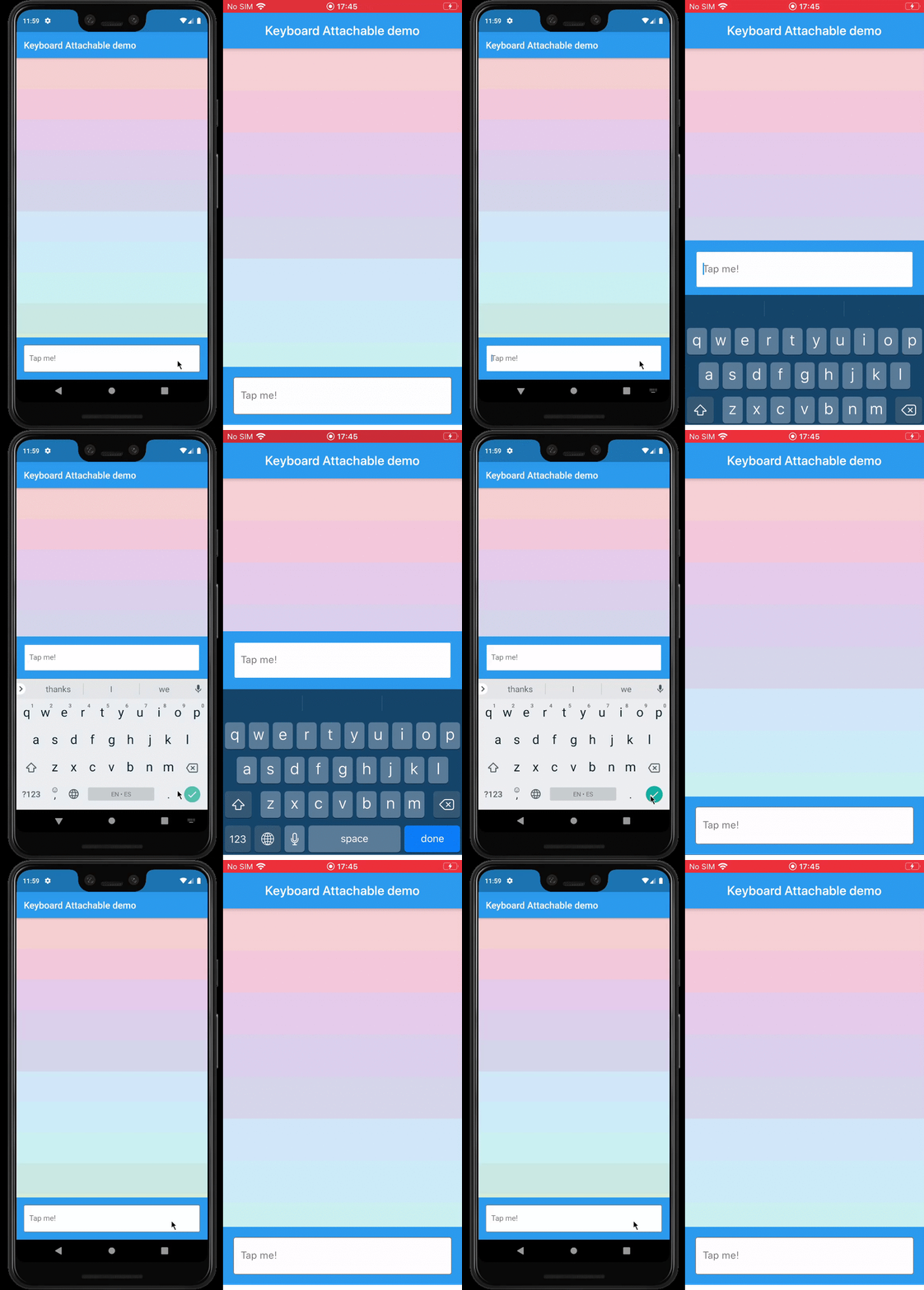
Example

Features

  • An alternative to Scaffold's resizeToAvoidBottomInset, with animations.
  • Control the animations that should happen when the soft keyboard is shown and hidden with a transition builder.
  • Animate the shrinkage and expansion of the page when the soft keyboard is shown and hidden, matching the platform soft keyboard animation.
  • Easily add permanent page footers that can be attached to the top of the soft keyboard.

Usage

This package exposes a FooterLayout stateless widget and a KeyboardAttachable stateful widget.

FooterLayout is a widget that can lay out a child widget above a footer. It does that by positioning a footer widget at the bottom of the available space first, and then positioning a child widget in the remaining space.

    Widget build(BuildContext context) => FooterLayout(
          footer: MyFooterWidget(),
          child: PageMainContent(),
        );

KeyboardAttachable is a widget that adds space below its baseline when the soft keyboard is shown and hidden with an animation that matches that of the platform keyboard. This widget can be used to animate its child when the soft keyboard is shown or hidden, so that the child widget appears to be attached to the keyboard.

You can combine these two widgets by passing a KeyboardAttachable widget as the footer of a FooterLayout to create a page that shrinks and expands when the soft keyboard appears and disappears, with an animation that matches the platform keyboard animation. Additionally, you can pass a child widget to your KeyboardAttachable to have a footer in your page that attaches itself to the soft keyboard when shown.

Warning: In order for this to work with animations, the resizeToAvoidBottomInset parameter of the Scaffold above the page has to be false. In addition to that, when there are SafeAreas involved the layout, it is recommended to set their maintainBottomViewPadding property to true in order for the animations to run smoothly, like so:

/// Builds a [Scaffold] that lays out a footer at the bottom of the page.
class KeyboardAttachablePage extends StatelessWidget {
  @override
  Widget build(BuildContext context) => Scaffold(
        backgroundColor: Colors.blue,
        resizeToAvoidBottomInset: false,
        appBar: AppBar(title: const Text("Keyboard Attachable demo")),
        body: SafeArea(
          maintainBottomViewPadding: true,
          child: FooterLayout(
            footer: KeyboardAttachableFooter(),
            child: ColorsList(),
          ),
        ),
      );
}

Getting started

In the pubspec.yaml of your flutter project, add the following dependency:

dependencies:
  keyboard_attachable: "^[LATEST_VERSION]"

Then run $ flutter pub get. In your library, add the following import:

import 'package:keyboard_attachable/keyboard_attachable.dart';

Author

Diego Rogel - GitHub

Changelog

Check the Changelog page to see what's recently changed.

License

This project is licensed under the MIT License - see the LICENSE file for details.

Categorias

Dependências

Lista de dependências 1 itens

Repositório-fonte

Projetos que usam este pacote

Ainda não há dados.