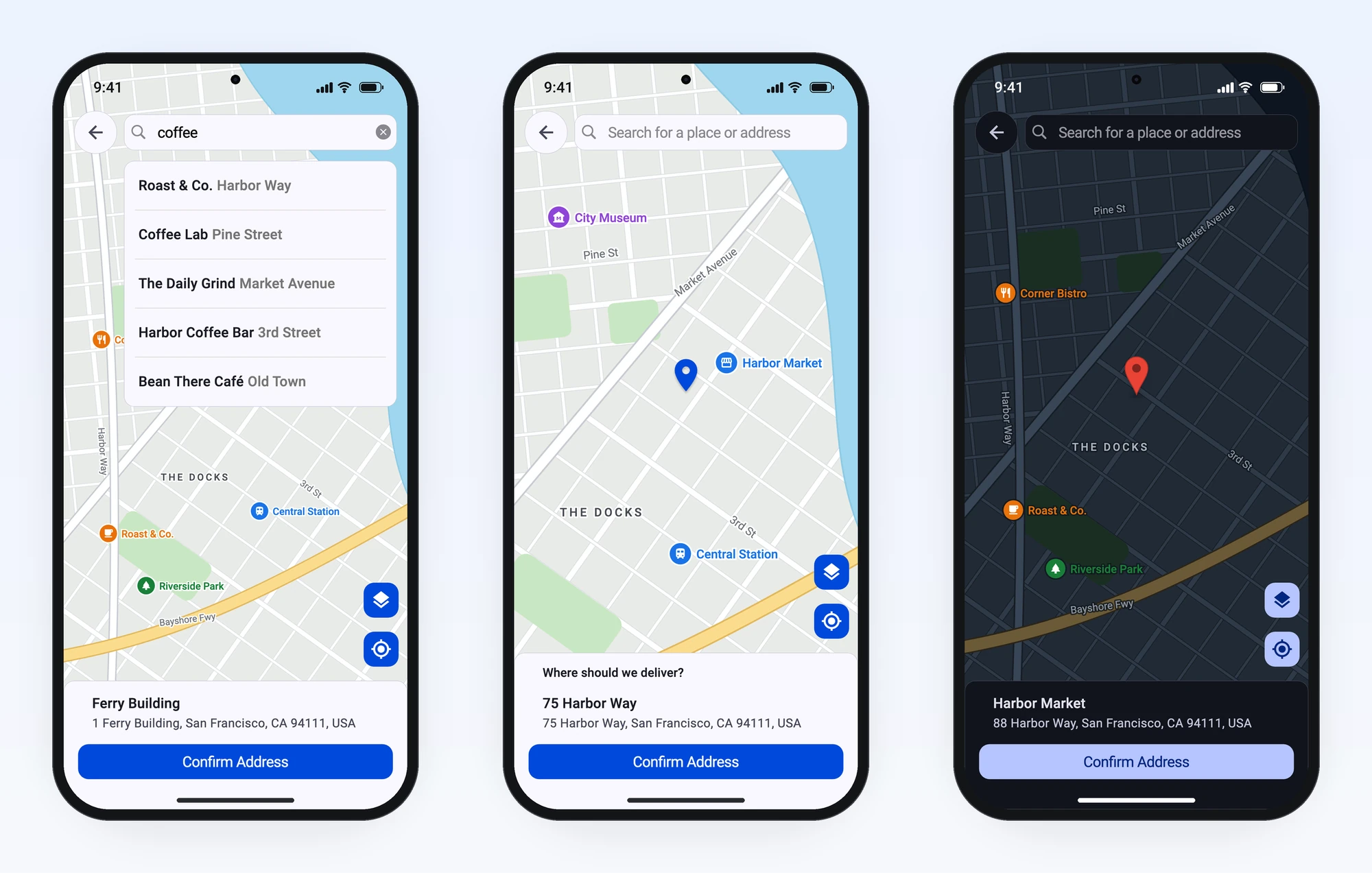
Orientação gerada a partir de informações públicas. Apenas para referência.
Um pacote Flutter que permite aos usuários selecionar localizações em um mapa do Google dentro do aplicativo. Construído sobre o google_maps_flutter, oferece uma interface intuitiva para seleção de coordenadas e recuperação de detalhes de endereço. Ideal para aplicações que exigem entrada precisa de localização, como serviços de entrega, planejamento de eventos ou funcionalidades de geotagging. O pacote suporta plataformas Android, iOS e Web, garantindo consistência entre plataformas. Simplifica a integração com o Google Maps ao lidar com interações no mapa, posicionamento de marcadores e resolução de localização.
Aplicativos que precisam de localizações selecionadas pelo usuário
Desenvolvedores usando o Google Maps no Flutter
aplicações de serviço baseado em localização
Aplicativos móveis e web com necessidades de geolocalização
Prototipagem de recursos de seleção rápida de localização
Considerações
Requer chave da API do Google Maps
Personalização limitada além dos marcadores básicos
Dependente da estabilidade do google_maps_flutter
O suporte web pode ter pequenas diferenças de renderização
Permissões adicionais necessárias para acesso à localização
README original
Snapshot do README original do repositório-fonte vinculado. Consulte o repositório para o conteúdo mais recente.
map_location_picker
A Google Maps location picker for Flutter. Users search for a place, tap or
drag a marker, or pan the map under a fixed pin. You get back a typed address
you can use straight away.
Works on Android, iOS and web. Search uses Places API (New) and needs no
CORS proxy.
final picked = awaitshowMapLocationPicker(
context,
config: constMapLocationPickerConfig(apiKey: 'YOUR_API_KEY'),
);
debugPrint(picked?.formattedAddress); // 1 Ferry Building, San Francisco, CA 94111, USA
Features
Two ways to pick. Tap or drag a marker, or keep a fixed pin in the centre
while the map moves underneath (the delivery-app pattern).
Place search with Places API (New) autocomplete. Autocomplete is billed
per session, and each search's session token is reused and then closed
correctly for you.
A typed result.PickedPlace has the coordinates, formatted address,
street, city, postal code and country code, and the coordinates are there
even when geocoding fails.
Full screen or embedded. Push the picker as a route and await the
result, or place it inside a form you already have.
Programmatic control through MapLocationPickerController: move the map,
jump to the user's location, change the map type, or read the current
address.
Typed errors. An invalid key, an exceeded quota and a refused location
permission each arrive as a different MapPickerErrorKind.
Built to be customised. Every visible string can be translated. The theme,
bottom card, pin, buttons and markers can all be restyled or replaced, and
nearby places are optional.
These screenshots come from the package's real widgets, generated by
tool/screenshots. A test harness can't load
Google's map tiles, so the map is an illustration. In your app, the picker shows
real Google Maps.
Getting started
Requirements
Minimum
Flutter
3.38.1
Dart
3.10
Android
API 24 (Flutter's default)
iOS
14.0
Web
Any browser Flutter supports; JS and WebAssembly builds
macOS, Windows and Linux are not supported, because google_maps_flutter has
no desktop implementation.
1. Install
dependencies:map_location_picker:^4.0.1
Everything you need comes from one import. LatLng, MapType,
GeocodingResult and the other types are re-exported, so you don't add
google_maps_flutter yourself.
In the Google Cloud console,
turn on billing and enable these APIs for the platforms you ship:
API
Used for
Maps SDK for Android
The map on Android
Maps SDK for iOS
The map on iOS
Maps JavaScript API
The map on web
Places API (New)
Search, place details and nearby places
Geocoding API
Turning coordinates into addresses
[!IMPORTANT]
Enable Places API (New), not the legacy "Places API". This package only
calls the new endpoints, and Google has closed the legacy API to projects
created after 1 March 2025.
The Google Maps plugin requires iOS 14.0. Projects created with Flutter
3.38 target iOS 13.0, and pod install fails until you raise the target. In
ios/Podfile, uncomment the platform line and set it to
platform :ios, '14.0'. In Xcode, set Minimum Deployments for the Runner
target to 14.0. Newer Flutter templates already target a later version.
In ios/Runner/AppDelegate.swift, make two additions and leave everything
else as Flutter generated it:
import GoogleMaps // next to the existing imports

// Inside application(_:didFinishLaunchingWithOptions:), as the first line:
GMSServices.provideAPIKey("YOUR_API_KEY")
Don't replace the whole file. Projects created with Flutter 3.38 register
plugins with GeneratedPluginRegistrant in that same method, and newer
templates do it in didInitializeImplicitFlutterEngine. Either way, removing
that call leaves the map without its plugin.
In ios/Runner/Info.plist:
<key>NSLocationWhenInUseUsageDescription</key><string>Shows your location on the map so you can pick an address.</string>
[!NOTE]
A location picker doesn't need NSLocationAlwaysUsageDescription or
UIBackgroundModes: location. Leave them out unless your app needs
background location for another reason, because they invite App Store review
questions.
Web
In web/index.html, add the Maps JavaScript API after<base href>:
Load it synchronously, as google_maps_flutter_web documents, without async
or loading=async. The web map plugin creates google.maps.Map directly, so
the API must be ready before your app starts.
That script draws the map. Search doesn't depend on it: the package calls the
Places REST API directly, and places.googleapis.com supports CORS, so no
proxy is needed.
4. Pick a location
Future<void> chooseLocation(BuildContext context) async {
final picked = awaitshowMapLocationPicker(
context,
config: MapLocationPickerConfig(
apiKey: 'YOUR_API_KEY',
onError: (e) => debugPrint('${e.kind}: ${e.message}'),
),
);
if (picked == null) return; // The user backed out.debugPrint(picked.formattedAddress); // 1 Ferry Building, San Francisco, CA 94111, USAdebugPrint('${picked.latLng}'); // LatLng(37.7955, -122.3937), always presentdebugPrint(picked.city); // San FranciscodebugPrint(picked.countryCode); // US
}
That's a complete integration. Everything below is optional.
[!TIP]
Keep the key out of source control. Pass it at build time with
flutter run --dart-define=MAPS_API_KEY=..., then read it with
const String.fromEnvironment('MAPS_API_KEY').
Usage
Picking modes
Marker mode is the default: the user taps the map or drags the marker.
Centre-pin mode keeps a pin fixed in the middle while the user pans the map
underneath, the way most delivery and ride-hailing apps work. The address
resolves once the map stops moving.
constMapLocationPickerConfig(
apiKey: 'YOUR_API_KEY',
pinMode: PickerPinMode.centerPin,
bottomCardTitle: 'Where should we deliver?',
showBackButton: true,
)
To draw your own pin, pass centerPinBuilder: (context, state) => .... The
PinState tells you whether the map is idle or being dragged.
If location services are off or permission is refused, the picker stays at
initialPosition. If no fix arrives within locationTimeout, it uses the
device's last known position, or initialPosition if there isn't one. Either
way it never opens on a blank map, and none of these fallbacks call onError.
Restricting search
constMapLocationPickerConfig(
apiKey: 'YOUR_API_KEY',
countries: ['gb', 'ie'], // ISO 3166-1 alpha-2, up to 15
placeTypes: [PlaceType.streetAddress], // up to 5
language: 'en', // language of the returned addresses
)
If you need more control, build the filter yourself. Any field you set on it
takes precedence over the shortcuts above:
MapLocationPicker has its own Scaffold and is meant to be a full-screen
route. To put the picker inside a form, use MapLocationPickerView, which takes
the same arguments, and give it a bounded height:
The picker geocodes its starting point without calling
onMainMarkerPositionChanged, so initialise _position to your
initialPosition (or read controller.position) rather than waiting for the
first callback.
If the page scrolls, the scroll view claims vertical drags before the map
sees them. Let the map claim them first:
Besides address, it exposes position, isLoading, result, results,
mapType, pinState, nearbyPlaces and lastError. confirm() calls
onNext just like tapping Confirm, but it skips the button's checks. Call it
only when isLoading is false (and, if you set requireGeocodedAddress, only
when result isn't null).
Reading the result
showMapLocationPicker returns a PickedPlace, or null if the user backs out.
Field
Type
Notes
latLng
LatLng
Always present, even if geocoding failed
displayLabel
String
The best single label for the place; never null
formattedAddress
String?
For example 10 Downing St, London SW1A 2AA, UK
name
String?
The place name, when the user picked a search result
streetNumber, street
String?
city / locality, administrativeArea
String?
postalCode
String?
country, countryCode
String?
countryCode is ISO alpha-2, for example GB
placeId
String?
result
GeocodingResult?
The raw geocoding result
place
Place?
The raw Places (New) result, when the user picked a search result
If you work with a GeocodingResult directly, for example in onNext or
onAddressDecoded, the same fields are available as extension getters:
result.city, result.postalCode, result.countryCode, result.latLng and
result.component('administrative_area_level_2').
Handling errors
Failures reach onError as a MapLocationPickerException with a kind, a
message and, for HTTP failures, a statusCode. The one exception is the
initial lookup for startWithCurrentLocation, which falls back quietly
instead. The location kinds come from the my-location button and
controller.goToCurrentLocation().
MapLocationPickerConfig(
apiKey: 'YOUR_API_KEY',
onError: (e) {
if (!e.isUserFacing) return; // cancelled requests and "no results"final message = switch (e.kind) {
MapPickerErrorKind.requestDenied =>
'Maps is misconfigured: check the API key and enabled APIs.',
MapPickerErrorKind.network => 'You appear to be offline.',
MapPickerErrorKind.locationPermissionDeniedForever =>
'Allow location access in system settings.',
_ => e.message,
};
ScaffoldMessenger.of(context).showSnackBar(SnackBar(content: Text(message)));
},
)
The other kinds are cancelled, invalidRequest, quotaExceeded,
noResults, locationServiceDisabled, locationPermissionDenied,
locationTimeout, mapUnavailable, unsupportedPlatform and unknown.
Key problems look different depending on which API reported them:
Search, place details and nearby places (Places API (New)) take the kind
from the HTTP status. A wrong key arrives as invalidRequest (HTTP 400,
"API key not valid"). A disabled API, disabled billing or a key restriction
arrives as requestDenied (HTTP 403).
The address lookup (Geocoding API) takes the kind from Google's status
field and has no statusCode. A wrong key arrives there as requestDenied,
with the message "The provided API key is invalid."
An empty key fails search with unknown in debug builds, because the
Places client asserts before sending anything, and with requestDenied in
release builds.
Localization
Every visible string is a field of MapLocationPickerStrings, and each has an
English default. Two exceptions are set on the config itself: bottomCardTitle,
and fabTooltip, the my-location button's tooltip (default 'My Location').
Set language as well, so Google returns addresses in the same language.
MapLocationPickerConfig(
  apiKey: 'YOUR_API_KEY',
  language: 'fr',
  bottomCardTitle: 'Où livrer ?',
  fabTooltip: 'Ma position',
  strings: MapLocationPickerStrings(
    searchHint: 'Rechercher une adresse',
    confirmAddress: "Confirmer l'adresse",
    loadingAddress: 'Chargement…',
    noAddressFound: 'Aucune adresse trouvée',
    nearbyPlacesCount: (n) => n == 1 ? '1 adresse' : '$n adresses',
    // ...and 12 more; see the API reference.
  ),
)
If you use gen-l10n, the localization prompt
adds all 18 strings to your ARB files for you.
Theming and dark mode
The search bar, bottom card, buttons and sheets use your app's Theme and
ColorScheme, so they follow light and dark mode automatically. You can
override them with cardColor (a translucent colour lets the blurred map show
through), cardRadius, cardBorder, floatingControlsColor and
floatingControlsIconColor.
Google's map tiles don't switch automatically. For a dark map, pass a style: a
JSON mapStyle, or a cloudMapId that has a dark style.
You can also replace or hide the search bar (searchBarBuilder,
showSearchBar), the back button (backButtonBuilder) and the floating
buttons (showMapTypeButton, showMyLocationButton). You can add your own
markers with additionalMarkers, customMarkerIcons and onMarkerTapped.
AI assistants often suggest APIs from older versions of this package, or from
other packages, because that's what their training data contains. Three things
help them get 4.x right.
1. Point them at llms.txt
llms.txt
is a compact, authoritative reference to the 4.x API, written for language
models. It covers the platform setup, the config options most apps use, the result
type, error kinds, localization, testing, troubleshooting and a list of removed
APIs. Assistants that
can browse will read it from the link. For any other assistant, paste the file
into the chat.
2. Add project rules
Paste this into your assistant's instructions file so every future request
follows it:
Tool
File
Claude Code
CLAUDE.md
OpenAI Codex and other tools that read AGENTS.md
AGENTS.md
GitHub Copilot
.github/copilot-instructions.md
Cursor
.cursor/rules/map-location-picker.mdc
Gemini CLI
GEMINI.md
## map_location_picker (4.x)

- API reference: https://raw.githubusercontent.com/itsarvinddev/map_location_picker/master/llms.txt. Prefer it over memory; the 3.x APIs no longer exist.
- Import only `package:map_location_picker/map_location_picker.dart`. It re-exports LatLng, MapType, GeocodingResult, Place and PlacesAPINew; don't add google_maps_flutter for them.
- Full-screen picking: `final picked = await showMapLocationPicker(context, config: MapLocationPickerConfig(apiKey: key));` returns `PickedPlace?`. null means the user cancelled, and `picked.latLng` is never null.
- Inside an existing layout, use `MapLocationPickerView` with a bounded height. Never put `MapLocationPicker`, which has its own Scaffold, in a Column or ListView. In a scroll view, set `gestureRecognizers: {Factory<OneSequenceGestureRecognizer>(() => EagerGestureRecognizer())}` so the map gets drags.
- Options are fields of `MapLocationPickerConfig`. `searchConfig:`, `geoCodingConfig:` and `controller:` are separate arguments beside `config:`.
- Handle failures with `onError: (MapLocationPickerException e) { ... }`. Switch on `e.kind` (a `MapPickerErrorKind`), and only show UI when `e.isUserFacing`.
- Google Cloud APIs: Maps SDK for Android, Maps SDK for iOS, Maps JavaScript API, Places API (New) (not the legacy Places API) and Geocoding API.
- Never use MapPickerConfig, PlacesAutocompleteConfig, google_maps_webservice types, `components:`, `result.geometry.location`, a CORS proxy, or background location permissions.
- Tests: subclass `GeoCodingConfig`, override `reverseGeocode`, and drive a `MapLocationPickerController` in plain `test()`.
For Cursor, start the .mdc file with this front matter so the rule always
applies:
Each prompt below is self-contained: open it, copy it, and paste it into your
assistant with your project open. To test them, we gave each prompt to an
assistant that had no access to this package's source, then compiled and
reviewed what it produced.
Add a location picker to my app — First-time setup: dependency, Android/iOS/web configuration, and a button that returns a typed address.
Add the Flutter package map_location_picker to this app.

Goal: on the home screen, add a "Choose location" button. Tapping it opens a full-screen map picker. After the user confirms, show the picked address and coordinates on screen.

1. Add `map_location_picker: ^4.0.1` to pubspec.yaml and run `flutter pub get`.
2. Read the key with `const mapsApiKey = String.fromEnvironment('MAPS_API_KEY');` rather than hard-coding it.
3. Open the picker and await the result:
   final PickedPlace? picked = await showMapLocationPicker(
     context,
     config: MapLocationPickerConfig(
       apiKey: mapsApiKey,
       onError: (MapLocationPickerException e) => debugPrint('${e.kind}: ${e.message}'),
     ),
   );
   `debugPrint` comes from `package:flutter/material.dart`, so don't add a separate foundation.dart import. null means the user backed out. Check `mounted` before using context after the await. PickedPlace has `latLng` (never null), `displayLabel` (never null), and the nullable `formattedAddress`, `street`, `city`, `postalCode` and `countryCode`.
4. Platform setup, only for the platform folders that exist:
   - Android, android/app/src/main/AndroidManifest.xml: add the ACCESS_COARSE_LOCATION and ACCESS_FINE_LOCATION permissions. Inside <application>, add <meta-data android:name="com.google.android.geo.API_KEY" android:value="YOUR_API_KEY"/>
   - iOS: the Google Maps plugin needs iOS 14.0. If IPHONEOS_DEPLOYMENT_TARGET in ios/Runner.xcodeproj/project.pbxproj is below 14.0, raise it to 14.0. Make ios/Podfile's platform line (uncomment it if needed) match the project's target, never lower than 14.0. Never lower an existing target. In ios/Runner/AppDelegate.swift, add `import GoogleMaps` and make `GMSServices.provideAPIKey("YOUR_API_KEY")` the first line of `application(_:didFinishLaunchingWithOptions:)`. Leave the rest of the file as generated: plugin registration differs between Flutter versions, and both forms work. In ios/Runner/Info.plist, add NSLocationWhenInUseUsageDescription with a one-line reason.
   - Web, web/index.html: directly after <base href="$FLUTTER_BASE_HREF">, add <script src="https://maps.googleapis.com/maps/api/js?key=YOUR_API_KEY"></script> (synchronous: no `async` or `loading=async`, because the web map plugin needs the API loaded before the app starts)
5. End with a short reply that covers: the Google Cloud APIs to enable, every place I must replace YOUR_API_KEY, and the run command `flutter run --dart-define=MAPS_API_KEY=<your key>`.

Facts about map_location_picker 4.x. Trust these over what you remember; earlier versions had different APIs.
- Full API reference: https://raw.githubusercontent.com/itsarvinddev/map_location_picker/master/llms.txt (read it if you can open links).
- Requires Flutter 3.38.1+ and Dart 3.10+. Dependency line: `map_location_picker: ^4.0.1`.
- Import only `package:map_location_picker/map_location_picker.dart`. It re-exports LatLng, MapType, GeocodingResult, Place and PlacesAPINew, so don't import google_maps_flutter, google_maps_apis, geolocator or dio for them, or add those packages to pubspec.yaml.
- Picker options are fields of `MapLocationPickerConfig(apiKey: ..., ...)`, passed as `config:`. `searchConfig:`, `geoCodingConfig:` and `controller:` are separate arguments beside `config:`, never config fields.
- Platform setup: Android needs the `com.google.android.geo.API_KEY` meta-data plus the ACCESS_FINE_LOCATION and ACCESS_COARSE_LOCATION permissions. iOS needs a deployment target of at least 14.0, `GMSServices.provideAPIKey` in AppDelegate.swift, and NSLocationWhenInUseUsageDescription in Info.plist. Web needs `<script src="https://maps.googleapis.com/maps/api/js?key=YOUR_API_KEY"></script>` after <base href> in web/index.html, loaded synchronously (no `async`, no `loading=async`, no `libraries=places`; search runs over REST).
- Google Cloud APIs to enable, with billing on: Maps SDK for Android, Maps SDK for iOS, Maps JavaScript API (web), Places API (New) (not the legacy "Places API") and Geocoding API.
- These do not exist in 4.x: MapPickerConfig, PlacesAutocompleteConfig, google_maps_webservice types (Prediction, GoogleMapsPlaces), `components:`, reading the picked point from `result.geometry.location`. Web search needs no CORS proxy, and the picker needs no background location permission.
- When you're done, run `flutter analyze` and fix everything it reports. If you can't run commands, say so.
Build a delivery-address step — Centre-pin picker restricted to your countries, mapped into your own model, with user-facing error handling.
Using map_location_picker, build a delivery-address step for checkout.

- Create lib/checkout/delivery_step.dart containing an immutable `DeliveryAddress` model (latitude, longitude, formattedAddress, city, postalCode, countryCode) and a function `Future<DeliveryAddress?> pickDeliveryAddress(BuildContext context)`.
- The function opens the picker with `showMapLocationPicker(context, config: MapLocationPickerConfig(apiKey: ..., ...))`, which returns `PickedPlace?`. Return null when the user backs out, so the caller keeps the previous address.
- Config: `pinMode: PickerPinMode.centerPin` (the pin stays fixed and the map moves under it), `bottomCardTitle: 'Where should we deliver?'`, `startWithCurrentLocation: true`, `showBackButton: true`, and `countries: ['us']` to restrict search. Replace 'us' with the lowercase ISO 3166-1 alpha-2 codes of the countries we deliver to, up to 15.
- Build the model from `picked.latLng.latitude`, `picked.latLng.longitude`, `picked.formattedAddress`, `picked.city`, `picked.postalCode` and `picked.countryCode`. Everything except latLng can be null.
- Errors: add `onError: (MapLocationPickerException e) { ... }` to the config. Show a SnackBar with `e.message` only when `e.isUserFacing` is true. When `e.kind == MapPickerErrorKind.requestDenied`, say the API key is wrong, missing or restricted, billing is off, or Places API (New) or the Geocoding API isn't enabled. When it is `MapPickerErrorKind.invalidRequest` and the message says "API key not valid", say the key is wrong.
- Wire it into the home screen: a "Set delivery address" button that calls pickDeliveryAddress and shows the saved address.
- Read the key from `String.fromEnvironment('MAPS_API_KEY')`. At the end of your reply, list any platform setup from the facts below that the project is still missing. The location permissions are required because of startWithCurrentLocation.

Facts about map_location_picker 4.x. Trust these over what you remember; earlier versions had different APIs.
- Full API reference: https://raw.githubusercontent.com/itsarvinddev/map_location_picker/master/llms.txt (read it if you can open links).
- Requires Flutter 3.38.1+ and Dart 3.10+. Dependency line: `map_location_picker: ^4.0.1`.
- Import only `package:map_location_picker/map_location_picker.dart`. It re-exports LatLng, MapType, GeocodingResult, Place and PlacesAPINew, so don't import google_maps_flutter, google_maps_apis, geolocator or dio for them, or add those packages to pubspec.yaml.
- Picker options are fields of `MapLocationPickerConfig(apiKey: ..., ...)`, passed as `config:`. `searchConfig:`, `geoCodingConfig:` and `controller:` are separate arguments beside `config:`, never config fields.
- Platform setup: Android needs the `com.google.android.geo.API_KEY` meta-data plus the ACCESS_FINE_LOCATION and ACCESS_COARSE_LOCATION permissions. iOS needs a deployment target of at least 14.0, `GMSServices.provideAPIKey` in AppDelegate.swift, and NSLocationWhenInUseUsageDescription in Info.plist. Web needs `<script src="https://maps.googleapis.com/maps/api/js?key=YOUR_API_KEY"></script>` after <base href> in web/index.html, loaded synchronously (no `async`, no `loading=async`, no `libraries=places`; search runs over REST).
- Google Cloud APIs to enable, with billing on: Maps SDK for Android, Maps SDK for iOS, Maps JavaScript API (web), Places API (New) (not the legacy "Places API") and Geocoding API.
- These do not exist in 4.x: MapPickerConfig, PlacesAutocompleteConfig, google_maps_webservice types (Prediction, GoogleMapsPlaces), `components:`, reading the picked point from `result.geometry.location`. Web search needs no CORS proxy, and the picker needs no background location permission.
- When you're done, run `flutter analyze` and fix everything it reports. If you can't run commands, say so.
Embed the picker in an existing form — MapLocationPickerView inside a scrolling page, with a controller, state callbacks and a "Use my location" button.
Embed a map location picker directly inside this app's checkout form, instead of opening a new screen. If there is more than one candidate screen, ask me which one.

- Use `MapLocationPickerView`, not `MapLocationPicker`. `MapLocationPicker` has its own Scaffold, meant for full-screen routes, and renders squashed inside a Column or ListView. `MapLocationPickerView` takes the same arguments but needs a bounded height: `SizedBox(height: 400, child: MapLocationPickerView(config: ..., controller: ...))`. If the form scrolls, also set `gestureRecognizers: {Factory<OneSequenceGestureRecognizer>(() => EagerGestureRecognizer())}` in the config, so drags move the map instead of scrolling the page. This needs `import 'package:flutter/foundation.dart';` and `import 'package:flutter/gestures.dart';`.
- In initState, build one `MapLocationPickerConfig` and create `MapLocationPickerController(config: thatConfig)`. Pass that same config and the controller to the view, and dispose the controller in dispose().
- Config fields: `apiKey`; `showMapTypeButton: false`; `onMainMarkerPositionChanged: (LatLng p) { ... }`, which stores the coordinate with setState; and `onAddressDecoded: (GeocodingResult? r) { ... }`, which stores `r?.formattedAddress` and `_controller.position` with setState. The picker geocodes its starting point without firing `onMainMarkerPositionChanged`, so storing the position here too keeps the coordinate from being null once an address exists.
- Below the map, add a "Use my location" button that calls `controller.goToCurrentLocation()`.
- Keep the "Place order" button disabled until an address has been decoded. When it is pressed, use the stored coordinate and address; for example, show both in a SnackBar.

Facts about map_location_picker 4.x. Trust these over what you remember; earlier versions had different APIs.
- Full API reference: https://raw.githubusercontent.com/itsarvinddev/map_location_picker/master/llms.txt (read it if you can open links).
- Requires Flutter 3.38.1+ and Dart 3.10+. Dependency line: `map_location_picker: ^4.0.1`.
- Import only `package:map_location_picker/map_location_picker.dart`. It re-exports LatLng, MapType, GeocodingResult, Place and PlacesAPINew, so don't import google_maps_flutter, google_maps_apis, geolocator or dio for them, or add those packages to pubspec.yaml.
- Picker options are fields of `MapLocationPickerConfig(apiKey: ..., ...)`, passed as `config:`. `searchConfig:`, `geoCodingConfig:` and `controller:` are separate arguments beside `config:`, never config fields.
- Platform setup: Android needs the `com.google.android.geo.API_KEY` meta-data plus the ACCESS_FINE_LOCATION and ACCESS_COARSE_LOCATION permissions. iOS needs a deployment target of at least 14.0, `GMSServices.provideAPIKey` in AppDelegate.swift, and NSLocationWhenInUseUsageDescription in Info.plist. Web needs `<script src="https://maps.googleapis.com/maps/api/js?key=YOUR_API_KEY"></script>` after <base href> in web/index.html, loaded synchronously (no `async`, no `loading=async`, no `libraries=places`; search runs over REST).
- Google Cloud APIs to enable, with billing on: Maps SDK for Android, Maps SDK for iOS, Maps JavaScript API (web), Places API (New) (not the legacy "Places API") and Geocoding API.
- These do not exist in 4.x: MapPickerConfig, PlacesAutocompleteConfig, google_maps_webservice types (Prediction, GoogleMapsPlaces), `components:`, reading the picked point from `result.geometry.location`. Web search needs no CORS proxy, and the picker needs no background location permission.
- When you're done, run `flutter analyze` and fix everything it reports. If you can't run commands, say so.
Migrate from 3.x to 4.x — The Flutter bump, trimmed exports, deprecated options, the showMapLocationPicker rewrite, and behaviour changes to check.
Upgrade this app from map_location_picker 3.x to 4.x. The migration guide is https://github.com/itsarvinddev/map_location_picker/blob/master/MIGRATION_GUIDE.md. Most apps only need steps 1 and 2; the rest is cleanup and adopting the new API.

1. In pubspec.yaml, set `map_location_picker: ^4.0.1`, and set the environment to `sdk: ">=3.10.0 <4.0.0"` and `flutter: ">=3.38.1"`. 4.x cannot resolve on older Flutter versions.
2. Run `flutter pub get` and `flutter analyze`. The one breaking change is that the package import re-exports fewer symbols. If something no longer resolves, import it from its own package instead (and add that package to pubspec.yaml if the app doesn't depend on it yet). For example, legacy Places API types come from `import 'package:google_maps_apis/places.dart';`, and the Places (New) `AddressComponent` comes from `import 'package:google_maps_apis/places_new.dart' as places_new;`. `LatLng`, `MapType`, `Marker`, `GoogleMapController`, `GeocodingResult`, `AddressComponent`, `Place`, `Suggestion`, `PlacesAPINew`, `AutocompleteSearchFilter`, `LocationSettings`, `LocationPermission` and `Position` are still exported. `CancelToken`, `SuggestionsController` and http's `Client` are newly exported, so dependencies added only for those can be removed.
3. Replace these deprecated options. They still compile in 4.x but are ignored or superseded, and will be removed in 5.0.0:
   - `onLocationError: (e) => ...` → `onError: (MapLocationPickerException e) => ...`, which reports every failure with a typed `kind`.
   - `noAddressFoundText: '...'` → `strings: MapLocationPickerStrings(noAddressFound: '...')`.
   - `SearchConfig(hideWithKeyboard: ...)` → `SearchConfig(hideOnUnfocus: ...)`.
   - `bottomCardType: ...` → `cardType: ...`.
4. Where `MapLocationPicker` sits inside a Column, ListView or other layout rather than being pushed as a route, switch it to `MapLocationPickerView` and keep a bounded height. `MapLocationPicker` has its own Scaffold and renders squashed there.
5. Where the app pushes `MapLocationPicker` in a route and gets the result back through `onNext` plus `Navigator.pop`, replace the whole flow with
     final picked = await showMapLocationPicker(context, config: MapLocationPickerConfig(...), searchConfig: SearchConfig(...));
   Keep every existing config option. `searchConfig`, `geoCodingConfig` and `controller` are separate arguments next to `config:`, never fields of MapLocationPickerConfig. Read `picked.latLng.latitude`, `picked.latLng.longitude` and `picked.formattedAddress` instead of `result.geometry?.location`. null means the user backed out.
6. Check for these behaviour changes, and list any that affect this app in your summary rather than changing behaviour silently: `bottomCardTitle` is now actually rendered; tapping an entry in the matching-addresses sheet no longer fires `onNext` (use `onAddressSelected`); Confirm stays enabled when geocoding fails (`requireGeocodedAddress: true` restores the old behaviour); the marker is draggable (`draggableMarker: false`); `LatLng(0, 0)` is no longer treated as "unset" (`skipInitialGeocode: true`).
7. In ios/Runner/Info.plist, remove `UIBackgroundModes` → `location` and `NSLocationAlwaysUsageDescription` if they were only there for the picker. Keep `NSLocationWhenInUseUsageDescription`.
8. Run `flutter analyze` again, fix every error and deprecation warning, and summarise what changed.

If the code is older than 3.x (it uses `MapPickerConfig`, `PlacesAutocompleteConfig`, or options passed directly to `MapLocationPicker(...)` instead of `config:`), first rename those to `MapLocationPickerConfig` and `SearchConfig` and move the options into `config: MapLocationPickerConfig(...)`, following the 1.x → 2.0.0 section of the guide.

Facts about map_location_picker 4.x. Trust these over what you remember; earlier versions had different APIs.
- Full API reference: https://raw.githubusercontent.com/itsarvinddev/map_location_picker/master/llms.txt (read it if you can open links).
- Requires Flutter 3.38.1+ and Dart 3.10+. Dependency line: `map_location_picker: ^4.0.1`.
- Import only `package:map_location_picker/map_location_picker.dart`. It re-exports LatLng, MapType, GeocodingResult, Place and PlacesAPINew, so don't import google_maps_flutter, google_maps_apis, geolocator or dio for them, or add those packages to pubspec.yaml.
- Picker options are fields of `MapLocationPickerConfig(apiKey: ..., ...)`, passed as `config:`. `searchConfig:`, `geoCodingConfig:` and `controller:` are separate arguments beside `config:`, never config fields.
- Platform setup: Android needs the `com.google.android.geo.API_KEY` meta-data plus the ACCESS_FINE_LOCATION and ACCESS_COARSE_LOCATION permissions. iOS needs a deployment target of at least 14.0, `GMSServices.provideAPIKey` in AppDelegate.swift, and NSLocationWhenInUseUsageDescription in Info.plist. Web needs `<script src="https://maps.googleapis.com/maps/api/js?key=YOUR_API_KEY"></script>` after <base href> in web/index.html, loaded synchronously (no `async`, no `loading=async`, no `libraries=places`; search runs over REST).
- Google Cloud APIs to enable, with billing on: Maps SDK for Android, Maps SDK for iOS, Maps JavaScript API (web), Places API (New) (not the legacy "Places API") and Geocoding API.
- These do not exist in 4.x: MapPickerConfig, PlacesAutocompleteConfig, google_maps_webservice types (Prediction, GoogleMapsPlaces), `components:`, reading the picked point from `result.geometry.location`. Web search needs no CORS proxy, and the picker needs no background location permission.
- When you're done, run `flutter analyze` and fix everything it reports. If you can't run commands, say so.
Translate the picker with gen-l10n — ARB keys for all 18 strings (with ICU plurals) and a localized config that also localizes Google's addresses.
Translate the map_location_picker UI using this app's existing gen-l10n setup. Find the ARB files and locales yourself.

Every visible string is a field of `MapLocationPickerStrings`, passed as `strings:` inside `MapLocationPickerConfig(...)`. Here are the fields with their English defaults:
- String fields: loadingAddress 'Loading address...', loadingAddressSubtitle 'Fetching location details.', confirmAddress 'Confirm Address', noAddressFound 'No address found', mapTypeTooltip 'Map type', mapTypeTitle 'Map type', mapTypeMessage 'Select the map type you want to see.', mapTypeNormal 'Standard Map', mapTypeSatellite 'Satellite Map', mapTypeTerrain 'Terrain Map', mapTypeHybrid 'Hybrid Map', cancel 'Cancel', loadingNearbyPlaces 'Loading addresses...', tapToSelect 'tap to select', searchHint 'Search for a place or address'.
- `String Function(int count)` fields: nearbyPlacesCount and nearbyPlacesTitle, which both default to '1 matching address' / '{count} matching addresses'.
- One visible string is not in MapLocationPickerStrings: the my-location button's tooltip is `fabTooltip` on MapLocationPickerConfig itself (default 'My Location'). Translate it too. (`bottomCardTitle` is also on the config, but it is empty by default.)
- Some field names are historical. nearbyPlacesCount, nearbyPlacesTitle and loadingNearbyPlaces label the list of other addresses Google matched for the pinned point, not nearby shops. Translate the English defaults, not the field names.

1. For each locale, add an ARB key for every field plus `fabTooltip`, prefixed `mapPicker` (for example `mapPickerConfirmAddress`, `mapPickerFabTooltip`). Make the two count fields ICU plurals with a `{count}` placeholder of type `int`.
2. Where the picker is opened, build `MapLocationPickerStrings(...)` from the generated `AppLocalizations`, and pass the count fields as `nearbyPlacesCount: (n) => l10n.mapPickerNearbyPlacesCount(n)`. Set `fabTooltip: l10n.mapPickerFabTooltip` on the same `MapLocationPickerConfig`, next to `strings:`. Also set `language: Localizations.localeOf(context).languageCode` so Google returns addresses in the same language; use a bare code like 'es', never a locale name like 'es_MX'. The config depends on context, so it can't be `const`.
3. Run `flutter gen-l10n`, then `flutter analyze`, and fix any issues.

Facts about map_location_picker 4.x. Trust these over what you remember; earlier versions had different APIs.
- Full API reference: https://raw.githubusercontent.com/itsarvinddev/map_location_picker/master/llms.txt (read it if you can open links).
- Requires Flutter 3.38.1+ and Dart 3.10+. Dependency line: `map_location_picker: ^4.0.1`.
- Import only `package:map_location_picker/map_location_picker.dart`. It re-exports LatLng, MapType, GeocodingResult, Place and PlacesAPINew, so don't import google_maps_flutter, google_maps_apis, geolocator or dio for them, or add those packages to pubspec.yaml.
- Picker options are fields of `MapLocationPickerConfig(apiKey: ..., ...)`, passed as `config:`. `searchConfig:`, `geoCodingConfig:` and `controller:` are separate arguments beside `config:`, never config fields.
- Platform setup: Android needs the `com.google.android.geo.API_KEY` meta-data plus the ACCESS_FINE_LOCATION and ACCESS_COARSE_LOCATION permissions. iOS needs a deployment target of at least 14.0, `GMSServices.provideAPIKey` in AppDelegate.swift, and NSLocationWhenInUseUsageDescription in Info.plist. Web needs `<script src="https://maps.googleapis.com/maps/api/js?key=YOUR_API_KEY"></script>` after <base href> in web/index.html, loaded synchronously (no `async`, no `loading=async`, no `libraries=places`; search runs over REST).
- Google Cloud APIs to enable, with billing on: Maps SDK for Android, Maps SDK for iOS, Maps JavaScript API (web), Places API (New) (not the legacy "Places API") and Geocoding API.
- These do not exist in 4.x: MapPickerConfig, PlacesAutocompleteConfig, google_maps_webservice types (Prediction, GoogleMapsPlaces), `components:`, reading the picked point from `result.geometry.location`. Web search needs no CORS proxy, and the picker needs no background location permission.
- When you're done, run `flutter analyze` and fix everything it reports. If you can't run commands, say so.
Debug empty search results — Makes failures visible, then walks the causes in order of likelihood: key, APIs, restrictions, quota.
In this app, map_location_picker's search suggestions are always empty. Help me find out why.

1. Make failures visible. In the `MapLocationPickerConfig(...)` where the picker is opened, add:
   onError: (MapLocationPickerException e) => debugPrint('map_location_picker ${e.kind}: ${e.message} (HTTP ${e.statusCode})'),
   Remove `const` from the config if the analyzer requires it.
2. Check where `apiKey` gets its value. If it comes from `String.fromEnvironment`, `--dart-define-from-file` or an env file, then a plain `flutter run` passes an empty key, and that alone empties the suggestions.
3. Tell me: the exact run command for this project, including any --dart-define the key needs; what to do in the app (search starts after 3 typed characters); and the log line to look for, `map_location_picker <kind>: ...`, in the `flutter run` console.
4. Explain what each kind means for this symptom, most likely first:
   - `unknown` whose message contains a failed assertion ("an apiKey must be specified"): the key is empty. Debug builds check this before sending anything; in release builds an empty key arrives as `requestDenied`.
   - `invalidRequest` (HTTP 400): most often the key itself is wrong; the message says "API key not valid". Otherwise a bad `countries` or `placeTypes` value.
   - `requestDenied` (HTTP 403): Places API (New) isn't enabled on the key's project (the legacy "Places API" doesn't count); or billing is off; or the key is restricted to apps and the requests lack identifying headers. For a restricted key, send the same headers both via `geocodingApiHeaders: headers` and via `placesApi: PlacesAPINew(apiKey: key, headers: headers)`. On Android the headers are `X-Android-Package` (the applicationId) and `X-Android-Cert` (the signing certificate's SHA-1 as hex with the colons removed; debug and release certificates differ). On iOS the header is `X-Ios-Bundle-Identifier`.
   - `quotaExceeded` (HTTP 429): a quota is used up.
   - `network`: no connectivity, or a proxy or firewall blocks places.googleapis.com.
   - No error at all: fewer than 3 characters were typed, or `countries` / `placeTypes` filter out every result.
   Errors with no HTTP status come from the address lookup (Geocoding API), which reports a wrong key as `requestDenied` with "The provided API key is invalid.", so read `message` as well as `kind`.
   Also check the native Maps key while you're there. It does not affect search:
   - Android without the `com.google.android.geo.API_KEY` meta-data: the app crashes when the map opens ("API key not found").
   - iOS without a `GMSServices.provideAPIKey` call: the app also crashes when the map opens.
   - Either platform with a key that is present but wrong or unauthorised: blank map, no crash.
5. Don't suggest a CORS proxy or the legacy Places API.

Facts about map_location_picker 4.x. Trust these over what you remember; earlier versions had different APIs.
- Full API reference: https://raw.githubusercontent.com/itsarvinddev/map_location_picker/master/llms.txt (read it if you can open links).
- Requires Flutter 3.38.1+ and Dart 3.10+. Dependency line: `map_location_picker: ^4.0.1`.
- Import only `package:map_location_picker/map_location_picker.dart`. It re-exports LatLng, MapType, GeocodingResult, Place and PlacesAPINew, so don't import google_maps_flutter, google_maps_apis, geolocator or dio for them, or add those packages to pubspec.yaml.
- Picker options are fields of `MapLocationPickerConfig(apiKey: ..., ...)`, passed as `config:`. `searchConfig:`, `geoCodingConfig:` and `controller:` are separate arguments beside `config:`, never config fields.
- Platform setup: Android needs the `com.google.android.geo.API_KEY` meta-data plus the ACCESS_FINE_LOCATION and ACCESS_COARSE_LOCATION permissions. iOS needs a deployment target of at least 14.0, `GMSServices.provideAPIKey` in AppDelegate.swift, and NSLocationWhenInUseUsageDescription in Info.plist. Web needs `<script src="https://maps.googleapis.com/maps/api/js?key=YOUR_API_KEY"></script>` after <base href> in web/index.html, loaded synchronously (no `async`, no `loading=async`, no `libraries=places`; search runs over REST).
- Google Cloud APIs to enable, with billing on: Maps SDK for Android, Maps SDK for iOS, Maps JavaScript API (web), Places API (New) (not the legacy "Places API") and Geocoding API.
- These do not exist in 4.x: MapPickerConfig, PlacesAutocompleteConfig, google_maps_webservice types (Prediction, GoogleMapsPlaces), `components:`, reading the picked point from `result.geometry.location`. Web search needs no CORS proxy, and the picker needs no background location permission.
- When you're done, run `flutter analyze` and fix everything it reports. If you can't run commands, say so.
Write tests for code that uses the picker — A fake geocoder and the controller, so logic is tested without rendering GoogleMap.
Write unit tests for the code in this project that uses map_location_picker. Cover every branch, including when geocoding returns nothing, and put the tests under test/.

How to test code that uses this package:
- Test through `MapLocationPickerController`. Don't pump the picker widget: `GoogleMap` can't render under `flutter test`.
- Use plain `test()`. With no map attached, `moveTo` starts a 15-second map-ready timer that only `controller.dispose()` cancels. `testWidgets()` fails if that timer is still pending when the test body ends, and `addTearDown` runs too late to prevent it, so if you ever need testWidgets, call `controller.dispose()` at the end of the test body.
- Fake the network: subclass `GeoCodingConfig`, call `super(apiKey: 'test')`, and override exactly this method:
    @override
    Future<(GeocodingResult?, List<GeocodingResult>)> reverseGeocode(
      LatLng position, {
      MapPickerErrorCallback? onErrorOverride,
    }) async => ...;
- Create `MapLocationPickerController(config: const MapLocationPickerConfig(apiKey: 'test'), geoCodingConfig: fake)` and register `addTearDown(controller.dispose)`.
- Build results with `GeocodingResult(formattedAddress: '...', addressComponents: [AddressComponent(longName: '...', shortName: '...', types: ['route'])])`. The getters read these component types: `street` reads `route`; `city` reads `locality`, falling back to `postal_town`; `postalCode` reads `postal_code`; `countryCode` reads the short name of `country`.
- `await controller.moveTo(const LatLng(lat, lng), animate: false)` resolves the address. Then check `controller.result`, `controller.address` and `controller.position`.

Run `flutter test` and make sure every test passes.

Facts about map_location_picker 4.x. Trust these over what you remember; earlier versions had different APIs.
- Full API reference: https://raw.githubusercontent.com/itsarvinddev/map_location_picker/master/llms.txt (read it if you can open links).
- Requires Flutter 3.38.1+ and Dart 3.10+. Dependency line: `map_location_picker: ^4.0.1`.
- Import only `package:map_location_picker/map_location_picker.dart`. It re-exports LatLng, MapType, GeocodingResult, Place and PlacesAPINew, so don't import google_maps_flutter, google_maps_apis, geolocator or dio for them, or add those packages to pubspec.yaml.
- Picker options are fields of `MapLocationPickerConfig(apiKey: ..., ...)`, passed as `config:`. `searchConfig:`, `geoCodingConfig:` and `controller:` are separate arguments beside `config:`, never config fields.
- Platform setup: Android needs the `com.google.android.geo.API_KEY` meta-data plus the ACCESS_FINE_LOCATION and ACCESS_COARSE_LOCATION permissions. iOS needs a deployment target of at least 14.0, `GMSServices.provideAPIKey` in AppDelegate.swift, and NSLocationWhenInUseUsageDescription in Info.plist. Web needs `<script src="https://maps.googleapis.com/maps/api/js?key=YOUR_API_KEY"></script>` after <base href> in web/index.html, loaded synchronously (no `async`, no `loading=async`, no `libraries=places`; search runs over REST).
- Google Cloud APIs to enable, with billing on: Maps SDK for Android, Maps SDK for iOS, Maps JavaScript API (web), Places API (New) (not the legacy "Places API") and Geocoding API.
- These do not exist in 4.x: MapPickerConfig, PlacesAutocompleteConfig, google_maps_webservice types (Prediction, GoogleMapsPlaces), `components:`, reading the picked point from `result.geometry.location`. Web search needs no CORS proxy, and the picker needs no background location permission.
- When you're done, run `flutter analyze` and fix everything it reports. If you can't run commands, say so.
Configuration reference
All options are named and optional, and all of them go on
MapLocationPickerConfig. The ones most apps use:
Option
Default
What it does
apiKey
''
Key for the Places and Geocoding REST calls
pinMode
PickerPinMode.marker
marker (tap or drag) or centerPin (the map moves under a fixed pin)
initialPosition / initialZoom
LatLng(28.8993, 76.6250) / 14
Where the map opens; set it to your market
startWithCurrentLocation
false
Open at the user's location, falling back to initialPosition
countries / placeTypes
null
Restrict search; up to 15 countries and 5 types
language
null
Language for addresses and search results
onError
null
Receives failures as a MapLocationPickerException
onNext
null
Confirm button callback; not needed with showMapLocationPicker
onAddressDecoded / onMainMarkerPositionChanged
null
Live updates while the user picks
requireGeocodedAddress
false
When true, Confirm is disabled until an address resolves
showNearbyPlaces
false
Chips for places around the pin
strings
English
Every visible string
bottomCardTitle
''
Heading above the address
showBackButton / showSearchBar
false / true
Top bar controls
showMapTypeButton / showMyLocationButton
true / true
Floating buttons
floatingControlsPosition
bottomEnd
Where the floating buttons sit
cardColor / cardRadius / cardBorder
null
Card colour (defaults to the theme's surface), corner radius and border
mapStyle / cloudMapId
null
Map styling, for example a dark map
geocodingApiHeaders / placesApi
null
Headers for restricted keys (see below)
It also accepts the usual GoogleMap options under their normal names, such as
myLocationEnabled, zoomControlsEnabled, minMaxZoomPreference, polygons
and padding. The API reference
and llms.txt list every option.
API key security and costs
Restricting the key
Restricting your key to your app is strongly recommended. The map SDKs identify
your app on their own, but the REST calls this package makes need identifying
headers, and you must send them to both clients:
import'package:flutter/foundation.dart';
final headers = <String, String>{
if (!kIsWeb && defaultTargetPlatform == TargetPlatform.iOS)
'X-Ios-Bundle-Identifier': 'com.example.app',
if (!kIsWeb && defaultTargetPlatform == TargetPlatform.android) ...{
'X-Android-Package': 'com.example.app',
// SHA-1 of the signing certificate in hex, colons removed.// Debug and release certificates differ; allow both on the key.'X-Android-Cert': '00112233445566778899AABBCCDDEEFF00112233',
},
};
MapLocationPickerConfig(
apiKey: 'YOUR_API_KEY',
geocodingApiHeaders: headers, // for the Geocoding API
placesApi: PlacesAPINew(apiKey: 'YOUR_API_KEY', headers: headers), // for Places API (New)
)
The sample uses defaultTargetPlatform rather than dart:io's Platform,
which throws on web.
On web, don't send these headers. They identify a native app, while browser
keys are checked by HTTP referrer, and the Geocoding API's CORS response
doesn't allow custom headers, so the browser would block those requests. An
HTTP referrer restriction works for the Maps JavaScript API and Places API
(New), but the Geocoding API rejects referrer-restricted keys. For geocoding on
web, either route it through your own backend with geocodingBaseUrl, or pass
a separate key limited to the Geocoding API, with a quota, as
geoCodingConfig: GeoCodingConfig(apiKey: geocodingKey, language: 'fr'). A
GeoCodingConfig passed this way replaces the one built from the config, so
set language and any other geocoding options on it directly.
See Google's API security best practices.
Keeping Places costs down
The package reuses one session token across a search and closes it with the
details call, so you pay per session rather than per keystroke. To reduce the
Place Details cost further, request fewer fields by passing this as
searchConfig::
Add an onError callback and type at least three characters. For errors
from search:
unknown with a failed assertion ("an apiKey must be specified"): the key is
empty. That's the debug-build symptom; in release builds an empty key
arrives as requestDenied. A key read with String.fromEnvironment is empty
unless you pass --dart-define.
invalidRequest with "API key not valid": the key is wrong.
requestDenied: Places API (New) isn't enabled, billing is off, or the
key is restricted and the identifying headers are
missing.
quotaExceeded: a quota is used up.
Errors from the address lookup (no statusCode) come from the Geocoding API,
which reports a wrong key as requestDenied too. Read e.message to tell the
causes apart.
The map is blank, or the app crashes when it opens
Crash on Android or iOS: the native key is missing. Without the Android
meta-data, the Maps SDK throws "API key not found". Without the iOS
GMSServices.provideAPIKey call, it throws on the first map.
Blank or grey map: the native key is invalid, restricted to a different
app, or the platform's Maps SDK isn't enabled for it. The device log names
the cause.
Web: without the <script> tag the map never initialises. The
controller reports mapUnavailable the first time it tries to move the
camera, for example to your location or to a search result, after waiting
15 seconds for the map.
Confirm does nothing or stays disabled
Does nothing: you're using MapLocationPicker or MapLocationPickerView
without onNext. Pass one, or use showMapLocationPicker.
Disabled: Confirm is disabled while an address is loading. If you set
requireGeocodedAddress: true, it also stays disabled until geocoding
succeeds. A custom confirmButton ignores that setting.
When geocoding fails, onError says why and Confirm stays enabled by default.
showMapLocationPicker still returns the coordinate, and onNext receives
null.
The picker is squashed into a corner
MapLocationPicker is inside a Column or scroll view. Use
MapLocationPickerView with a bounded height instead.
Widgets over the map don't respond to taps on web
The map is an HTML platform view, and it takes pointer events. The package
already wraps its own overlays; wrap any widgets you stack over the map in
PointerInterceptor from
pointer_interceptor.
Migrating from 3.x
4.0 needs Flutter 3.38.1, re-exports fewer symbols from the package import,
deprecates four options (onLocationError, noAddressFoundText,
hideWithKeyboard and bottomCardType), and adds MapLocationPickerView for
embedding and showMapLocationPicker for getting a result directly. Most apps
need two changes: the Flutter upgrade, and a direct import for any symbol that
no longer resolves. The
migration guide covers each change, and the
migration prompt can make most of the edits
for you. The changelog lists everything else.
Contributing and support
Issues and pull requests are welcome; see CONTRIBUTING.md.
When reporting a bug, include the onError output, because it usually names the
cause.
If this package saves you time, you can support its development: