Buscar pacotes, repositórios e categorias de apps

Capa de material_dialogs
Detalhes do pacotev1.1.5

material_dialogs

Um pacote Flutter tem como objetivo ajudá-lo a criar diálogos Material animados, simples e estilosos no seu aplicativo.

AndroidiOSWebmacOSWindowsLinux
Downloads em 30 dias
4,1 mil
Curtidas
360
Pontos Pub
155

Instalar pacote

flutter pub add material_dialogs

Visão geral do pacote

Orientação gerada a partir de informações públicas. Apenas para referência.

Material Dialogs é um pacote Flutter projetado para simplificar a criação de diálogos animados, estilos e personalizáveis com design Material. Ele fornece uma API fácil de usar para criar interfaces modernas de diálogos que seguem as diretrizes do Material em todas as plataformas. O pacote suporta vários tipos de diálogos, incluindo alertas, confirmações e diálogos personalizados, com animações suaves e layouts responsivos. Ideal para melhorar a interação do usuário com pop-ups visualmente atraentes em aplicativos voltados para Android, iOS, Web, macOS, Windows e Linux.

Casos de uso

  • Exibindo alertas e confirmações
  • Criando diálogos modais personalizados
  • Melhorando o feedback do usuário com animações
  • Implementando prompts de onboarding ou tutoriais
  • Adicionar folhetos interativos
  • Melhorando a consistência da interface com o Material Design

Principais recursos

  • Transições animadas
  • Temas personalizáveis
  • Suporte multiplataforma
  • API simples
  • Tipos de diálogos embutidos
  • design responsivo

Indicado para

  • Desenvolvedores procurando implementação rápida de diálogos
  • Aplicativos que exigem design Material consistente
  • Projetos direcionados a múltiplas plataformas
  • Aplicações focadas em interface do usuário
  • Equipes que priorizam a experiência do desenvolvedor
  • Prototipagem e desenvolvimento rápido

Considerações

  • Limitado à estética do Material Design
  • Pode exigir estilos adicionais para temas não-Material
  • Depende da biblioteca Material do Flutter
  • Não adequado para modais personalizados complexos
  • Melhor usado com o sistema de temas padrão do Flutter
  • Requer conhecimento da árvore de widgets do Flutter

README original

Snapshot do README original do repositório-fonte vinculado. Consulte o repositório para o conteúdo mais recente.

Flutter Material Dialogs

pub

Flutter Material Dialogs 📱

A Flutter library aims to help you create 💪🏻animated, 😃 simple, 😎 stylish Material Dialogs in your app.

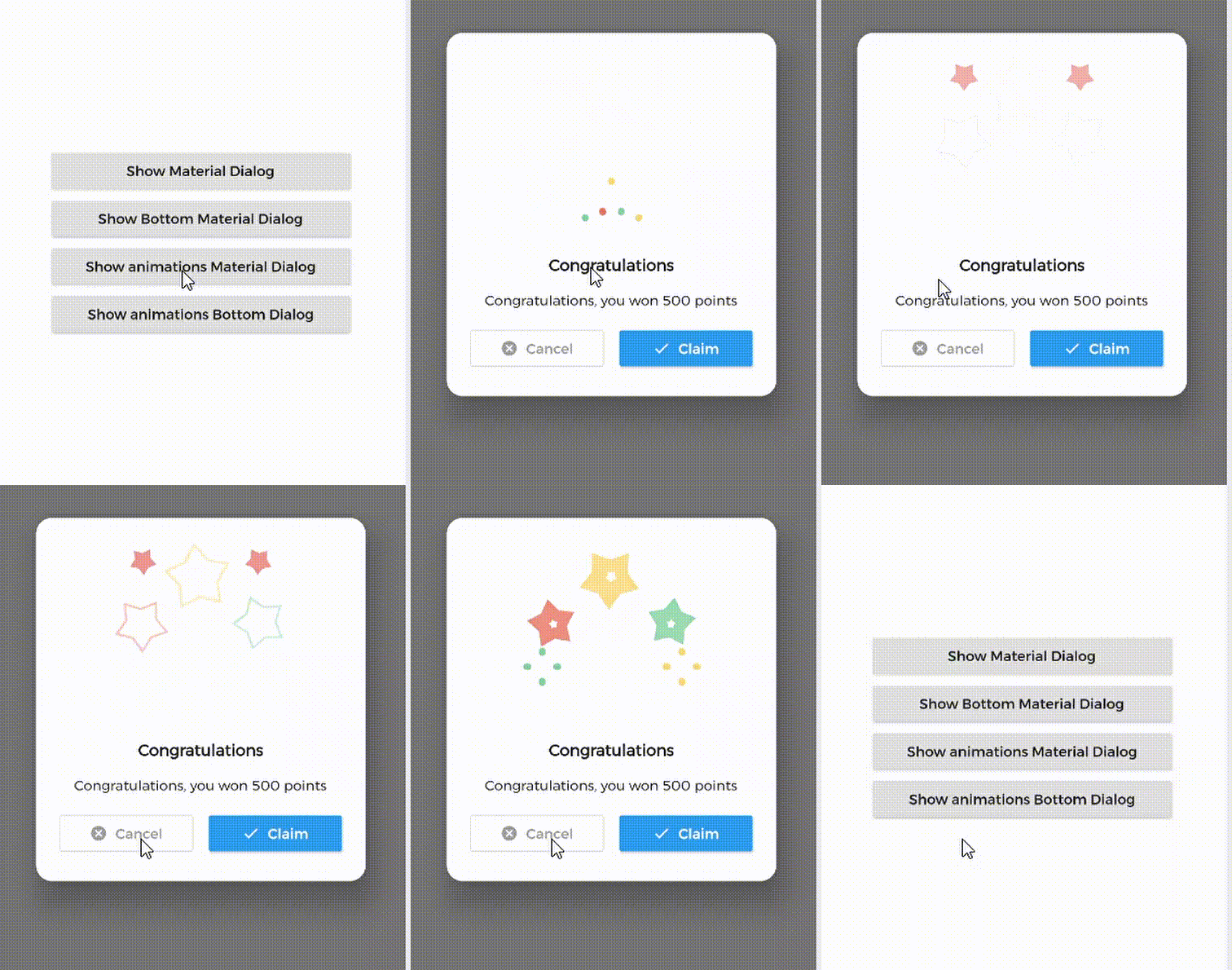
1. Material Dialog 2. Animations Material Dialog 3. Bottom Material Dialog 4. Animations Bottom Dialog

Table of Contents:

Introduction

MaterialDialog This Plugin will be useful to create simple, animated, and beautiful dialogs in your next Flutter app. This library implements Airbnb's Lottie library to render After Effects animation in app.

Types of Dialog

MaterialDialog library provides two types of dialog i.e.

1. Material Dialog 2. Bottom Sheet Material Dialog
A normal material dialog which can have one or two buttons. A Bottom Sheet material dialog which can have one or two buttons, is showed from bottom of device.

Implementation

Implementation of Material Dialog library is so easy. You can check /example directory for demo. Let's have look talk in details about it.

install
i. pubspec

In pubspec.yaml

dependencies:
  material_dialogs: _latest_version

Now in your Dart code, you can use:

import 'package:material_dialogs/material_dialogs.dart';

Details see pub.dev.

Create Dialog

As there are two types of dialogs in library. Material Dialogs are instantiated as follows.

i. Material Dialog

Dialogs class will be used to create your dialog, below is an example to show your dialog in the app.

Dialogs.materialDialog(
          msg: 'Are you sure ? you can\'t undo this',
          title: "Delete",
          color: Colors.white,
          context: context,
          actions: [
            IconsOutlineButton(
              onPressed: () {},
              text: 'Cancel',
              iconData: Icons.cancel_outlined,
              textStyle: TextStyle(color: Colors.grey),
              iconColor: Colors.grey,
            ),
            IconsButton(
              onPressed: () {},
              text: 'Delete',
              iconData: Icons.delete,
              color: Colors.red,
              textStyle: TextStyle(color: Colors.white),
              iconColor: Colors.white,
            ),
          ])

IconsOutlineButton and IconsButton are both buttons widgets provided by the plugin to make things easier for you read more, you can use any other buttons if you want.

ii. Bottom Sheet Material Dialog

Dialogs class will be used to create your dialog, use bottomMaterialDialog. Below is an example to show your dialog in the app.

Dialogs.bottomMaterialDialog(
          msg: 'Are you sure? you can\'t undo this action',
          title: 'Delete',
          context: context,
          actions: [
            IconsOutlineButton(
              onPressed: () {},
              text: 'Cancel',
              iconData: Icons.cancel_outlined,
              textStyle: TextStyle(color: Colors.grey),
              iconColor: Colors.grey,
            ),
            IconsButton(
              onPressed: () {},
              text: 'Delete',
              iconData: Icons.delete,
              color: Colors.red,
              textStyle: TextStyle(color: Colors.white),
              iconColor: Colors.white,
            ),
          ]),

Show Animations

Animations in this library are implemented using Lottie animation library. You can get free animations files here.

*.json file downloaded from LottieFiles should be placed in flutter project.

For example, here cong_example.json animation file is used in the assets folder to show congratulations animation in the example app.

In code, set lottieBuilder arg in Widget to set Animation to the dialog.

Dialogs.materialDialog(
          color: Colors.white,
          msg: 'Congratulations, you won 500 points',
          title: 'Congratulations',
          lottieBuilder: Lottie.asset(
          'assets/cong_example.json',
          fit: BoxFit.contain,
          ),
          context: context,
          actions: [
            IconsButton(
              onPressed: () {},
              text: 'Claim',
              iconData: Icons.done,
              color: Colors.blue,
              textStyle: TextStyle(color: Colors.white),
              iconColor: Colors.white,
            ),
          ]),

Icons buttons

The plugin provide you some out of the box customized buttons to help you creating your dialog.

IconsOutlineButton

This widget helps you create an outline button easily

    IconsOutlineButton(
      onPressed: () {},
      text: 'Cancel',
      iconData: Icons.cancel_outlined,
      textStyle: TextStyle(color: Colors.grey),
      iconColor: Colors.grey,
    ),
IconsButton

This widget helps you create a material button with icons in few lines of code

    IconsButton(
      onPressed: () {},
      text: 'Delete',
      iconData: Icons.delete,
      color: Colors.red,
      textStyle: TextStyle(color: Colors.white),
      iconColor: Colors.white,
    ),
CustomView

You can add your own Widget inside the dialog by using the customView attribute and CustomViewPosition to place it wherever you want.

Possible values
BEFORE_ANIMATION
BEFORE_TITLE (Default)
BEFORE_MESSAGE
BEFORE_ACTION
AFTER_ACTION
Dialogs.materialDialog(
          color: Colors.white,
          msg: 'Congratulations, you won 500 points',
          title: 'Congratulations',
          lottieBuilder: Lottie.asset(
          'assets/cong_example.json',
          fit: BoxFit.contain,
          ),
          customView: MySuperWidget(),
          customViewPosition: CustomViewPosition.BEFORE_ACTION,
          context: context,
          actions: [
            IconsButton(
              onPressed: () {},
              text: 'Claim',
              iconData: Icons.done,
              color: Colors.blue,
              textStyle: TextStyle(color: Colors.white),
              iconColor: Colors.white,
            ),
          ]),

Limitations

it's better to make your animation to have the same background color as your dialog's background color, please use lottie editor to remove the background layer of your animation or make it same as your dialog background color before using it in the plugin.

Contribute

Let's develop with collaborations. We would love to have contributions by raising issues and opening PRs. Filing an issue before PR is must.

Credits

This library is built using following open-source libraries.

License

Project is published under the Apache 2.0 license. Feel free to clone and modify repo as you want, but don't forget to add reference to authors :)

Categorias

Dependências

Lista de dependências 1 itens

Repositório-fonte

Projetos que usam este pacote

Ainda não há dados.