
Buscar pacotes, repositórios e categorias de apps

Capa de new_version
Detalhes do pacotev0.3.1

new_version

Verifique se seu usuário possui a versão mais recente do seu aplicativo Flutter.

AndroidiOSmacOSWindowsLinux
Downloads em 30 dias
456
Curtidas
618
Pontos Pub
130

Instalar pacote

flutter pub add new_version

Visão geral do pacote

Orientação gerada a partir de informações públicas. Apenas para referência.

O pacote new_version ajuda aplicativos Flutter a verificar se a versão atual está atualizada, comparando-a com uma versão especificada em uma fonte remota, como um arquivo JSON ou um ponto final de API. Ele suporta múltiplas plataformas, incluindo Android, iOS, macOS, Windows e Linux. O pacote permite que desenvolvedores solicitem aos usuários atualizarem o aplicativo quando uma versão mais recente estiver disponível, melhorando a experiência do usuário e garantindo acesso às últimas funcionalidades e correções de segurança. É leve e fácil de integrar com configuração mínima.

Casos de uso

  • Solicite aos usuários que atualizem o aplicativo
  • Verifique por atualizações ao iniciar o aplicativo
  • Verifique a compatibilidade de versão
  • Notifique os usuários sobre novas versões
  • Integrar com fluxos de CI/CD

Principais recursos

  • Suporte multiplataforma
  • Integração simples
  • Verificação remota de versão
  • Prompts de atualização personalizáveis
  • Suporta pontos de extremidade JSON e HTTP

Indicado para

  • Aplicativos que exigem controle de versão
  • Desenvolvedores gerenciando atualizações de aplicativos
  • Projetos com lançamentos frequentes
  • Aplicações móveis voltadas para o usuário
  • Equipes usando implantação automatizada

Considerações

  • Requer acesso à internet
  • Depende de fonte externa de versão
  • Pode ser necessário um estratégia de cache
  • Não adequado para aplicativos de primeira offline
  • A lógica de comparação de versão deve ser definida
README original

Snapshot do README original do repositório-fonte vinculado. Consulte o repositório para o conteúdo mais recente.

Archive Notice

This plugin is relatively stable and feature-complete, but I won't be working on it or accepting pull requests going forward. If anyone is interested in taking over as maintainer, feel free to email me. I'm also happy to link to popular forks that have spun off. Thanks.

New Version Plugin 🎉

A Flutter plugin that makes it possible to:

  • Check if a user has the most recent version of your app installed.
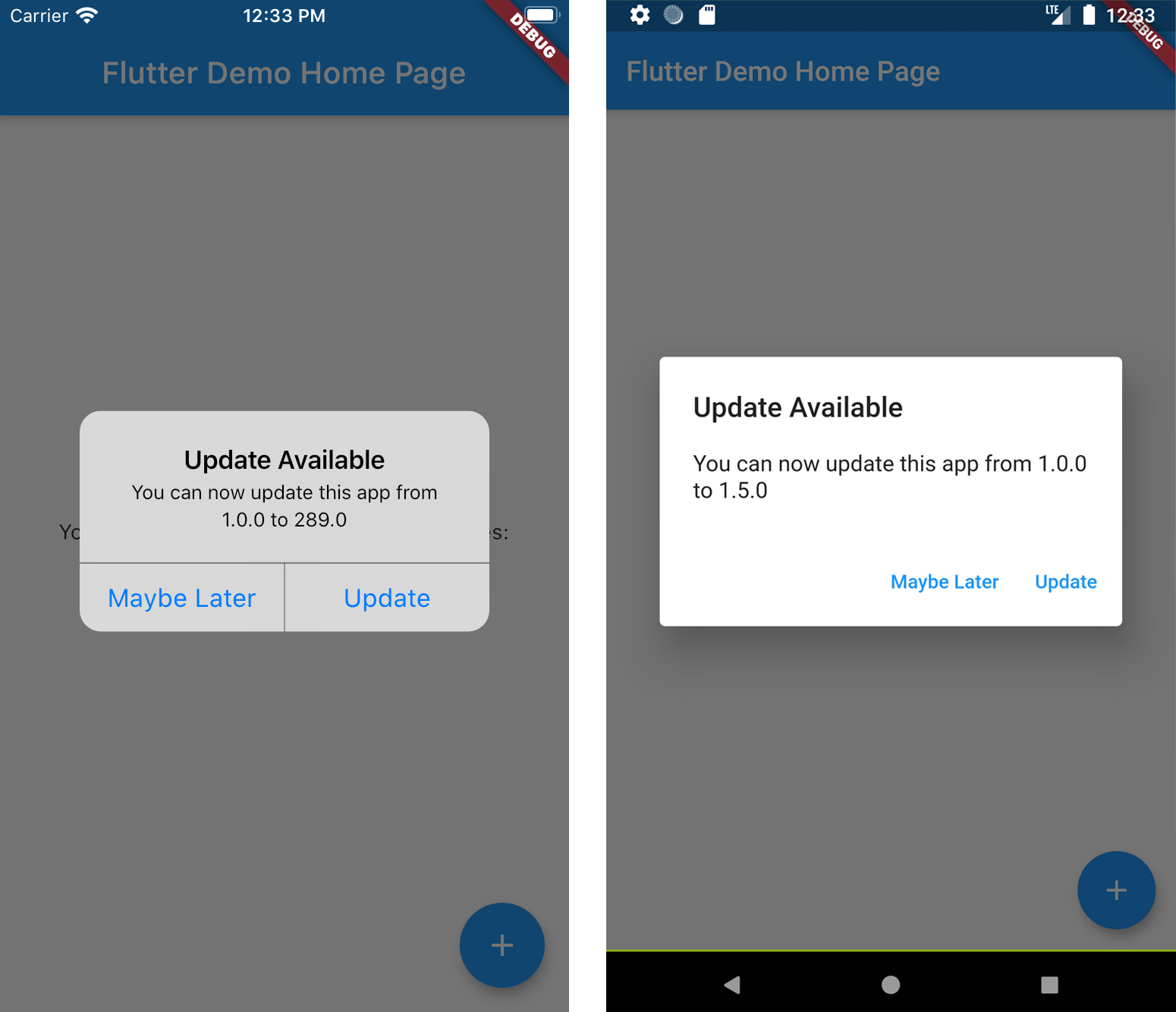
  • Show the user an alert with a link to the appropriate app store page.

See more at the Dart Packages page.

Screenshots

Installation

Add new_version as a dependency in your pubspec.yaml file.

dependencies:
  new_version: ^0.3.0

Usage

In main.dart (or wherever your app is initialized), create an instance of NewVersion.

final newVersion = NewVersion();

The plugin will automatically use your Flutter package identifier to check the app store. If your app has a different identifier in the Google Play Store or Apple App Store, you can overwrite this by providing values for androidId and/or iOSId.

For iOS: If your app is only available outside the U.S. App Store, you will need to set iOSAppStoreCountry to the two-letter country code of the store you want to search. See http://en.wikipedia.org/wiki/ISO_3166-1_alpha-2 for a list of ISO Country Codes.

You can then use the plugin in two ways.

Quickstart

Calling showAlertIfNecessary with your app's BuildContext will check if the app can be updated, and will automatically display a platform-specific alert that the user can use to go to the app store.

newVersion.showAlertIfNecessary(context: context);

Advanced 😎

If you want to create a custom alert or use the app version information differently, call getVersionStatus. This will return a Future<VersionStatus> with information about the local and app store versions of the app.

final status = await newVersion.getVersionStatus();
status.canUpdate // (true)
status.localVersion // (1.2.1)
status.storeVersion // (1.2.3)
status.appStoreLink // (https://itunes.apple.com/us/app/google/id284815942?mt=8)

If you want to present a customized dialog, you can pass your VersionStatus to showUpdateDialog().

newVersion.showUpdateDialog(
  context: context, 
  versionStatus: status,
  dialogTitle: 'Custom dialog title',
  dialogText: 'Custom dialog text',
  updateButtonText: 'Custom update button text',
  dismissButtonText: 'Custom dismiss button text',
  dismissAction: () => functionToRunAfterDialogDismissed(),
)

Categorias

Dependências

Lista de dependências 5 itens

Repositório-fonte

Projetos que usam este pacote

Ainda não há dados.