Orientação gerada a partir de informações públicas. Apenas para referência.
nfc_in_flutter é um plugin Flutter que permite a leitura de tags NFC no Android e no iOS, atualmente suportando apenas tags formatadas em NDEF. Ele fornece uma interface simples para detectar e recuperar dados de tags NFC, tornando-o ideal para aplicações que envolvem troca de dados sem contato. O plugin foi projetado para desenvolvedores que buscam funcionalidade NFC multiplataforma com configuração mínima. Embora as capacidades de leitura sejam disponíveis, operações de gravação ainda não são suportadas. O pacote é mantido ativamente e de código aberto, com documentação e exemplos disponíveis no repositório do GitHub.
Casos de uso
Lendo tags NDEF em aplicativos de varejo
Habilitar controle de acesso sem contato
Facilitando check-ins de eventos
Transferindo pequenos dados via NFC
Integração com pôsteres inteligentes
Principais recursos
Suporte multiplataforma (Android e iOS)
Leitura de tag NDEF apenas
API simples para detecção de NFC
de código aberto e mantido ativamente
Integração leve
Indicado para
Aplicativos móveis que exigem recuperação de dados NFC
Desenvolvedores construindo soluções sem contato
Projetos usando tags formatadas em NDEF
Prototipagem de recursos com NFC
Aplicativos voltados para usuários Android e iOS
Considerações
Operações de escrita não são suportadas
Limitado ao formato NDEF
Requer compatibilidade com dispositivo
O iOS pode ter restrito a varredura em segundo plano
Permissões específicas da plataforma necessárias
README original
Snapshot do README original do repositório-fonte vinculado. Consulte o repositório para o conteúdo mais recente.
nfc_in_flutter
NFC in Flutter is a plugin for reading and writing NFC tags in Flutter. It works on both Android and iOS with a simple stream interface.
⚠️ Currently only NDEF formatted tags are supported.
Usage
Read NFC tags
// NFC.readNDEF returns a stream of NDEFMessageStream<NDEFMessage> stream = NFC.readNDEF();
stream.listen((NDEFMessage message) {
print("records: ${message.records.length}");
});
Read one NFC tag
NDEFMessage message = await NFC.readNDEF(once: true).first;
print("payload: ${message.payload}");
// once: true` only scans one tag!
Writing to tags
You can access a message's NFC tag using the NDEFMessage's .tag property. The tag has a .write method, which allows you to write a NDEF message to the tag.
Note that the read stream must still be open when the .write method is called. This means that the once argument in .readNDEF() cannot be used.
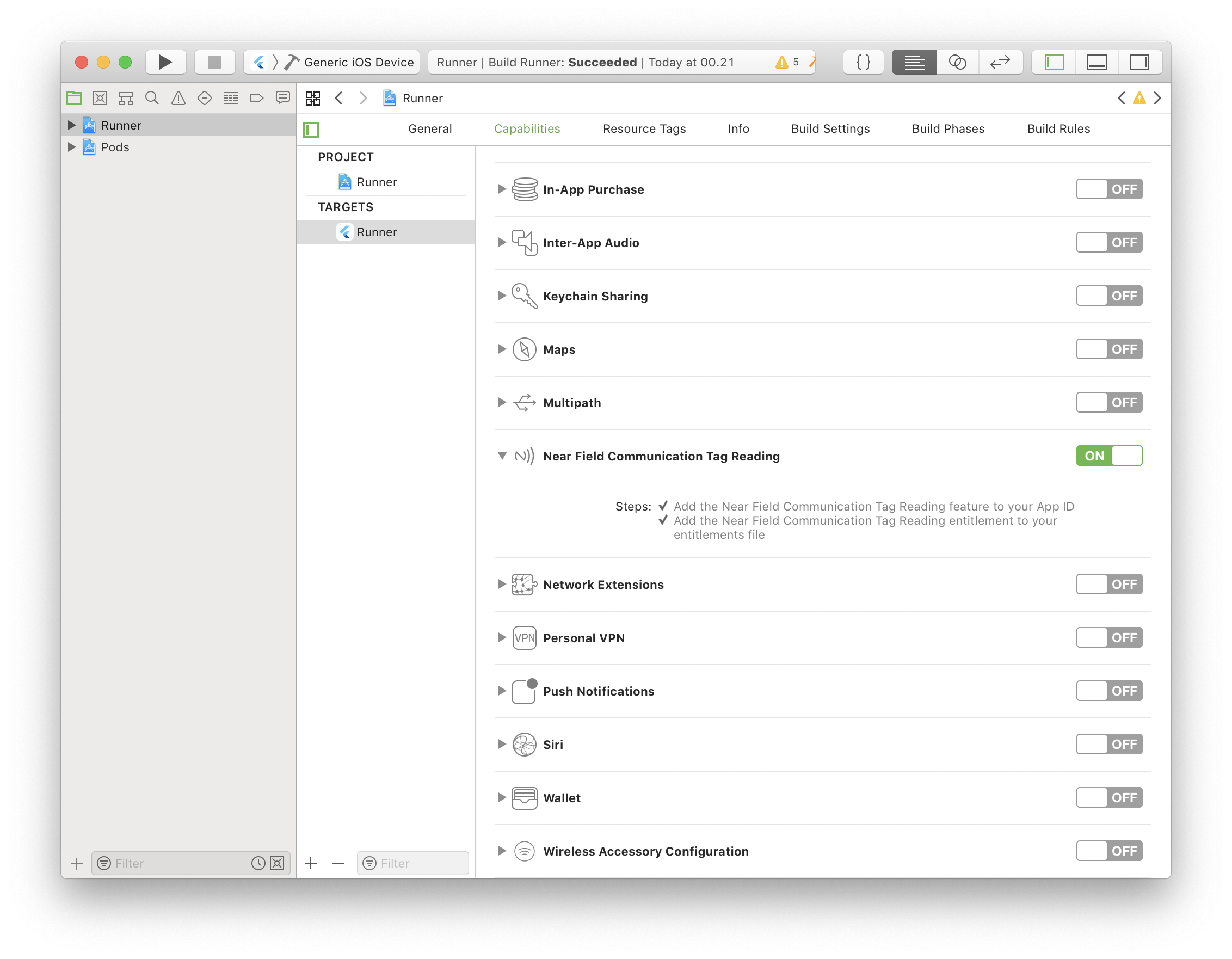
On iOS you must add turn on the Near Field Communication capability, add a NFC usage description and a NFC entitlement.
Turn on Near Field Communication Tag Reading
Open your iOS project in Xcode, find your project's target and navigate to Capabilities. Scroll down to 'Near Field Communication Tag Reading' and turn it on.
Turning on 'Near Field Communication Tag reading'
Adds the NFC tag-reading feature to the App ID.
Adds the Near Field Communication Tag Reader Session Formats Entitlement to the entitlements file.
Open your ios/Runner/Info.plist file and add a new NFCReaderUsageDescription key. It's value should be a description of what you plan on using NFC for.
If you're new to NFC you may come to expect a lot of readNFC() calls, but instead you see readNDEF() and NDEFMessage. NDEF is just a formatting standard the tags can be encoded in. There are other encodings than NDEF, but NDEF is the most common one. Currently NFC in Flutter only supports NDEF formatted tags.
Host Card Emulation
NFC in Flutter supports reading from emulated host cards*.
To read from emulated host cards, you need to do a few things.
Call readNDEF() with the readerMode argument set to an instance of NFCDispatchReaderMode.
Insert the following <intent-filter /> in your AndroidManifest.xml activity:
If you start a readNDEF() stream with the reader mode set to an instance of NFCDispatchReaderMode, while another stream is active with the NFCNormalReaderMode, it will throw a NFCMultipleReaderModesException.
Platform differences
When you call readNDEF() on iOS, Core NFC (the iOS framework that allows NFC reading) opens a little window. On Android it just starts listening for NFC tag reads in the background.
⚠️ This will also freeze Flutter while open. Please send a Pull Request if you can fix this.
Error handling
Errors are no exception to NFC in Flutter (hah, get it). The stream returned by NFC.readNDEF() can send 7 different exceptions, and even worse: they are different for each platform!
See the full example in the example directory for an example on how to check for errors.
Exceptions for both platforms
NDEFReadingUnsupportedException
Thrown when a reading session is started, but not actually supported.
iOS
NFCUserCanceledSessionException
Thrown when the user clicks Cancel/Done core NFC popup. If you don't need to know if the user canceled the session you can start reading with the throwOnUserCancel argument set to false like so: readNDEF(throwOnUserCancel: false)
NFCSessionTimeoutException
Core NFC limits NFC reading sessions to 60 seconds. NFCSessionTimeoutException is thrown when the session has been active for 60 seconds.
NFCSessionTerminatedUnexpectedlyException
Thrown when the reading session terminates unexpectedly.
NFCSystemIsBusyException
Throw when the reading session fails because the system is too busy.
Android
NFCIOException
Thrown when a I/O exception occurs. Will for example happen if a tag is lost while being read or a tag could not be connected to.
NDEFBadFormatException
Thrown when the tag is expected to NDEF formatted, but it is incorrectly formatted.