Buscar pacotes, repositórios e categorias de apps

Capa de nice_intro
Detalhes do pacotev0.2.1

nice_intro

Faça seus usuários conhecerem seu aplicativo com facilidade! Este pacote ajudará você a criar belas telas de introdução para o seu aplicativo.

Downloads em 30 dias
45
Curtidas
93
Pontos Pub
60

Instalar pacote

flutter pub add nice_intro

Visão geral do pacote

Orientação gerada a partir de informações públicas. Apenas para referência.

Nice Intro é um pacote Flutter projetado para simplificar a criação de telas de introdução visualmente atraentes para aplicativos móveis. Ele permite que desenvolvedores criem apresentações suaves e personalizáveis que ajudam os usuários a entenderem rapidamente e se envolvam com os recursos do aplicativo. Com configuração intuitiva e uma API limpa, ele oferece suporte a animações, posicionamento de conteúdo e transições adaptadas para experiências de usuário pela primeira vez. O pacote foca na estética e usabilidade, tornando a introdução tanto envolvente quanto eficaz.

Casos de uso

  • Onboarding de novos usuários
  • Percursos de recursos do aplicativo
  • Experiência do usuário pela primeira vez
  • Introduções ao lançamento de produtos
  • Melhoria da engajamento do usuário
  • Fluxos de tutorial simplificados

Principais recursos

  • Designs de diapositivas personalizáveis
  • Animações suaves
  • Integração fácil com o Flutter
  • Suporte para texto, imagens e ícones
  • Manuseio de layout responsivo
  • Controles de navegação configuráveis

Indicado para

  • Desenvolvedores de aplicativos móveis
  • designers de UX
  • Startups lançando aplicativos
  • Aplicativos que exigem educação do usuário
  • Projetos com necessidades de onboarding

Considerações

  • Personalização específica de plataforma limitada
  • Sem suporte de localização embutido
  • Requer manipulação manual da gestão de estado
  • Depende de dependências externas para funcionalidades avançadas
  • Não otimizado para fluxos de trabalho complexos de múltiplos passos

README original

Snapshot do README original do repositório-fonte vinculado. Consulte o repositório para o conteúdo mais recente.

nice_intro

Get your users to know your app with ease

Getting Started

Onboarding is a great way to introduce your app to newcomers, to help them quickly adapt to the new conditions so that they can get the most out of your app

Pub Version Donate

A Flutter package to build awesome intro slides for your apps.

Demo

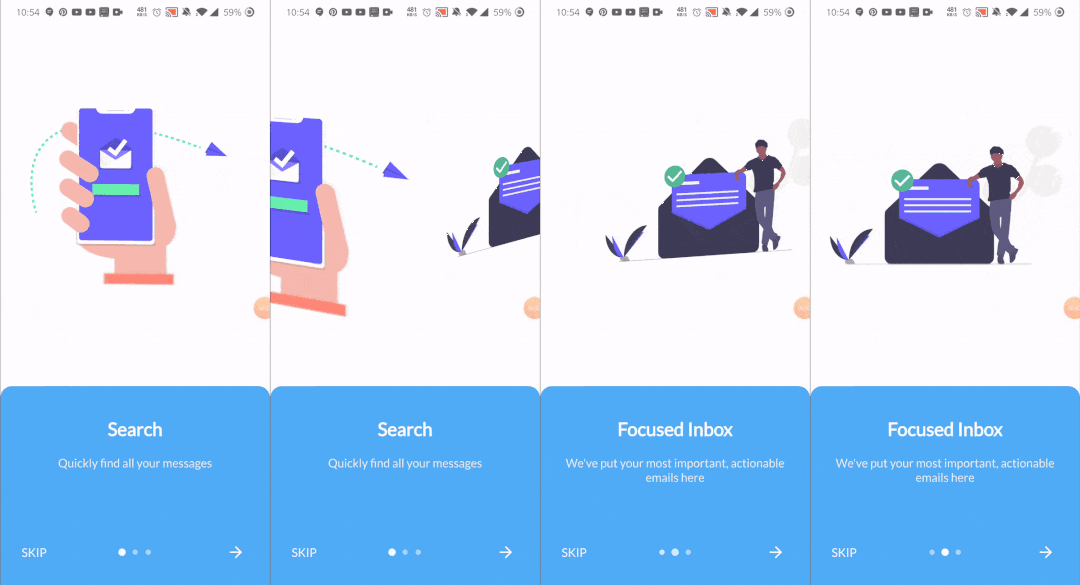
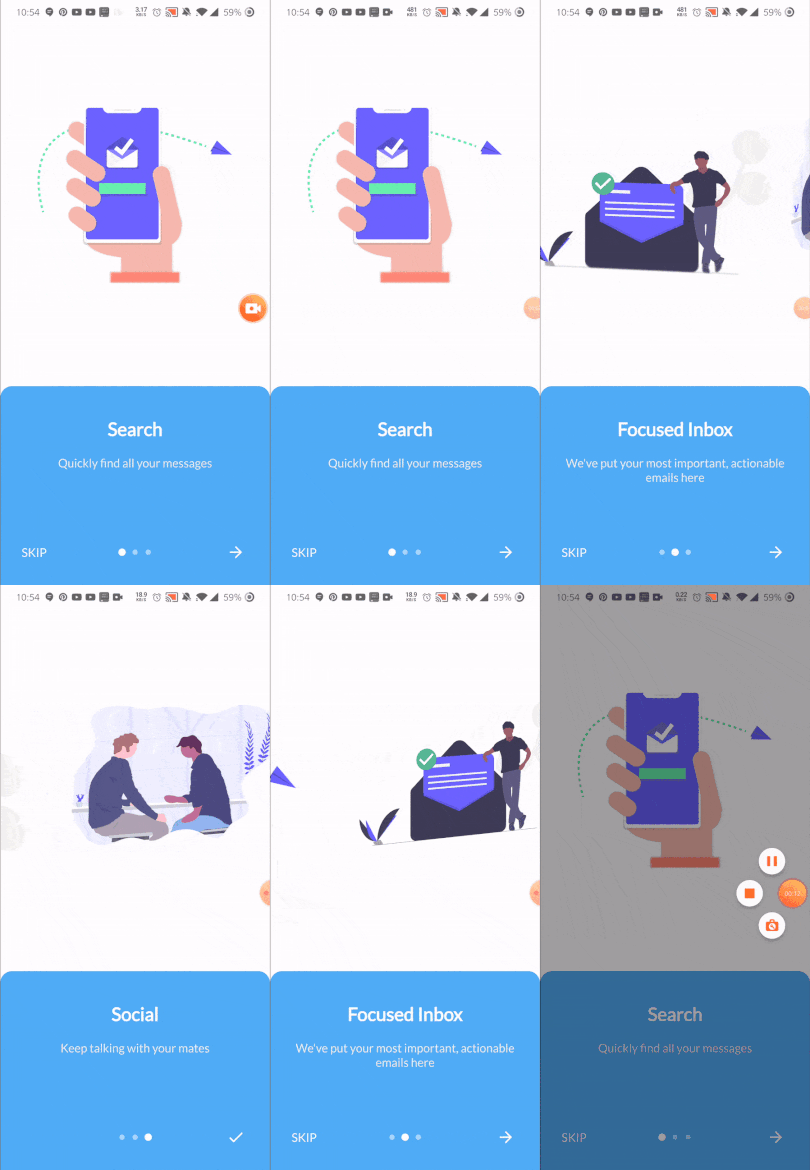
This is somehow what you can expect from this package :)

Package Demo package demo

Installation

Add the following to pubspec.yaml:

dependencies:
  nice_intro: ^0.2.0

Usage Example

First, import the following files

import 'package:nice_intro/intro_screen.dart';
import 'package:nice_intro/intro_screens.dart';

Then, create a list of screens each one with the IntroSreen class:

List<IntroScreen> pages =  [
        IntroScreen(
          title: 'Search',
          imageAsset: 'assets/img/1.png',
          description: 'Quickly find all your messages',
          headerBgColor: Colors.white,
        ),
        IntroScreen(
          title: 'Focused Inbox',
          headerBgColor: Colors.white,
          imageAsset: 'assets/img/2.png',
          description: "We've put your most important, actionable emails here",
        ),
        IntroScreen(
          title: 'Social',
          headerBgColor: Colors.white,
          imageAsset: 'assets/img/3.png',
          description: "Keep talking with your mates",
        ),
      ];

You'll come up with a list of nice slides screens.

Finally, pass the pages to an instance of IntroScreens class:

IntroScreens introScreens = IntroScreens(
      footerBgColor: TinyColor(Colors.blue).lighten().color,
      activeDotColor: Colors.white,
      footerRadius: 18.0,
      indicatorType: IndicatorType.CIRCLE,
      pages:pages

    return Scaffold(
      body: introScreens,
    );

And pass it to your scaffold widget.

Documentation
IntroScreen widget's properties
Name Type Default Description
title String required Set the title of your slide screen
description String required Set the description of your slide screen
header String Container() Set the widget to use as the header part of your screen
imageAsset String null Set the image path of your slide screen
textStyle TextStyle null Set the style of the title and description of your slide
headerBgColor Color Colors.white Set the background color of the slide
headerPadding EdgeInsets EdgeInsets.all(12) Set the padding of the header part of your slide screen
containerBg Color Colors.white Set the wrapper container's background color
IntroScreens widget's properties
Name Type Default Description
slides List<IntroScreen> required list of your slides
onDone Function required Set the action to do when the last slide is reached
onSkip Function required Set the action to do when the user skips the slides
footerRadius double 12.0 Set the radius of the footer part of your slides
footerBgColor Color Color(0xff51adf6) Set the background color of the footer part of your slides
footerGradients List<Color> [] Set the list of colors for the gradient of the footer part of your slides
footerPadding EdgeInsets EdgeInsets.all(24) Set the padding of the footer part of your slides
indicatorType IndicatorType IndicatorType.CIRCLE Set the type of indicator for your slides
activeDotColor Color Colors.white Set the color of the active indicator color
inactiveDotColor Color null Set the color of an inactive indicator color
skipText String "Skip" Set the text of the skip widget
nextWidget Widget Set the widget to use for next interaction of your slides
doneWidget Widget Set the widget to display when the last slide is reached
viewPortFraction double 1.0 Set the viewport fraction of your slides
textColor Color Colors.white Set the text color of the footer part of your slides
physics ScrollPhysics BouncingScrollPhysics Set the physics for the page view
IndicatorType enum properties
  • IndicatorType.CIRCLE
  • IndicatorType.LINE
  • IndicatorType.DIAMOND

Now enjoy!

Refer to example folder and the source code for more information.

Categorias

Dependências

Lista de dependências 1 itens

Repositório-fonte

Projetos que usam este pacote

Ainda não há dados.