Orientação gerada a partir de informações públicas. Apenas para referência.
OCR Scan Text é um pacote Flutter que envolve a biblioteca de reconhecimento de texto do Google ML Kit, permitindo que desenvolvedores extraiam texto de imagens capturadas pela câmera ou selecionadas da galeria do dispositivo. Oferece detecção de texto precisa e rápida com suporte para múltiplos idiomas e reconhecimento de escrita manuscrita. O pacote simplifica a integração de recursos avançados de OCR em aplicativos móveis sem exigir conhecimento profundo dos frameworks de aprendizado de máquina subjacentes. Projetado para Android e iOS, garante consistência entre plataformas na funcionalidade de digitalização de texto.
Casos de uso
Extrair texto de documentos
Digitalizar cartões de visita
Leia notas manuscritas
Capturar texto de capturas de tela
Automatizar entrada de dados
Principais recursos
Reconhecimento de texto em tempo real
Suporte a múltiplos idiomas
Detecção de escrita manuscrita
Integração de câmera
Operação off-line
Indicado para
Aplicativos de digitalização de documentos
Ferramentas de anotação
Automação de entrada de dados
Recursos de acessibilidade
Sistemas de inventário móvel
Considerações
Requer permissões de câmera
O desempenho varia conforme o dispositivo
Melhores resultados com imagens claras
Limitado à reconhecimento apenas de texto
Pode exigir pré-processamento de imagem para entradas de baixa qualidade
README original
Snapshot do README original do repositório-fonte vinculado. Consulte o repositório para o conteúdo mais recente.
Flutter OCR Scan Text
OCR Flutter
v1.3.1
Flutter OCR Scan Text is a wrapper around the "Google ML kit Text Recognition" library.
It helps to facilitate accurate text search and display of results from the camera. It also allows to manage text searches from an image or a pdf.
Features
Allows you to easily scan text from the camera, extract accurate results and display them to the user.
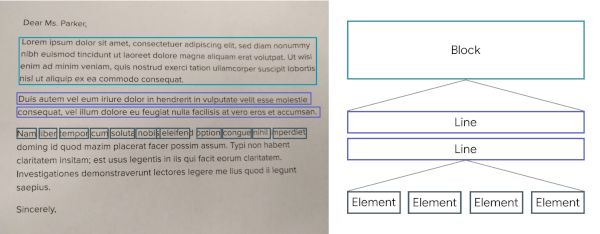
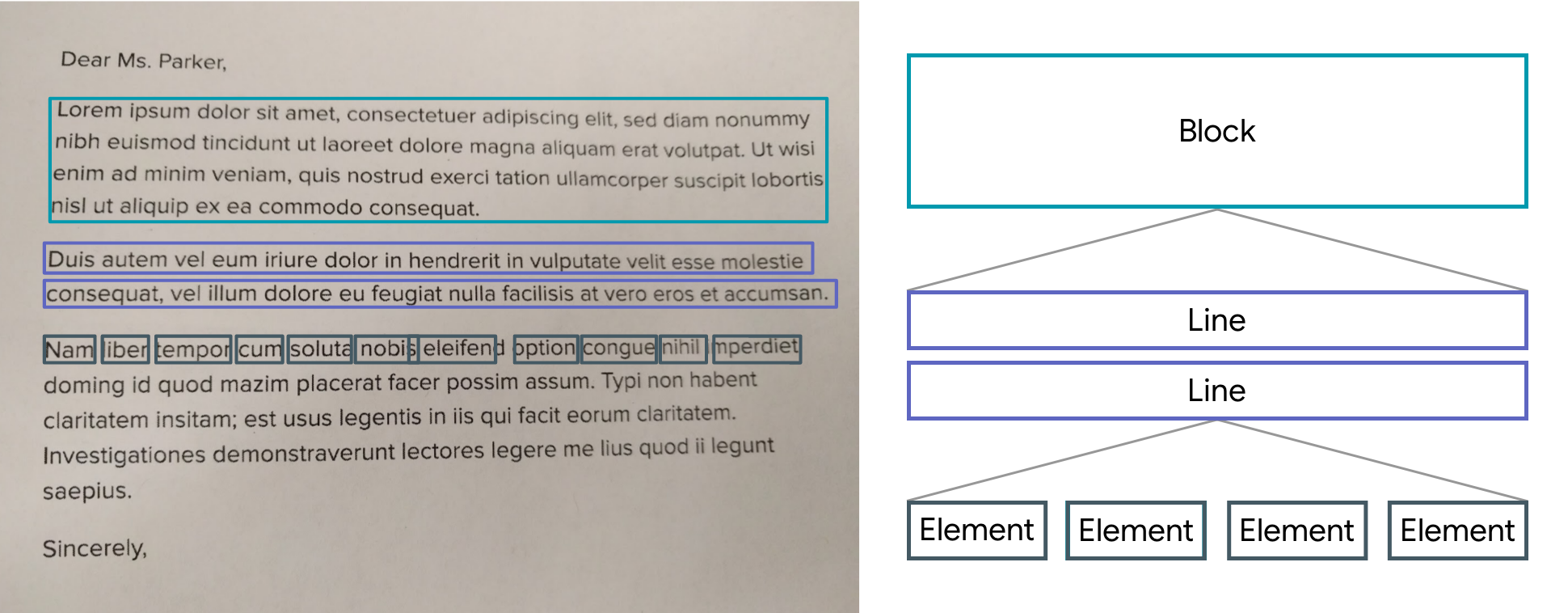
The results are returned by list of Block.
A Block contains: the global text of the block, a list of Lines and the position.
A Line contains: the global text of the line, a list of Elements and the position.
An Element contains: a word and the position.
Note: The library uses the Camera package, be sure to ask for permission.
A LiveScanWidget needs a module list to start detection.
Validated results will be returned to the "matchedResult" method.
Create a scan module :
In this example (see the /example folder), we consider all Elements to be results.
Create a scan module :
classScanAllModuleextendsScanModule
The constructor of a module:
label: A label (optional) that will be displayed to the user during rendering
color: A color (optional) that will be used for rendering
validateCountCorrelation: The number of times the same result must be found in the same place for it to be valid. (As the camera moves certain numbers / letters may be misinterpreted over several frames).
The purpose of a module is to search among the Blocks for a list of results (ScanResult) and to return it using the "matchedResult" method.
@overrideFuture<List<ScanResult>> matchedResult(List<TextBlock> textBlock, String text) async {
List<ScanResult> list = [];
for (var block in textBlock) {
for (var line in block.lines) {
for (var element in line.elements) {
list.add(ScanResult(cleanedText: element.text, scannedElementList: [element]));
}
}
}
return list;
}
Start a module :
module.start();
Stop a module :
module.stop();
Scan file with Widget (Supported extension : png, jpg and pdf )
You can use TextBlockHelper methods to help find results.
TextBlockHelper.extractTextElementsWithRegex :
Find the list of elements that match with the regex
TextBlockHelper.nextTextElement :
Find the next TextElement a right or left of TextElement
TextBlockHelper.combineRecreateTextLine :
When texts are on the same line but distant, MLKit can create two different TextBlock. The "combineRecreateTextLine" method will create a TextLine, from a starting TextElement, taking into account the Elements of each TextBlock
TextBlockHelper.combineLeftTextElement :
Return a List of TextElement with all TextElement to the left of startElement including startElement.
TextBlockHelper.combineRightTextElement :
Return a List of TextElement with all TextElement to the right of startElement including startElement.
TextBlockHelper.combineBetweenTextElement :
Return a List of TextElement between startElement and endElement