Buscar pacotes, repositórios e categorias de apps

Capa de oktoast
Detalhes do pacotev3.4.0

oktoast

Uma biblioteca de toast pura para Flutter, com suporte a estilo/widget personalizados, fácilmente alcançar o mesmo efeito dos toasts nativos.

AndroidiOSWebmacOSWindowsLinux
Downloads em 30 dias
47,3 mil
Curtidas
361
Pontos Pub
160

Instalar pacote

flutter pub add oktoast

Visão geral do pacote

Orientação gerada a partir de informações públicas. Apenas para referência.

oktoast é uma biblioteca leve e puramente Flutter para notificações tipo toast, projetada para oferecer notificações nativas em todas as plataformas. Suporta estilos e widgets personalizados, permitindo que desenvolvedores criem mensagens de toast visualmente consistentes e altamente personalizáveis. Com integração simples por meio de um único comando, permite a implementação rápida de feedbacks suaves e não intrusivos nos aplicativos. A biblioteca é mantida ativamente e compatível com Android, iOS, Web, macOS, Windows e Linux.

Casos de uso

  • Exibindo feedback breve do usuário
  • Mostrando mensagens de sucesso ou erro
  • Personalizando a aparência do toast
  • Fornecendo atualizações temporárias de status
  • Melhorando a responsividade da interface do usuário
  • Substituindo o snackbar padrão do Flutter

Principais recursos

  • Suporta widgets e estilos personalizados
  • Compatibilidade multiplataforma
  • API simples para configuração rápida
  • Exibição não bloqueante de toast
  • Duração e posição configuráveis
  • Leve e performático

Indicado para

  • Feedback do aplicativo móvel
  • Notificações de aplicativo da web
  • Dicas do usuário do aplicativo de desktop
  • Aplicativos que exigem design consistente de toast
  • Desenvolvedores que querem dependências mínimas
  • Projetos que precisam de toasts independentes de plataforma

Considerações

  • Pode exigir estilos adicionais para layouts complexos
  • animações internas limitadas
  • Não ideal para notificações persistentes
  • Requer gerenciamento manual de múltiplos Toasts
  • Melhor adequado apenas para mensagens transitórias
  • Sem suporte de localização embutido

README original

Snapshot do README original do repositório-fonte vinculado. Consulte o repositório para o conteúdo mais recente.

oktoast

oktoast pub package GitHub GitHub stars

A library for flutter.

A pure dart toast Library.

You can completely customize the style of toast.

中文博客介绍

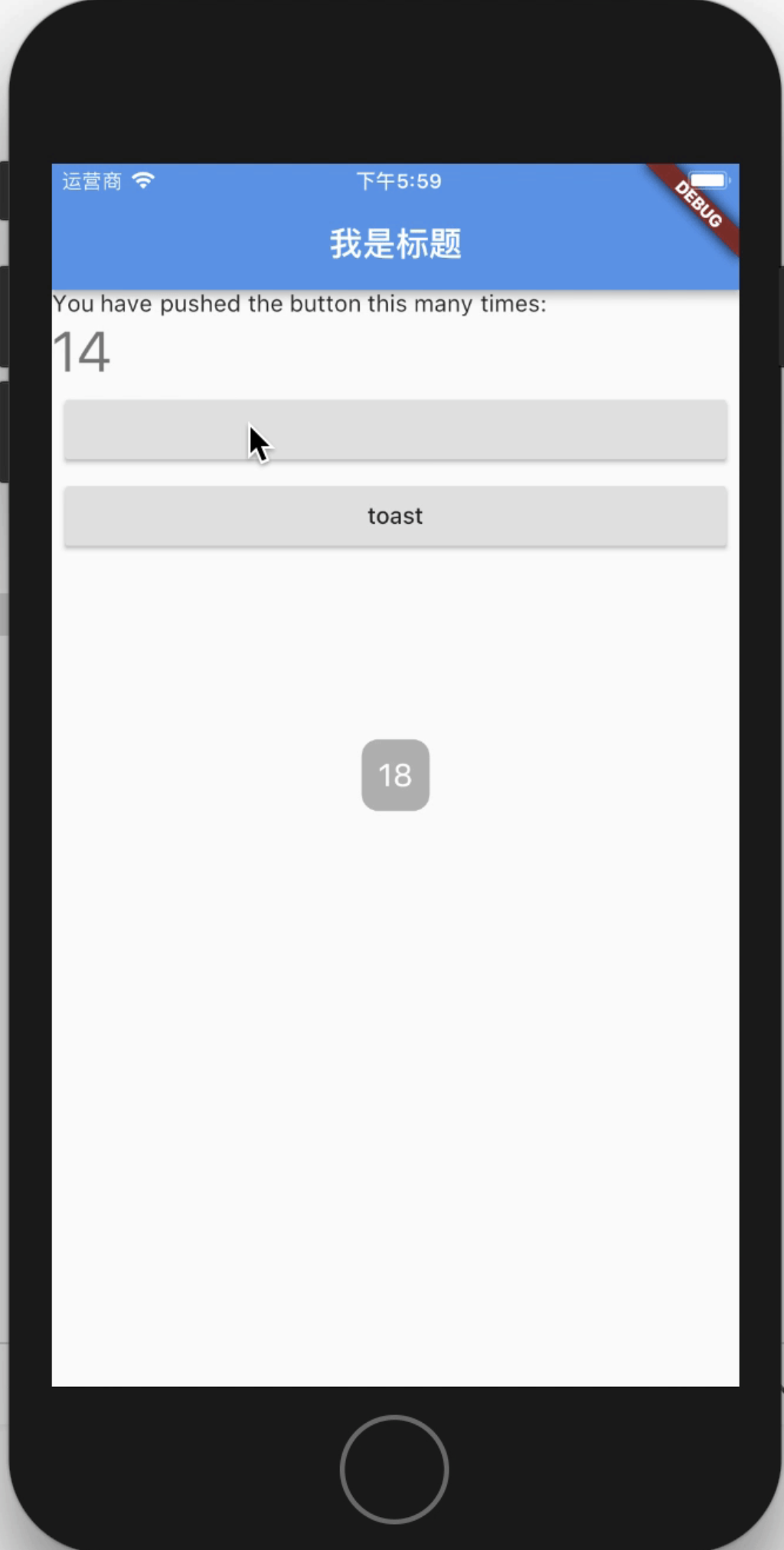
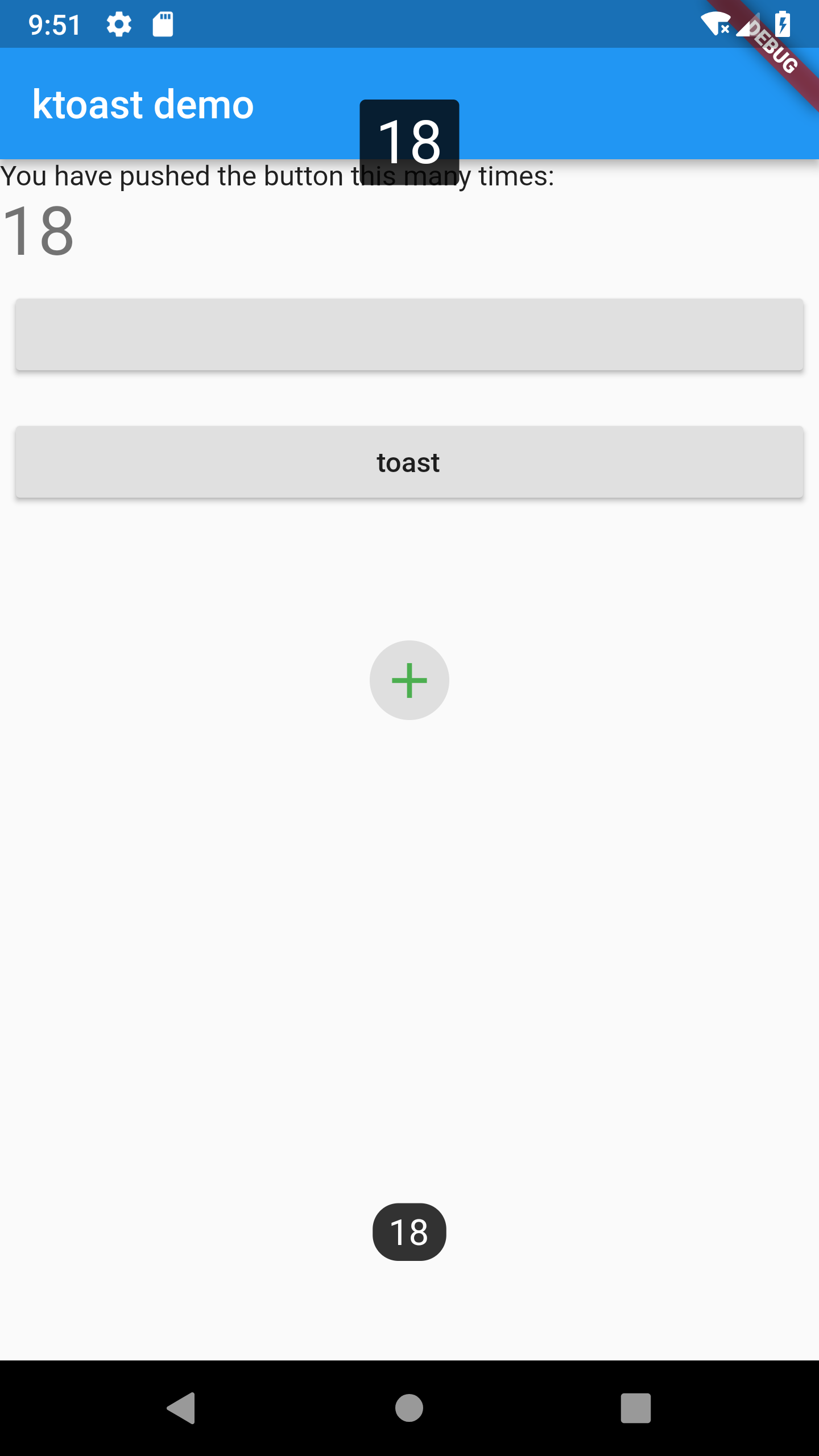
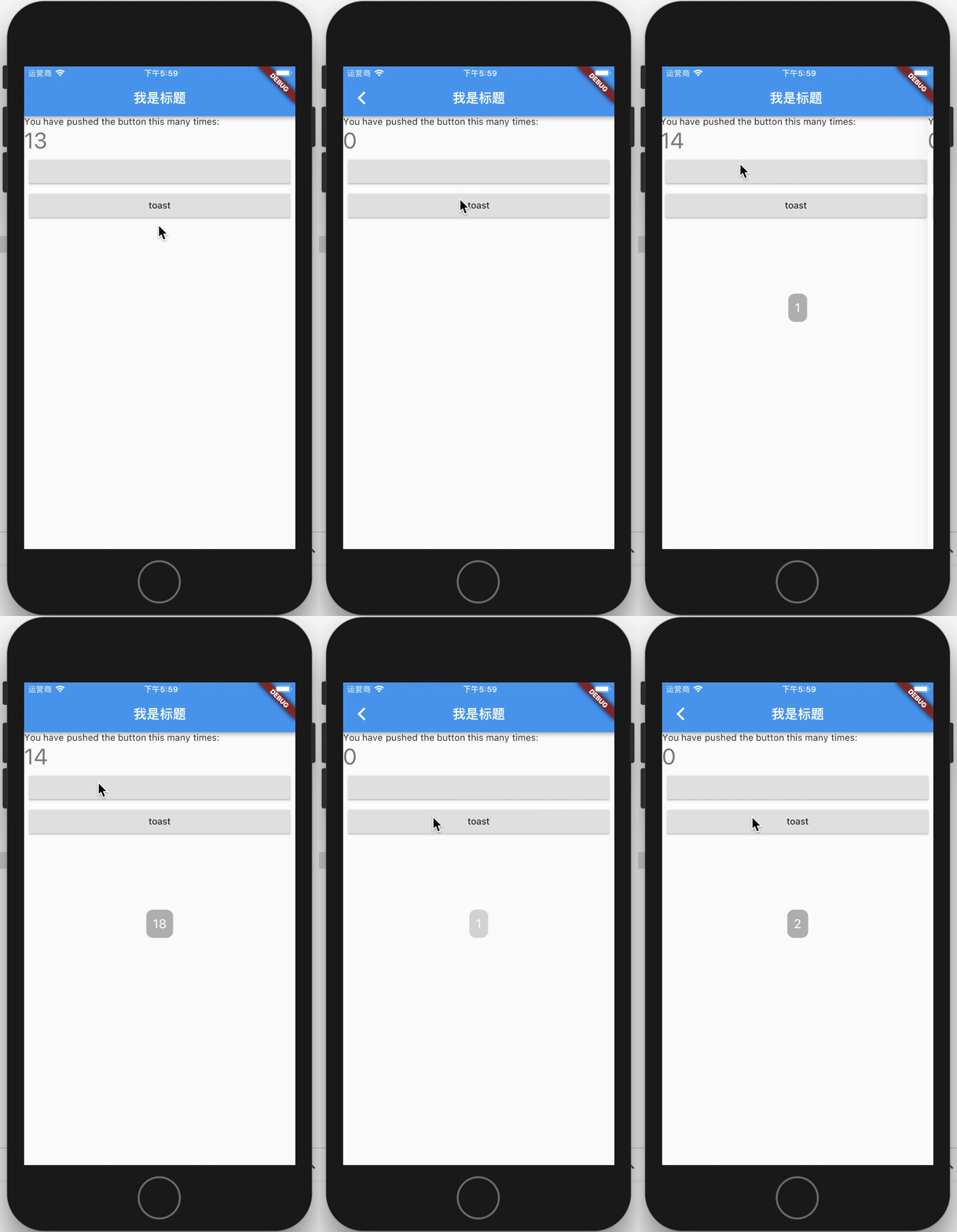
Screenshot

Default Custom GIF
pic pic pic

Versions

3.x.x

Starting from the 3.x version, OKToast provides a null-safety version, the specific introduction of null-safety can be viewed in dart or flutter.

The 2.3.2 version is the last version that does not support null-safety.

About version 1.x

if you use OKToast 1.x, Please use the 1.x branch, and read version readme.

Proposed migration to 2.x version. The new version does not require buildContext.

And you can completely customize the style of toast, because now you can use showToastWidget.

Usage

1. Add library to your pubspec.yaml
flutter pub add oktoast
2. Import library in dart file
import 'package:oktoast/oktoast.dart';
3. Wrap your app widget
OKToast(
  /// set toast style, optional
  child:MaterialApp()
);

Tips: If you happened error like: No MediaQuery widget found, you can try to use this code to include OKToast to your App.

MaterialApp(
  builder: (BuildContext context, Widget? widget) {
    return OKToast(child: widget);
  },
);
4. Call method showToast
showToast('content');

// position and second have default value, is optional
showToastWidget(Text('hello oktoast'));

Explain

There are two reasons why you need to wrap MaterialApp

  1. Because this ensures that toast can be displayed in front of all other controls
  2. Context can be cached so that it can be invoked anywhere without passing in context

Properties

OKToast params

OKToast have default style, and you also can custom style or other behavior.

name type need desc
child Widget required Usually Material App
textStyle TextStyle optional
radius double optional
backgroundColor Color optional backroundColor
position ToastPosition optional
dismissOtherOnShow bool optional If true, other toasts will be dismissed. Default false.
movingOnWindowChange bool optional If true, when the size changes, toast is moved. Default true.
textDirection TextDirection optional
textPadding EdgeInsetsGeometry optional Outer margin of text
textAlign TextAlign optional When the text wraps, the align of the text.
handleTouch bool optional Default is false, if it's true, can responed use touch event.
animationBuilder OKToastAnimationBuilder optional Add animation to show / hide toast.
animationDuration Duration optional The duration of animation.
animationCurve Curve optional Curve of animation.
duration Duration optional Default duration of toast.
Method showToast

Display text on toast.

Description of params see OKToast.

name type need desc
msg String required Text of toast.
context BuildContext optional
duration Duration optional
position ToastPosition optional
textStyle TextStyle optional
textPadding EdgeInsetsGeometry optional
backgroundColor Color optional
radius double optional
onDismiss Function optional
textDirection TextDirection optional
dismissOtherToast bool optional
textAlign TextAlign optional
animationBuilder OKToastAnimationBuilder optional
animationDuration Duration optional
animationCurve Curve optional
Method showToastWidget

Display custom widgets on toast

Description of params see showToast.

name type need desc
widget Widget required The widget you want to display.
context BuildContext optional
duration Duration optional
position ToastPosition optional
onDismiss Function optional
dismissOtherToast bool optional
textDirection TextDirection optional
handleTouch bool optional
animationBuilder OKToastAnimationBuilder optional
animationDuration Duration optional
animationCurve Curve optional
Method dismissAllToast

Dismiss all toast.

Return value of showToast and showToastWidget

about return type:
showToast and showToastWidget return type is ToastFuture, The ToastFuture can be use to dismiss the toast.

For all dismiss toast method

An optional parameter showAnim is added to control whether fading animation is required for dismiss.

The praram default value is false.

Examples

import 'package:flutter/material.dart';
import 'package:oktoast/oktoast.dart'; // 1. import library

void main() => runApp( MyApp());

class MyApp extends StatelessWidget {
  @override
  Widget build(BuildContext context) {
    return OKToast(
      // 2. wrap your app with OKToast
      child:  MaterialApp(
        title: 'Flutter Demo',
        theme:  ThemeData(
          primarySwatch: Colors.blue,
        ),
        home:  MyHomePage(),
      ),
    );
  }
}

class MyHomePage extends StatefulWidget {
  MyHomePage({Key key}) : super(key: key);

  @override
  _MyHomePageState createState() =>  _MyHomePageState();
}

class _MyHomePageState extends State<MyHomePage> {
  int _counter = 0;

  void _incrementCounter() {
    _counter++;

    // 3.1 use showToast method
    showToast(
      "$_counter",
      duration: Duration(seconds: 2),
      position: ToastPosition.bottom,
      backgroundColor: Colors.black.withOpacity(0.8),
      radius: 13.0,
      textStyle: TextStyle(fontSize: 18.0),
    );

    showToast(
      "$_counter",
      duration: Duration(seconds: 2),
      position: ToastPosition.top,
      backgroundColor: Colors.black.withOpacity(0.8),
      radius: 3.0,
      textStyle: TextStyle(fontSize: 30.0),
    );

    // 3.2 use showToastWidget method to custom widget
    Widget widget = Center(
      child: ClipRRect(
        borderRadius: BorderRadius.circular(30.0),
        child: Container(
          width: 40.0,
          height: 40.0,
           color: Colors.grey.withOpacity(0.3),
          child: Icon(
            Icons.add,
            size: 30.0,
            color: Colors.green,
          ),
        ),
      ),
    );

    ToastFuture toastFuture = showToastWidget(
      widget,
      duration: Duration(seconds: 3),
      onDismiss: () {
        print("the toast dismiss"); // the method will be called on toast dismiss.
      },
    );

    // can use future
    Future.delayed(Duration(seconds: 1), () {
      toastFuture.dismiss(); // dismiss
    });

    setState(() {

    });
  }

  @override
  Widget build(BuildContext context) {
    return  Scaffold(
      appBar:  AppBar(
        title:  Text("ktoast demo"),
      ),
      body: Stack(
        children: <Widget>[
           Center(
            child: ListView(
              children: <Widget>[
                 Text(
                  'You have pushed the button this many times:',
                ),
                 Text(
                  '$_counter',
                  style: Theme.of(context).textTheme.display1,
                ),
                Padding(
                  padding: const EdgeInsets.all(8.0),
                  child: RaisedButton(
                    onPressed: () {
                      Navigator.push(context,
                          MaterialPageRoute(builder: (ctx) => MyHomePage()));
                    },
                  ),
                ),
                Padding(
                  padding: const EdgeInsets.all(8.0),
                  child: RaisedButton(
                    onPressed: _incrementCounter,
                    child: Text('toast'),
                  ),
                ),
              ],
            ),
          ),
        ],
      ),
    );
  }
}


CHANGELOG

Link

LICENSE

Apache-2.0

Categorias

Repositório-fonte

Projetos que usam este pacote