Buscar pacotes, repositórios e categorias de apps

Capa de overlay_tutorial
Detalhes do pacotev3.0.0

overlay_tutorial

Um pacote Flutter para exibir tutoriais em sobreposição cortando um buraco no widget. Também permite adicionar dicas ao lado do buraco.

AndroidiOSWebmacOSWindowsLinux
Downloads em 30 dias
1,6 mil
Curtidas
69
Pontos Pub
130

Instalar pacote

flutter pub add overlay_tutorial

Visão geral do pacote

Orientação gerada a partir de informações públicas. Apenas para referência.

OverlayTutorial é um pacote Flutter projetado para orientar os usuários sobre os recursos do aplicativo destacando widgets específicos com uma sobreposição recortada. Permite que desenvolvedores exibam dicas interativas ao lado da área realçada, melhorando o onboarding e o engajamento do usuário. O pacote suporta múltiplas plataformas, incluindo Android, iOS, Web, macOS, Windows e Linux, tornando-o versátil para aplicações multiplataforma. Com integração simples via pub add, ele melhora a descoberta de funcionalidades sem interromper a interface.

Casos de uso

  • Onboarding de novos usuários
  • Destacando elementos principais da interface do usuário
  • Guiando usuários por fluxos de trabalho complexos
  • Melhorando a usabilidade do aplicativo
  • Apresentando novos recursos
  • Educar os usuários sobre a funcionalidade do aplicativo

Principais recursos

  • Buraco cortado sobre o widget-alvo
  • Posicionamento de dica personalizável
  • Suporte multiplataforma
  • Integração fácil com pub
  • Aparência configurável de sobreposição
  • Suporta múltiplos alvos de plataforma

Indicado para

  • Fluxos de onboarding do aplicativo
  • Ferramentas de descoberta de recursos
  • Interfaces de educação do usuário
  • Aplicações móveis e web
  • Projetos de melhoria da UX
  • Tutoriais interativos

Considerações

  • Pode exigir posicionamento cuidadoso para uma experiência do usuário ideal
  • Impacto no desempenho com muitos sobreposições
  • Personalização limitada além da estilização básica
  • Depende da hierarquia correta de widgets
  • Não adequado para documentação estática
  • Requer testes em todas as plataformas-alvo

README original

Snapshot do README original do repositório-fonte vinculado. Consulte o repositório para o conteúdo mais recente.

overlay_tutorial

A Flutter package for displaying overlay tutorial.

Feature

  • Allow to display an overlay tutorial with hole cropping.
  • Allow to display hint aside hole.
  • Allow to customize hole shape.

Usage

Wrap the widget that you want to create a hole using OverlayTutorialHole. Ensure you have OverlayTutorialScope as a parent of these holes.

  1. Use OverlayTutorialScope.enabled property to control the visibility of the overlay tutorial. If this is false, the entire overlay tutorial will be hidden.
  2. Use OverlayTutorialHole.enabled property to control the visibility of the holes.

Wrap your UI


Widget build(BuildContext context) {
  final textTheme = Theme.of(context).textTheme;
  const tutorialColor = Colors.yellow;
  return SafeArea(
    child: Stack(
      children: [
        OverlayTutorialScope(
          enabled: _isTutorialEnabled,
          overlayColor: Colors.blueAccent.withOpacity(.6),
          // Disable all the widgets. All the widgets are now non-interactive.
          child: AbsorbPointer(
            absorbing: _isTutorialEnabled,
            child: Scaffold(
              appBar: AppBar(
                title: Text(widget.title),
              ),
              body: Center(
                child: Column(
                  mainAxisAlignment: MainAxisAlignment.center,
                  children: <Widget>[
                    AnimatedBuilder(
                      animation: _tweenAnimation,
                      builder: (context, child) {
                        return SlideTransition(
                          position: _tweenAnimation,
                          child: child,
                        );
                      },
                      child: OverlayTutorialHole(
                        enabled: true,
                        overlayTutorialEntry: OverlayTutorialCustomShapeEntry(
                          shapeBuilder: (rect, path) {
                            path = Path.combine(
                              PathOperation.difference,
                              path,
                              Path()
                                ..addOval(Rect.fromLTWH(
                                  rect.left - 16,
                                  rect.top,
                                  112,
                                  64,
                                )),
                            );
                            return path;
                          },
                        ),
                        child: const Icon(
                          Icons.share,
                          size: 64,
                        ),
                      ),
                    ),
                    const SizedBox(height: 64),
                    const Text(
                      'You have pushed the button this many times:',
                    ),
                    OverlayTutorialHole(
                      enabled: true,
                      overlayTutorialEntry: OverlayTutorialRectEntry(
                        padding: const EdgeInsets.symmetric(horizontal: 8.0),
                        radius: const Radius.circular(16.0),
                        overlayTutorialHints: <OverlayTutorialWidgetHint>[
                          OverlayTutorialWidgetHint(
                            position: (rect) => Offset(0, rect.bottom),
                            builder: (context, entryRect) {
                              return SizedBox(
                                width: MediaQuery.of(context).size.width,
                                child: Center(
                                  child: Padding(
                                    padding: const EdgeInsets.all(8.0),
                                    child: Text(
                                      'Current Counter will be displayed here',
                                      style: textTheme.bodyText2!
                                          .copyWith(color: tutorialColor),
                                    ),
                                  ),
                                ),
                              );
                            },
                          ),
                        ],
                      ),
                      child: Text(
                        '$_counter',
                        style: Theme.of(context).textTheme.headline4,
                      ),
                    ),
                  ],
                ),
              ),
              floatingActionButton: OverlayTutorialHole(
                enabled: true,
                overlayTutorialEntry: OverlayTutorialRectEntry(
                  padding: const EdgeInsets.all(8.0),
                  radius: const Radius.circular(16.0),
                  overlayTutorialHints: [
                    OverlayTutorialWidgetHint(
                      builder: (context, entryRect) {
                        return Positioned(
                          top: entryRect.rRect!.top - 24.0,
                          left: entryRect.rRect!.left,
                          child: Text(
                            'Try this out',
                            style: textTheme.bodyText2!
                                .copyWith(color: tutorialColor),
                          ),
                        );
                      },
                    ),
                    OverlayTutorialWidgetHint(
                      position: (rect) => Offset(0, rect.center.dy),
                      builder: (context, entryRect) {
                        return SizedBox(
                          width: entryRect.rRect!.left,
                          child: Padding(
                            padding: const EdgeInsets.only(right: 8.0),
                            child: Row(
                              mainAxisAlignment: MainAxisAlignment.end,
                              children: [
                                Flexible(
                                  child: Text(
                                    'Click here to add counter',
                                    style: textTheme.bodyText2!
                                        .copyWith(color: tutorialColor),
                                  ),
                                ),
                              ],
                            ),
                          ),
                        );
                      },
                    ),
                  ],
                ),
                child: FloatingActionButton(
                  onPressed: _incrementCounter,
                  tooltip: 'Increment',
                  child: const Icon(Icons.add),
                ),
              ),
            ),
          ),
        ),
        if (_isTutorialEnabled)
          Align(
            alignment: Alignment.topRight,
            child: GestureDetector(
              onTap: () {
                _isTutorialEnabled = false;
                setState(() {});
              },
              child: Padding(
                padding: const EdgeInsets.all(8.0),
                child: Container(
                  padding: const EdgeInsets.all(16),
                  decoration: const BoxDecoration(
                    shape: BoxShape.circle,
                    color: Colors.black,
                  ),
                  child: const Icon(
                    Icons.close,
                    color: Colors.red,
                  ),
                ),
              ),
            ),
          ),
      ],
    ),
  );
}

Hole Shape

  • OverlayTutorialRectEntry draws a Rectangle shape
  • OverlayTutorialCircleEntry draws a Circle shape
  • OverlayTutorialCustomShapeEntry allows to draw a customized shape

Disabling Widget

Disabling widget is not provided by this package out of the box. You can achieve this using one of the Flutter widget: AbsorbPointer or IgnorePointer. Make sure you do not wrap the OverlayTutorialScope with these widgets as this will disable the widget in OverlayTutorialWidgetHint.

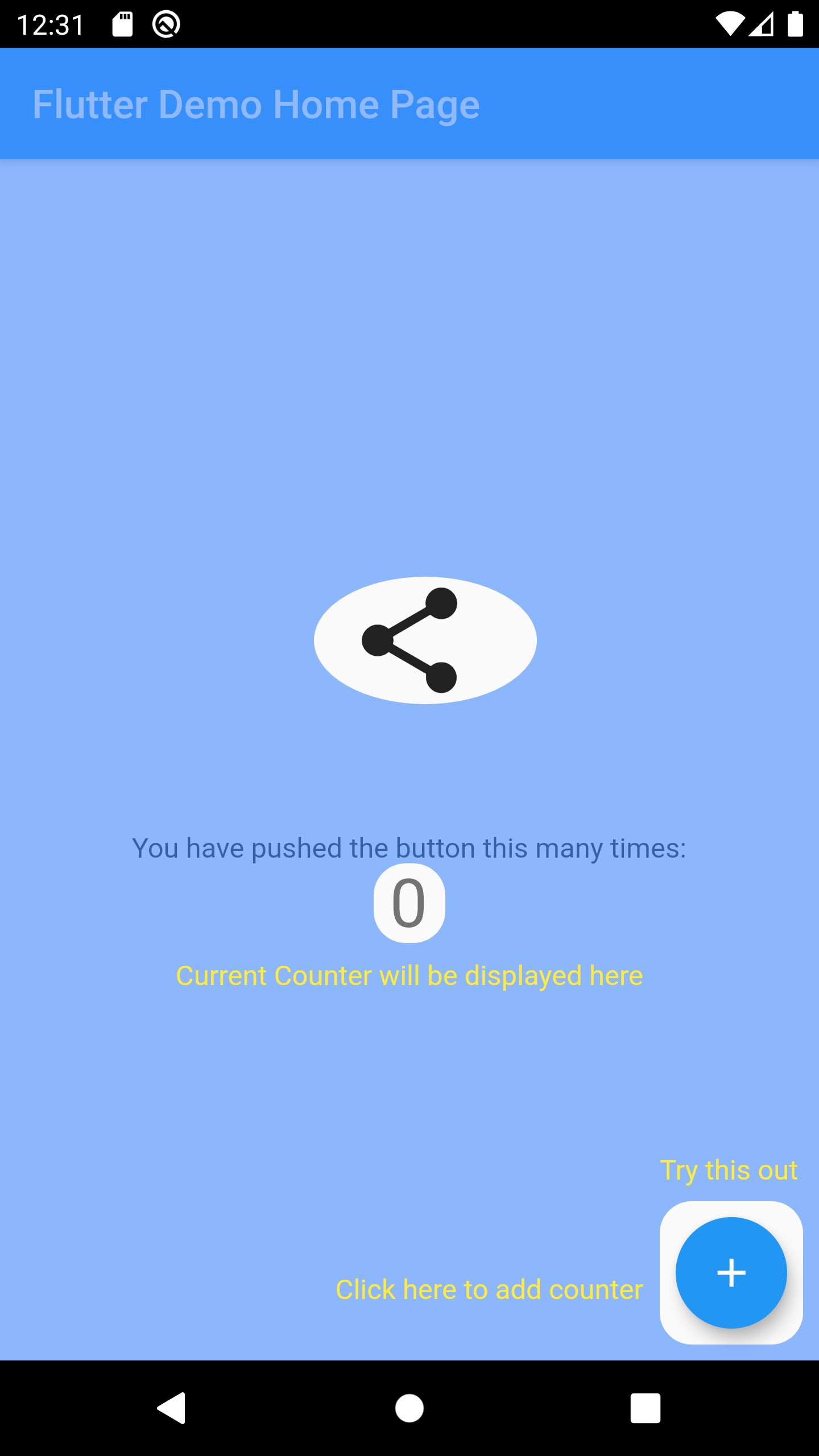
Screenshot

API

Check Dart Documentation

License

License.

Categorias

Dependências

Lista de dependências 3 itens

Repositório-fonte

Projetos que usam este pacote

Ainda não há dados.