Buscar pacotes, repositórios e categorias de apps

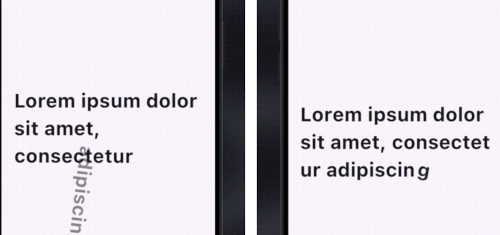
Capa de pretty_animated_text
Detalhes do pacotev3.3.0

pretty_animated_text

Um plugin Flutter para criar widgets de texto animados personalizáveis, aprimorando a estética do aplicativo com animações de texto envolventes.

AndroidiOSWeb
Downloads em 30 dias
1,4 mil
Curtidas
138
Pontos Pub
150

Instalar pacote

flutter pub add pretty_animated_text

Visão geral do pacote

Orientação gerada a partir de informações públicas. Apenas para referência.

Um pacote Flutter que permite aos desenvolvedores criar widgets de texto animados visualmente atraentes com efeitos personalizáveis. Ele melhora as interfaces de aplicativos ao adicionar animações dinâmicas de texto, como digitação, desvanecimento e deslizamento, aumentando o engajamento do usuário. O plugin é leve e se integra perfeitamente em projetos Flutter para plataformas Android, iOS e Web. Com opções simples de configuração, permite um controle fino sobre velocidade, atraso e estilo da animação. Ideal para telas de inicialização, sequências de introdução e elementos de interface interativa.

Casos de uso

  • Telas de onboarding
  • Telas de inicialização
  • Elementos de interface do usuário interativos
  • Rótulos dinâmicos
  • Saudações animadas
  • Destacar mensagens importantes

Principais recursos

  • Tipos de animação personalizáveis
  • Desempenho suave em todas as plataformas
  • Integração fácil com widgets existentes
  • Tempo e atrasos configuráveis
  • Suporta vários efeitos de texto
  • Leve e eficiente

Indicado para

  • Designers de aplicativos em busca de charme visual
  • Desenvolvedores criando fluxos de onboarding envolventes
  • Projetos que exigem texto animado sem código complexo
  • Aplicativos Flutter voltados para frontend
  • Melhoria de UI/UX em aplicativos móveis e web

Considerações

  • Pode afetar o desempenho se usado em excesso
  • Limitado a animações apenas de texto
  • Requer ajuste cuidadoso para resultados suaves
  • Não adequado para atualizações de alta frequência
  • Melhor usado com moderação para uma experiência de usuário otimizada

README original

Snapshot do README original do repositório-fonte vinculado. Consulte o repositório para o conteúdo mais recente.

Pretty Animated Text logo

Pretty Animated Text

Link: https://pretty-animated-text.vercel.app

Buy Me A Coffee    GitHub Repo stars

A text animation UI plugin that provides you with gorgeous and customizable animated text widgets so that you can use them effortlessly in your project.

Physics-based animations are utilized for text animations, providing a smooth and delightful experience.

This project heavily inspires on jasudev's AnimateText for SwiftUI package

Key Features:
  • Various text animation types:
    • Spring animation
    • Chime bell animation
    • Scale animation
    • Rotate animation
    • Blur animation
    • Offset (slide) animation
    • Scramble animation (new in v3)
    • Glitch animation with RGB-split chromatic shadows (new in v3.2)
    • Squash bounce animation with an elastic traveling wave (new in v3.2)
    • Reveal animation with sliding cursor (new in v3)
    • Gravity animation with real 2D rigid-body physics (collisions, piling, tap & drag) via forge2d (new in v3)
  • Supports both letter-by-letter and word-by-word animations
  • Customizable animation duration and styles
  • Easy to integrate into existing Flutter projects

Installation

To use this package, add pretty_animated_text as a dependency in your pubspec.yaml file:

flutter pub add pretty_animated_text

How to

Animations are configured using AnimationConfig. There are two main animation types that you can trigger inside the config:

  • for word by word → AnimationType.word
  • for letter by letter → AnimationType.letter

You can also pass callbacks to react to animation lifecycle events:

  • onPlay: Triggered when the animation starts.
  • onComplete: Triggered when the animation finishes.
  • onPause, onResume, onDismissed, etc.

And for texts such as RotateText and OffsetText, you can trigger some more variations like rotation direction and slide offset.

Currently, the plugin supports default Flutter text alignments:

  • TextAlign.start
  • TextAlign.center
  • TextAlign.end
Code Examples
  • Spring Text

      SpringText(
        text: 'Lorem ipsum dolor sit amet ...',
        style: const TextStyle(fontSize: 18),
        config: AnimationConfig(
          duration: const Duration(seconds: 4), 
          type: AnimationType.word,
          onPlay: (controller) => print('Animation started'),
          onComplete: (controller) => print('Animation completed'),
        ),
      )
    
  • Chime Bell Text

      ChimeBellText(
        text: 'Lorem ipsum dolor sit amet ...',
        style: const TextStyle(fontSize: 18),
        config: const AnimationConfig(
          duration: Duration(seconds: 4), 
          type: AnimationType.word,
        ),
      )
    
  • Scale Text

      ScaleText(
        text: 'Lorem ipsum dolor sit amet ...',
        style: const TextStyle(fontSize: 18),
        config: const AnimationConfig(
          duration: Duration(seconds: 4), 
          type: AnimationType.word,
        ),
      )
    
  • Blur Text

      BlurText(
        text: 'Lorem ipsum dolor sit amet ...',
        style: const TextStyle(fontSize: 18),
        config: const AnimationConfig(
          duration: Duration(seconds: 4), 
          type: AnimationType.word,
        ),
      )
    
  • Rotate Text

    For RotateText, you can tweak two rotation directions.

    • clockwise → RotateAnimationType.clockwise (default)
    • anti-clockwise → RotateAnimationType.anticlockwise
      RotateText(
        text: 'Lorem ipsum dolor sit amet ...',
        direction: RotateAnimationType.clockwise,
        style: const TextStyle(fontSize: 18),
        config: const AnimationConfig(
          duration: Duration(seconds: 4), 
          type: AnimationType.word,
        ),
      )
    
  • Offset Text

    OffsetText has multiple slide effects that you can tweak according to your needs.

    • Top to bottom → SlideAnimationType.topBottom (default)
    • Bottom to top → SlideAnimationType.bottomTop
    • Alternate top-bottom → SlideAnimationType.alternateTB
    • Left to right → SlideAnimationType.leftRight
    • Right to left → SlideAnimationType.rightLeft
    • Alternate left-right → SlideAnimationType.alternateLR
      OffsetText(
        text: 'Lorem ipsum dolor sit amet ...',
        slideType: SlideAnimationType.topBottom,
        style: const TextStyle(fontSize: 18),
        config: const AnimationConfig(
          duration: Duration(seconds: 4), 
          type: AnimationType.word,
        ),
      )
    
  • Scramble Text (new in v3)

      ScrambleText(
        text: 'Lorem ipsum dolor sit amet ...',
        style: const TextStyle(fontSize: 18),
        config: AnimationConfig(
          duration: const Duration(milliseconds: 300),
          type: AnimationType.letter, // or AnimationType.word
        ),
      )
    

    Phase 1 (first half of the animation): every character cycles through random glyphs. Phase 2 (second half): characters resolve left-to-right into the final text. Spaces are never scrambled.

  • Glitch Text (new in v3.2)

      GlitchText(
        text: 'Lorem ipsum dolor sit amet ...',
        style: const TextStyle(fontSize: 18),
        config: AnimationConfig(
          duration: const Duration(milliseconds: 300),
          type: AnimationType.word, // or AnimationType.letter
          repeat: true, // loop the glitch continuously
        ),
        // Optional: customize the tear (defaults shown)
        glitchStyle: const GlitchStyle(
          shadows: true, // true = chromatic tinted tear + RGB-split shadow fringe
          color1: Color(0xFFFF2E88), // primary split (pink)
          color2: Color(0xFF23D7F5), // secondary split (cyan)
          shadowColor: Color(0xFF0D0A1A), // dark shadow accent
        ),
      )
    

    All characters are visible and readable from the start; a random, rotating subset briefly glitches by tearing into horizontal slices that shear sideways (with an RGB-split shadow fringe on the sheared parts when shadows is on). In word mode at most one word glitches at a time; in letter mode a random group of 2-3 letters glitches together. The order covers every segment exactly once per forward pass and is reshuffled on each repeat. Because the slices are disjoint bands, each glyph is still drawn exactly once (no ghosting), so the text stays readable while it tears — the caller's TextStyle (font, weight) is preserved. Use GlitchStyle(shadows: true) for a chromatic tinted tear or shadows: false for a clean monochrome one. Enable config.repeat for a continuous loop.

  • Squash Bounce Text (new in v3.2)

    A SplitText-inspired squash bounce. Each glyph drops, squashes, and rotates, then elastically settles back to rest — animating as a continuous traveling wave across the text.

      SquashBounceText(
        text: 'Lorem ipsum dolor sit amet ...',
        style: const TextStyle(fontSize: 18),
        config: AnimationConfig(
          duration: const Duration(milliseconds: 150),
          type: AnimationType.letter, // or AnimationType.word
          repeat: true, // loop the bounce continuously
        ),
        // Optional: customize the bounce (defaults shown)
        squashStyle: const SquashBounceStyle(
          dropFraction: 0.5, // peak drop as a fraction of glyph height
          squashScaleY: 0.3, // vertical scale at the squash peak
          rotateDegrees: 17, // peak rotation, pivoting on the glyph's bottom
          squashPhase: 0.2, // fraction of each glyph's window spent squashing in
          waveSpread: 0.6, // smaller = tighter wave, larger = more sequential
        ),
      )
    

    Each glyph runs its full drop→squash→elastic-return over a wide window while the start times are packed tightly, so many glyphs are mid-flight at slightly offset phases — reading as one wave traveling across the text. The caller's TextStyle (font, weight) is preserved. Enable config.repeat for a continuous loop.

  • Reveal Text (new in v3)

      RevealText(
        text: 'Lorem ipsum dolor sit amet ...',
        style: const TextStyle(fontSize: 18),
        config: AnimationConfig(
          duration: const Duration(milliseconds: 300),
          type: AnimationType.word, // or AnimationType.letter
        ),
        // Optional: customize the sliding cursor
        cursorColor: Colors.indigo,
        dimOpacity: 0.3, // initial opacity of unrevealed text (default 0.3)
      )
    

    All text starts at dimOpacity (default 0.3). A cursor sweeps left-to-right and each character/word transitions to full opacity as the cursor passes it.

  • Gravity Text (new in v3)

    A real 2D rigid-body simulation powered by forge2d (a Box2D port). The whole text is visible at rest first; on play each segment (letter or word) becomes a physics body and falls under gravity — letters collide, pile up on the floor between the walls, carry real linear + angular momentum, push their neighbours, and rest (sleep) until disturbed. Tap a letter to kick it, or press-drag-and-release to throw it.

      GravityText(
        text: 'Lorem ipsum dolor sit amet ...',
        style: const TextStyle(fontSize: 18),
        config: const AnimationConfig(
          type: AnimationType.letter, // or AnimationType.word
        ),
        // Optional: tune the physics
        gravity: 30.0, // m/s²
        pixelsPerMeter: 50.0,
        density: 1.0,
        friction: 0.4,
        restitution: 0.1, // bounciness (keep low so piles settle)
        // Optional: stage / interaction
        height: 400, // floor sits at the bottom of the stage (null = fill parent)
        enableInteraction: true, // tap to kick, drag to throw
        kickStrength: 9.0, // m/s imparted to a tapped letter
        maxSpin: 2.5, // max angular velocity (rad/s) when a segment drops
      )
    

    Playback via the controller: play / restart / repeat re-drop the text from its reading layout; pause / resume freeze and run the simulation.

Project License:

This project is licensed under MIT License.

Feel free to check it out and give it a ️ if you love it. Follow me for more updates and more projects

Suggestions are warmly welcome & more updates are coming along the way ...️

Copyright (©️) 2024 YE LWIN OO

Categorias

Dependências

Lista de dependências 3 itens

  • forge2d^0.14.2+1
  • plugin_platform_interface^2.0.2
  • web^1.1.0

Repositório-fonte

Projetos que usam este pacote