Buscar pacotes, repositórios e categorias de apps

Capa de proste_bezier_curve
Detalhes do pacotev2.0.2

proste_bezier_curve

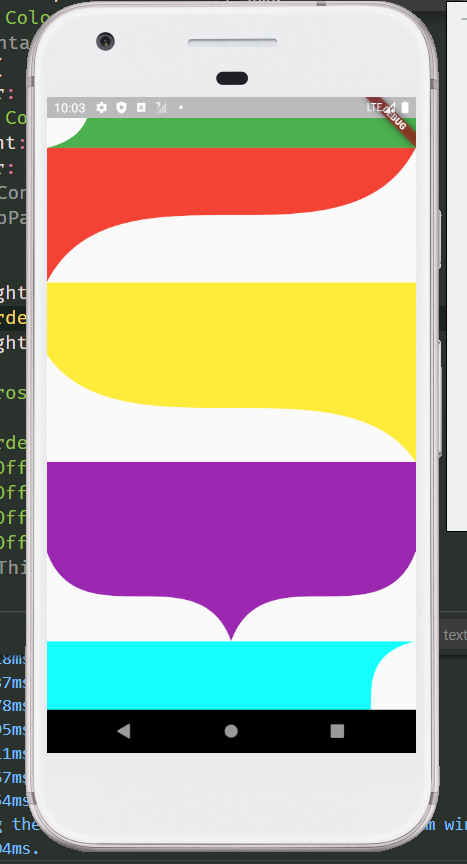
Menos código, menos dificuldade, desenhando curva padrão de Bezier. O pacote pode ser usado para recortar o widget ou desenhar o caminho por si mesmo.

AndroidiOSWebmacOSWindowsLinux
Downloads em 30 dias
546
Curtidas
67
Pontos Pub
150

Instalar pacote

flutter pub add proste_bezier_curve

Visão geral do pacote

Orientação gerada a partir de informações públicas. Apenas para referência.

Proste Bezier Curve é um pacote leve para Flutter que simplifica a criação e utilização de curvas de Bezier padrão. Reduz o código boilerplate e a complexidade, permitindo que desenvolvedores criem caminhos personalizados ou recortem widgets com formas suaves e curvas. Ideal para elementos da interface que exigem contornos elegantes e fluidos, ele é compatível com todas as principais plataformas, incluindo Android, iOS, Web, macOS, Windows e Linux. O pacote é especialmente útil para projetar interfaces modernas com esforço mínimo.

Casos de uso

  • Criando bordas de interface com curvas
  • Recortando widgets com formas personalizadas
  • Designando transições de caminho animadas
  • Construindo componentes de desenho interativos
  • Melhorando o apelo visual com curvas suaves

Principais recursos

  • API simples para criação de curvas Bézier
  • Suporta recorte de widget com caminhos de Bezier
  • Compatibilidade multiplataforma
  • Código mínimo necessário
  • Personalização flexível de caminho

Indicado para

  • Designers de UI procurando curvas elegantes
  • Desenvolvedores criando formas personalizadas
  • Aplicativos que precisam de caminhos animados suaves
  • Iniciantes do Flutter explorando desenho de caminhos
  • Projetos focados em estéticas limpas e modernas

Considerações

  • Limitado a curvas de Bezier padrão (não B-splines)
  • Sem suporte embutido para animação
  • Requer manipulação manual de atualizações de caminho
  • Não ideal para designs complexos baseados em splines
  • Mais adequado para caminhos estáticos ou simples dinâmicos

README original

Snapshot do README original do repositório-fonte vinculado. Consulte o repositório para o conteúdo mais recente.

English | 中文

Introduction

The control points of Bezier curve are obtained through data calculation, and then the points are drawn into curves through the drawing function of flutter.

The difference between using package and drawing your own path

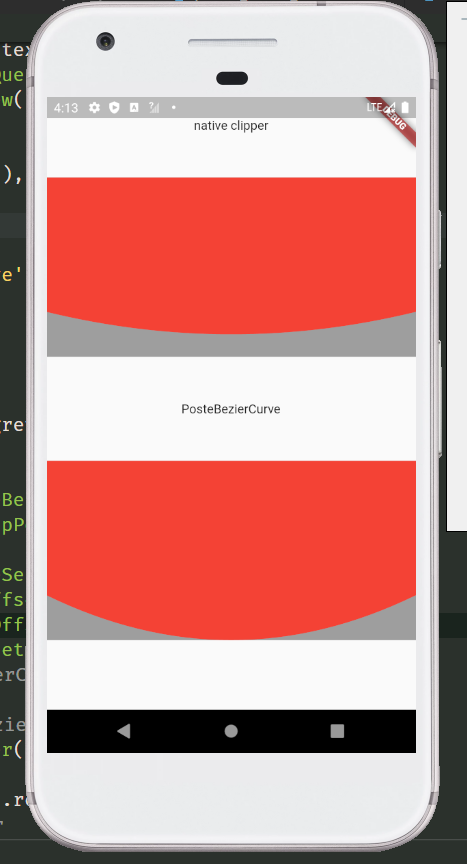
The common method of tracing points according to the position of elements will leave a gap. Only after the control points are calculated can the element information be completely filled. For example, in the following picture, the coordinates of the points used are the same, but the styles cut out are different. The function I want to provide is to restore the design style as much as possible. And after using the package, you only need to confirm the coordinates of each point, without other complex calculations, and the code is more concise.

  • draw your own
Stack(
  children: [
    Container(
      height: 200,
      color: Colors.grey,
    ),
    ClipPath(
      clipper: NativeClipper(),
      child: Container(
        height: 200,
        color: Colors.red,
      ),
    ),
  ],
)

class NativeClipper extends CustomClipper<Path> {
  @override
  Path getClip(Size size) {
    Path path = Path();

    path.lineTo(0, 0);
    path.lineTo(0, size.height - 50);
    path.quadraticBezierTo(size.width / 2, size.height, size.width, size.height - 50);
    path.lineTo(size.width, 0);
    path.lineTo(0, 0);
    return path;
  }

  @override
  bool shouldReclip(covariant CustomClipper<Path> oldClipper) => true;
}
  • use package

Stack(
  children: [
    Container(
      height: 200,
      color: Colors.grey,
    ),
    ClipPath(
      clipper: ProsteBezierCurve(
        position: ClipPosition.bottom,
        list: [
          BezierCurveSection(
            start: Offset(0, 150),
            top: Offset(screenWidth / 2, 200),
            end: Offset(screenWidth, 150),
          ),
        ],
      ),
      child: Container(
        height: 200,
        color: Colors.red,
      ),
    ),
  ],
),

Usage

Second order Bezier curve

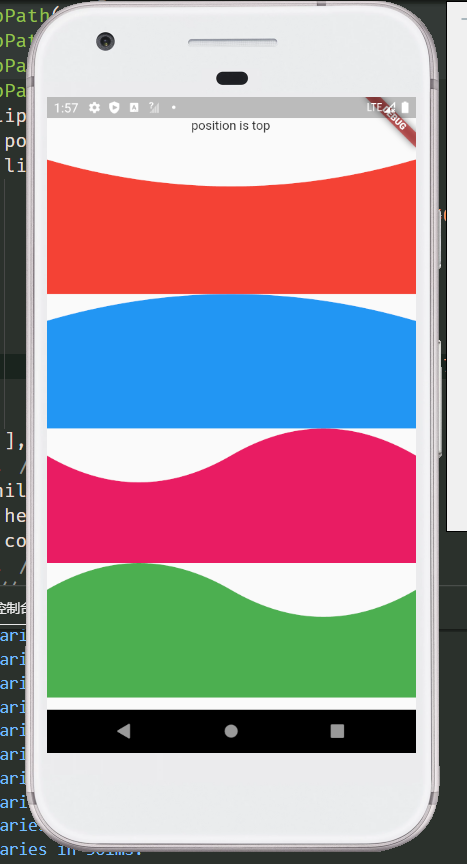
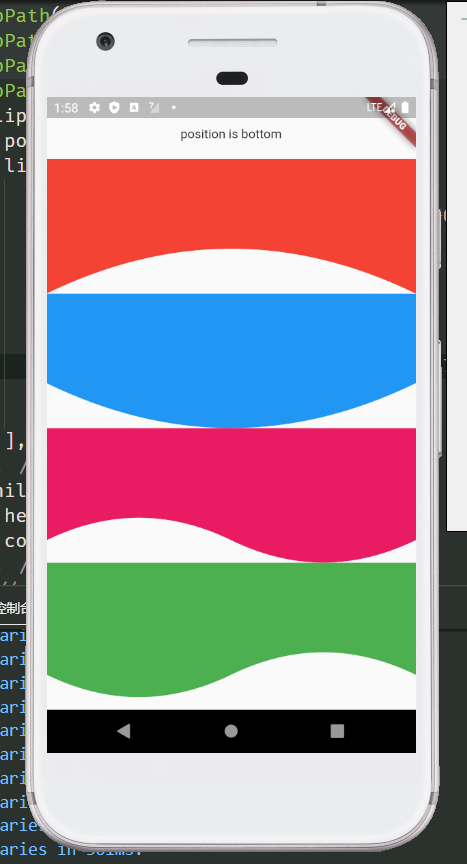
more preview

Examples
  ClipPath(
    clipper: ProsteBezierCurve(
      position: ClipPosition.top,
      list: [
        BezierCurveSection(
          start: Offset(screenWidth, 0),
          top: Offset(screenWidth / 2, 30),
          end: Offset(0, 0),
        ),
      ],
    ),
    child: Container(
      color: Colors.red,
      height: 150,
    ),
  )

  
  /// Wavy line
  ClipPath(
    clipper: ProsteBezierCurve(
      position: ClipPosition.bottom,
      list: [
        BezierCurveSection(
          start: Offset(0, 125),
          top: Offset(screenWidth / 4, 150),
          end: Offset(screenWidth / 2, 125),
        ),
        BezierCurveSection(
          start: Offset(screenWidth / 2, 125),
          top: Offset(screenWidth / 4 * 3, 100),
          end: Offset(screenWidth, 150),
        ),
      ],
    ),
    child: Container(
      height: 150,
      color: Colors.red,
    ),
  )
class
  • ProsteBezierCurve Used to draw and return the clipping path
parameter type default describe
list List<BezierCurveSection> Used to draw Bezier curve, you can pass in more than one
reclip bool true Allow redrawing elements
position ClipPosition ClipPosition.left Used to determine the drawing position of the curve
  ClipPath(
    clipper: ProsteBezierCurve(
      position: ClipPosition.top,
      reclip: false,
      list: [
        ...
      ],
    ),
    child: ...,
  ),
  • BezierCurveSection Clips for drawing curves
parameter type default describe
start Offset start point of Bezier curve
top Offset top point of Bezier curve
end Offset end point of Bezier curve
proportion double 1/2 the proportion of the top position of the Bezier curve,It doesn't need to be modified

  ClipPath(
    clipper: ProsteBezierCurve(
      position: ClipPosition.top,
      reclip: false,
      list: [
        BezierCurveSection(
          proportion: 1 / 3,
          start: Offset(..,..),
          top: Offset(..,..),
          end: Offset(..,..),
        ),
      ],
    ),
    child: ...,
  )

  • BezierCurveDots Coordinates of Bezier curve control points
parameter type default describe
x1 double The X-coordinate of the first point
y1 double The Y-coordinate of the first point
x2 double The X-coordinate of the second point
y2 double The Y-coordinate of the second point
Static function of ProsteBezierCurve
  • BezierCurveDots calcCurveDots(BezierCurveSection param) Obtain the coordinates of the control points after calculation, and draw the path after obtaining the control points, such as drawing curves with multiple edges or combining the curves with other drawing rules

ClipPath(
  clipper: CustomSelfClipper1(),
  child: Container(
    height: 150,
    color: Colors.red,
  ),
)

class CustomSelfClipper1 extends CustomClipper<Path> {
  @override
  Path getClip(Size size) {
    Path path = Path();
    BezierCurveSection section1 = BezierCurveSection(
      start: Offset(0, 30),
      top: Offset(10, 45),
      end: Offset(0, 60),
    );
    BezierCurveSection section2 = BezierCurveSection(
      start: Offset(size.width, size.height - 90),
      top: Offset(size.width - 10, size.height - 105),
      end: Offset(size.width, size.height - 120),
    );
    BezierCurveDots dot1 = ProsteBezierCurve.calcCurveDots(section1);
    BezierCurveDots dot2 = ProsteBezierCurve.calcCurveDots(section2);

    List<double> dot1List = dot1.getList(); // Return to list<double>
    Map<String, double> dot2Map = dot1.getMap(); // Return to Map<String, double>

    print(dot1List); // [20.0, 45.0, 0.0, 60.0]
    print(dot2Map); // {x1: 20.0, y1: 45.0, x2: 0.0, y2: 60.0}

    path.lineTo(0, 0);
    path.lineTo(0, 30);
    path.quadraticBezierTo(dot1.x1, dot1.y1, dot1.x2, dot1.y2);
    path.lineTo(0, size.height);
    path.lineTo(size.width, size.height);
    path.lineTo(size.width, size.height - 90);
    path.quadraticBezierTo(dot2.x1, dot2.y1, dot2.x2, dot2.y2);
    path.lineTo(size.width, 0);
    path.lineTo(0, 0);
    return path;
  }

  @override
  bool shouldReclip(covariant CustomClipper<Path> oldClipper) => true;
}

/// This method can splice the third-order Bezier curve, but is not recommended. You can use the ProsteThirdOrderBezierCurve

class CustomSelfClipper2 extends CustomClipper<Path> {
  @override
  Path getClip(Size size) {
    Path path = Path();
    BezierCurveSection section1 = BezierCurveSection(
      start: Offset(0, size.height),
      top: Offset(30, size.height - 50),
      end: Offset(80, size.height - 70),
    );
    BezierCurveSection section2 = BezierCurveSection(
      start: Offset(size.width - 100, size.height - 70),
      top: Offset(size.width - 30, size.height - 95),
      end: Offset(size.width, size.height - 160),
    );
    BezierCurveDots dot1 = ProsteBezierCurve.calcCurveDots(section1);
    BezierCurveDots dot2 = ProsteBezierCurve.calcCurveDots(section2);

    path.lineTo(0, 0);
    path.lineTo(0, size.height);
    path.quadraticBezierTo(dot1.x1, dot1.y1, dot1.x2, dot1.y2);
    path.lineTo(size.width - 100, size.height - 70);
    path.quadraticBezierTo(dot2.x1, dot2.y1, dot2.x2, dot2.y2);
    path.lineTo(size.width, 0);
    path.lineTo(0, 0);
    return path;
  }

  @override
  bool shouldReclip(covariant CustomClipper<Path> oldClipper) => true;
}

Third order Bezier curve

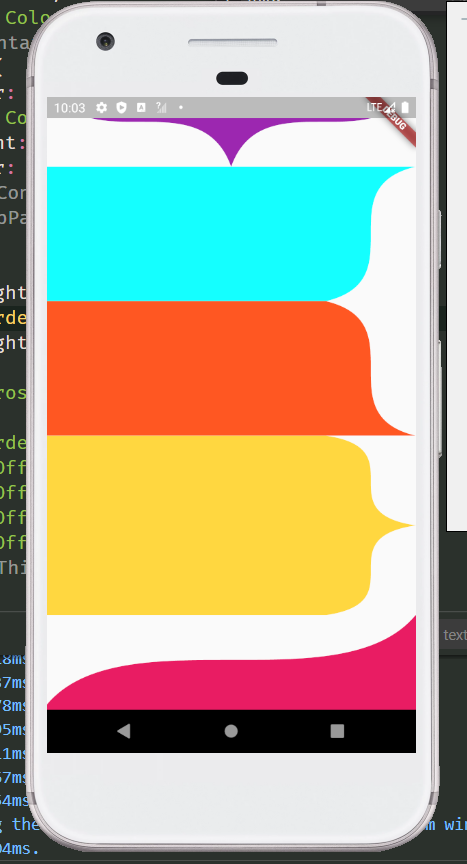
more preview

Examples

  ClipPath(
    clipper: ProsteThirdOrderBezierCurve(
      position: ClipPosition.bottom,
      list: [
        ThirdOrderBezierCurveSection(
          p1: Offset(0, 100),
          p2: Offset(0, 200),
          p3: Offset(screenWidth, 100),
          p4: Offset(screenWidth, 200),
        ),
      ],
    ),
    child: Container(
      height: 200,
      color: Colors.red,
    ),
  )

class
  • ProsteThirdOrderBezierCurve Clipping path for drawing and returning third order Bezier curves
parameter type default describe
list List<ThirdOrderBezierCurveSection> Used to draw Bezier curve, you can pass in more than one
reclip bool true Allow redrawing elements
position ClipPosition ClipPosition.left Used to determine the drawing position of the curve
ClipPath(
  clipper: ProsteThirdOrderBezierCurve(
    position: ClipPosition.bottom,
    list: [
      ...
    ],
  ),
  child: ...,
)
  • ThirdOrderBezierCurveSection Fragment for drawing third order Bezier curve
parameter type default describe
p1 Offset The coordinates of the first point
p2 Offset The coordinates of the second point
p3 Offset The coordinates of the third point
p4 Offset The coordinates of the fourth point
smooth double .5 The greater the value of smoothness 0 ~ 1, the straighter the value is, the smaller the value is, and the larger the arc is. When the drawing distance is short and saw tooth appears, try to increase this value
ClipPath(
  clipper: ProsteThirdOrderBezierCurve(
    position: ClipPosition.bottom,
    list: [
      ThirdOrderBezierCurveSection(
        smooth: .7,
        p1: Offset(0, 100),
        p2: Offset(0, 200),
        p3: Offset(screenWidth, 100),
        p4: Offset(screenWidth, 200),
      ),
    ],
  ),
  child: Container(
    height: 200,
    color: Colors.red,
  ),
)

/// Spire shape
ClipPath(
  clipper: ProsteThirdOrderBezierCurve(
    position: ClipPosition.top,
    list: [
      ThirdOrderBezierCurveSection(
        p1: Offset(screenWidth, 0),
        p2: Offset(screenWidth, 100),
        p4: Offset(screenWidth / 2, 100),
        p3: Offset(screenWidth / 2, 0),
      ),
      ThirdOrderBezierCurveSection(
        p1: Offset(screenWidth / 2, 100),
        p2: Offset(screenWidth / 2, 0),
        p3: Offset(0, 100),
        p4: Offset(0, 0),
      ),
    ],
  ),
  child: Container(
    height: 200,
    color: Colors.teal,
  ),
)

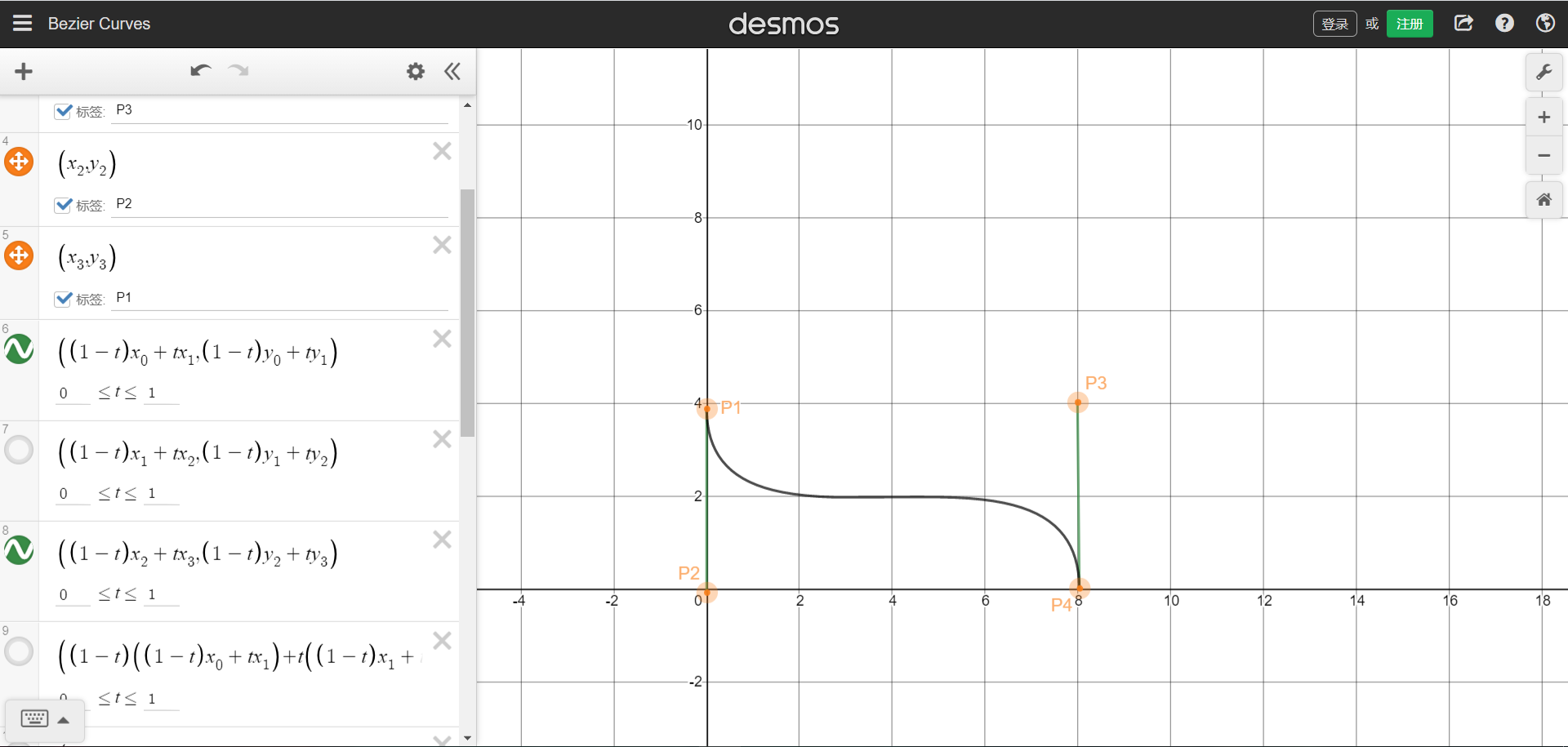
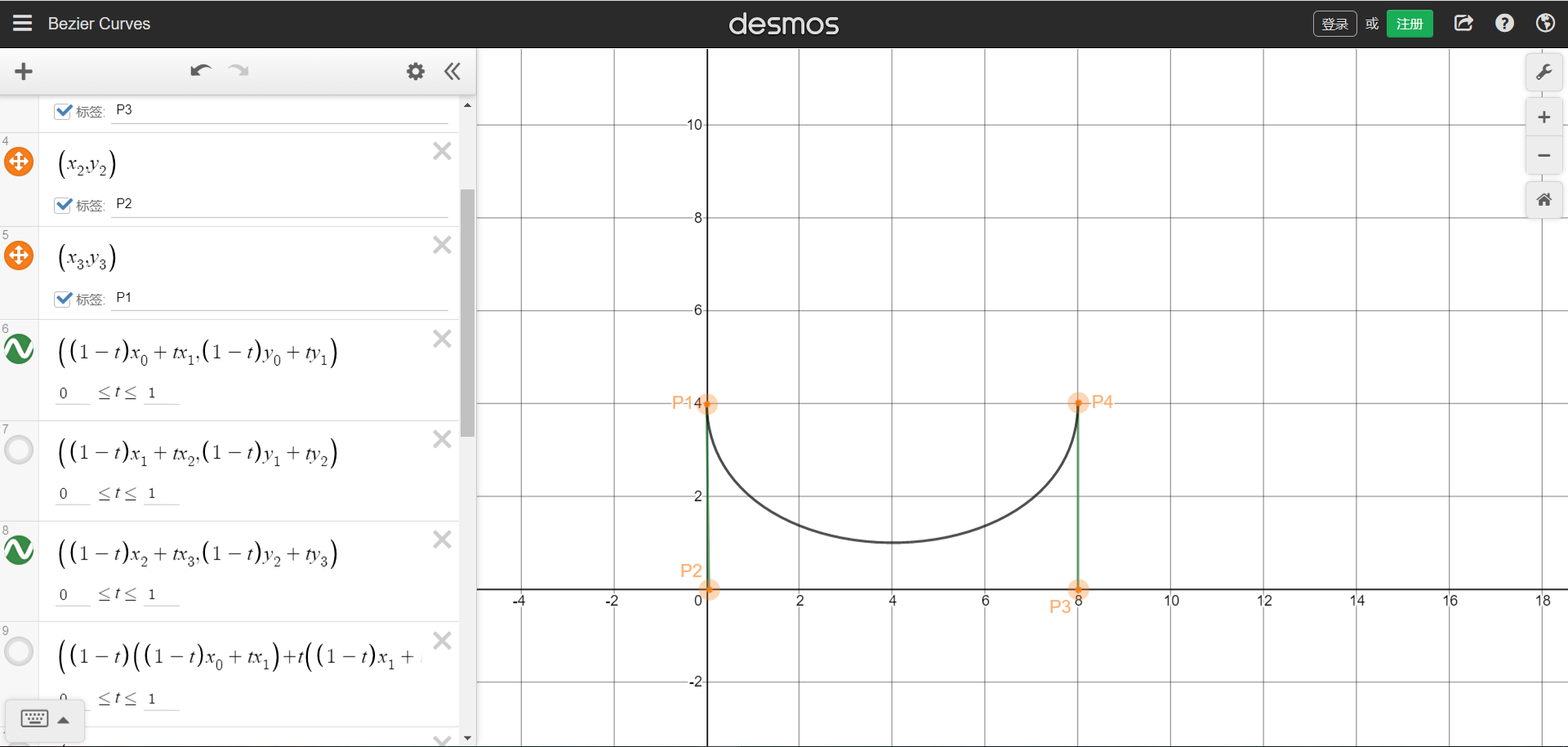
The position coordinates of the four points can refer to the figure below. The starting and ending points are P1 and P4 respectively.Picture sample URL。You can understand that four points form a rectangle, and the four coordinates are the positions of the four points. The curve will be drawn in the rectangle.

We can also draw a single arc graph through the third-order Bessel function, need P1 and P4 are on the same side,But that brings up the problem that was stated at the beginning,The arc does not cling to the bottom.

  • ThirdOrderBezierCurveDots Coordinates of third order Bezier curve control points
parameter type default describe
x1 double The X-coordinate of the first point
y1 double The Y-coordinate of the first point
x2 double The X-coordinate of the second point
y2 double The Y-coordinate of the second point
x3 double The X-coordinate of the third point
y3 double The Y-coordinate of the third point
Static function of ProsteThirdOrderBezierCurve
  • ThirdOrderBezierCurveDots calcCurveDots(ThirdOrderBezierCurveSection param) Obtain the coordinates of the control points after calculation, and draw the path after obtaining the control points, such as drawing curves with multiple edges or combining the curves with other drawing rules

ClipPath(
  clipper: CustomSelfClipper1(),
  child: Container(
    height: 200,
    color: Colors.teal,
  ),
)

class CustomSelfClipper1 extends CustomClipper<Path> {
  @override
  Path getClip(Size size) {
    Path path = Path();
    ThirdOrderBezierCurveSection param = ThirdOrderBezierCurveSection(
      smooth: 0.3,
      p1: Offset(0, size.height),
      p2: Offset(0, 0),
      p3: Offset(size.width, size.height),
      p4: Offset(size.width, 0),
    );
    ThirdOrderBezierCurveDots dots = ProsteThirdOrderBezierCurve.calcCurveDots(param);

    List<double> dotsList = dots.getList(); // Return to list<double>
    Map<String, double> dotsMap = dots.getMap(); // Return to Map<String, double>

    print(dotsList); // [71.56809408040556, 0.0, 339.8604773481659, 200.0, 411.42857142857144, 0.0]
    print(dotsMap); // {x1: 71.56809408040556, y1: 0.0, x2: 339.8604773481659, y2: 200.0, x3: 411.42857142857144, y3: 0.0}

    path.lineTo(0, 0);
    path.lineTo(0, size.height);
    path.cubicTo(dots.x1, dots.y1, dots.x2, dots.y2, dots.x3, dots.y3);
    path.lineTo(0, 0);

    return path;
  }

  @override
  bool shouldReclip(covariant CustomClipper<Path> oldClipper) => true;
}

If you have any issue, please submit them to issues, I will deal with them as soon as I see them. Thank you!

Categorias

Repositório-fonte

Projetos que usam este pacote

Ainda não há dados.