Orientação gerada a partir de informações públicas. Apenas para referência.
Um pacote Flutter/Dart que gera um arquivo `pubspec.yaml.g.dart` a partir do seu `pubspec.yaml`. Ele automatiza a extração de ativos, dependências e outras metadados para um arquivo Dart, permitindo acesso seguro por tipo aos dados do pubspec. Basta adicionar o pacote e executar `dart run build_runner build` para gerar a saída. Ideal para projetos que precisam de acesso dinâmico às informações do pubspec sem analisar manualmente o YAML.
Casos de uso
Acessando caminhos de ativos programaticamente
Gerando código a partir das dependências do pubspec
Habilitar metadados do pubspec com segurança de tipo
Automatizando a gestão de ativos em builds
Integrando dados do pubspec na lógica do aplicativo
Principais recursos
Gera código Dart a partir de pubspec.yaml
Suporta todas as plataformas do Flutter
Usa o build_runner para automação
Fornece acesso seguro por tipo ao pubspec
Configuração mínima necessária
Indicado para
Projetos com estruturas de ativos complexas
Geração de código em tempo de compilação é necessária
Aplicativos que exigem acesso dinâmico ao pubspec
Equipes que desejam gerenciamento automatizado do pubspec
Desenvolvedores usando fluxos de trabalho do build_runner
Considerações
Requer o build_runner para ser configurado
Arquivos gerados não devem ser editados manualmente
Pode aumentar levemente o tempo de compilação
Não necessário para projetos simples
Depende da formatação correta do pubspec.yaml
README original
Snapshot do README original do repositório-fonte vinculado. Consulte o repositório para o conteúdo mais recente.
pubspec_generator
Code generator pubspec.yaml.g.dart from pubspec.yaml
Pubspec Generator is a Dart library that auto-generates a class containing the information from pubspec.yaml description, dependencies and the current app version for all possible platforms. This is an efficient way to keep the application metadata up-to-date across your entire project.
Features
Automated code generation: Create a Dart class that includes your pubspec.yaml description and current application version automatically.
Cross-platform compatibility: Supports all platforms where Dart is available.
Continually updated: The generated class updates as your pubspec.yaml changes, so your application's metadata remains current at all times.
Command line utility
You can use the command line utility to generate a pubspec.dart file from a pubspec.yaml file.
This is useful for quickly generating the Dart class without needing to set up a full build environment.
dart pub global activate pubspec_generator
dart pub global run pubspec_generator:generate --input pubspec.yaml --output lib/src/pubspec.yaml.g.dart
Better to prefer this approach for quick generation over the fully fledged build runner setup.
Installation
First, add pubspec_info_codegen to your pubspec.yaml:
To use the library, you need to run the provided script which triggers the code generation. Below is an example command to do so:
$ dart run build_runner build --delete-conflicting-outputs
This command generates a pubspec.yaml.g.dart file in your lib directory, which contains a class with your pubspec.yaml description and the current app version. You can import this file in your Dart code and use the class to access your app's metadata.
Use Cases
Consistent app metadata across multiple platforms: This library ensures that the application metadata (description, version) is consistent across all platforms, reducing the chances of discrepancies.
Reduced manual errors: Automated code generation eliminates the need for manual updates and thereby reduces the potential for errors.
Faster development process: Less time spent managing app metadata means more time for feature development.
Dynamic display of app information: You can use the generated class to dynamically display the app's description and version in the UI, which would automatically stay updated with changes in pubspec.yaml.
Automated Version Migration: With the library's functionality, you can also handle automated version migration. If your app has different behavior or functionalities across different versions, you can use the auto-generated class to identify the current version and execute the necessary migration logic. This ensures a smooth and seamless user experience across updates.
Backend Request Headers: The generated class can also be used to add meta information from pubspec.yaml into the headers of your backend requests. This can help your backend service identify the app version that is making the request, which can be useful for debugging, tracking, or version-specific behaviors on the backend.
App Analytics Configuration: The metadata from pubspec.yaml (like app version) can be sent to your analytics tool (such as Firebase Analytics) to track the usage of different app versions. This can provide valuable insights into your user base, helping you understand how different versions of your app are being used, which versions are most popular, and how updates affect user behavior. It can also assist in identifying any issues or crashes specific to a certain version.
Result
Generated record for version. A full output example can be found here.
We appreciate any form of support, whether it's a financial donation or just a star on GitHub. It helps us to continue developing and improving our library. Thank you for your support!
License
The MIT License is a permissive free software license originating at the Massachusetts Institute of Technology (MIT). It's a simple license that has minimal restrictions on what end-users can do with the software. Here's a summary of the permissions, conditions, and limitations under the MIT License:
Permissions:
Commercial Use: You are free to use the software for commercial purposes.
Modification: You can make changes to the software and distribute your modifications.
Distribution: You can distribute the original or modified (derivative) software.
Private Use: You are free to use the software for private purposes.
Conditions:
Include Copyright: You must include the original copyright notice in any copy of the software/source code.
Include License: You must include a copy of the license in any copy of the software/source code.
Limitations:
No Liability: The software is provided "as is". The authors or copyright holders cannot be held liable for any damages or other liability, whether in an action of contract, tort, or otherwise, arising from, out of, or in connection with the software or the use or other dealings in the software.
No Warranty: The authors or copyright holders provide no warranty of any kind.
It's important to note that this is a simplified explanation of the MIT License. If you're using MIT-licensed software in a manner that could expose you to legal risk, it's always a good idea to consult with a qualified legal professional.


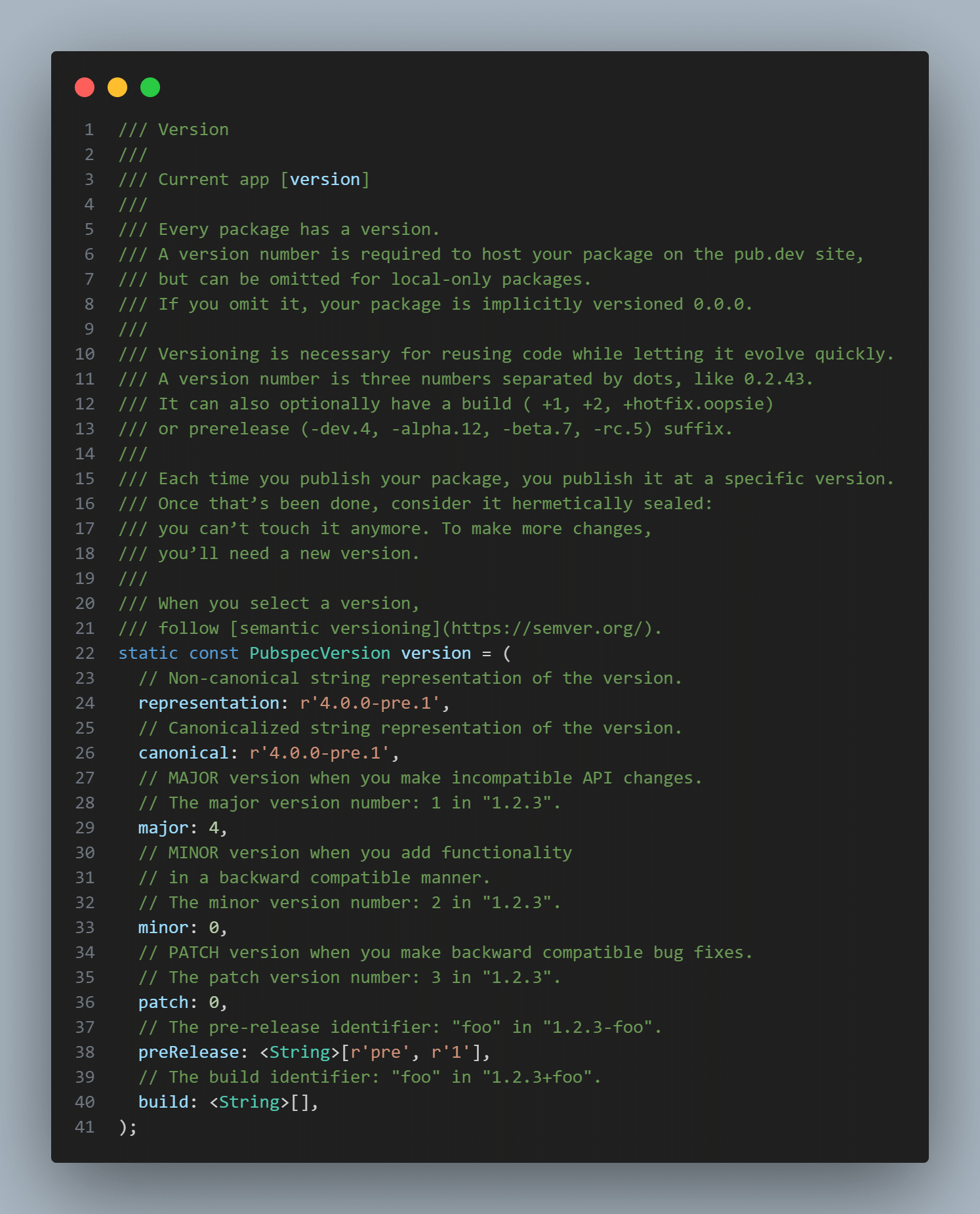 Generated record for version. A full output example can be found