Orientação gerada a partir de informações públicas. Apenas para referência.
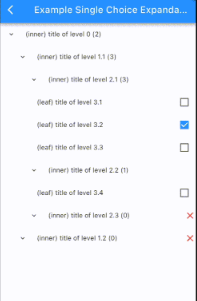
Um pacote Flutter projetado para visualizar estruturas de dados em árvore em uma interface hierárquica. Permite que desenvolvedores renderizem dados aninhados como visualizações de árvore interativas, com suporte para expansão e colapso dinâmico de nós. O pacote enfatiza uma lógica de renderização limpa e recursiva e é otimizado para desempenho com grandes conjuntos de dados. Ideal para aplicações que exigem representação de dados estruturados, como exploradores de arquivos, organogramas ou hierarquias de categorias. Construído com o sistema de widgets do Flutter, integra-se perfeitamente em todas as principais plataformas.
Casos de uso
Exibindo diretórios do sistema de arquivos
Renderização de organogramas
Mostrando hierarquias de categoria e subcategoria
Construção de árvores de configuração
Visualização de estruturas de dados JSON ou XML
Principais recursos
renderização recursiva de nó
Nós expansíveis e colapsáveis
Estilo de nó personalizável
Suporte para aninhamento profundo
Compatibilidade multiplataforma
Renderização eficiente para árvores grandes
Indicado para
Desenvolvedores construindo interfaces de dados hierárquicos
Aplicativos que precisam de navegação interativa em árvore
Projetos com modelos de dados aninhados
UIs que exigem estrutura de árvore visual
Aplicativos Flutter direcionados a múltiplas plataformas
Considerações
Pode exigir otimização para árvores muito grandes
Estilização personalizada exige compreensão dos widgets do Flutter
Interatividade embutida limitada além de expandir/colapsar
Não adequado para estruturas de dados planas
O desempenho depende da complexidade do nó
README original
Snapshot do README original do repositório-fonte vinculado. Consulte o repositório para o conteúdo mais recente.
recursive_tree_flutter
Languages:
The recursive_tree_flutter library helps build a tree data structure and visualizes it as an inheritance tree (stack view or expandable tree view). While most tree-view libraries focus on the interface, recursive_tree_flutter prioritizes the tree data structure, allowing it to support various special UI styles - that's the strength of this library. For example, it can update the tree when a node is selected, return a list of chosen nodes/leaves, return a list of favorite nodes...
Various functions for tree operations, such as finding nodes, searching with text, updating multiple choice/single choice trees, etc.
Allows lazy-loading to expand the tree at runtime.
The tree data structure can be used independently from the Flutter UI.
Visualizes the tree structure using Flutter.
Allows customization of the Flutter UI to suit specific requirements.
Contents
Tree Data Structure (Dart code)
Inspired by the structure of a directory tree on a computer, there are two types of nodes: directories and files. A directory can contain multiple files and other directories, and a file is the smallest level that cannot contain anything else.
Similarly to the directory tree structure on a computer, recursive_tree_flutter will build a tree data structure that includes inner nodes and leaf nodes.
AbsNodeType: An abstract class representing the data type of a node. A node can be either an inner node or a leaf node. This class has the following properties:
id: required, dynamic.
title: required, String.
isInner: boolean, default is true.
isUnavailable: boolean, default is false.
isChosen: nullable boolean, default is false.
isExpanded: boolean, default is false.
isFavorite: boolean, default is false.
isShowedInSearching: boolean, default is true. Also known as isDisplayable, được sử dụng used when the UI tree has a search function.
clone(): abstract method, T extends AbsNodeType. Allows cloning the object.
parent: required, TreeType<T>?. If parent == null, it means we are at the root of the entire tree.
isChildrenLoadedLazily: boolean, default is false. Only used if the current tree is lazy-loading, indicating whether the children have been loaded before or not.
isLeaf: Is current tree at a leaf node?
isRoot: Is current tree at the root node?
clone(tree, parent): static method. Allows cloning a tree.
searchLeavesWithTitleDFS(tree, text, result): Searches for all trees whose root title data contains the searching text using the DFS algorithm. The results are stored in the result variable.
returnChosenLeaves(tree, result): Searches for all leaves whose title data contains the searching text using the DFS algorithm. The results are stored in the result variable.
returnFavoriteNodes(tree, result): Returns all nodes that have been added to the favorite list. The results are stored in the result variable.
findRightmostOfABranch(tree): (Not important) Finds the rightmost node of the current tree branch (a tree with a current level minus 1). This function is used in the VTS Department Tree to determine which node is at the bottom of the branch, so its leading widget will be slightly different.
updateAllUnavailableNodes(tree): Updates the isUnavailable property of all nodes in the current tree. Suppose when parsing data for the first time, some leaves will be unavailable, and we need to update the affected inner nodes. The function returns true if the tree is available (chosenable), otherwise false.
We can see that NodeWidget is a StatefulWidget built recursively and wrapped by SingleChildScrollView to provide scrolling capability to the tree. Updating the tree (data) will change the state/UI of the NodeWidget - this can be done using setState or Provider for management. NodeWidget will inherit ExpandableTreeMixin (as shown in the example VTSDepartmentTreeWidget using setState) with some functions like:
initTree(): Initializes the tree (data) (called in initState()).
initRotationController(): Initializes the rotationController variable used to create an animation effect when expanding the UI tree (called in initState()).
disposeRotationController().
buildView(): Builds the UI of the tree (already written).
buildNode(): Builds the UI of a node (must be implemented). This function allows developers to freely customize the UI in unlimited ways.
buildChildrenNodes(): Builds the child nodes with animation for expansion (already written).
generateChildrenNodesWidget(): Returns List<NodeWidget>, must be implemented (an example is provided in the function documentation).
toggleExpansion(): Determines whether to collapse/expand the child nodes.
updateStateToggleExpansion(): Updates the state after performing the collapse/expand action.
BSD-3-Clause License
Copyright (c) 2023, ViettelSolutionsRedistribution and use in source and binary forms, with or without
modification, are permitted provided that the following conditions are met:
1. Redistributions of source code must retain the above copyright notice, this
list of conditions and the following disclaimer.
2. Redistributionsin binary form must reproduce the above copyright notice,
this list of conditions and the following disclaimer in the documentation
and/or other materials provided with the distribution.
3. Neither the name of the copyright holder nor the names of its
contributors may be used to endorse or promote products derived from
this software without specific prior written permission.
THIS SOFTWARE IS PROVIDED BY THE COPYRIGHT HOLDERS AND CONTRIBUTORS "AS IS"
AND ANY EXPRESS OR IMPLIED WARRANTIES, INCLUDING, BUT NOT LIMITED TO, THE
IMPLIED WARRANTIES OF MERCHANTABILITY AND FITNESS FOR A PARTICULAR PURPOSE ARE
DISCLAIMED. IN NO EVENT SHALL THE COPYRIGHT HOLDER OR CONTRIBUTORS BE LIABLE
FOR ANY DIRECT, INDIRECT, INCIDENTAL, SPECIAL, EXEMPLARY, OR CONSEQUENTIAL
DAMAGES (INCLUDING, BUT NOT LIMITED TO, PROCUREMENT OF SUBSTITUTE GOODS OR
SERVICES; LOSS OF USE, DATA, OR PROFITS; OR BUSINESS INTERRUPTION) HOWEVER
CAUSED AND ON ANY THEORY OF LIABILITY, WHETHER IN CONTRACT, STRICT LIABILITY,
OR TORT (INCLUDING NEGLIGENCE OR OTHERWISE) ARISING IN ANY WAY OUT OF THE USE
OF THIS SOFTWARE, EVEN IF ADVISED OF THE POSSIBILITY OF SUCH DAMAGE.