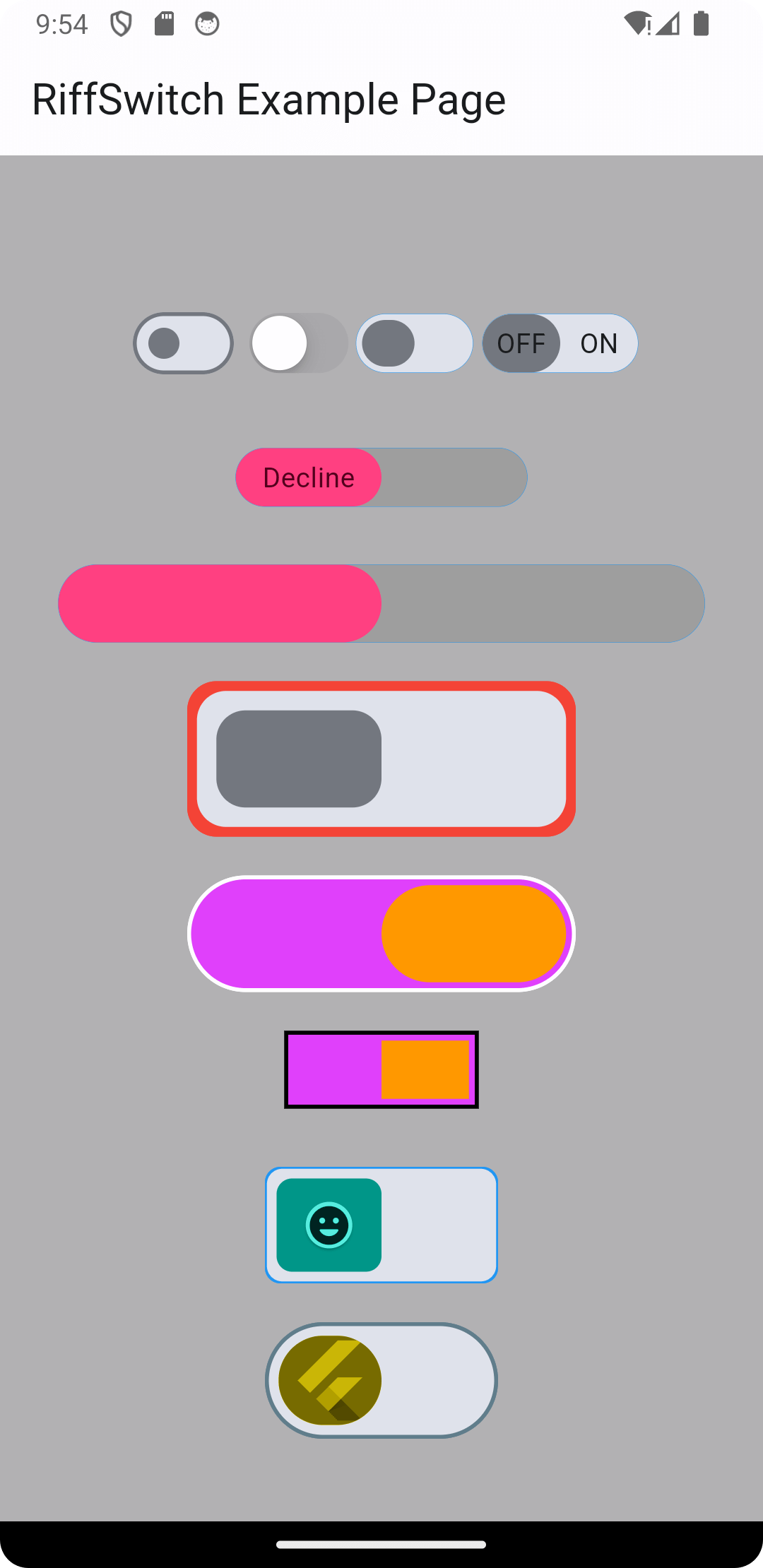
Experimente transições suaves e interações envolventes com o RiffSwitch. A biblioteca de switches que permite efeitos deslizantes fáceis e animações cativantes.
Orientação gerada a partir de informações públicas. Apenas para referência.
RiffSwitch é um pacote Flutter projetado para aprimorar interfaces de usuário com transições suaves de deslizamento e animações visualmente atraentes para componentes de interruptores. Permite que desenvolvedores criem interruptores envolventes e interativos com código mínimo, ideal para alternadores em configurações, preferências ou indicadores de status. A biblioteca oferece suporte a múltiplas plataformas, incluindo Android, iOS, Web, macOS, Windows e Linux, garantindo comportamento consistente entre dispositivos. Com estilos personalizáveis e feedback responsivo, o RiffSwitch melhora a experiência do usuário tornando as interações mais dinâmicas e refinadas.
Casos de uso
Interruptores de alternância personalizados
Configurações de preferência do usuário
Indicadores de status ligado/desligado
Elementos de interface do usuário interativos
Interfaces de aplicativos móveis e web
Principais recursos
animações suaves de deslizamento
Compatibilidade multiplataforma
Aparência personalizável
Feedback interativo responsivo
Configuração mínima necessária
Indicado para
Designers de interface procurando acabamento visual
Aplicativos que exigem controles de alternância intuitivos
Projetos Flutter multiplataforma
Projetos que enfatizam a experiência do usuário
Considerações
Pode exigir estilos adicionais para temas complexos
Impacto no desempenho em listas grandes de interruptores
Limitado à funcionalidade específica do interruptor
Não adequado para componentes interativos não de alternância
Depende do framework de animação do Flutter
README original
Snapshot do README original do repositório-fonte vinculado. Consulte o repositório para o conteúdo mais recente.
RiffSwitch
Breathe life into your Flutter UI with RiffSwitch, the switch library that empowers effortless sliding effects and captivating animations.
Customize the sliding behavior for a unique user experience, while interactive dragging fosters a sense of control and responsiveness.
Witness smooth state transitions as the switch flips, adding a touch of visual polish to your app.
Whether you prefer simple or decorative switch types, RiffSwitch seamlessly integrates into your UI,
transforming basic interactions into engaging experiences.
Experience seamless transitions and engaging interactions with RiffSwitch.
NOTE: It's important to note that the thumbColor property takes precedence over any color applied directly to the active or inactive thumb,
whether through a container widget or any other means.
This allows for consistent and predictable customization of the thumb's color across different states of the switch,
ensuring a cohesive visual appearance throughout the application.
Screenshots
Screenshot 1
Screenshot 2
Screenshot 3
Screenshot 4
Screenshot 5
Screenshot 6
Screen Record 1
Screen Record 2
Contributing
Contributions are welcome! Feel free to open issues or submit pull requests.
Issues: If you encounter any bugs, have feature requests, or want to suggest improvements, please open an issue on our GitHub repository. Provide as much detail as possible to help us understand the problem or idea better.
Pull Requests: If you'd like to contribute code changes, feel free to submit a pull request. Before doing so, make sure to fork the repository and create a new branch for your changes. Follow the existing coding style and guidelines, and write clear and concise commit messages. Your pull request will undergo review, and we'll work together to ensure the changes align with the project's goals.
Feature Requests: If you have ideas for new features or enhancements, please open an issue to discuss them. We value community feedback and want to ensure that new features align with the project's direction and objectives.
Spread the Word: Help us grow the FontResoft community by sharing the project with others. Whether through social media, blog posts, or word of mouth, spreading the word about FontResoft helps attract more users and contributors.
License
This project is licensed under the BSD 3-Clause License - see the LICENSE file for details.