Buscar pacotes, repositórios e categorias de apps

Capa de rotated_corner_decoration
Detalhes do pacotev2.1.0+1

rotated_corner_decoration

O pacote RotatedCornerDecoration foi desenvolvido para criar e aplicar adesivos de canto. Ele fornece rotação automática de TextSpans.

AndroidiOSWebmacOSWindowsLinux
Downloads em 30 dias
118
Curtidas
113
Pontos Pub
150

Instalar pacote

flutter pub add rotated_corner_decoration

Visão geral do pacote

Orientação gerada a partir de informações públicas. Apenas para referência.

RotatedCornerDecoration é um pacote do Flutter projetado para criar e aplicar insígnias de canto com rotação automática de texto. Permite que desenvolvedores adicionem facilmente elementos decorativos de canto — como fitas ou insígnias — a widgets, garantindo que rótulos de texto estejam corretamente orientados mesmo quando posicionados em cantos. Ideal para melhorias na interface, como tags 'Novo' ou 'Promoção', o pacote suporta múltiplas plataformas, incluindo Android, iOS, Web, macOS, Windows e Linux. O pacote simplifica o processo de alinhar texto dentro de contêineres rotacionados usando a rotação automática de TextSpan.

Casos de uso

  • Adicionando emblemas decorativos nos cantos
  • Criando rótulos dinâmicos de faixa
  • Melhorando a interface com indicadores visuais
  • Exibindo tags de status nos cantos
  • Personalizando decorações de cantos do widget
  • Criando banners promocionais

Principais recursos

  • TextSpans de rotação automática
  • Suporta múltiplas plataformas
  • Integração fácil com widgets existentes
  • Posicionamento de canto flexível
  • Código mínimo de boilerplate
  • Compatibilidade multiplataforma

Indicado para

  • Designers de interface buscando charme visual
  • Desenvolvedores construindo aplicativos de comércio eletrônico
  • Equipes criando interfaces de painel
  • Aplicativos que precisam de indicadores de status
  • Projetos com requisitos personalizados de insignias

Considerações

  • Requer compreensão do layout do TextSpan
  • Pode ser necessário ajuste fino para layouts complexos
  • Limitado a casos de uso de decoração de cantos
  • Não adequado para sobreposições de tela inteira
  • Melhor usado com conteúdo de texto simples

README original

Snapshot do README original do repositório-fonte vinculado. Consulte o repositório para o conteúdo mais recente.

Pay attention!

If you need a regular (not rotated) text at the corner of widgets please consider to use Stack with Containers and Text widgets.
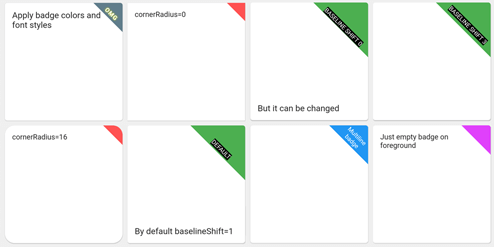
This package was developed to provide auto rotation of TextSpans.

Example

Take a look at the provided example application for how to use the CornerDecoration.

How to use

screenshot1678647469887

Container(
  foregroundDecoration: RotatedCornerDecoration.withColor(
    color: Color(0xffffd700),
    badgeSize: Size(16, 16),
  ),
),

screenshot1678647470825

Container(
  foregroundDecoration: RotatedCornerDecoration.withColor(
    color: Colors.red,
    spanBaselineShift: 4,
    badgeSize: Size(64, 64),
    badgeCornerRadius: Radius.circular(8),
    badgePosition: BadgePosition.topStart,
    textSpan: TextSpan(
      text: 'OMG',
      style: TextStyle(
        color: Colors.white,
        fontSize: 12,
        letterSpacing: 1,
        fontWeight: FontWeight.bold,
        shadows: [
          BoxShadow(color: Colors.yellowAccent, blurRadius: 8),
        ],
      ),
    ),
  ),
),

screenshot1678647471437

Container(
  foregroundDecoration: RotatedCornerDecoration.withColor(
    color: Colors.blue,
    badgeSize: Size(64, 64),
    textSpan: TextSpan(
      text: 'Multiline\nbadge',
      style: TextStyle(fontSize: 10),
    ),
  ),
),

screenshot1678647472293

Container(
  foregroundDecoration: RotatedCornerDecoration.withColor(
    color: Colors.black87,
    badgeSize: Size(64, 64),
    spanBaselineShift: 2,
    textSpan: TextSpan(
      children: [
        TextSpan(
          text: 'LOREM\n',
          style: TextStyle(
            fontSize: 10,
            fontWeight: FontWeight.bold,
            color: Colors.redAccent,
          ),
        ),
        TextSpan(
          text: 'IPSUM',
          style: TextStyle(
            fontSize: 7,
            fontStyle: FontStyle.italic,
            letterSpacing: 5,
            color: Colors.yellow,
          ),
        ),
      ],
    ),
  ),
),

screenshot1678647473029

Container(
  foregroundDecoration: RotatedCornerDecoration.withColor(
    color: Colors.brown,
    badgeSize: Size(112, 56),
    textSpan: TextSpan(
      text: 'WEIRD BADGE',
      style: TextStyle(fontSize: 10),
    ),
  ),
),

screenshot1678647473739

Container(
  foregroundDecoration: RotatedCornerDecoration.withColor(
    color: Colors.blueGrey,
    badgeSize: Size(64, 64),
    textSpan: TextSpan(
      text: 'WOW',
      style: TextStyle(fontSize: 10),
    ),
    spanHorizontalOffset: -12,
  ),
),

screenshot1678647478380

Container(
  foregroundDecoration: RotatedCornerDecoration.withColor(
    color: Colors.green,
    badgeSize: Size(64, 64),
    textSpan: TextSpan(
      text: 'SHIFT 1',
      style: TextStyle(fontSize: 10, backgroundColor: Colors.black),
    ),
  ),
),

screenshot1678647479092

Container(
  foregroundDecoration: RotatedCornerDecoration.withColor(
    color: Colors.green,
    badgeSize: Size(64, 64),
    spanBaselineShift: 3,
    textSpan: TextSpan(
      text: 'SHIFT 4',
      style: TextStyle(fontSize: 10, backgroundColor: Colors.black),
    ),
  ),
),

screenshot1678647479917

Container(
  foregroundDecoration: RotatedCornerDecoration.withGradient(
    gradient: LinearGradient(
      begin: Alignment.topRight,
      end: Alignment.bottomLeft,
      colors: [Colors.blue, Colors.lightGreenAccent],
    ),
    badgeSize: Size(64, 64),
  ),
  decoration: RotatedCornerDecoration.withGradient(
    badgePosition: BadgePosition.topStart,
    gradient: LinearGradient(
      begin: Alignment.topLeft,
      end: Alignment.topRight,
      stops: [0, 0.5, 1],
      colors: [
        Colors.purpleAccent,
        Colors.amber,
        Colors.blue,
      ],
    ),
    badgeSize: Size(64, 64),
  ),
),

screenshot1678647480605

Container(
  foregroundDecoration: RotatedCornerDecoration.withGradient(
    gradient: RadialGradient(
      center: Alignment.topRight,
      radius: 1.5,
      stops: const [0, 0.25, 0.5],
      colors: [
        Colors.redAccent,
        Colors.redAccent.withOpacity(0.5),
        Colors.redAccent.withOpacity(0),
      ],
    ),
    badgeSize: const Size(64, 64),
  ),
  decoration: RotatedCornerDecoration.withGradient(
    badgePosition: BadgePosition.topStart,
    gradient: SweepGradient(
      center: const FractionalOffset(0.27, -0.65),
      colors: List.generate(360, _generator),
    ),
    badgeSize: const Size(64, 64),
  ),
),

screenshot1678647483564

Container(
  foregroundDecoration: RotatedCornerDecoration.withColor(
    color: Colors.lightBlue,
    badgeSize: Size(64, 64),
    badgeShadow: BadgeShadow(color: Colors.black, elevation: 4),
  ),
),

screenshot1678647484300

Container(
  foregroundDecoration: RotatedCornerDecoration.withColor(
    color: Colors.indigo,
    badgeSize: Size(64, 64),
    badgePosition: BadgePosition.bottomStart,
    textDirection: TextDirection.ltr,
  ),
),

screenshot1678647485147

Container(
  foregroundDecoration: RotatedCornerDecoration.withColor(
    color: Colors.indigo,
    badgeSize: Size(64, 64),
    badgePosition: BadgePosition.bottomStart,
    textDirection: TextDirection.rtl,
  ),
),

EXPERIMENTAL FEATURE!

use isEmoji: true to disable span rotating
you can shift span position with spanHorizontalOffset and TextStyle.height parameters screenshot1678649657350

Container(
  foregroundDecoration: RotatedCornerDecoration.withColor(
    color: Colors.purple,
    badgeSize: Size(64, 64),
    isEmoji: true,
    textSpan: TextSpan(
      text: '🤮',
      style: TextStyle(fontSize: 20, height: 1.7),
    ),
  ),
),

Categorias

Repositório-fonte

Projetos que usam este pacote

Ainda não há dados.