Orientação gerada a partir de informações públicas. Apenas para referência.
O pacote seo_renderer é um plugin do Flutter projetado para aplicativos Flutter Web, permitindo que widgets de texto sejam renderizados como HTML para melhorar a otimização de motores de busca. Convertendo os componentes de texto do Flutter em HTML estático, ele aumenta a visibilidade no SEO sem sacrificar a funcionalidade dinâmica do aplicativo. Este pacote é particularmente útil para aplicativos web com grande volume de conteúdo, onde a descoberta é importante. Ele suporta todas as principais plataformas, incluindo Web, Android, iOS, macOS, Windows e Linux, garantindo uma renderização consistente em diferentes ambientes.
Casos de uso
Melhorando o SEO para conteúdo web do Flutter
Renderização de texto estático para motores de busca
Melhorar a visibilidade das páginas de blog ou artigo
Otimizando sites de documentação
Apoiar robores web com texto estruturado
Habilitar o renderização do lado do servidor de texto
Principais recursos
Converte widgets Text do Flutter em HTML
Melhora o índice de motores de busca
Compatibilidade multiplataforma
Leve e integração fácil
Preserva o formato de texto
Funciona sem problemas com o Flutter Web
Indicado para
Aplicativos web do Flutter orientados por conteúdo
Blogs e sites de notícias
Portais de documentação
Aplicações web focadas em SEO
Desenvolvedores priorizando visibilidade na web
Considerações
Não necessário para casos de uso não relacionados a SEO
Pode aumentar levemente o tamanho do pacote
Melhor usado em conteúdo estático ou semi-estático
Requer manipulação cuidadosa em interfaces dinâmicas
Limitado à renderização de texto, não conversão completa de widget
Impacto no desempenho em blocos de texto grandes
README original
Snapshot do README original do repositório-fonte vinculado. Consulte o repositório para o conteúdo mais recente.
SEO Renderer [Not Maintaining]
Alternative : https://pub.dev/packages/seo
A flutter plugin (under development) to render text, link, image widgets as html elements for SEO purpose.
Created specifically for issue https://github.com/flutter/flutter/issues/46789
It will automatic detect the crawler using regex and navigator userAgent and add the HtmlElement you choose to the DOM.
All PR's are welcome :)
Getting Started
Add this to your pubspec.yaml
dependencies:seo_renderer:^0.6.0
Get the package from Pub:
flutter packages get
Import it in your file
import'package:seo_renderer/seo_renderer.dart';
Usage
It's required to add a RobotDetector to detect if page is visited by a robot and add seoRouteObserver to observe when widgets change their visibility. To do this simply wrap MaterialApp within RobotDetector and add seoRouteObserver in navigatorObservers:
runApp(
  RobotDetector(
    debug: true, // you can set true to enable robot mode
    child: MaterialApp(
      home: MyApp(),
      navigatorObservers: [seoRouteObserver],
    ),
  ),
);
For more complex projects it's recommended to add these lines in index.html which will force html web renderer in case robot is detected. It's because canvaskit has some stricter limits and potenitally can break.
To render html text element above a child you pass Text, RichText as the child or simply set the text.
TextRenderer(
  child: Text(
    'Lorem Ipsum is simply dummy text of the printing and typesetting industry.',
  ),
)

TextRenderer(
  text: 'Lorem Ipsum is simply dummy text of the printing and typesetting industry.',
  child: CustomWidget(),
)
Optionally you can change the html element between <h1> to <h6> and <p> by setting style. Default value is TextRendererStyle.paragraph.
TextRenderer(
  style: TextRendererStyle.paragraph,
  child: Text(
    'Lorem Ipsum is simply dummy text of the printing and typesetting industry.',
  ),
)

TextRenderer(
  style: TextRendererStyle.header1,
  child: Text(
    'Lorem Ipsum is simply dummy text of the printing and typesetting industry.',
  ),
)
LinkRenderer
To render html link element above a child set text and href.
To render html image element above a child set alt and pass Image.network(...), Image.asset(...), Image.memory(...) as the child or simply set the src.
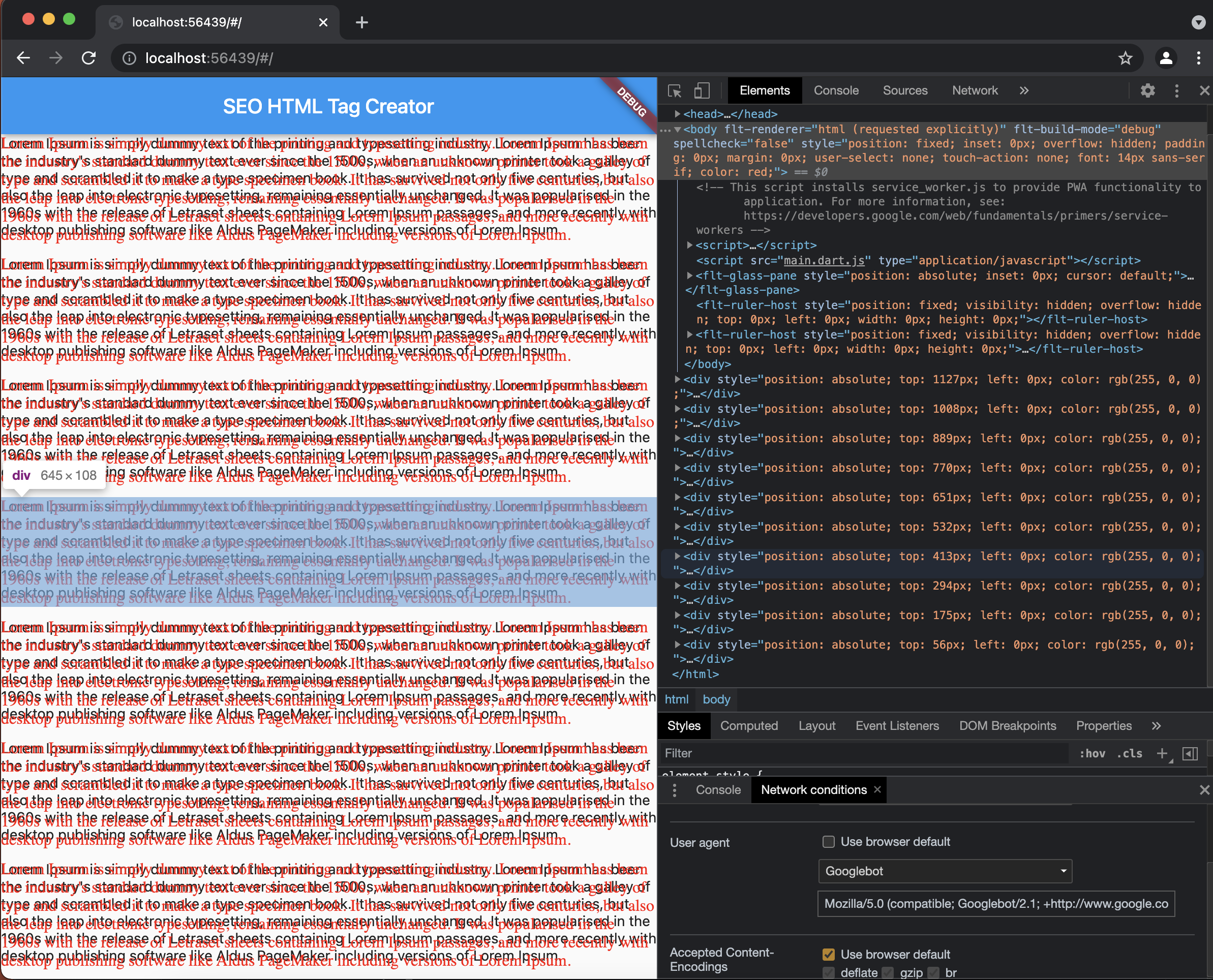
Select GoogleBot here's how as userAgent in Network Condition and refresh the page to see created Div Elements.
License
MIT License

Copyright (c) 2021 Sahdeep Singh

Permission is hereby granted, free of charge, to any person obtaining a copy
of this software and associated documentation files (the "Software"), to deal
in the Software without restriction, including without limitation the rights
to use, copy, modify, merge, publish, distribute, sublicense, and/or sell
copies of the Software, and to permit persons to whom the Software is
furnished to do so, subject to the following conditions:

The above copyright notice and this permission notice shall be included in all
copies or substantial portions of the Software.

THE SOFTWARE IS PROVIDED "AS IS", WITHOUT WARRANTY OF ANY KIND, EXPRESS OR
IMPLIED, INCLUDING BUT NOT LIMITED TO THE WARRANTIES OF MERCHANTABILITY,
FITNESS FOR A PARTICULAR PURPOSE AND NONINFRINGEMENT. IN NO EVENT SHALL THE
AUTHORS OR COPYRIGHT HOLDERS BE LIABLE FOR ANY CLAIM, DAMAGES OR OTHER
LIABILITY, WHETHER IN AN ACTION OF CONTRACT, TORT OR OTHERWISE, ARISING FROM,
OUT OF OR IN CONNECTION WITH THE SOFTWARE OR THE USE OR OTHER DEALINGS IN THE
SOFTWARE.