Buscar pacotes, repositórios e categorias de apps

Capa de side_menu_animation
Detalhes do pacotev1.1.0

side_menu_animation

Menu lateral animado com interface personalizável. Inspirado na biblioteca Yalantis (Android/iOS).

AndroidiOSWebmacOSWindowsLinux
Downloads em 30 dias
25
Curtidas
97
Pontos Pub
150

Instalar pacote

flutter pub add side_menu_animation

Visão geral do pacote

Orientação gerada a partir de informações públicas. Apenas para referência.

Um pacote Flutter que fornece um menu lateral animado com interface personalizável, inspirado na biblioteca Yalantis para Android e iOS. Oferece transições suaves e efeitos visuais para aprimorar experiências de navegação em múltiplas plataformas. O pacote permite personalização total da aparência e comportamento, tornando-o ideal para aplicativos que exigem um drawer moderno e interativo. É compatível com Android, iOS, Web, macOS, Windows e Linux, garantindo consistência entre plataformas.

Casos de uso

  • Navegação de aplicativo móvel
  • Interfaces de painel da web
  • Aplicações multiplataforma
  • Designs de gaveteiro personalizáveis
  • Componentes de interface interativa

Principais recursos

  • Transições animadas suaves
  • Interface do usuário altamente personalizável
  • Suporte multiplataforma
  • Design responsivo
  • Integração fácil com código existente
  • Suporte para modo escuro

Indicado para

  • Desenvolvedores construindo aplicativos móveis ou web
  • Designers procurando padrões modernos de navegação
  • Projetos que exigem menus laterais animados
  • Aplicativos direcionados a múltiplas plataformas
  • Equipes usando Flutter para desenvolvimento full-stack

Considerações

  • Pode exigir ajuste de desempenho em dispositivos mais antigos
  • As opções de personalização podem aumentar a complexidade
  • Documentação limitada além da configuração básica
  • Conflitos potenciais com outros pacotes de navegação
  • Não otimizado para itens de menu muito grandes
  • Requer conhecimento do sistema de animação do Flutter

README original

Snapshot do README original do repositório-fonte vinculado. Consulte o repositório para o conteúdo mais recente.

Side Menu Animation

pub package

Animated Side Menu with customizable UI. Inspired in Yalantis library (Android/iOS). Original Design: https://dribbble.com/shots/1689922-Side-Menu-Animation

Sample

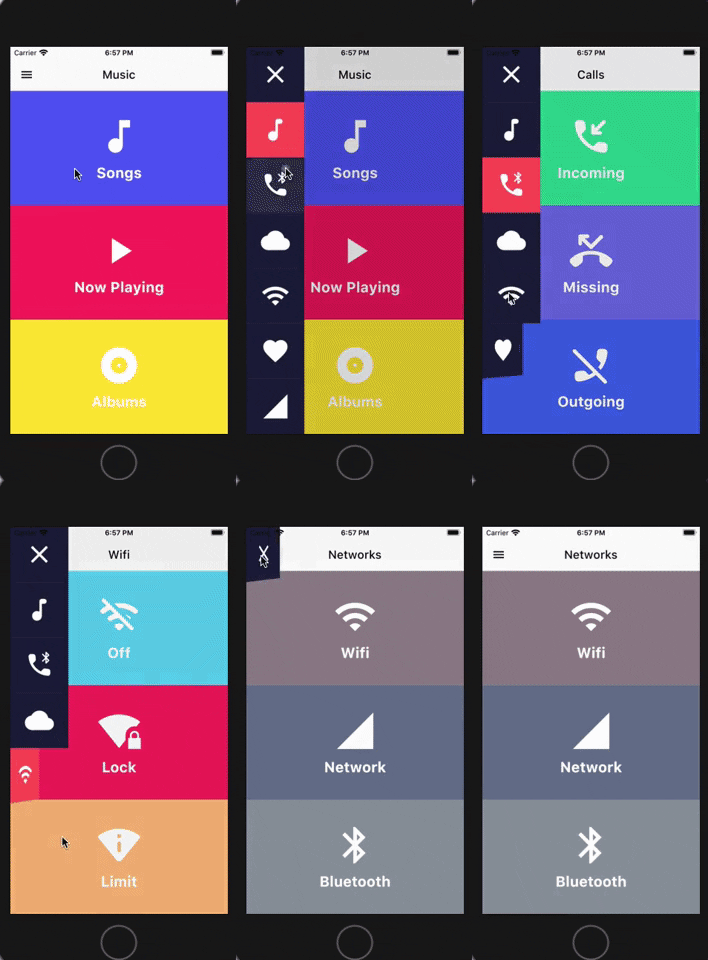
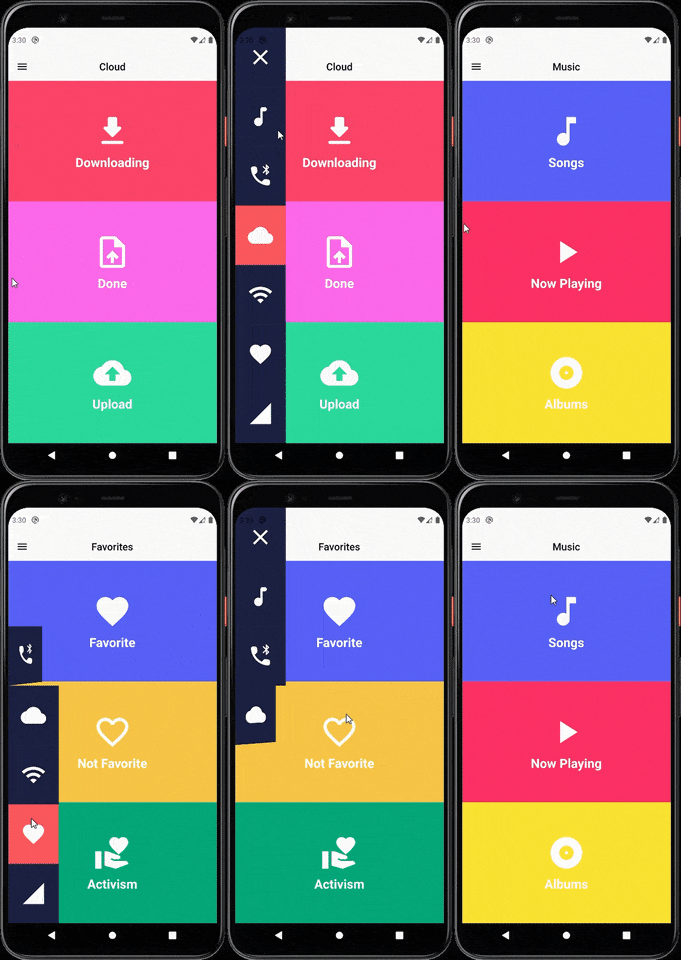
SIDE MENU ANIMATION SIDE MENU ANIMATION - DRAG GESTURE

Learn how to build this package

  • Video 1: https://www.youtube.com/watch?v=vcdETKdI15E
  • Video 2: https://www.youtube.com/watch?v=W7mxTcwX5Wg

(Don't forget to subscribe and like)

Features

  • Optional parameter to tap outside to dismiss
  • Optional parameter to change the scrimColor
  • Custom color item for the side menu selected
  • Custom color item for the side menu unselected
  • Custom width for the side menu
  • Custom duration of the animation side menu
  • Display the menu from left or right

Getting Started

You should ensure that you add the router as a dependency in your flutter project.

dependencies:
 side_menu_animation: "^0.0.1"

You should then run flutter packages upgrade or update your packages in IntelliJ.

Example Project

There is a example project in the example folder. Check it out. Otherwise, keep reading to get up and running.

Usage

Need to include the import the package to the dart file where it will be used, use the below command,

import 'package:side_menu_animation/side_menu_animation.dart';

SideMenu

class SideMenuScreen extends StatelessWidget {
  final _index = ValueNotifier<int>(1);

  @override
  Widget build(BuildContext context) {
    return Scaffold(
      body: SideMenuAnimation(
        appBarBuilder: (showMenu) => AppBar(
          leading: IconButton(icon: Icon(Icons.menu, color: Colors.black), onPressed: showMenu),
          backgroundColor: Theme.of(context).scaffoldBackgroundColor,
          elevation: 0,
          brightness: Brightness.light,
          centerTitle: true,
          title: ValueListenableBuilder<int>(
            valueListenable: _index,
            builder: (_, value, __) => Text(value.toString(), style: TextStyle(color: Colors.black)),
          ),
        ),
        views: [YourCustomViews1Here(), YourCustomViews2Here()],
        items: [MyCustomItem1Here(), MyCustomItem2Here()],
        selectedColor: Color(0xFFFF595E),
        unselectedColor: Color(0xFF1F2041),
        tapOutsideToDismiss: true,
        scrimColor: Colors.black45,
        onItemSelected: (value) {
          if (value > 0 && value != _index.value) _index.value = value;
        },
      ),
    );
  }
}

SideMenuBuilder

class SideMenuBuilderScreen extends StatelessWidget {
  final _index = ValueNotifier<int>(1);

  @override
  Widget build(BuildContext context) {
    return Scaffold(
      body: SideMenuAnimation.builder(
        builder: (showMenu) {
          return Scaffold(
            appBar: AppBar(
              leading: IconButton(icon: Icon(Icons.menu, color: Colors.black), onPressed: showMenu),
              backgroundColor: Theme.of(context).scaffoldBackgroundColor,
              elevation: 0,
              brightness: Brightness.light,
              centerTitle: true,
              title: ValueListenableBuilder<int>(
                valueListenable: _index,
                builder: (_, value, __) => Text(_value.toString(), style: TextStyle(color: Colors.black)),
              ),
            ),
            body: ValueListenableBuilder<int>(
              valueListenable: _index,
              builder: (_, value, __) => IndexedStack(
                index: value - 1,
                children: [YourCustomViews1Here(), YourCustomViews2Here()],
              ),
            ),
          );
        },
       items: [MyCustomItem1Here(), MyCustomItem2Here()],
        selectedColor: Color(0xFFFF595E),
        unselectedColor: Color(0xFF1F2041),
        onItemSelected: (value) {
          if (value > 0 && value != _index.value) _index.value = value;
        },
      ),
    );
  }
}

For more info about the ussage, check the example project.

Contact

You can follow me on twitter @diegoveloper , Youtube channel

If you want to contribute with the project, just open a Pull request :), all contributions are welcome.

Contribution

If you want to contribute with this package, follow this steps:

  • Fork this repository.
  • Do your changes! You can add your name with link into the CONTRIBUTORS.md file.
  • Before push your changes run dartfmt . -w.
  • Create a Pull request on Github from your fork/branch to my repo(main branch).

Categorias

Repositório-fonte

Projetos que usam este pacote

Ainda não há dados.