Buscar pacotes, repositórios e categorias de apps

Capa de simple_timer
Detalhes do pacotev2.0.0

simple_timer

Um widget de temporizador simples que exibe o progresso do temporizador com várias opções personalizáveis.

Downloads em 30 dias
69
Curtidas
55
Pontos Pub
70

Instalar pacote

flutter pub add simple_timer

Visão geral do pacote

Orientação gerada a partir de informações públicas. Apenas para referência.

Um pacote Flutter que fornece um widget de cronômetro simples e personalizável para exibir contagem regressiva ou progresso do cronômetro. Ele suporta várias personalizações visuais e funcionais, como estilo de texto, cor e opções de animação. Ideal para aplicativos que exigem rastreamento de tempo em tempo real com configuração mínima. O widget é leve e fácil de integrar a interfaces existentes. Funciona sem problemas entre plataformas sem configuração adicional.

Casos de uso

  • Cronômetros de contagem regressiva em aplicativos de fitness
  • Funcionalidade de cronômetro em ferramentas de produtividade
  • O cronômetro é exibido em questionários educacionais
  • Indicadores de progresso em tempo real em jogos
  • Lembretes baseados em tempo em gerenciadores de tarefas

Principais recursos

  • Aparência personalizável do temporizador
  • animações suaves de progresso
  • Suporte para modos de contagem regressiva e cronômetro
  • Integração fácil com widgets do Flutter
  • Temas configuráveis de texto e cor

Indicado para

  • Desenvolvedores construindo recursos de rastreamento de tempo
  • Designers de interface precisando de componentes de cronômetro limpos
  • Aplicativos que exigem complexidade mínima de temporizador
  • Desenvolvedores iniciantes do Flutter aprendendo gerenciamento de estado

Considerações

  • Limitado à funcionalidade básica de temporizador
  • Nenhuma persistência embutida para temporizadores em andamento
  • Não suporta temporizadores concorrentes múltiplos
  • Comportamentos específicos da plataforma podem variar
  • Requer manipulação manual do ciclo de vida do temporizador

README original

Snapshot do README original do repositório-fonte vinculado. Consulte o repositório para o conteúdo mais recente.

SimpleTimer

A Simple Timer Widget that displays the timer progress with various customizable options.

Installing

To Start using this library include simple_timer as a dependency in your puspec.yaml file. Make sure to include the latest version.

Pub link: https://pub.dev/packages/simple_timer

Usage

To use the widget, import the package in your project

import 'package:simple_timer/simple_timer.dart';

The timer can be controlled in two ways:

  • Using a TimerController (preferred) - The TimerController is a convenience wrapper (subclass) of an AnimationController and needs a TickerProvider, so be sure to extend a TickerProvider in your class. Declare and instantiate your timer controller like below:

    // declaration
    TimerController _timerController;
    
    // instantiation
    _timerController = TimerController(this);
    

    Note: Remember to dispose the TimerController

    and set the controller property to the TimerController object like below:

    Container(
        child: SimpleTimer(
            controller: _timerController,
            duration: Duration(seconds: 10),
        )
    )
    

    TimerController methods:

    Method Description
    start Starts the timer e.g. (_timerController.start())
    pause Pauses the timer e.g. (_timerController.pause())
    reset Resets the timer e.g. (_timerController.reset())
    restart Restarts the timer e.g. (_timerController.restart())
    add Increases time left by the specified duration i.e. allows more time e.g. (_timerController.add(Duration(seconds: 10)))
    subtract Decreases time left by the specified duration i.e. reduces the time e.g. (_timerController.subtract(Duration(seconds: 10)))
  • Setting the Status - The timer can also be controler by passing a TimerStatus value to the status property; like below:

    Container(
        child: SimpleTimer(
            status: TimerStatus.start,
            duration: Duration(seconds: 10),
        )
    )
    

Note: The SimpleTimer widget uses its parent size.

Customizable Options

There are various customizable options provided by the SimpleTimer widget, see below:

Property Description Value Type Default Value
duration The duration of the timer Duration
controller A TimerController to control the timer. If this is provided then status must be null. TimerController
status An alternative to the controller that sets the status of the timer. If provided, controller must be null TimerStatus
timerStyle Sets the look of the animated timer widget TimerStyle ring
delay Sets a start delay for timer - i.e. delays the start of the timer by the specified duration Duration Duration(seconds: 0)
backgroundColor The background color of the inner shape (circle) of the timer Color grey
progressIndicatorColor The color of the animating progress indicator. Color green
progressIndicatorDirection The rotating direction of the timer's progress indicator TimerProgressIndicatorDirection clockwise
displayProgressIndicator Sets whether to show the progress indicator bool true
displayProgressText Sets whether to show the progress text bool true
progressTextStyle The TextStyle used by the progress text. TextStyle
progressTextCountDirection The counting direction of the text displayed by the timer TimerProgressTextCountDirection count_down
progressTextFormatter A callback function to format the text displayed by this Timer. String Function(Duration) displays duration in MM:SS format
onStart Callback executed when the timer starts counting VoidCallback
onEnd Callback executed when the timer has finished counting VoidCallback
valueListener The callback executed for each change in the time elapsed void Function(Duration)

Pub link: https://pub.dev/packages/simple_timer

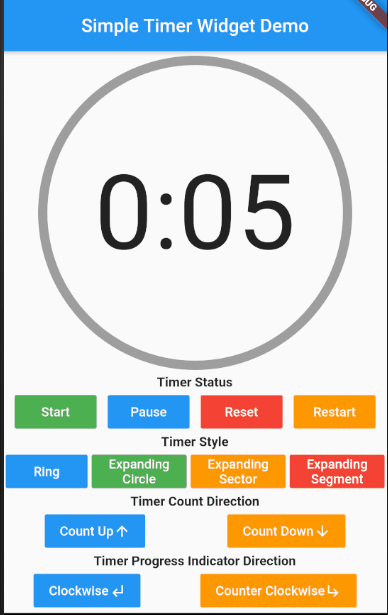
Demo - Controlling the Timer Status

simple_timer_demo_01

Demo - Customizable options

simple_timer_demo_02

Categorias

Repositório-fonte

Projetos que usam este pacote

Ainda não há dados.